



How to Run Qwen3.8-Max Locally: 397GB Build & Hardware (2026)
Everyone wants to run the biggest open model on their own machine, and Qwen3.8-Max is the biggest of all at 2.4 trillion parameters. So here is the honest answer up front, before you download 397 gigabytes and find out the hard way: you cannot run Qwen3.8-Max on a laptop, a Mac, or a single graphics card. It is a datacenter model. But there is a version of Qwen3.8 that does run beautifully on a single consumer GPU, and most people searching for this actually want that one. This guide covers both, with the real hardware math.
The short version: the 2.4T Qwen3.8-Max flagship needs a multi-GPU server even when squeezed down to a 397GB quantized build, because a mixture-of-experts model has to keep all its weights in fast memory even though only a fraction activate per token. Realistic quantized weights land between roughly 490GB and 800GB, and even eight top GPUs sit at the edge. If you want a Qwen you can actually run at home, the companion Qwen3.8-27B dense model fits on a single 16GB to 24GB card, and this guide shows you the exact requirements and steps.
QUICK ANSWER
You cannot practically run Qwen3.8-Max locally on consumer hardware. It is a 2.4 trillion parameter mixture-of-experts model, and all of its weights must sit in accelerator-reachable memory even though only about 95 billion parameters activate per token. Even an aggressive 397GB quantization needs a multi-GPU server, and realistic quantized builds run 490GB to 800GB. For local use, run the Qwen3.8-27B dense model instead: it fits on a single GPU, needing roughly 13GB VRAM at Q3, 16GB at Q4, and 21GB at Q6.
Can You Actually Run Qwen3.8-Max Locally?
No, not in the way most people mean. When someone asks about running a model locally, they usually picture a download that runs on their gaming PC, their Mac, or at most a single rented GPU. Qwen3.8-Max does not fit any of those. It is a 2.4 trillion parameter model, and that scale puts it firmly in datacenter territory, no matter how aggressively you compress it.
This is not a driver problem or a settings tweak. It is basic memory math. A 2.4 trillion parameter model at one byte per parameter is roughly 2,400 gigabytes of raw weights. Even heavy quantization, which trades some quality for smaller size, only brings that down to a range of about 490GB to 800GB, and the most extreme low-bit builds land near 397GB. Every one of those numbers is far beyond a single GPU, a Mac, or a normal workstation, and it means a server that costs more than the computer you are reading this on.
So the honest framing for this guide is two-track. If you genuinely need the full 2.4T Qwen3.8-Max on your own infrastructure, this is a multi-GPU server project, and the sections below give you the real requirements so you go in with open eyes. If you actually just want a strong Qwen model running on hardware you own, skip to the Qwen3.8-27B section, because that is the model built for exactly that, and it is the answer most readers are looking for.
For the full picture of the flagship model itself, see our Qwen3.8-Max review, and for a comparable local-running guide, our how to run Kimi K3 locally guide.
The 397GB Build: What Aggressive Quantization Costs
The 397GB figure comes from the most aggressive practical quantization of Qwen3.8-Max, compressing each parameter down to roughly 1.3 bits instead of the 16 bits of the full-precision model. That is an enormous reduction, taking the model from around 4,800GB at full precision to under 400GB, and it is the floor of what is realistically usable. It is the number that makes people think local is possible, so it is worth understanding exactly what it costs you.
Table 1: Qwen3.8-Max quantization and size
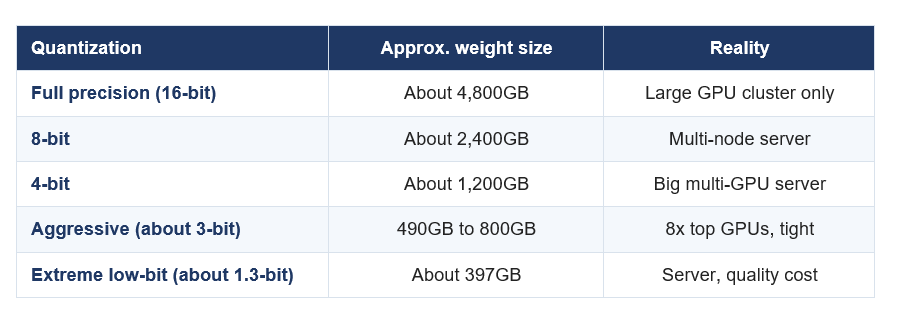
Sizes are approximate and depend on the exact quantization method. Lower-bit builds shrink the model but reduce output quality, and none fit a single consumer GPU.
The trade with the 397GB build is quality. Pushing a model down to roughly 1.3 bits per weight degrades its accuracy and reliability compared with the full model, sometimes noticeably, because you are throwing away most of the precision the model was trained with. So even if you assemble the hardware to load 397GB, you are running a compromised version of Qwen3.8-Max, not the full-quality one Alibaba benchmarks. For a flagship model whose whole appeal is top-tier capability, running it at extreme low-bit undercuts the reason to use it at all.
The takeaway on 397GB: it is the smallest Qwen3.8-Max can get while still running, not a size that makes it a home model. You still need a server to hold it, and you pay for the small size in output quality. It is a useful number to know precisely so you can rule out the idea that 397GB means it fits on your machine, because it does not.
Why a 2.4T Model Needs Datacenter Hardware
The natural question is why a mixture-of-experts model needs so much memory when only a fraction of it runs at once. Qwen3.8-Max activates only about 95 billion of its 2.4 trillion parameters for any given token, so it feels like it should behave like a 95 billion parameter model. The catch is that you do not know in advance which experts a token will need, so all of the weights have to be resident in memory the accelerator can reach, ready to be used at any moment.
That is the core reason mixture-of-experts models are efficient to compute but expensive to host. The compute per token is modest because only the active experts run, which is why these models are fast and cheap to serve at scale. But the memory footprint is the full model, because every expert must be loaded and available. You get the speed of a smaller model and the memory bill of a giant one, and it is the memory bill that decides what hardware you need.
On top of the weights themselves, real inference needs headroom for the key-value cache that holds the running context, for activations during generation, and for the overhead of loading and serving the model. So the practical memory requirement is meaningfully larger than the raw weight size alone. This is why a 490GB to 800GB weight file does not fit neatly into 800GB of GPU memory: you need margin on top, and that margin is exactly what pushes even large clusters to their limit.
The GPU Cluster Math
To make this concrete, here is what it actually takes in GPUs. The full or lightly quantized Qwen3.8-Max needs to spread across many high-end accelerators, and even the biggest single servers are tight.
- 8x H100 gives 640GB of memory, which is not close to holding a lightly quantized 2.4T model with room for cache and activations.
- 8x H200 gives about 1,128GB, better, but still leaves little margin once you add the overhead beyond the raw weights.
- 8x B300 gives about 2,304GB, which sits right at the edge for a larger quantization, with essentially no spare room for KV cache or checkpoint overhead.
The lesson is that Qwen3.8-Max is a multi-accelerator, often multi-node deployment, the kind of setup that lives in a datacenter or a cloud provider, not under a desk. Even the 397GB extreme-low-bit build, which could in principle spread across five or six 80GB GPUs, still means renting or owning several data-center cards and accepting the quality hit. For almost everyone, the correct conclusion is that self-hosting the flagship is not worth it, and the cloud API or the smaller model is the right path.
If you want strong open models that are far more practical to run, see our best open source AI models collection and the DeepSeek V4 review.
The Model You Can Actually Run: Qwen3.8-27B
Here is the good news that most local-AI searchers are really after. Alongside the giant flagship, the Qwen3.8 family includes a Qwen3.8-27B dense model, and that one is built for exactly the kind of local, single-GPU use people have in mind. A 27 billion parameter dense model is a completely different hardware story from a 2.4 trillion parameter one: it fits on a single card, runs at good speed, and can even be fine-tuned on realistic budgets.
Table 2: Qwen3.8-27B local VRAM requirements
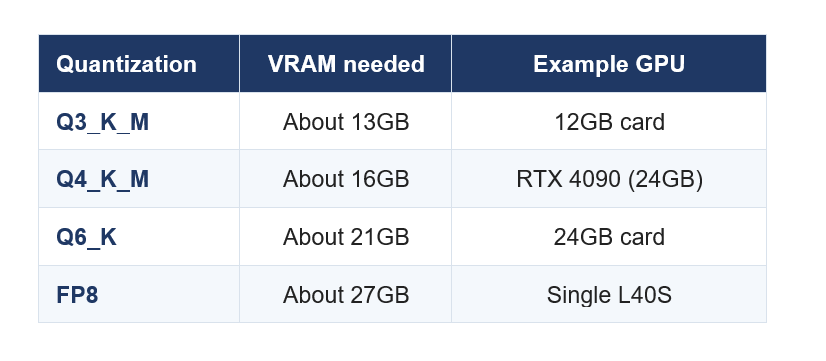
Approximate VRAM for the Qwen3.8-27B dense model. Lower quantization runs on smaller cards with some quality tradeoff; higher precision needs more VRAM but preserves quality.
The difference in what these two models ask of you is night and day. The flagship needs a rack of data-center GPUs and hundreds of gigabytes of memory; the 27B needs a single gaming or workstation card with 12GB to 27GB of VRAM depending on the quantization you choose. For running Qwen on your own hardware, the 27B is not a consolation prize, it is the correct tool, and it delivers strong quality that is more than enough for most local tasks like coding help, drafting, summarizing, and private data work.
How to Run Qwen3.8-27B Locally
Running the 27B locally is straightforward and follows the same path as any modern local model. Here is the practical sequence from nothing to your first response.
- Check your GPU memory. Confirm how much VRAM your card has, then pick a quantization from the table above that fits, leaving a little headroom for context.
- Choose a runner. For the simplest setup, use Ollama or LM Studio, which handle download and serving for you. For more control or higher throughput, use llama.cpp or vLLM.
- Download the right quantized weights. Get the Qwen3.8-27B build in the quantization you chose, such as Q4_K_M for a 16GB or 24GB card, from the official Qwen release on Hugging Face.
- Load and test. Start the model in your runner and send a simple prompt to confirm it responds at a usable speed. Watch VRAM usage to make sure you are not overflowing.
- Tune for your use. Adjust the context length and quantization to balance quality, speed, and memory. Drop to a lower-bit quant if you run out of VRAM, or raise it if you have room to spare.
- Connect it to your tools. Point your editor, chat interface, or scripts at the local model's endpoint so you can use it the way you would a hosted API, but private and free to run.
That is the whole process. Once it is running, the 27B behaves like any local model: fully offline, no per-token cost, and your data never leaves your machine, which is the entire appeal of running open weights yourself. If you have run a local model before, this will feel familiar, and if you have not, the 27B is a friendly place to start because it fits comfortably on common hardware.
PICK YOUR QUANT WISELY
The quantization you choose is the main lever between quality and fit. Q4_K_M is the popular sweet spot, running well on a 16GB to 24GB card with good quality. Go to Q3 only if you must fit a 12GB card and can accept a quality dip, and step up to Q6 or FP8 if you have the VRAM and want the best output. When in doubt, start at Q4 and adjust from there.
Which Qwen Version Should You Run?
With two very different models sharing the Qwen3.8 name, the choice comes down to what you have and what you need. Here is the simple guide.
- Run Qwen3.8-27B locally if you want a strong Qwen on your own single-GPU hardware, for private, offline, no-cost use. This is the right pick for almost everyone reading this.
- Use the Qwen3.8-Max API if you need the full 2.4T flagship quality but do not want to own a GPU cluster. You get the top model without the hardware, paying per use.
- Self-host Qwen3.8-Max only if you have a genuine reason and a multi-GPU server, such as strict data control at scale or heavy sustained volume that justifies the infrastructure.
- Consider another open model if your priority is coding value on modest hardware, where models like DeepSeek V4 may fit your budget and use case better.
The honest recommendation: for local use, run the 27B and do not look back. It gives you a capable Qwen on hardware you already have, with all the privacy and cost benefits of local inference. Reserve the 2.4T flagship for the cloud API, where someone else owns the datacenter, and only take on self-hosting the giant model if you are a team with a specific need and the infrastructure to match.
Cost Reality: Local vs API
The last piece is money, because the whole appeal of running locally is often to save it. For the 27B, local wins cleanly once you own the GPU: after the hardware cost, running it is effectively free per token, your data stays private, and you can use it as much as you like. For anyone with an existing capable GPU, the 27B is the cheapest way to get strong Qwen output at volume.
For the 2.4T flagship, the math flips hard. Buying or renting a multi-GPU server to self-host Qwen3.8-Max costs far more than almost any individual or small team would spend on the API, and you would be running a quantized, quality-reduced version unless you go all the way to expensive high-memory hardware. The cloud API exists precisely so you can access the full flagship without owning the datacenter, and for the vast majority of users that is dramatically cheaper than self-hosting the giant model. The rule of thumb is simple: self-host the small model, rent the big one.
For where Qwen sits against the models you can actually run and afford, see our best AI models of August 2026 ranking.
Verdict
The honest verdict on running Qwen3.8-Max locally is that you should not try to run the flagship at home, and you do not need to. The 2.4 trillion parameter model is a datacenter system by design, and even its smallest 397GB build needs a server and sacrifices quality to get that small. Chasing it on consumer hardware is a dead end that wastes a large download and a lot of time.
What to do instead: run the Qwen3.8-27B dense model locally, which is the version built for single-GPU use and the one most people actually want. It fits on a 12GB to 24GB card, runs fully offline and private, costs nothing per token, and delivers strong quality for everyday tasks. Save the full Qwen3.8-Max for the cloud API when you genuinely need flagship power. That split, small model local and big model in the cloud, is how experienced local-AI users work, and it gets you the best of both without a datacenter in your closet.
Frequently Asked Questions
Q: Can you run Qwen3.8-Max locally?
Not on normal hardware. Qwen3.8-Max is a 2.4 trillion parameter mixture-of-experts model, and all its weights must sit in accelerator-reachable memory, so it needs a multi-GPU server even when heavily quantized. For local use, run the Qwen3.8-27B dense model instead, which fits on a single consumer GPU.
Q: How big is Qwen3.8-Max and how much storage does it need?
Qwen3.8-Max has 2.4 trillion parameters, roughly 4,800GB at full 16-bit precision. Quantization shrinks it, but realistic builds still run 490GB to 800GB, and the most aggressive low-bit build lands near 397GB. Every one of those exceeds a single GPU or a Mac, which is why it needs server-class hardware.
Q: What GPU do you need to run Qwen3.8-Max?
You need a cluster, not a single GPU. Even 8x H100 at 640GB is not enough for a lightly quantized 2.4T model with cache and activation overhead, 8x H200 at about 1,128GB is tight, and 8x B300 at about 2,304GB sits at the edge. This is datacenter hardware, so most users should use the API or the 27B model.
Q: What is the 397GB Qwen3.8-Max build?
The 397GB build is the most aggressive practical quantization of Qwen3.8-Max, compressing each parameter to roughly 1.3 bits. It is the smallest the model can get while still running, but it still needs a multi-GPU server and it reduces output quality noticeably, so it is not a way to run the flagship on a home machine.
Q: Why does a 2.4T model need datacenter hardware?
Even though only about 95 billion of its 2.4 trillion parameters activate per token, a mixture-of-experts model must keep all its weights resident in fast memory, because any expert may be needed at any moment. You get the compute cost of a small model but the memory footprint of a giant one, and the memory is what demands datacenter hardware.
Q: Can I run Qwen3.8-27B on a single GPU?
Yes. The Qwen3.8-27B dense model is designed for single-GPU use. It needs roughly 13GB VRAM at Q3, 16GB at Q4 on a card like the RTX 4090, 21GB at Q6, and 27GB at FP8. A common gaming or workstation GPU can run it, which makes it the practical local Qwen for most people.
Q: How do I run Qwen3.8-27B locally?
Check your GPU VRAM, pick a quantization that fits, and use a runner like Ollama or LM Studio for simplicity or llama.cpp or vLLM for control. Download the Qwen3.8-27B weights in your chosen quant from Hugging Face, load and test with a simple prompt, then connect it to your tools. Q4_K_M on a 16GB or 24GB card is the popular starting point.
Q: Is it cheaper to run Qwen locally or use the API?
For the 27B, local is cheaper once you own the GPU, since per-token cost is effectively zero and your data stays private. For the 2.4T flagship, the API is far cheaper than buying or renting a multi-GPU server, so the rule is simple: self-host the small model and rent the big one through the cloud API.
Recommended Blogs
- Qwen3.8-Max review
- How to run Kimi K3 locally
- Best open source AI models
- DeepSeek V4 review
- Best AI models of August 2026
Resources and Community
Join our community of 70,000+ AI enthusiasts and learn to build powerful AI applications. Whether you are a beginner or an experienced developer, Build Fast with AI helps you understand and implement AI in your projects.
- Website (buildfastwithai.com)
- LinkedIn (Build Fast with AI)
- Instagram (@buildfastwithai)
- Founder Twitter (@satvikps)
- Twitter (@BuildFastWithAI)
Agentic AI Launchpad 2026
A structured 6-week cohort program that takes you from AI basics to building and deploying real-world agentic AI systems. Includes live sessions, expert mentorship, project reviews, and a builder community network.
Ready to go from learning to building? Join the next cohort: Agentic AI Launchpad 2026
Free AI Resources
Access free tools, workshops, and micro-learning to keep building:
Follow Build Fast with AI for more honest, practical guides to running and choosing open AI models.

