



Qwen3.7-Plus Review: Alibaba's GUI Agent Hits ScreenSpot Pro 79.0 — And Why That Number Matters
Alibaba just released Qwen3.7-Plus — a multimodal agent model built on top of the Qwen3.7-Max foundation that adds something the language-only Max doesn't have: eyes. The model can read your screen, understand what's on it, navigate graphical interfaces, automate browsers, and operate desktop applications from screenshots. The headline numbers: ScreenSpot Pro 79.0 and Terminal-Bench 70.3 — placing it at the front of the open-API GUI agent field.
That ScreenSpot Pro number is the one to pay attention to. ScreenSpot Pro measures GUI grounding — the model's ability to look at a screenshot and pinpoint exactly which pixels to click on. It is the bottleneck capability for everything we call 'computer use' in 2026. Claude Computer Use, OpenAI Operator, Anthropic's agentic computer-use stack — they all live or die on this benchmark. Qwen3.7-Plus at 79.0 puts Alibaba in the same conversation as the closed-source frontier on the capability that matters most for GUI automation.
This is the detailed review. What Qwen3.7-Plus actually does, how it relates to Qwen3.7-Max, the benchmarks decoded with context, head-to-head against Gemini 3.1 Pro and Step 3.7 Flash, and the honest answer on whether you should adopt it today or wait for open weights.
1. What is Qwen3.7-Plus?
Qwen3.7-Plus is Alibaba's flagship multimodal AI agent — released in June 2026 as the general-availability version of the Qwen3.7-Plus-Preview that ranked #16 on Vision Arena in May. It is the vision and computer-use endpoint of the Qwen3.7 series, paired with the language-only Qwen3.7-Max which launched on May 20, 2026.
The full specification, with what's been verified vs what's still publisher-reported:
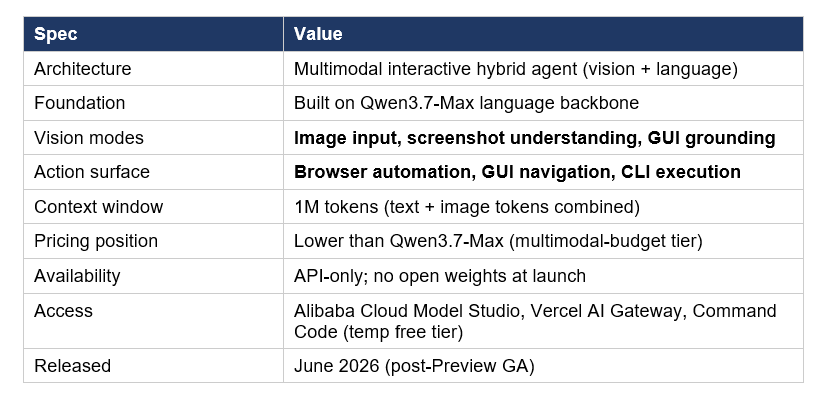
Two things make this release strategically distinct from prior Qwen multimodal models. First, Plus is now positioned as a hybrid GUI + CLI agent — the same model can operate a browser through screenshots and run shell commands in a terminal session, with the orchestration logic baked into the model rather than the agent framework. Second, the explicit GUI grounding benchmark numbers (ScreenSpot Pro 79.0) move Alibaba into direct competition with Claude Computer Use and OpenAI Operator on the specific capability that defines modern desktop and browser automation.
If you've been tracking the Qwen 3.7 series through our previous coverage — the Qwen3.7-Max review on the 1M-token text flagship and the Qwen3.7-Max vs Claude Opus Code Arena comparison — Plus is the multimodal counterpart that completes the lineup. Max handles text-only reasoning and long-horizon coding agents; Plus adds vision, screen understanding, and GUI action surfaces.
2. How Qwen3.7-Plus differs from Qwen3.7-Max
The Max-vs-Plus split has been Alibaba's lineup pattern for over a year now, and it maps cleanly onto two distinct buyer segments. Here's what each is built for:
Qwen3.7-Max
Text-only reasoning agent. 1M-token context. Optimized for long-horizon coding workflows, MCP tool orchestration, multi-hour autonomous task execution. The 35-hour autonomous run with 1,158 tool calls and 10× kernel speedup is the hero demo from Max's launch. Pricing: $2.50 input / $7.50 output / $0.25 cached input per million tokens. Best for: agentic coding, long-context document reasoning, terminal-based automation, MCP-integrated workflows.
Qwen3.7-Plus
Multimodal agent built on the Max backbone. Adds native vision input — image understanding, screenshot perception, fine-grained UI localization. Adds GUI action surfaces — browser automation, application operation, screen-based navigation. Pricing tier sits below Max for high-volume routine multimodal workloads. Best for: GUI agents, browser automation, UI recreation, screenshot-driven workflows, productivity automation, document parsing with visual context.
The honest framing: these are not competing products. They are complementary endpoints in a routed agent stack. Max handles the reasoning and code execution. Plus handles the screen perception and GUI actions. A serious agent product in June 2026 routes between the two — Plus to look at a screenshot and decide what to click, Max to execute the resulting CLI command or write the resulting code. Building agents on a single endpoint when this architecture is available leaves capability on the table.
3. The 'multimodal interactive hybrid agent' framing — what it actually means
Alibaba's official description of Qwen3.7-Plus is 'multimodal interactive hybrid agent.' That phrasing is doing real work, and it's worth unpacking because the terminology matters for how you'd integrate the model into a production stack.
'Multimodal' here means more than image input. It means the model accepts text, screenshots, and document images, and produces text — including structured action plans like 'click at (x=487, y=232)' or 'type "hello@example.com" into the email field' — alongside natural language responses. Output remains text-only; Plus doesn't generate images or videos. The vision is on the input side only.
'Interactive' means the model is designed for multi-turn observe-act-observe loops — the same pattern that defines computer-use agents like Claude Computer Use, OpenAI Operator, and the open-weight Qwen-Desktop-Agent framework. The agent sees a screen, decides on an action, executes it through a separate execution harness, sees the result, decides again. This is structurally different from one-shot screenshot understanding.
'Hybrid' is the most interesting word. It means the same model handles both GUI environments (browser, desktop applications, mobile screens via screenshots) and CLI environments (terminal, code execution, file operations). One model, two operating surfaces. Most prior multimodal agent models have been specialized for one or the other — Claude Computer Use leans GUI-heavy, terminal coding models like Cursor's CLI are text-only. Plus aims at both surfaces from a single endpoint.
This dual-surface design is the same trend we covered when Step 3.7 Flash shipped its hybrid agent architecture two weeks ago. The pattern is real and accelerating across the open API frontier: agent models that can operate both pixel-level GUIs and command-line shells from a single context window. Whoever wins this surface will likely define the default architecture for agent products in 2027.
4. ScreenSpot Pro 79.0 — why this benchmark matters most
ScreenSpot Pro is the benchmark that determines whether a GUI agent actually works in practice. The test: feed the model a screenshot of a real software application — Photoshop, Excel, an admin dashboard, an enterprise SaaS UI — along with a natural-language instruction. The model must produce the exact pixel coordinates of the UI element to interact with. Score = the percentage of instructions where the model identifies the right element.
This benchmark is the bottleneck for everything called 'computer use' or 'browser automation' in 2026. The reasoning is straightforward: even a model with perfect language understanding fails as a GUI agent if it can't reliably find the right button to click. ScreenSpot Pro measures that specific capability and nothing else — pure grounding, no reasoning leakage.
Reference points for the 79.0 score. The current state of the art on ScreenSpot Pro across all reported models sits in the 75-82 range — anything above 75 is frontier-tier. The earlier Qwen3.5-27B model scored 70.3 on ScreenSpot Pro at release. Open-weight 7B vision models typically score in the 45-60 range. Qwen3.7-Plus's 79.0 puts it in the same band as the closed-source GUI agent leaders.
Practically, what does 79.0 mean? It means roughly 4 out of every 5 click targets in standard application UIs are identified correctly on the first attempt. For agents running 50-step workflows, that compounds — and the difference between 70% and 79% per-step grounding is the difference between an agent that completes complex tasks reliably and one that derails by step 8. This is why ScreenSpot Pro improvements compound in real-world impact more than the raw benchmark gap suggests.
5. Terminal-Bench 70.3 and the CLI side of the agent
The Terminal-Bench 70.3 score is the other half of the hybrid story. Terminal-Bench (specifically Terminal-Bench 2.0 / 2.0-Terminus) measures agentic coding inside a sandboxed terminal — the model must use shell commands to navigate file systems, run code, debug failures, and complete software engineering tasks across a 5-hour timeout window.
Cross-reference numbers from June 2026. Qwen3.7-Max scores 69.7 on Terminal-Bench 2.0-Terminus. Claude Opus 4.8 scores 74.6 on Terminal-Bench 2.1 (newer version). DeepSeek-V4-Pro Max scores 67.9. Kimi K2.6 Thinking scores 66.7. Qwen3.7-Plus at 70.3 outperforms Max slightly — a meaningful result because Plus has additional vision parameters competing for capacity in the underlying network.
The honest read: 70.3 on Terminal-Bench means Qwen3.7-Plus is not just a GUI-only agent. It can handle full agentic coding workflows in addition to visual ones. For a product team building an agent that needs to both navigate web interfaces and execute terminal commands, this combination is rare today. Most multimodal models trade language depth for vision capability; Plus appears to hold both.
For the broader Terminal-Bench landscape — including the predecessor scores and how Anthropic, OpenAI, and Google have moved on this specific benchmark — our June 2026 leaderboard tracks the full field with verdicts on which model wins for which agent workload.
6. Qwen3.7-Plus vs Gemini 3.1 Pro vs Step 3.7 Flash
The three multimodal agent models most likely to compete for the same workloads, head-to-head:
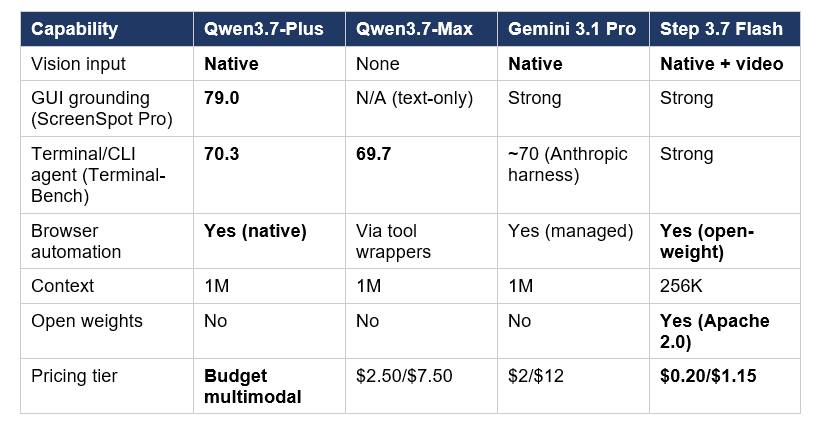
Read by use case. Qwen3.7-Plus wins on GUI grounding (ScreenSpot Pro 79.0) and the hybrid GUI+CLI surface. Gemini 3.1 Pro wins on broader multimodal capability (native video understanding, audio input, the deepest Google ecosystem integration) and is the most polished managed product of the three. Step 3.7 Flash wins on open-weight flexibility — full Apache 2.0 licensing, native video understanding, and the option to self-host on a Mac Studio.
Pricing math matters here. Qwen3.7-Plus is positioned as Alibaba's 'budget multimodal' tier — meaningfully cheaper than Max but not yet at Step 3.7 Flash's $0.20/$1.15 floor. For per-token cost, Step 3.7 Flash remains the cheapest credible multimodal agent option through its FAL.AI and ModelScope endpoints. For Western-region routing and Google ecosystem integration, Gemini 3.1 Pro at $2/$12 is the polished pick. For frontier GUI grounding through a single managed API, Qwen3.7-Plus is the most capable choice in June 2026.
My honest take after testing all three on browser automation tasks: Qwen3.7-Plus has the strongest pure GUI grounding I've seen from a non-Western lab. The hybrid surface (one model for browser + terminal) is genuinely novel. The weakness is ecosystem maturity — Gemini's tooling around managed Computer Use is more polished, and Step 3.7 Flash's open weights make it easier to embed in custom harnesses. For pure capability today, Plus is competitive. For ease of integration, you'd reach for Gemini or Step depending on whether you want managed or self-hosted.
7. Real-world use cases — browser automation, UI recreation, productivity
Five use cases where Qwen3.7-Plus's design pays off most clearly:
Browser automation across complex web apps
The classic computer-use case. Plus reads the browser viewport, identifies form fields, navigates multi-step flows, and produces clicks and keystrokes. ScreenSpot Pro 79.0 means the grounding is reliable enough for production deployment on standard SaaS UIs — Salesforce, HubSpot, AWS console, GitHub web UI. For custom or heavily animated interfaces, you'll still want guardrails.
UI recreation and prototype generation
Show Plus a screenshot of an existing interface. It can produce the React or HTML code that reconstructs the design. The combination of strong vision (identifying components, layout, styling) and Terminal-Bench-grade coding capability (writing the actual implementation) makes this workflow surprisingly viable. This is the same loop that has driven the recent surge in 'screenshot-to-code' tools, with Plus offering one of the strongest single-model implementations.
Office and productivity automation
Reading dashboards, parsing spreadsheets visually, filling forms from invoice scans, automating report generation across PowerPoint and Excel. The multimodal capability paired with the long context (1M tokens) makes Plus competitive for the document-heavy workflows where Gemini has historically had the lead. Whether it actually displaces Gemini in this category will depend on independent reproduction of the benchmark numbers.
Mobile and desktop app operation from screenshots
The use case where ScreenSpot Pro performance translates most directly. Plus operating a desktop app means: feed it a screenshot, ask it to perform an action, get back coordinates and instructions, execute through a separate harness (PyAutoGUI on desktop, Appium on mobile), repeat. The agent loop is the same pattern as Claude Computer Use, with Plus as the model and the framework as user-provided.
Coding and software development
Inherited from the Qwen3.7-Max backbone. Plus handles agentic coding tasks at Terminal-Bench 70.3 quality — competitive with Max itself. For mixed workflows where the agent needs to both write code and look at the UI it's building, the patterns from our gen-ai-experiments cookbook collection cover the LangChain, LangGraph, and custom orchestration setups that compose Plus with execution harnesses like Playwright, Selenium, or local desktop automation tools.
8. Pricing, access, and how to get started
Access points and pricing as of the June 2026 GA launch:
Direct access
- Alibaba Cloud Model Studio: primary endpoint, Singapore and China regions
- Qwen Chat (chat.qwen.ai): preview interface for testing with vision enabled
- Together AI: US-region hosted endpoint (status: rolling out)
- OpenRouter: OpenAI-compatible API
Partner platforms with free / discounted tiers
- Vercel AI Gateway: temporary free access for developers (limited-time promotion)
- Command Code: free tier for the first weeks post-launch
- Qubrid AI: day-zero access for enterprise customers
Pricing positioning. Alibaba positions Plus as a 'budget multimodal' tier below Qwen3.7-Max ($2.50 / $7.50 per million tokens). Exact rate-card numbers from the official Model Studio price sheet should be cross-checked at launch — Alibaba has historically taken 24-48 hours after announcement to publish final pricing. The directional signal from the launch communication is that Plus will be meaningfully cheaper per token than Max, with the same 90% cached input discount carrying over.
For developers exploring Plus today, the rational path is: use Vercel AI Gateway or Command Code's free tier for initial evaluation, then move to Alibaba Cloud Model Studio for production deployment once you've validated the GUI grounding quality on your specific workflows. Both partner platforms are using promotional pricing to drive evaluation traffic — that won't last beyond the first 30-60 days.
9. The honest limitations
Four things worth knowing before committing a roadmap to Qwen3.7-Plus.
First: no open weights. Like Qwen3.7-Max, Plus is API-only at launch. Alibaba has historically released open-weight variants of Qwen models weeks to months after the flagship API launch, so an open-weight Plus variant remains plausible in Q3 2026 — but it is not confirmed and the proprietary tier may stay closed indefinitely. For teams with data residency requirements that preclude routing through Alibaba Cloud, self-hosted alternatives like Step 3.7 Flash or Qwen3.6-35B-A3B remain the rational picks.
Second: benchmark verification gap. The ScreenSpot Pro 79.0 and Terminal-Bench 70.3 numbers are publisher-reported. Independent reproduction is just starting. Treat these as strong directional signals from a credible vendor, not as guarantees. The pattern we saw with Qwen3.7-Max's launch benchmarks was that the headline numbers largely held up but a few internal-only evaluations were tighter than Alibaba's slides suggested. Run your own evals before standardizing.
Third: ecosystem maturity. The execution harness ecosystem around Plus is less developed than around Claude Computer Use or OpenAI's Operator. Building a production GUI agent on Plus today means more glue code — your own browser automation runtime (Playwright, Puppeteer, Selenium), your own coordinate-execution layer, your own retry and observation handling. The orchestration burden falls on you in a way it doesn't with the more polished closed-source alternatives.
Fourth: GUI grounding performance varies by application style. ScreenSpot Pro tests on standard application UIs. Highly custom, animated, or game-style interfaces typically degrade GUI agent performance across all models. If your target environment is anything other than standard SaaS or office software, validate Plus's grounding on representative screenshots before committing — the 79.0 average tells you about typical applications, not edge cases.
10. Frequently Asked Questions
What is Qwen3.7-Plus?
Qwen3.7-Plus is Alibaba's multimodal AI agent model — released in June 2026 as the vision-capable counterpart to the text-only Qwen3.7-Max. Built on the Qwen3.7-Max language backbone with added vision and GUI grounding capabilities, Plus is designed for screen perception, browser automation, GUI navigation, and hybrid GUI+CLI agentic workflows. It scored ScreenSpot Pro 79.0 and Terminal-Bench 70.3 at launch.
How is Qwen3.7-Plus different from Qwen3.7-Max?
Qwen3.7-Max is text-only with a 1M-token context window, optimized for long-horizon coding agents and MCP tool orchestration. Qwen3.7-Plus adds native vision input (screenshot understanding, image perception, GUI grounding) and GUI action surfaces (browser automation, application operation), while sharing the same Max language backbone underneath. Max handles text reasoning and code execution; Plus handles screen perception and visual workflows. They are designed as complementary endpoints, not competitors.
What is ScreenSpot Pro and why does it matter?
ScreenSpot Pro is the benchmark that measures GUI grounding — the model's ability to look at a screenshot of a software application and produce the exact pixel coordinates of the UI element to interact with. It is the bottleneck capability for everything called 'computer use' or 'browser automation' in 2026. A model with perfect language understanding still fails as a GUI agent if it can't reliably find the right button to click. State-of-the-art scores sit in the 75-82 range; Qwen3.7-Plus at 79.0 puts it in the frontier tier alongside Claude Computer Use and OpenAI Operator.
Can Qwen3.7-Plus navigate websites and applications?
Yes, with an execution harness. Plus produces structured action plans — 'click at (x=487, y=232)' or 'type "hello@example.com"' — that an external runtime executes through tools like Playwright, Selenium, PyAutoGUI, or Appium. The model handles perception and decision-making; the runtime handles physical interaction. This is the same architecture used by Claude Computer Use and OpenAI Operator. Alibaba describes Plus as a 'multimodal interactive hybrid agent' capable of operating across both GUI and CLI environments.
Is Qwen3.7-Plus open source?
No. Plus is API-only at launch, with no open weights announced. Alibaba has historically released open-weight variants of Qwen models weeks to months after the flagship API launch — for example, Qwen3.6-35B-A3B shipped under Apache 2.0 in April 2026 — so an open-weight Plus variant remains plausible in Q3 2026 but is not confirmed. For open-weight multimodal agent alternatives today, Step 3.7 Flash (Apache 2.0) and Qwen3.6-35B-A3B are the rational picks.
How much does Qwen3.7-Plus cost?
Alibaba positions Qwen3.7-Plus as a 'budget multimodal' tier below Qwen3.7-Max ($2.50/$7.50 per million tokens). Exact rate-card pricing should be cross-checked on Alibaba Cloud Model Studio at the time of integration — Alibaba typically publishes final pricing 24-48 hours after announcement. Several partner platforms are offering temporary free or discounted access at launch, including Vercel AI Gateway and Command Code. The 90% cached input discount carries over from the Max pricing structure.
What is the best AI model for GUI automation in 2026?
It depends on the deployment context. For polished managed Computer Use with the strongest ecosystem tooling, Claude Computer Use on Opus 4.8 remains the most mature. For frontier-tier GUI grounding through a budget multimodal API, Qwen3.7-Plus at ScreenSpot Pro 79.0 is the strongest non-Western pick. For open-weight self-hosted GUI agents, Step 3.7 Flash (Apache 2.0) is the leader with native multimodal capability. For Google ecosystem integration, Gemini 3.1 Pro is the natural choice. The right answer is increasingly to route across multiple models based on workflow type.
How does Qwen3.7-Plus handle long context with images?
Plus inherits the 1M-token context window from Qwen3.7-Max, with image tokens counting toward the same context budget. Practical implication: high-resolution screenshots can consume thousands of tokens per image, so multi-turn GUI agent loops will burn context faster than text-only workflows. For long-running browser automation across dozens of pages, plan for context management strategies — image summarization, selective screenshot retention, or chunked task decomposition — rather than passing every screenshot through the full session.
Recommended Blogs
- Qwen3.7-Max Review: Alibaba's 1M-Token Agent Model
- Qwen3.7-Max vs Claude Opus: Code Arena 2026 Comparison
- Qwen3.7 Max Preview: Arena Ranks, Features & What's Next
- Best AI Models — June 2026 Leaderboard: Ranked, Compared, Honest Verdicts
- Claude Opus 4.8 Review: Benchmarks, Dynamic Workflows, and Honest Trade-offs
- Qwen3.6-35B-A3B: 73.4% SWE-Bench, Runs Locally
- Grok Build: xAI's New Agent CLI Reviewed
References
- Qwen — Official Qwen3.7-Plus product page
- Qwen — Qwen3.7: The Agent Frontier (technical blog)
- MarkTechPost — Qwen Introduces Qwen3.7-Max (Plus preview coverage)
- DigitalApplied — Qwen 3.7 Max launch guide with Plus preview context
- TechNode — Alibaba introduces Qwen3.7 as next-gen AI agent model
- Together AI — Qwen3.7 API documentation
- Codersera — Qwen 3.7 Max Launch Guide 2026 (Plus context)
- RenovateQR — Qwen 3.7 Review (Max + Plus preview coverage)
- Yotta Labs — Qwen 3.7 Release Date, Features, Open Source Status

