



OpenAI Codex 2026: Computer Use, Memory & Full Review
Three million developers used Codex last week. On April 16, 2026, OpenAI told every single one of them: we built you a super app. Not a coding assistant. Not a terminal agent. A full desktop tool that can control your Mac, browse the web, generate images, remember what you like, run scheduled tasks in the background, and connect to 90+ external tools — all inside one application. The update is called "Codex for (almost) everything" and it is the most significant shift in the AI developer tool landscape since Claude Code launched in early 2025. Here is everything you need to know — and whether it finally beats Claude Code.
1. What Is the Codex 'For Almost Everything' Update?
The 'Codex for (almost) everything' update, released April 16, 2026, is not a new product — it is a fundamental repositioning of an existing one. OpenAI is turning Codex from a coding agent into a full developer workstation that happens to run AI.
To understand the scope: the Codex desktop app first launched for macOS on February 2, 2026, with Windows support following March 4. The April 16 update is the first major capability expansion after that launch — and the one that makes Codex genuinely competitive with Claude Code, Cursor, and the rest of the AI coding ecosystem as a full-workflow tool, not just a code generator.
Quick Stat: Codex now serves 3 million weekly developer users. Within ChatGPT Business and Enterprise, the number of Codex users grew 6x between January and April 2026. Notion, Ramp, and Braintrust are among the named enterprise users.
The timing also matters. The update landed the same week Anthropic redesigned Claude Code's desktop app with multi-sessions and Routines. OpenAI watched Claude Code eat market share for six months and responded with a product that goes far beyond code editing. Whether that response was enough — that is what we are here to figure out.
2. All 6 New Features, Explained
Here is the full feature breakdown — what each one does, why it matters, and where it is still limited.
Feature 1: Background Computer Use (macOS)
This is the headline feature. Codex can now operate any macOS app — Figma, Xcode, Slack, your browser — by seeing your screen, moving a cursor, clicking, and typing, all while you continue working in other apps. Multiple agents can run in parallel without blocking each other.
The use cases OpenAI highlights include native app testing, simulator flows, GUI-only bug fixing, and iterating on frontend changes. If you have used Claude Code's auto mode for autonomous codebase edits, think of Codex computer use as the visual equivalent — it operates the UI layer that terminal-based agents cannot reach.
Important Limitation: Computer use is initially macOS-only and is NOT available in the EU, UK, or Switzerland at launch. OpenAI has indicated EU/UK rollout is coming but has not given a date.
Feature 2: In-App Browser
Codex now includes a browser window inside the desktop app. You can open local development servers or public pages that do not require sign-in, comment directly on rendered elements — 'make this button 20px taller', 'fix the font on the hero section' — and have Codex act on your annotations immediately.
The practical payoff is tight: you no longer need to switch between your code editor, the browser, and a feedback tool. One window, one agent, one loop. OpenAI has signalled that full browser control (not just localhost) is coming, which would make this genuinely comparable to Anthropic's computer-use agent, but for now the in-app browser is limited to unauthenticated pages.
Feature 3: Image Generation with gpt-image-1.5
Codex can now generate and edit images inline, powered by OpenAI's gpt-image-1.5 model. The intended use cases are developer-adjacent: product mockups, interface concepts, game assets, diagrams. You can reference a screenshot, describe what you want changed, and get an updated visual without opening a separate tool.
Image generation uses included limits roughly 3-5x faster than standard text tasks, so power users on the Plus tier should plan accordingly. The $100 Pro tier (more on this below) is the safer choice if image workflows are central to your work.
Feature 4: Memory Preview
Codex now ships a preview of persistent memory. The agent remembers your preferences, coding style, corrections you have made in the past, and context that was hard to gather the first time. The next session starts with that knowledge already loaded, which means faster task completion and fewer 'remind me how you like your commit messages' prompts.
This mirrors what OpenAI is building in the broader ChatGPT ecosystem — GPT-6 (codenamed Spud) is expected to make memory a cornerstone feature. For now, Codex memory is rolling out to Enterprise and Edu first, with EU/UK access delayed. If you are building multi-agent AI systems that need persistent context, also check out the Anthropic Advisor Strategy for smarter AI agents — it covers comparable patterns on the Claude side.
Feature 5: 90+ New Plugins (MCP + App Integrations)
OpenAI shipped over 90 new curated plugins with this update. They combine three types: skills (task-specific abilities), app integrations (Slack, Notion, Google Workspace, GitHub, GitLab, Microsoft Suite, Atlassian Rovo, CircleCI, Render, and more), and MCP servers (Model Context Protocol connectors for custom tool access).
The curated approach is deliberate — OpenAI is specifically trying to prevent the plugin ecosystem from becoming a malware vector, which has been a documented risk in open frameworks like OpenClaw. If you want to understand how MCP works under the hood before building on top of it, the complete MCP guide on BuildFastWithAI covers the full protocol. For hands-on experimentation with MCP integrations, the MCP Workshop cookbook in the gen-ai-experiments repo walks through building and connecting MCP servers step-by-step.
Feature 6: Extended Automations & Developer Workflow Tools
Automations in Codex can now reuse existing conversation threads, preserving context built up over multiple sessions. More importantly, Codex can schedule future work — you can tell it to check a long-running process tonight and pick it up tomorrow morning. The agent wakes itself up and continues, potentially across days or weeks, without manual prompting.
On the developer tools side: multi-terminal support (multiple terminal tabs per thread), SSH connections to remote devboxes in alpha, full GitHub PR review inside the app (inspect diffs, address comments, ask Codex to make changes), file preview for generated PDFs/spreadsheets/docs, and context-aware suggestions for what to work on next using memory + connected plugins.
3. How to Set Up Codex Computer Use on Mac (Step-by-Step)
Computer use is the biggest new capability — and also the one with the most friction to set up. Here is exactly how to get it running.
- Download and sign in. Go to openai.com/codex and download the macOS desktop app. Sign in with your ChatGPT account (Plus, Pro, Business, or Enterprise). The April 16 update rolls out automatically — no manual install needed if you already have the app.
- Open a new thread. Inside the Codex app, start a new thread. You do not need to select a project folder to use computer use — it is available from any thread.
- Grant permissions (one-time). Type a computer-use command like: 'Open Figma and update the button colors on my pricing page.' Codex will request Accessibility and Screenshot permissions. Approve both — this is a one-time setup. Codex uses these to see your screen and control input.
- Run agents in parallel. You can open multiple threads and run separate agents simultaneously — one checking your design, another running tests — without them interfering with your own active work in other apps.
- Use the in-app browser for frontend. For web-based feedback, open the browser tab inside Codex, navigate to your localhost server, highlight elements, and annotate directly. Codex reads your comments and makes changes in the linked thread.
Security Note: Computer use is permission-scoped. Codex only activates it when you explicitly request a task that needs GUI access. It does not run continuously in the background. That said, be deliberate about what you ask it to do — it has a cursor and can type in any visible field.
For teams building production AI workflows that control remote environments, compare this with Cursor's remote agent approach for device-agnostic development — Cursor handles this via SSH and cloud VMs rather than local desktop automation.
4. Codex Pricing Breakdown: Token Billing, $100 Tier & What's Free
OpenAI made two pricing changes in early April 2026 that you need to understand before committing to a plan.
First: on April 2, 2026, Codex switched from per-message pricing to token-based billing. Usage is now calculated as credits per million input tokens, cached input tokens, and output tokens. This is more transparent — you can see exactly where credits go — but it means complex agentic tasks that spawn multiple sub-steps burn through limits faster than a simple message count would suggest.
Second: the ChatGPT Business seat price dropped from $25 to $20 per seat. Codex-only pay-as-you-go seats are now available for Business and Enterprise — no fixed seat fee, billed purely on token consumption. Eligible Business workspaces also get $100 in credits per new Codex-only member (up to $500 per team) for a limited time.
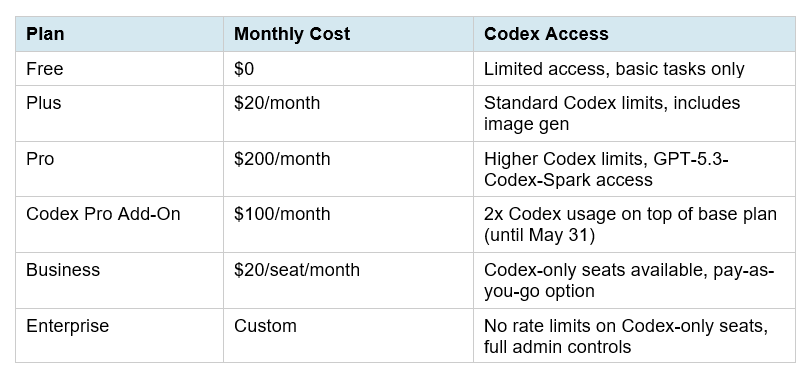
My take on pricing: the $100 add-on tier is the right choice for developers who are doing serious image generation or multi-agent parallel work. Image gen burns limits 3-5x faster, and if you are running multiple agent threads in parallel, limits compound quickly. For casual daily coding use, Plus at $20 covers most workflows. The token-based pricing switch makes costs predictable for teams but unpredictable for individuals who do not monitor usage dashboards.
5. Codex vs Claude Code — April 2026 Head-to-Head
The Claude Code vs Codex comparison has been the defining developer debate of 2026. The April 16 Codex update changes several of the variables that previously gave Claude Code the edge. Here is the updated picture.
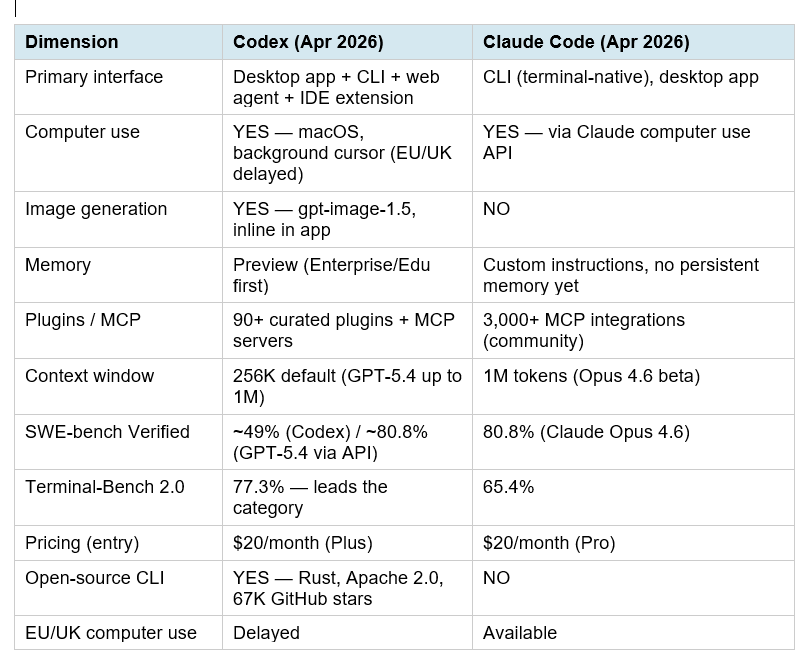
The honest summary: Claude Code still produces higher-quality code on complex real-world tasks (SWE-bench gap is real). But Codex now wins on three dimensions Claude cannot match: image generation, MCP plugin ecosystem breadth within a curated safety framework, and terminal-native autonomous speed. The workflows are converging but they are not identical.
For a deeper benchmark breakdown with real developer workflows, the best AI for coding comparison (Nemotron vs GPT-Codex vs Claude) goes into the full SWE-bench, Terminal-Bench, and OSWorld numbers with context on what each benchmark actually measures.
And if you want to understand how Anthropic is approaching the multi-agent coordination problem that Codex is now competing in, the Claude Code desktop redesign overview covers what Anthropic shipped the same week — multi-sessions, Routines, and a completely rebuilt desktop experience.
6. Who Should Actually Switch to Codex?
The right tool depends on your workflow, not on which company you prefer. Here is a clear decision matrix.
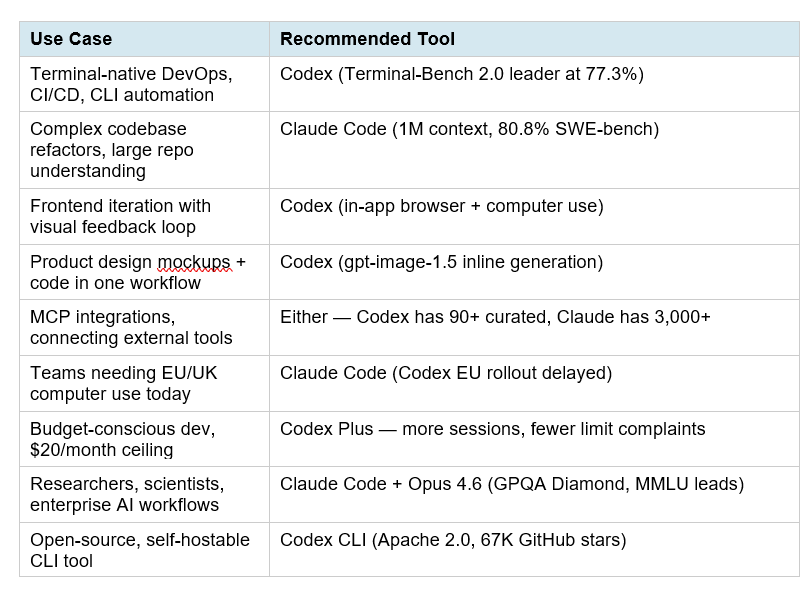
For a complete view of where every AI model ranks in April 2026 across coding, reasoning, and multimodal tasks, the best AI models April 2026 ranked by benchmarks covers the full leaderboard with GPT-5.4, Gemini 3.1 Pro, Claude Opus 4.6, and the open-source tier.
7. Hot Takes: What This Update Really Means
I want to be honest about what I actually think — not just what the press release says.
Hot Take 1: The 'Super App' framing is real, but premature
OpenAI's engineering lead described this as building a super app 'in the open.' That is a bold claim. What they actually shipped is a very good coding tool with computer use bolted on, a browser that only works on localhost, and memory that is rolling out to enterprise first. Real super apps work for everyone from day one. This is a strong beta of something that could become a super app by Q4 2026. Write that difference down.
Hot Take 2: The plugin curation is smarter than it looks
Everyone is calling Claude Code's 3,000+ MCP integrations an advantage over Codex's curated 90+. I think this is backwards. Curated plugins with security review are worth ten times as many unvetted ones in a production environment. OpenAI watched what happened with OpenClaw (prompt injection via untrusted messages, supply chain attacks via malicious skills) and designed against it. If you are building enterprise software, 90 vetted plugins beat 3,000 unknown ones every time.
Hot Take 3: The token-based pricing is a risk for power users
Per-message pricing was predictable. Token-based pricing for agentic workflows is not. A single computer-use task that involves 5 steps of screen reading, clicking, and writing burns tokens at every step. Image generation burns 3-5x faster than text. Multi-terminal sessions are multiplied. The $100 add-on tier exists because OpenAI knows Plus users will hit ceilings very quickly once they start using the new features. Build that expectation into your budget.
Hot Take 4: This was the right move at the right time
Claude Code authors roughly 135,000 GitHub commits per day, per SemiAnalysis. Codex had to respond with something bigger than a benchmark improvement. Expanding into the full developer workflow — visual design, desktop automation, memory, scheduled agents — is the correct strategic bet. OpenAI is not competing on code quality alone. They are competing on workflow ownership. And if GPT-6 lands in May as expected, the underlying model that powers all of this will take another step forward. Worth watching.
Build With Codex: Cookbook Resources
If you want to go beyond reading and start building with Codex, here are the most relevant hands-on resources from the BuildFastWithAI cookbook collection.
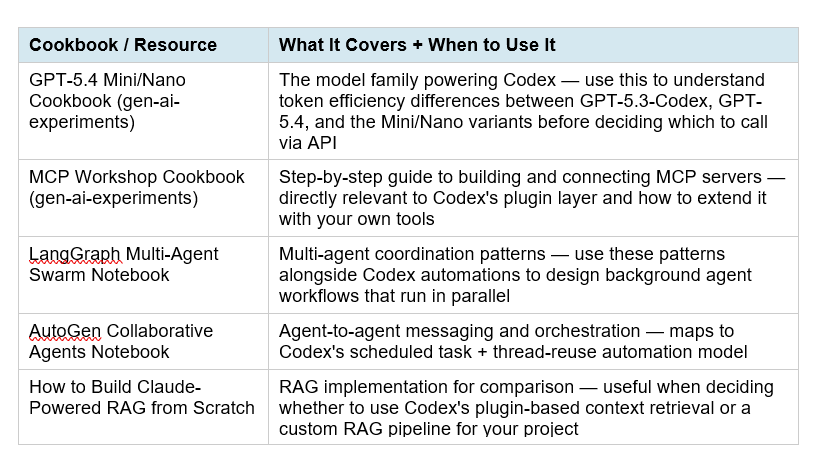
All of these notebooks are production-ready and runnable. Access the full collection at the BuildFastWithAI gen-ai-experiments repository on GitHub. Each notebook includes API setup, full code, and annotated explanations — no prior experience with the specific framework required.
8. Frequently Asked Questions
What is 'Codex for almost everything' — is it a new product?
No, it is not a new product. 'Codex for (almost) everything' is the name OpenAI gave to its April 16, 2026 major feature update for the existing Codex desktop app, which launched February 2, 2026. The update adds computer use, in-app browser, image generation, memory preview, 90+ plugins, and extended automations. Think of it as Codex 2.0, not a new app.
Is Codex computer use available on Windows?
At launch (April 16, 2026), computer use is macOS-only. Windows support has not been announced with a specific date. The Codex desktop app itself runs on Windows (supported since March 4, 2026), but the computer use feature requires macOS at this time. EU, UK, and Switzerland users are also excluded from computer use at launch.
How does Codex memory work, and when do I get it?
Codex memory is a preview feature that stores useful context from previous interactions — your preferences, corrections, project-specific knowledge — and surfaces it automatically in future sessions. As of April 20, 2026, memory is rolling out to Enterprise and Edu plans first, with Plus and Pro users expected to receive it in the coming weeks. EU and UK users have a separate rollout timeline.
What is the difference between the $100 Codex add-on and the $200 Pro plan?
The $200 Pro plan is the full ChatGPT subscription tier that includes Codex plus all other ChatGPT features. The $100 Codex add-on is a separate tier specifically for developers who want doubled Codex usage limits on top of their existing plan. It includes access to GPT-5.3-Codex-Spark (the fast Cerebras-hardware variant) and is available until at least May 31, 2026. If you are a Plus user who hits Codex limits regularly, the add-on is more economical than upgrading to Pro.
Does Codex replace Claude Code?
Not for every use case. Codex leads on terminal automation (Terminal-Bench 2.0: 77.3% vs Claude's 65.4%), has image generation that Claude Code lacks, and now has desktop computer use. Claude Code leads on complex codebase reasoning (SWE-bench: 80.8% vs Codex's ~49%), has a larger 1M-token context window in beta, and has 3,000+ MCP integrations vs Codex's curated 90+. The pragmatic answer: use Codex for DevOps, frontend visual loops, and scheduled autonomous tasks. Use Claude Code for architecture, large-scale refactors, and research-grade reasoning.
How do I install the Codex CLI?
The Codex CLI is open-source (Apache 2.0) and installable via npm: run 'npm install -g @openai/codex' and authenticate with your ChatGPT account or API key. The CLI works on macOS and Linux, with experimental Windows support via WSL2. Run 'codex' in your terminal to start an interactive session. The full CLI is available at github.com/openai/codex.
Can Codex connect to GitHub, Slack, and Notion?
Yes. The April 16 update includes native integrations for GitHub (PR review, commit, push), Slack, Notion, Google Workspace, GitLab Issues, Microsoft Suite, Atlassian Rovo, CircleCI, Render, and many more — all available as curated plugins in the Codex app settings. For custom tool connections, MCP servers can be added directly.
What model actually powers Codex in 2026?
Codex in 2026 runs on GPT-5.4 (the flagship, supporting up to 1M tokens via the API) and GPT-5.3-Codex (the coding-specialized variant). GPT-5.3-Codex-Spark, available to Pro users, is a fast variant running on Cerebras WSE-3 hardware at over 1,000 tokens per second. You can switch between models using /model in the CLI or via the model picker in the desktop app.
9. Recommended Blogs
If this post was useful, these related articles go deeper on the tools and topics covered above:
- Claude Code vs Codex 2026: Which Terminal AI Tool Wins?
- Claude Code Desktop Redesign: Multi-Sessions + Routines (2026)
- Claude Code Auto Mode: Unlock Safer, Faster AI Coding (2026)
- What Is MCP (Model Context Protocol)? Complete 2026 Guide
- Cursor Remote Agents: Control Dev From Any Device (2026)
- Best AI Models April 2026: Ranked by Benchmarks
- Best AI for Coding 2026: Nemotron vs GPT-5.3 vs Claude Opus
References
- Codex for (almost) everything — OpenAI (Apr 16, 2026)
- Codex Changelog — OpenAI Developers
- Codex Flexible Pricing for Teams — OpenAI (Apr 2, 2026)
- Codex Pricing — OpenAI Developers
- Codex Desktop App Major Update — SmartScope (Apr 17, 2026)
- Codex Computer Use Guide — AnotherWrapper (Apr 17, 2026)
- Codex CLI — GitHub (openai/codex)
- Codex vs Claude Code — Morphllm (Feb 2026)
- Codex can now operate between apps — Help Net Security (Apr 17, 2026)
- BuildFastWithAI gen-ai-experiments Cookbooks — GitHub

