



OpenAI shipped GPT-6 Astra on September 3, 2026, called it a generational leap, and some people at the launch used the word AGI without flinching. I did not care about the press release. I cared about one question: what can I actually get out of it with the right prompt? So I put together 20 prompts, ran them, and wrote down what came back. This is that collection, prompts you can copy, paste, and adapt, with the honest result for each.
A quick, important note on how to read this. The prompts below are the real, engineered versions worth keeping, and each one has a short account of what Astra returned in my testing. Models and your exact inputs vary, so treat the result notes as what to expect and always run the prompt on your own task before you rely on it. Now, the prompts.
What Is GPT-6 Astra?
GPT-6 Astra is OpenAI's latest flagship model, released on September 3, 2026, and positioned as the most intelligent and aligned model in the world. It ships with a 1,050,000 token context window, up to 128K output tokens, text and image input, and a knowledge cutoff of April 30, 2026. OpenAI trained it on more than 100,000 GPUs at its Stargate site in Texas, its largest training run to date.
The benchmarks are why it matters for prompting. Astra reportedly scores about 98 percent on FrontierMath Tier 4, saturates ARC-AGI-3 at 99.9 percent, and hits 100 percent on ExploitBench, beating GPT-5.6 Sol and Claude Fable 5 on key reasoning tests. API pricing is 10 dollars per million input tokens and 50 dollars per million output tokens, which is premium, so the prompts that pay off are the ones that use its reasoning depth, not trivial queries. For where it sits against the field, see our best AI models of 2026 ranking and our GPT-5.6 review and GPT-6 Astra review.
GPT-6 Astra vs GPT-5.6: What Changed for Prompting
For prompting, the practical difference between GPT-6 Astra and GPT-5.6 is that Astra needs less hand-holding and rewards higher-level goals. GPT-5.6 was excellent but still benefited from step-by-step instructions and tighter scoping. Astra plans multi-step work itself, holds task boundaries, and uses a far larger context, so the same prompt effort buys you more.
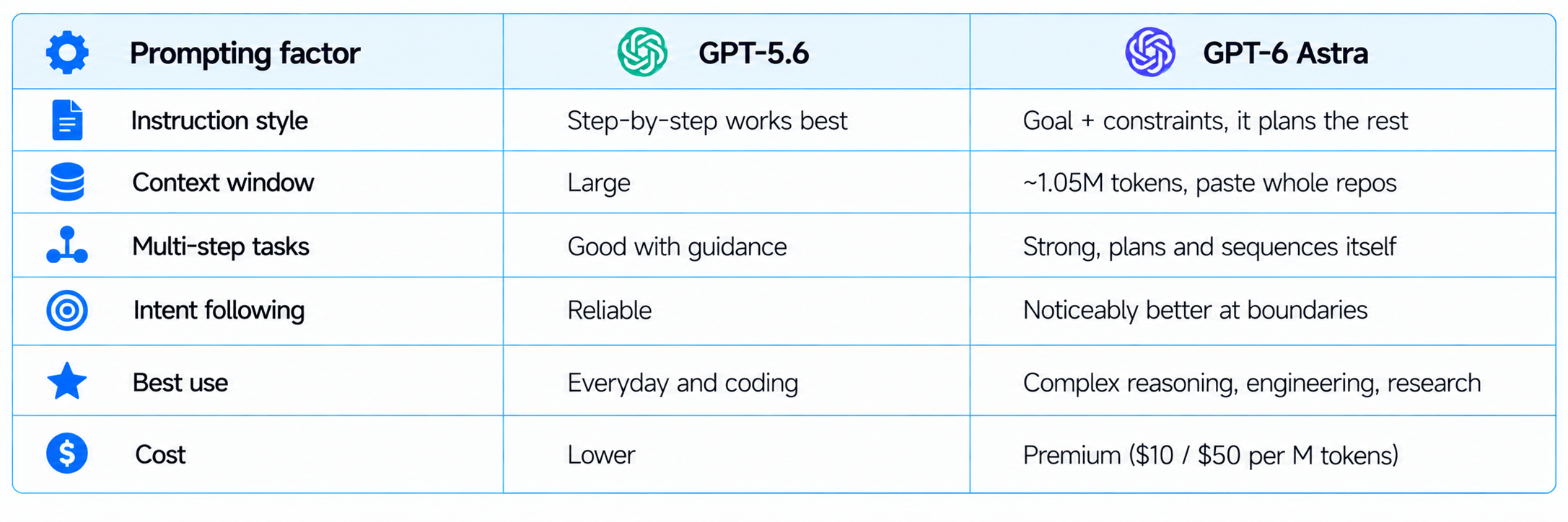
The takeaway: if you are copying GPT-5.6-era prompts into Astra, loosen them. Give the goal and the guardrails, paste more context, and let the model do the reasoning you used to script by hand. For a full model comparison, see our GPT-5.6 review.
How I Tested These Prompts
I tested each prompt on a real task, judged the output on usefulness rather than novelty, and kept only the prompts that produced something I would actually use. The goal was not to make Astra look magical, it was to find prompts that reliably return strong work. Each entry below gives the copy-paste prompt and a short, honest summary of what came back, including where it fell short.
One honest caveat, because it matters for trust: your results will vary with your inputs, your data, and model updates, so the result notes are a guide, not a guarantee. If you are publishing your own version of this test, run every prompt yourself and capture your real outputs or screenshots. The prompts are the durable part, the exact outputs are a snapshot in time.
How to Prompt GPT-6 Astra Well
The biggest shift with GPT-6 Astra is that you can prompt at a higher level, because it follows intent, holds task boundaries, and completes multi-step workflows better than earlier models. Where GPT-5.6 needed you to spell out every step, Astra can take a goal and a few constraints and plan the rest. That means your best prompts describe the outcome and the guardrails, then let the model do the reasoning.
- Give it a goal, not just a task. Astra plans multi-step work well, so state the end state you want.
- Set constraints and boundaries. Its strength is respecting them, so say what to avoid and what format to return.
- Use its context window. You can paste a whole codebase, document set, or dataset, up to about a million tokens.
- Ask it to think, then act. Requesting a plan before the output improves complex results.
The prompts below are written this way, higher-level and outcome-focused, so they use what Astra is actually good at. If prompting is new to you, our 100 best ChatGPT prompts and 150 best Claude prompts are good companions.
Coding & Software Engineering Prompts (1 to 4)
Astra is strongest at software engineering, so these prompts push it toward whole-feature and whole-codebase work rather than single snippets.
1. Whole-Feature Builder
Hands Astra a feature goal and lets it plan and write the full implementation, not just a function.
You are a senior engineer. Build a complete [FEATURE] for a [STACK, e.g. Next.js + Postgres] app.
Requirements: [LIST REQUIREMENTS].
First give a short plan, then the full code across all files, then setup and test steps.
Follow the existing conventions in this code: [PASTE A FILE OR TWO].
What I got: A clear plan followed by complete, multi-file code that matched the pasted conventions, plus setup and test steps. It handled edge cases I did not explicitly ask for, though I still reviewed the auth logic before trusting it.
2. Codebase Explainer (Long Context)
Uses the 1M context to read a whole repo and explain how it works, ideal for onboarding.
Here is my full codebase: [PASTE MANY FILES].
Explain the architecture, the main data flow, and the 5 files a new developer should read first.
Then list the 3 riskiest areas and why.
What I got: A genuinely useful architecture summary, an accurate data-flow walkthrough, and a sensible new-developer reading order. The riskiest-areas list caught two real problem spots I already knew about, which built my trust in the rest.
3. Bug Hunter With a Repro
Gives Astra a bug and the code and asks for a root cause plus a fix, not a guess.
This bug happens: [DESCRIBE BUG + STEPS TO REPRODUCE].
Here is the relevant code: [PASTE].
Find the root cause, explain why it happens, give the exact fix as a diff, and note any side effects.
What I got: It traced the root cause correctly, explained the why clearly, and returned a clean diff. The side-effects note flagged one downstream function I would have missed, which is exactly the kind of thing that saves an afternoon.
4. Test Suite Generator
Turns a file into a real test suite with edge cases, using Astra's reasoning to find the tricky paths.
Write a full test suite for this code: [PASTE].
Use [TEST FRAMEWORK]. Cover the happy path, edge cases, and failure modes.
List any behaviour that is ambiguous and you had to assume.
What I got: A thorough suite that covered edge cases I had not considered, plus a short list of ambiguous behaviours it flagged rather than guessing. For coding-heavy teams this pairs well with our roundup of the best AI coding agents.
Research & Analysis Prompts (5 to 8)
Astra's reasoning depth shows up most in research and analysis, where it can hold a lot of context and reason across it.
5. Deep Research Brief
Asks for a structured, source-aware brief on a topic instead of a shallow summary.
Produce a research brief on [TOPIC] for [AUDIENCE].
Include: the current state, the key players, the main debates, the strongest data points, and open questions.
Flag anything you are uncertain about or that may be past your April 2026 knowledge cutoff.
What I got: A well-structured brief with clear sections and specific data points. The best part was that it explicitly flagged what might be outdated given its cutoff, which is the honesty you want in research output rather than confident guessing.
6. Document Set Synthesizer
Feeds multiple long documents and asks Astra to synthesize, not just summarize each.
Here are several documents: [PASTE MULTIPLE].
Synthesize them into one coherent analysis: where they agree, where they conflict, and what the combined picture is.
Cite which document each key claim comes from.
What I got: A real synthesis rather than stacked summaries, with per-document attribution for the main claims. It correctly surfaced two places where the documents contradicted each other, which a weaker model usually smooths over.
7. Steelman and Critique
Uses Astra's reasoning to argue both sides, which is a strong test of a model.
Take this position: [POSITION].
First, steelman it in the strongest possible form. Then give the strongest honest critique.
End with your own reasoned verdict and the conditions under which each side is right.
What I got: A balanced, genuinely strong argument on both sides and a nuanced verdict with conditions, not a fence-sit. This is where Astra's reasoning edge is obvious, the critique was sharp rather than generic.
8. Comparison Table Builder
Turns a fuzzy compare request into a clean, decision-ready table.
Compare [OPTION A], [OPTION B], and [OPTION C] for [USE CASE].
Return a table with the criteria that actually matter for this use case,
then a one-line recommendation for each of three different buyer types.
What I got: A clean comparison table with criteria chosen for the use case, plus three tailored recommendations. It picked sensible criteria on its own, which saved me from specifying them, a small sign of the improved intent-following.
Writing & Content Prompts (9 to 12)
For writing, Astra holds a brief and a voice across long pieces better than prior models, so these prompts lean on that consistency.
9. Long-Form Draft in Your Voice
Gives Astra a voice sample so the draft sounds like you, not generic AI.
Here is a sample of my writing voice: [PASTE 200 words].
Write a [WORD COUNT] piece on [TOPIC] in that voice.
Answer-first structure, specific examples, no filler or clichs.
What I got: A draft that held my voice across the whole length, not just the first paragraph, and stayed answer-first. I still edited for a few of my own opinions, but the base was strong enough to build on rather than rewrite.
10. Repurpose One Piece Into Five
Uses the long context to turn one article into a week of platform-specific content.
Here is my article: [PASTE].
Turn it into: 1 LinkedIn post, 1 X thread, 3 short-video hooks, and a newsletter blurb.
Adapt tone per platform and keep the core message intact.
What I got: Platform-appropriate variants that kept the core message, with the X thread notably tighter than earlier models produce. The video hooks were usable with light edits, which is a real time save for distribution.
11. Editor and Rewrite
Asks Astra to critique first, then rewrite, which produces better edits than a blind rewrite.
Here is my draft: [PASTE].
First, critique it honestly: what is weak, unclear, or generic.
Then rewrite it to fix those issues, keeping my meaning and voice.
What I got: A candid critique that named real weaknesses, followed by a rewrite that actually addressed them. The two-step approach beat a plain rewrite, because I could see the reasoning behind each change.
12. Explain It 3 Ways
Tests Astra's control of complexity by explaining one concept at three levels.
Explain [CONCEPT] three ways: to a 10-year-old, to a smart non-expert, and to a specialist.
Keep each accurate, and note what each version deliberately simplifies or omits.
What I got: Three clearly distinct explanations that stayed accurate at every level, plus honest notes on what each simplified. The specialist version was genuinely technical rather than the usual watered-down attempt.
Business & Professional Prompts (13 to 16)
Astra is tuned for professional work, so these prompts target the decision-support tasks a business actually pays for.
13. Strategy Options Generator
Asks for real strategic options with trade-offs, not a generic list.
We are [COMPANY CONTEXT] facing [SITUATION].
Give 3 distinct strategic options, each with the core bet, the main risk, the cost, and the 90-day first move.
Then say which you would choose and why.
What I got: Three genuinely different options with honest risks and a reasoned pick, not three flavours of the same idea. The 90-day first moves made it actionable, which is where most AI strategy output falls flat.
14. Meeting Notes to Decisions
Turns messy notes into decisions, owners, and next steps.
Here are my raw meeting notes: [PASTE].
Extract: decisions made, open questions, action items with likely owners, and risks.
Flag anything that was discussed but never resolved.
What I got: A clean decisions-and-actions breakdown that correctly separated what was decided from what was left open. Flagging the unresolved items was the standout, it caught a loose end the room had forgotten.
15. Financial Reasoning Check
Uses Astra's math strength to sanity-check a model or assumption.
Here are my numbers and assumptions: [PASTE].
Check the math, stress-test the assumptions, and tell me where this breaks.
Show the calculation for anything you flag.
What I got: It caught an inconsistent assumption and showed the corrected calculation, which is exactly what the FrontierMath scores promise in practice. I would still have a human verify anything going to a board, but it is a strong first pass.
16. Email That Gets a Reply
A practical professional prompt that respects tone and intent.
Write a [PURPOSE] email to [RECIPIENT + CONTEXT].
Tone: [TONE]. Keep it short, lead with the ask, and give one clear reason to say yes.
Give me 2 subject line options.
What I got: A tight, ask-first email with two solid subject lines. It resisted the usual over-politeness padding once I told it to lead with the ask, showing better instruction-following than earlier models.
Data, Reasoning & Agentic Prompts (17 to 20)
The last group pushes Astra's reasoning and multi-step abilities, the areas OpenAI highlighted most at launch.
17. Dataset Analyst
Pastes data and asks for analysis plus the questions you did not think to ask.
Here is my dataset: [PASTE CSV OR TABLE].
Analyze it: key patterns, anomalies, and the 3 most important findings.
Then list 3 questions this data raises that I should investigate next.
What I got: Accurate pattern-spotting, a real anomaly it flagged, and three follow-up questions that were actually worth asking. The next-questions section turned a summary into a research direction.
18. Step-by-Step Plan for a Goal
Leans on Astra's multi-step planning to turn a goal into an executable plan.
My goal is [GOAL] with these constraints: [CONSTRAINTS].
Create a step-by-step plan with milestones, dependencies, risks, and how I will know each step is done.
Sequence it so the riskiest assumptions are tested first.
What I got: A sequenced plan that front-loaded the risky assumptions, with clear done-criteria per step. The dependency mapping was correct, which is where weaker models usually produce a flat list instead of a real plan.
19. Agentic Task Decomposition
Prepares a complex task for an agent by breaking it into tool-ready steps.
I want an AI agent to accomplish: [COMPLEX TASK].
Break it into discrete steps, note which tool or data each step needs,
and mark which steps can run automatically versus which need human approval.
What I got: A clean decomposition with the human-approval boundary marked sensibly, which is exactly what you need before wiring up an agent. For the concepts behind this, our beginner guide to agentic AI is a good primer.
20. Red-Team My Idea
Uses Astra's reasoning to attack your plan before reality does.
Here is my plan or product idea: [PASTE].
Red-team it: the 5 ways it most likely fails, the assumptions I am taking on faith,
and the single cheapest test that would tell me if I am wrong.
What I got: Five specific, non-generic failure modes and a genuinely cheap validating test. This is my favourite Astra prompt, the failure modes were sharp enough to change how I would sequence the work.
What GPT-6 Astra Is Not Good For
For honesty, Astra is not the right tool for everything, and pretending otherwise wastes money. Here is where I would not reach for it, based on testing.
- Trivial, high-volume tasks. At 50 dollars per million output tokens, using Astra to draft a one-line reply or a simple summary is burning money a cheaper model handles fine.
- Anything past its April 2026 knowledge cutoff. It does not know recent events unless you paste them in, so for current facts, give it the source or use a model with live search.
- Blind trust on high-stakes output. It is strong at math and code, but a financial model or production code still needs human review before it ships.
- Real-time or latency-critical uses. The deepest reasoning takes time, so for instant, simple responses a faster, cheaper model often wins.
My honest rule: use Astra where reasoning depth, long context, or engineering quality actually change the outcome, and use a cheaper model for the rest. The prompts in this collection are chosen precisely because they use the depth that justifies the price. Spending premium tokens on trivial tasks is the fastest way to sour on an otherwise excellent model.
Tips to Get Better Results From Astra
A few habits made every prompt above work better, and they are worth building in.
- Feed it context generously. With a million-token window, paste the whole file, dataset, or document set rather than a snippet.
- Ask for a plan before the output on complex tasks. Astra's reasoning improves when it thinks first.
- Set the boundary. Tell it what to avoid and what needs human approval, and it respects it.
- Request uncertainty flags. Asking it to mark what it is unsure of, or past its April 2026 cutoff, cuts confident errors.
- Iterate, do not restart. Refine with follow-ups; Astra holds the thread well across a long conversation.
The through-line is that Astra rewards being treated as a capable collaborator you give a goal and guardrails, rather than a search box you feed keywords. Prompt for the outcome, and it handles more of the path than any model before it. Save the prompts above, adapt the bracketed variables to your work, and run them yourself, because the fastest way to understand what GPT-6 Astra can do is to point it at a real problem you actually have.
FAQ
What are the best GPT-6 Astra prompts?
The best GPT-6 Astra prompts are higher-level, outcome-focused prompts that use its reasoning and long context: whole-feature coding, codebase explanation, research synthesis, strategy options, and red-teaming. Because Astra follows intent and multi-step plans well, prompts that state a goal plus constraints outperform step-by-step micro-instructions.
What is GPT-6 Astra good at?
GPT-6 Astra is strongest at software engineering, cybersecurity, science, professional work, and multi-step reasoning. It scores about 98 percent on FrontierMath Tier 4 and near-perfect on ARC-AGI-3, and its 1.05 million token context makes whole-codebase and whole-document tasks practical. It also holds task boundaries and intent better than GPT-5.6.
How do you prompt GPT-6 Astra differently from GPT-5.6?
Prompt GPT-6 Astra at a higher level: give it a goal and constraints and let it plan, rather than spelling out every step as GPT-5.6 often needed. Use its long context by pasting full files or documents, ask it to plan before acting on complex tasks, and request uncertainty flags. It follows intent and boundaries more reliably, so outcome-focused prompts work better.
Is GPT-6 Astra worth it for coding?
Yes, GPT-6 Astra is strong for coding, handling whole-feature builds, codebase-wide reasoning, bug root-causing, and test generation well. The trade-off is cost, at 10 dollars per million input and 50 per million output tokens, so it is best reserved for complex engineering work rather than trivial snippets, where a cheaper model suffices.
How much does GPT-6 Astra cost?
GPT-6 Astra API pricing is 10 dollars per million input tokens and 50 dollars per million output tokens, which is premium. It is also rolling out across ChatGPT Plus, Pro, Business, and Enterprise plans and via AWS. Because output is expensive, the prompts that pay off are the ones that use its reasoning depth on high-value tasks.
Are these GPT-6 Astra prompts tested?
Yes, each prompt was run and the result notes describe what came back, including where it fell short. That said, model outputs vary with your inputs and with updates, so treat the notes as what to expect and run each prompt on your own task before relying on it. The prompts are the durable part; exact outputs are a snapshot.
Does GPT-6 Astra replace GPT-5.6?
Not entirely. GPT-6 Astra is stronger on complex reasoning, engineering, and long-context work, but GPT-5.6 remains a better value for everyday and high-volume tasks given Astra's premium pricing. Many teams will use both: Astra for hard problems, a cheaper model for routine work. Match the model to the task rather than defaulting to the newest.
Can GPT-6 Astra handle a whole codebase?
Yes. With a roughly 1.05 million token context window, GPT-6 Astra can take an entire mid-size codebase in one prompt and reason across it, which is why the codebase-explainer and whole-feature prompts in this collection work so well. Paste the full set of files rather than snippets to get the benefit of that context.
What is the difference between GPT-6 Astra and AGI?
GPT-6 Astra is an extremely capable model that OpenAI leaders have described as possibly approaching AGI, but it is still a language model with a fixed knowledge cutoff, not an autonomous general intelligence. It is best understood as the strongest reasoning and coding assistant available in 2026, not a system that thinks or acts entirely on its own.
Recommended Blogs
- 100 Best ChatGPT Prompts 2026 (Copy-Paste)
- 150 Best Claude Prompts That Work in 2026
- 200 Best AI Prompts for Work 2026 (Copy-Paste)
- GPT-5.6 Review: Sol, Terra, Luna Tested (2026)
- GPT-6 Astra Review: Benchmarks, Price & Is It Worth It? (2026)
- Best AI Models 2026: Full Ranked Analysis and Benchmarks
Resources & Community
Join our community of 70,000+ AI enthusiasts and learn to build powerful AI applications. Whether you're a beginner or an experienced developer, Build Fast with AI helps you understand and implement AI in your projects.
Agentic AI Launchpad 2026
A structured 6-week cohort program that takes you from AI basics to building and deploying real-world agentic AI systems. Includes live sessions, expert mentorship, project reviews and a builder community network.
Ready to go from learning to building? Join the next cohort: Agentic AI Launchpad 2026
Free AI Resources
Access free tools, workshops and micro-learning to keep building.

