



OpenAI Sites for Codex: AI Just Got Its Own Internal-Tools Builder
OpenAI launched Sites for Codex on June 2, 2026 — and called the live event 'Intelligence at Work,' which is the right framing. The headline isn't that ChatGPT can now build websites. It's that ChatGPT can now build the internal tools knowledge workers actually need — dashboards, project trackers, knowledge bases, lightweight workflow apps — and host them at a shareable URL with workplace authentication baked in, all from a prompt.
Three numbers from the launch worth holding in mind. Codex now has more than 5 million weekly active users. Roughly 20% of those users are knowledge workers, not developers — and that 20% segment is growing 3× faster than the developer segment. That is the strategic context for everything OpenAI announced today. Codex started as a coding agent. By next year, it's going to be the operating environment for business professionals who have never opened a terminal.
This is the detailed review. What Sites actually does, how it works alongside the other launches (Annotations, 6 role-specific plugins, Codex moving into the ChatGPT app), what it means for Lovable and Replit and the no-code ecosystem (spoiler: less than the alarmist takes suggest), and the honest answer on whether you should adopt it for internal tools today.
1. What is OpenAI Sites for Codex?
Sites is a Codex feature that creates, deploys, and hosts interactive web applications from prompts. The user describes what they want — a team dashboard, an internal analytics portal, a project tracker, a knowledge base — and Codex builds the full application, deploys it to OpenAI-managed hosting, and returns a shareable URL with workplace authentication enforced through Sign in with ChatGPT.
The product framing in OpenAI's own words: 'Sites are a new kind of canvas for your ideas. Codex can take your ideas, analysis, and plans and turn them into dashboards, planners, review workspaces, project boards, galleries, and lightweight tools.' Read that list carefully. Every item is an internal tool, not a public-facing website. This is the most important strategic detail about Sites — it is not competing with Squarespace or Webflow for the public-website market. It is competing with the homegrown internal apps every company builds and then abandons because nobody wants to maintain them.
Launched June 2, 2026 at OpenAI's 'Intelligence at Work' event, alongside three other major announcements: Codex Annotations (visual targeted-edit feedback), six role-specific plugins (sales, marketing, finance, HR, product, ops), and the rollout of Codex inside the ChatGPT app itself. Sites is in preview for ChatGPT Business and Enterprise customers — Business workspaces have it enabled by default, Enterprise workspaces enable it through the Early Access section in admin settings.
If you've been tracking how the major labs are converging on app-builder territory, this is OpenAI's clearest move into the same surface as Claude Cowork (Anthropic's workspace agent) and the agent-CLI category that Grok Build is operating in. The labs are no longer just selling chat — they are selling the means of producing software, with each lab tilting differently. OpenAI's tilt is toward the knowledge-worker user, not the developer.
2. The full June 2, 2026 announcement, ranked by importance
OpenAI bundled four announcements into the Intelligence at Work event. They matter in different ways:
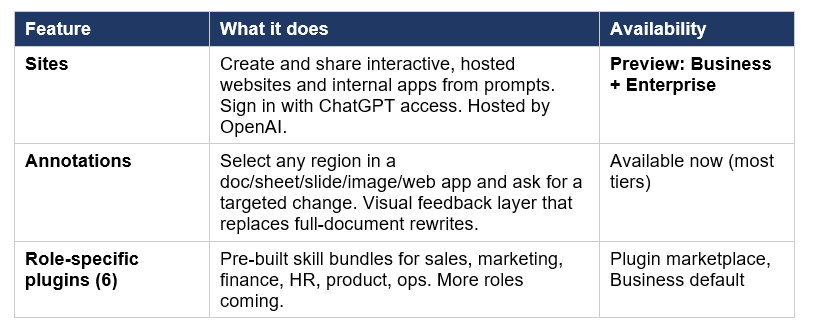
The ranking that makes sense if you're a builder or buyer. Codex coming into the ChatGPT app is the strategic move — OpenAI is signaling that the two products will share a common surface, which removes the friction of 'do I open ChatGPT or Codex?' that has hurt adoption. Sites is the headline feature for procurement teams and IT departments because it creates a new category of internal-tools spend. Annotations is the quietly transformative feature for the day-to-day editing experience — it changes how iteration on AI-generated content actually works. The 6 plugins matter most for individual professional users finding pre-built workflows for their role.
Three smaller details worth flagging. First, OpenAI is also adding Computer Use to Codex on Windows, which means Codex can now see and click in Windows apps the same way Claude Cowork does. Second, Codex is now rolling out 'Goal Mode' generally — define an outcome and let Codex iterate toward it. Third, OpenAI mentioned an open partner ecosystem for plugins, with companies building and deploying their own plugins directly inside the Codex platform.
3. How Sites actually works — Sign in with ChatGPT, hosted by OpenAI
The technical architecture of Sites is worth understanding because it shapes what the product is actually good for.
Step one: the user describes what they want in natural language inside Codex. 'Build a dashboard that shows our Q2 sales pipeline by region with filters by deal size and last activity date.' Codex generates the front-end, back-end, and data integration code, deploys the app to OpenAI-managed hosting infrastructure, and returns a URL like https://[your-app].sites.openai.com or similar.
Step two: authentication. The deployed Site uses Sign in with ChatGPT — meaning the people who can access it are the people who can log into your organization's ChatGPT workspace. This is the architectural choice that makes Sites genuinely viable for internal company apps. Existing no-code builders have to bolt on auth through Auth0 or Clerk or build it from scratch. Sites inherits the auth model from your existing ChatGPT subscription, which means a company with 500 employees on ChatGPT Business gets internal-tool authentication for those 500 employees for free.
Step three: integrations. Sites can connect to Slack, Google Calendar, Google Drive, and other workplace tools through Codex's existing app integration layer. The Codex plugins marketplace is the substrate that makes this possible — a Site can call any plugin a Codex user has access to. Internal company knowledge systems can be wired in through MCP servers or custom plugins that the Codex workspace already supports.
What's hosted by OpenAI and what isn't. OpenAI manages the application hosting. The data the app processes can live in connected systems — Google Drive, Slack channels, your CRM — accessed through the existing OAuth flows those integrations require. The app itself is hosted on OpenAI infrastructure, with the security and compliance guarantees of OpenAI's enterprise stack (SOC 2, HIPAA-eligible, EU data residency on Enterprise plans).
4. The use cases Sites is actually built for
Five categories of work where Sites is the right tool today:
Team dashboards and KPI viewers
The classic internal-tools use case. A sales ops manager describes a pipeline dashboard. A finance lead describes a budget tracker. A product manager describes a feature-adoption viewer. Sites builds it, deploys it, and the team accesses it through ChatGPT auth. This is the workflow that used to require a junior developer plus Looker or Retool — collapsed to one Codex prompt.
Project and review workspaces
Lightweight project trackers where the workflow is custom enough that Jira or Asana feel like overkill. Sprint review boards. Hiring pipeline trackers with custom evaluation criteria. Vendor selection workspaces with custom scoring. Sites is structured for these — OpenAI explicitly listed 'review workspaces' and 'project boards' in the launch announcement as canonical use cases.
Internal knowledge bases and documentation hubs
Connect Sites to Google Drive and your internal knowledge sources, and Codex can generate searchable, filtered, structured documentation hubs that pull from the same source-of-truth content. Particularly useful for onboarding workflows, support knowledge bases, and policy documentation where keeping the live source synced with the readable interface has historically been painful.
Custom business applications tied to company data
The category OpenAI is most aggressively positioning Sites for. Internal CRM views. Custom invoice generators. Expense approval workflows. Order tracking interfaces. Any application that exists somewhere between 'an Excel sheet' and 'a real engineering project' fits the Sites sweet spot. The economic argument is clean — these apps used to require a junior developer for two weeks. Sites builds them in a Codex session.
Lightweight planners and galleries
OpenAI specifically called out 'planners' and 'galleries' in the launch list. These are the smaller-scale use cases where Sites' speed-of-deployment is the value: a launch readiness tracker for a marketing team, a content gallery for a design team's portfolio review, a meeting agenda planner that connects to Google Calendar. Lower-stakes than enterprise CRM but quicker to ship than any alternative tool.
5. Sites vs Lovable, Replit, Webflow — the no-code comparison
The most-discussed reaction to the Sites launch was 'What does this mean for Lovable, Replit, and the AI no-code ecosystem?' The honest answer is more nuanced than the takes suggest. Lovable, Replit, and Webflow are actually listed in OpenAI's official Sites partner ecosystem — not competitors. That fact alone should reframe the conversation.
That said, there's real overlap in some workflows. Here's the side-by-side comparison:
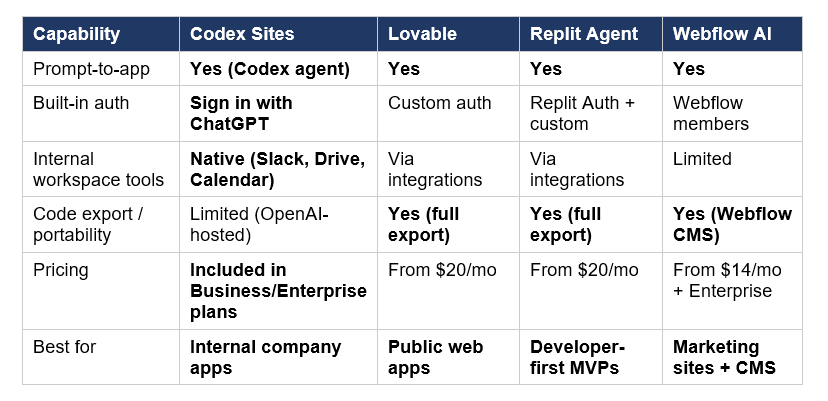
Read this carefully. Sites and the no-code AI builders are not competing for the same exact buyer. Sites is purpose-built for internal company apps with company-managed authentication. Lovable and Replit are purpose-built for public web apps and developer-first MVPs that need full code portability. Webflow remains the leader for marketing sites and CMS-driven content.
The genuine impact areas. Sites does pull internal-tool workflows away from generic no-code builders — if you're a 500-person company on ChatGPT Business, building an internal expense tracker in Sites is dramatically simpler than building it in Replit. Sites does not displace public-facing app development, where Lovable and Replit have stronger code-export, custom-auth, and database-management stories. The partner ecosystem framing OpenAI used at launch (Wix, Base44, Replit, Lovable, Figma, Webflow, Emergent) suggests OpenAI sees Sites as complementary to these tools for different use cases, not as a replacement.
My honest read: the immediate winner is companies on ChatGPT Business or Enterprise plans, who now have a powerful internal-tool builder included in their existing subscription. The immediate losers are companies selling internal-app builders at enterprise pricing (Retool, Internal.io, Bubble enterprise plans). The neutral outcome is the public no-code AI builders — Lovable, Replit, Webflow — who serve different use cases and now benefit from being in OpenAI's partner ecosystem. For broader context on how the agent platforms are converging, our June 2026 leaderboard tracks the full field with verdicts on which model wins for which workflow.
6. Codex Annotations — the underrated companion launch
Annotations is the announcement that will quietly change how knowledge workers interact with Codex more than anything else launched today. The capability: select any region inside a document, spreadsheet cell, slide element, image, or deployed web app, and ask Codex for a targeted change. Annotations now work across full content types — not just code and Markdown.
The user experience pattern this enables is the difference between 'rewrite this whole document because the third paragraph is wrong' and 'select the third paragraph, ask for a fix, leave everything else untouched.' The difference is enormous for iteration on long documents, complex slides, structured spreadsheets, and the same selective-regeneration pattern that has become standard for image-generation tools.
Two specific upgrades worth flagging. First: advanced in-app browser annotations now let users tweak styling like font size, colors, and spacing directly with annotations — which means iteration on Sites-deployed web apps becomes a visual feedback loop rather than a series of prompts. Second: annotations on slides and spreadsheets mean Codex is now usable as an editor for the kind of documents PowerPoint and Excel produce, not just text-first content.
This is the same architectural pattern that ElevenLabs Music v2's inpainting introduced for AI audio, and that image-generation tools have had for years. The category-wide shift from one-shot generation to targeted regeneration is the most important UX trend in AI productivity tools in 2026. Codex Annotations is OpenAI's mature implementation of it across every content type a knowledge worker handles.
7. The 6 role-specific plugins and what they mean for non-developers
OpenAI launched six new plugins designed for specific business roles. Each is essentially a curated bundle of skills, app integrations, and pre-built workflows for one type of professional. The plugins announced at launch:
- Sales — pipeline analysis, CRM workflows, deal-stage automation
- Marketing — campaign analysis, content workflows, performance dashboards
- Finance — financial reporting, budget tracking, variance analysis
- HR — recruiting workflows, employee documentation, policy access
- Product — feature analysis, user research synthesis, roadmap tools
- Operations — process documentation, cross-team workflows, ops automation
More are coming: OpenAI mentioned Corporate Finance, Private Equity Investing, Marketing Strategy, Strategy Consulting, and Legal as additional role plugins in development.
The strategic intent here is clear. Codex started as a coding assistant. Its biggest growth segment is now knowledge workers — 20% of the user base, growing 3× faster than developers. The role plugins are how OpenAI converts those knowledge workers from generic ChatGPT users into Codex power users. Instead of asking 'what can Codex do for me?', a sales VP installs the Sales plugin and immediately has CRM workflow templates, deal-coaching scripts, and pipeline dashboards available. The friction drops to zero.
This is essentially the same play Anthropic is running with Claude Cowork and the Claude Code marketplace — building role-specific skill bundles on top of the general-purpose agent. Where OpenAI's six plugins differ is that they appear designed to work natively with Sites: a sales plugin can spin up a sales dashboard as a Site, a finance plugin can deploy a budget tracker. The integration between role plugins and Sites is what gives the launch coherence. For comparable patterns on the Anthropic side, our Claude Code security plugin review covers how skill bundles work in the Claude ecosystem.
8. Pricing, access, and how to get started
Sites is in preview at launch, with the standard pricing structure of ChatGPT enterprise tiers:
- ChatGPT Business: Sites enabled by default in workspace settings
- ChatGPT Enterprise: Sites available as a toggle in the Early Access section
- ChatGPT Edu: not specified in launch materials — check with your OpenAI contact
- ChatGPT Plus / Pro / Free: not available at launch (broader availability 'expected in the future')
No additional Sites-specific fee at launch — it's included in the Business and Enterprise plans. Codex itself is included across all paid ChatGPT tiers, but the Sites preview is specifically gated to Business and Enterprise workspaces.
Getting started
For Business workspace admins: Sites is enabled by default. Users can access it through the Sites plugin in Codex. For Enterprise admins: enable the Sites toggle in the Early Access section of admin settings, then users can install the Sites plugin from the Codex Plugins marketplace.
Once enabled, the workflow is direct: open Codex, invoke the Sites plugin (either through the @ mention or by asking Codex to 'build me a [thing] and deploy it as a Site'), iterate on the application, and share the resulting URL with your team.
For builders composing more sophisticated workflows on top of OpenAI's stack — agent orchestration, multi-app integration, custom plugins — the 130+ open-source GenAI cookbooks at Build Fast with AI cover the LangChain, LangGraph, and agent-orchestration patterns that compose with OpenAI's tools and other frontier providers.
9. The honest limitations
Four things worth knowing before standardizing on Sites for internal-tools work.
First: this is a preview, not a generally available product. Preview features at OpenAI have historically iterated significantly before GA — pricing models can change, feature surfaces can expand or contract, and stability is below GA-level. For internal tools where downtime is acceptable, this is fine. For tools that need 99.9% uptime, treat the preview status as a constraint.
Second: portability is limited compared to no-code competitors. A Site is hosted by OpenAI, authenticated through ChatGPT, and deployed to OpenAI infrastructure. If you want to move your application off OpenAI's stack later — perhaps for data residency reasons, perhaps because you outgrow Sites' feature set — the export story is less clear than it is with Lovable or Replit, which both ship full code export as a core value proposition. Assume some level of vendor lock-in proportional to how much you build on Sites.
Third: feature surface is narrower than dedicated app builders today. Sites at launch is strong at the categories OpenAI listed — dashboards, project trackers, knowledge bases, lightweight tools — and less proven at more complex applications with custom data models, sophisticated business logic, or unusual integration requirements. For those, dedicated internal-tool platforms (Retool, Internal.io) or full-code AI builders (Lovable, Replit Agent) remain the more capable choice. The pattern resembles where Anthropic's Dynamic Workflows are positioned with Opus 4.8 — research preview with real promise but production decisions still warranted.
Fourth: authentication is tied to ChatGPT. Sign in with ChatGPT is the auth method. This works perfectly for internal apps inside companies on ChatGPT Business or Enterprise. It works poorly for apps that need to be accessible to external partners, contractors, or anyone outside the ChatGPT workspace. Sites is not currently the right tool for any app that needs SAML or custom IdP integration beyond what OpenAI's ChatGPT auth provides.
10. Frequently Asked Questions
What is OpenAI Sites for Codex?
Sites is a Codex feature launched June 2, 2026 that creates, deploys, and hosts interactive web applications from natural-language prompts. Users describe what they want — a dashboard, a project tracker, a knowledge base — and Codex builds the full application, deploys it to OpenAI-managed hosting, and returns a shareable URL with workplace authentication through Sign in with ChatGPT. It is currently in preview for ChatGPT Business (enabled by default) and Enterprise (available as a toggle in Early Access settings).
How do I use Codex Sites?
Open the Codex app or Codex inside ChatGPT, invoke the Sites plugin (through @ mention or by asking Codex to build and deploy a Site), describe the application you want, iterate on the generated app, and share the resulting URL with your team. Business workspace admins have Sites enabled by default; Enterprise admins enable it through the Early Access section in workspace settings. Once enabled, the Sites plugin is available from the Codex Plugins marketplace.
Is Sites available on ChatGPT Plus?
Not at launch. Sites is in preview only for ChatGPT Business and Enterprise plans. OpenAI has stated 'broader availability is expected in the future' but has not committed to a specific timeline for Plus, Pro, or Free tier access. Individual ChatGPT Plus users who want similar app-building capability can use Codex itself (available on Plus), but the deployed-Sites feature with Sign in with ChatGPT authentication is currently restricted to enterprise tiers.
Does Codex Sites compete with Lovable and Replit?
Less than the alarmist takes suggest. Lovable, Replit, Wix, Webflow, Figma, Base44, and Emergent are all listed in OpenAI's official Sites partner ecosystem, not as competitors. Sites is purpose-built for internal company apps with ChatGPT-based authentication and OpenAI-managed hosting. Lovable, Replit, and similar tools focus on public web apps, developer MVPs, and full code-export workflows where portability matters. There is real overlap for internal-tool use cases, but Sites and the public no-code builders serve different primary buyers.
What are Codex annotations?
Annotations let users select any region of a document, spreadsheet cell, slide element, image, or deployed web app and ask Codex for a targeted change to just that region — leaving everything else untouched. Previously, annotations worked on code, Markdown files, and websites; the June 2, 2026 update expanded annotations to documents, spreadsheets, slides, and richer image and browser editing. The architectural pattern is the same as image-generation inpainting — selective regeneration instead of full-content rewrites.
How many people use Codex?
Codex has more than 5 million weekly active users as of the June 2, 2026 announcement, with usage having grown sixfold since the launch of the Codex desktop app in February 2026. Developers remain the largest user segment, but knowledge workers now represent approximately 20% of Codex users and are growing 3× faster than the developer segment. This is the strategic context driving the entire June 2, 2026 launch — OpenAI is positioning Codex for knowledge-worker adoption rather than only developer use.
Can I export the code from a Codex Site?
OpenAI has not made full code export a centerpiece of the Sites launch. Sites are hosted by OpenAI on OpenAI-managed infrastructure, with authentication through Sign in with ChatGPT. If you need full code portability — the ability to take your application's source code and run it on your own infrastructure — Lovable, Replit Agent, and Webflow are stronger choices than Sites at launch. For teams committed to OpenAI's stack, Sites' hosted model is simpler and faster; for teams that need portability, the trade-off matters.
What other features launched alongside Sites?
OpenAI announced four major updates at the June 2, 2026 'Intelligence at Work' event. Sites itself (interactive hosted app builder, preview for Business/Enterprise). Codex Annotations (targeted-edit feedback across documents, sheets, slides, images, web apps). Six role-specific plugins (Sales, Marketing, Finance, HR, Product, Operations) with more roles like Legal and Corporate Finance coming. And the integration of Codex into the ChatGPT app itself, expected to roll out 'in the next few weeks.' Together, these announcements signal OpenAI's broader strategy of converting Codex from a coding-specific tool into a general-purpose knowledge-worker platform.
Is Sites secure for enterprise data?
Sites inherits the security and compliance posture of ChatGPT Business and Enterprise — including SOC 2 compliance, enterprise data privacy (OpenAI does not use Business or Enterprise data to train models by default), and EU data residency on Enterprise plans. Authentication runs through Sign in with ChatGPT, restricting access to the company's existing ChatGPT workspace members. For organizations already comfortable with ChatGPT Enterprise's compliance framework, Sites adds no new compliance surface; for organizations that have not yet approved ChatGPT for enterprise use, evaluating Sites means evaluating the broader ChatGPT enterprise stack.
Recommended Blogs
- Best AI Models — June 2026 Leaderboard: Ranked, Compared, Honest Verdicts
- Claude Opus 4.8 Review: Benchmarks, Dynamic Workflows, and Honest Trade-offs
- What Is Claude Cowork? The 2026 Guide You Need
- Grok Build: xAI's New Agent CLI Reviewed
- Claude Code Security-Guidance Plugin Review (2026)
- Qwen3.7-Plus Review: Alibaba's GUI Agent, Tested
- Claude AI 2026: Models, Features, Desktop & More
References
- OpenAI — Codex for every role, tool, and workflow (official launch)
- OpenAI Help Center — Using Codex with your ChatGPT plan
- OpenAI Developers — Codex Changelog
- VentureBeat — OpenAI's Codex update lets agents build interactive enterprise workspaces
- Neowin — OpenAI brings Codex to ChatGPT and introduces shareable interactive Sites
- 9to5Mac — OpenAI putting Codex inside ChatGPT app everywhere, releasing 6 business plugins
- OpenAI Help Center — ChatGPT Business Release Notes

