


Google just quietly made every other AI research tool look like a PowerPoint from 2014.
On March 4, 2026, NotebookLM launched Cinematic Video Overviews - a feature that takes your uploaded PDFs, notes, and documents and turns them into fully animated, narrated video explainers. Not slideshows. Not bullet points with voiceover. Actual cinematic videos, built by a three-model AI stack that includes Gemini 3, Nano Banana Pro, and Veo 3.
I've been watching AI tools try to crack the "notes-to-video" problem for two years. Most of them produce something that looks like a Canva template had a bad day. This one is different - and the reason why tells you a lot about where AI content creation is actually headed.
Here's everything you need to know: what it does, how it works, what it costs, and whether the $249.99/month price tag is remotely worth it.
What Is NotebookLM Cinematic Video Overview?
NotebookLM's Cinematic Video Overview is a feature that converts your uploaded source materials - PDFs, Google Docs, research papers, meeting notes, web articles - into short, fully animated video explainers, complete with narration, dynamic visuals, and a coherent narrative structure.
The feature uses a combination of advanced AI models, including Gemini 3, Nano Banana Pro, and Veo 3, to generate fluid animations and rich, detailed visuals designed to help you learn and engage with the topics you care about.
This is not a slideshow generator. What NotebookLM builds is closer to a short documentary about your research - structured like one, paced like one, and visually coherent like one.
I've seen demos of people uploading a single PDF about theoretical physics and getting back a beautifully animated explainer that makes entropy gravity actually comprehensible. The kind of video a YouTube science channel would spend a week producing manually. NotebookLM does it in minutes.
That's either exciting or slightly terrifying, depending on how you feel about where this is all going.
How It Works: The Three-Model AI Stack
Three Google AI models work in sequence to produce each video. Understanding the division of labor explains why the output quality jumped so dramatically from the old slideshows.
Gemini 3 - The Creative Director
Gemini now acts as a creative director, making hundreds of structural and stylistic decisions to best tell the story with your sources. It determines the best narrative, visual style, and format - and even refines its own work to ensure consistency before handing off to Veo.
This is the part that separates Cinematic Video Overviews from a simple "attach Veo to a document" approach. Gemini isn't just summarizing your notes - it's making editorial decisions about what to emphasize, what to cut, how to sequence ideas for maximum comprehension.
Nano Banana Pro - The Illustrator
Nano Banana Pro handles image generation, translating abstract concepts from your documents into AI-generated visual representations. If your notes mention a historical event or a scientific process, Nano Banana generates imagery to illustrate it - rather than pulling generic stock photos.
Want the full breakdown of what Nano Banana Pro can do? Read our comparison: Nano Banana vs Nano Banana Pro vs Nano Banana 2 — Which Google AI Image Model Wins?
Veo 3 - The Film Crew
Veo 3 synthesizes motion and animation from what Gemini and Nano Banana Pro have planned. The result is fluid video rather than static images with transitions - the visual difference between a YouTube explainer and a slideshow is almost entirely about motion, and this is what provides it.
The intent is not just to summarize but to teach. NotebookLM identifies the most instructive path through dense content, trims redundancy, and highlights conceptual pivots.
How to Generate a Cinematic Video in NotebookLM
The workflow is surprisingly simple, even if the technology behind it is anything but.
Step 1: Build Your Notebook
Add your sources - PDFs, Google Docs, web articles, transcripts, meeting notes. The more structured and source-specific your materials, the better the video output. Each source can contain up to 500,000 words or 200MB for uploaded files.
Step 2: Open the Studio Panel
Look for the video option in your notebook where Audio Overviews typically appear. Cinematic Video Overviews sit alongside the older Audio Overview and Video Overview buttons in the Studio panel.
Step 3: Prompt It (Optional But Powerful)
You don't need to write anything - one click works. But if you want something specific, prompt NotebookLM with goals like:
- "Create a three-minute explainer for a non-technical audience"
- "Compare the two approaches and highlight the trade-offs"
- "Summarize this research paper for a sales team briefing"
The system responds to directional prompts well. The more specific your intent, the more useful the output.
Step 4: Wait, Then Review
Generation takes a few minutes. The output will be a short video - typically 2-5 minutes - that you can watch directly in NotebookLM or download. Note: Ultra subscribers can generate a maximum of 20 cinematic video overviews per day.
Cinematic vs Old Video Overviews: What Actually Changed?
NotebookLM had Video Overviews before this - launched at Google I/O in July 2025. The gap between the old version and the Cinematic version is substantial enough to treat them as different products.
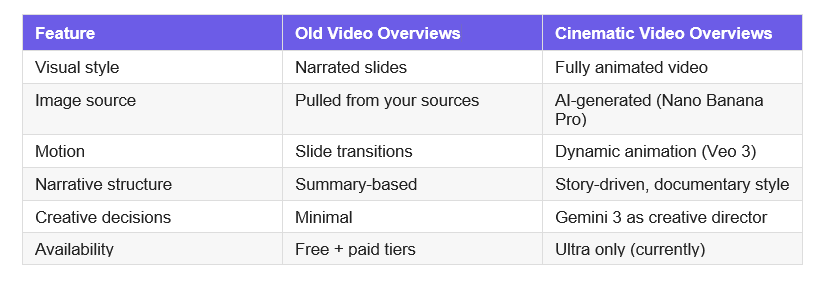
The original Video Overviews worked more like structured slideshows - if the sources within your notebook included visuals, NotebookLM would pull them in alongside text snippets to build the video.
The Cinematic version doesn't pull visuals from your sources - it generates them. Your documents don't need images for the output to be visual. That's the core difference.
My honest take: the old Video Overviews were a nice-to-have. The Cinematic version is the kind of thing that makes you stop and rethink what "studying" or "briefing" actually looks like.
NotebookLM Pricing & Limits: Free, Pro, and Ultra Explained
This is where a lot of people hit a wall. Cinematic Video Overviews are exclusive to the $249.99/month Google AI Ultra plan - at launch, at least. Here's the full breakdown:
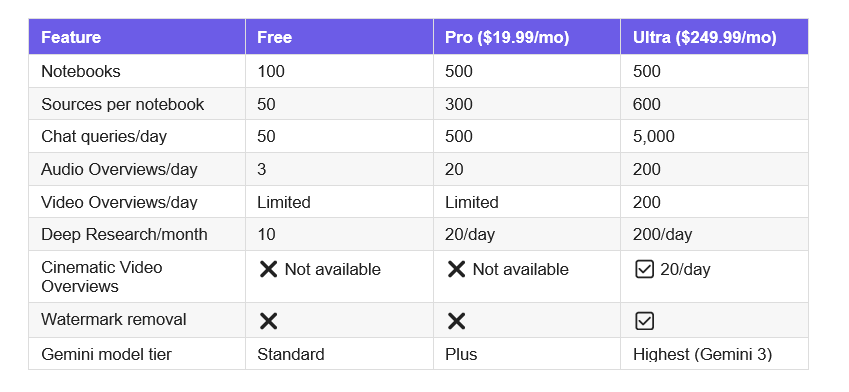
The free plan is genuinely useful for light research: 100 notebooks, 50 sources each, 50 chat queries and 3 audio generations per day. That's enough to explore whether NotebookLM fits your workflow before spending anything.
The Ultra price will make most people flinch - $250/month is a significant commitment. But it bundles in Gemini 3 Deep Think, Veo 3 video generation, Flow video editor, and 30TB of storage alongside the NotebookLM Ultra access. If you're a heavy user across Google's AI stack, the math changes.
For a broader look at the Gemini model stack powering this: Gemini 3.1 Flash Lite vs 2.5 Flash: Speed, Cost & Benchmarks (2026)
Who Should Actually Pay for This?
Not everyone. Let's be real about the use cases where this is a genuine multiplier versus where it's an expensive novelty.
The Cinematic Video Feature Makes Sense If You:
- Create educational content and currently spend significant time producing explainer videos
- Work in research or policy and need dense materials consumed by non-experts quickly
- Run a team and spend hours converting internal documentation into shareable summaries
- Build e-learning courses and need to produce visual overviews at scale
- Work in sales enablement - converting product specs into short explainer videos for reps
It Probably Doesn't Make Sense If You:
- Occasionally use NotebookLM for personal research (the free plan handles this fine)
- Need video output in languages other than English (currently English only)
- Are under 18 (the feature is restricted to users 18+)
- Work with proprietary data subject to privacy policies that restrict cloud processing
The clearest ROI case: internal sales enablement video production is historically painful and expensive. If NotebookLM can produce a passable explainer from a product spec in minutes, the $250/month math becomes much more interesting.
Curious how this compares to what Anthropic is building? See our breakdown: What Is Claude Cowork? The 2026 Guide You Need
NotebookLM Limitations You Need to Know
Language lock-in (for now). Cinematic Video Overviews are available in English only at launch - for Google AI Ultra subscribers (18+) on web and mobile. If your primary research or audience is non-English, you're waiting for a future expansion.
No post-generation editing. There's limited ability to make adjustments after generating content assets. You can't edit a Cinematic Video after the initial generation step. If the structure or narrative doesn't match what you wanted, you regenerate from scratch - ideally with a more specific prompt.
No offline mode. Every action requires an active internet connection on every plan. NotebookLM is a cloud-only tool at every tier.
Your data goes to Google's servers. All documents are stored and processed on Google's infrastructure. Google says it does not train AI on your data, but your content still passes through their systems. For sensitive or confidential materials, this is a legitimate concern.
Only Gemini available. Google's Gemini is the only available AI model. You can't bring your own API keys, switch to OpenAI or Claude, or run local inference for privacy. That's a real constraint for teams with model preferences or compliance requirements.
Unclear rollout path. Based on how past NotebookLM features rolled out - Audio Overviews, Video Overviews, Deep Research - Cinematic Video will likely reach Pro users before free users, but Google hasn't confirmed a timeline.
Frequently Asked Questions
Can NotebookLM generate video?
Yes. NotebookLM now generates two types of video: the original Video Overviews (narrated slides with visuals pulled from your sources) and the new Cinematic Video Overviews (fully animated explainer videos powered by Gemini 3, Nano Banana Pro, and Veo 3). Cinematic Video Overviews are currently available only for Google AI Ultra subscribers at $249.99/month.
What is the Cinematic Video Overview feature in NotebookLM?
Cinematic Video Overview is a NotebookLM feature that transforms uploaded documents - PDFs, Google Docs, research papers, transcripts - into animated, story-driven video explainers. Unlike the older narrated slides format, Cinematic overviews generate original animations and dynamic visuals using Veo 3, with Gemini 3 acting as a creative director making hundreds of structural and stylistic decisions.
How do I generate a Cinematic Video Overview in NotebookLM?
Add your source documents to a NotebookLM notebook, then open the Studio panel and select the Video option. You can generate without a prompt (one-click) or add specific direction like "three-minute explainer for a non-technical audience." Generation takes a few minutes. You need a Google AI Ultra subscription to access Cinematic Video Overviews specifically.
What are the limits for NotebookLM video overviews?
Ultra subscribers can generate up to 200 Video Overviews per day and up to 20 Cinematic Video Overviews per day. Free plan users have limited access to the standard Video Overviews. Cinematic Video Overviews are not available on the free or Pro tiers as of March 2026.
What are the limitations of the free version of NotebookLM?
The free plan includes 100 notebooks, 50 sources per notebook, 50 chat queries per day, 3 audio overviews per day, and 10 Deep Research sessions per month. Cinematic Video Overviews are not included. Free users cannot remove watermarks from generated outputs, and there is no offline mode on any plan.
How much does NotebookLM cost?
NotebookLM has three tiers: Free (no cost, limited daily usage), Pro at $19.99/month bundled with Google AI Pro (500 queries/day, 300 sources/notebook), and Ultra at $249.99/month bundled with Google AI Ultra (5,000 queries/day, 600 sources/notebook, Cinematic Video Overviews, watermark removal, 30TB storage).
Does NotebookLM accept video as input?
Not directly. NotebookLM accepts Google Docs, Google Slides, Google Sheets, PDFs, .docx files, audio files (MP3, WAV, and 20+ formats), text files, images with OCR, and CSV files. You can upload a transcript from a video, but you cannot upload a video file itself as a source.
Will Cinematic Video Overviews come to free users?
Google hasn't confirmed a timeline. Based on how past NotebookLM features rolled out - Audio Overviews, then Video Overviews, then Deep Research - the pattern suggests Pro access before free access. For now, it's Ultra-only.
What This Actually Means for Content Creators
NotebookLM Cinematic Video Overviews is not going to replace professional video production for high-stakes content. The output is impressive for AI, but a skilled editor with source footage will still produce something more nuanced and contextually specific.
What it will replace is the enormous category of "video that was never made because it was too expensive and time-consuming." Lecture summaries. Policy briefings. Internal product explainers. Study aids. Sales enablement. The video backlog that every organization, researcher, and educator carries around in their head.
The feature doesn't compete with professional video studios. It competes with the blank space where a video should have been.
And that's a much bigger category than most people realize. Google is betting $250/month on it. That bet is probably right.
More From Build Fast With AI
If you found this useful, these posts from our blog will sharpen your understanding of the tools powering NotebookLM's Cinematic Video feature:
- Nano Banana Pro vs Nano Banana 2 - Which Google AI Image Model Actually Wins?
Nano Banana Pro powers the image generation layer inside Cinematic Video Overviews. This breakdown tells you exactly what it can and can't do.
- Gemini 3.1 Flash Lite vs 2.5 Flash - Speed, Cost & Benchmarks (2026)
Understanding where Gemini 3 sits in Google's model stack helps you make sense of what's powering NotebookLM's creative direction layer.
- 6 Biggest AI Releases This Week - February 2026 Roundup (includes Veo 3 + Nano Banana 2)
The week Veo 3 and Nano Banana 2 shipped - full context on what changed and why it matters for NotebookLM's video quality.
- Claude Cowork: The 2026 Guide - What It Is and How to Use It
Comparing Google's NotebookLM ecosystem to Anthropic's Cowork? This is the companion read.
- GPT-5.4 Review - Features, Benchmarks & Access (2026)
How does Google's AI Ultra stack measure up against OpenAI's flagship? Read this before committing to either subscription.
Reference Links
All external sources used in this article:

