



Gemini Spark: How Google's 24/7 AI Agent Actually Works
Google now has an AI agent that keeps running after you close your laptop. Announced at Google I/O 2026 on May 19, Gemini Spark is a personal AI agent that lives on dedicated Google Cloud virtual machines, persists 24/7 without your device being awake, and can draft emails, book restaurants, and manage recurring workflows while you sleep. It is the most aggressive consumer AI agent Google has ever shipped — and the most privacy-controversial.
This is the architecture breakdown you will not find in the press release coverage. We cover exactly how Spark works under the hood, which parts of the Antigravity stack power it, how its MCP integration model differs from competitors, and whether the "may do things without asking" disclosure in the onboarding screen is something to worry about. If you are evaluating Spark for yourself, a team, or a side project, start with the foundational guide to building your first AI agent — then come back here for the Google-specific layer.
1. What Is Gemini Spark? The 60-Second Version
Gemini Spark is Google's 24/7 personal AI agent, announced at Google I/O 2026 on May 19, 2026. Unlike the regular Gemini chat interface — which ends when you close the tab — Spark runs persistently on dedicated Google Cloud virtual machines. It stays active whether your phone is locked, your laptop is shut, or your Wi-Fi is off at home.
Sundar Pichai described it at the I/O keynote as "your personal AI agent that helps you navigate your digital life, taking action on your behalf and under your direction." That last clause — under your direction — is load-bearing. Spark is designed to act autonomously on long-horizon tasks, but it is supposed to ask before high-stakes actions like spending money or sending external emails.
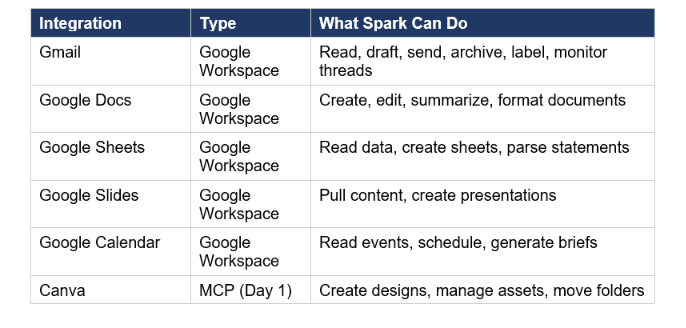
At launch, Spark integrates natively with Gmail, Google Docs, Sheets, and Slides. It also ships with MCP connections to Canva, OpenTable, and Instacart on day one, with Adobe, Samsung, Spotify, CapCut, and dozens more partners arriving over the summer. It is currently in beta for US Google AI Ultra subscribers and rolling out to trusted testers this week.
2. How It Actually Works: The Three-Layer Architecture
Gemini Spark is not a new model. It is an agent runtime — a persistent system built on top of Gemini 3.5 Flash and powered by the Google Antigravity platform. Understanding the difference matters if you are building with it or deciding whether it is worth the subscription.
Layer 1: The Gemini 3.5 Flash Brain
Spark's reasoning is powered by Gemini 3.5 Flash, the model Google launched at the same I/O keynote. Flash runs at 284.2 tokens per second — roughly 4x faster than comparable frontier models — which is why long-horizon agentic tasks that previously felt sluggish now complete quickly enough to be useful. For a full benchmark and pricing breakdown on the model underneath Spark, see the Gemini 3.5 Flash complete specs and benchmarks.
Layer 2: The Antigravity Agent Harness
Google Antigravity is the internal agent-first development platform that powers Spark and Google's own production systems. It wraps Gemini model calls with infrastructure for goal persistence, task decomposition, tool orchestration, safety constraints, and state recovery. Google describes it as the layer that prevents agents from "going rogue" — a constraint system that bounds autonomous action to what you have explicitly authorized. Antigravity 2.0, launched alongside Spark on May 19, is now available to external developers as a standalone desktop application, CLI, and SDK. If you want to build your own Spark-style agent using the same harness, the Google AI Studio vibe coding guide covers how Antigravity integrates into the AI Studio build environment.
Layer 3: The Cloud VM Persistence Layer
This is the architectural piece that makes Spark meaningfully different from the standard Gemini assistant. Spark runs on dedicated virtual machines within Google Cloud. When you assign it a task, that task runs as a persistent process — it is not tied to your device's session lifecycle. A regular Gemini chat ends when you close the browser. A Spark task keeps running, checks back in on trigger conditions, and sends you updates when something needs your attention or approval. The VM runs in Google's secure infrastructure, which means Spark inherits Google Cloud's standard data privacy protections by default for enterprise customers.
3. What Spark Can Do: Task Types and Real Examples
Google shipped Spark with five task categories at launch. Each maps to a specific capability of the Antigravity harness.
Inbox and Email Management
- Declutter your inbox: Summarize or archive newsletters, unsubscribe from email lists automatically
- Watch your inbox for ongoing threads and flag anything matching conditions you set (e.g., "anything from the legal team")
- Draft status update emails by pulling facts from your Gmail threads, Docs, Sheets, and Slides — without you writing a word
- For small businesses: monitor the inbox 24/7 so no customer question goes unanswered
Meeting Intelligence
- Get meeting briefs before calls — concise overviews plus relevant background pulled from your Calendar, Docs, and past Gmail threads
- Synthesize meeting notes spread across emails and chats, create a polished Google Doc with findings, and draft a project kickoff email
- Set a recurring trigger: every Monday, compile the week's open action items into a single briefing
Recurring Automation Tasks
- Parse monthly credit card statements and flag new or hidden subscription fees automatically
- Monitor school-related emails, extract critical deadlines, and send a consolidated daily digest to you and your partner
- Track five specific flights for two weeks and ping you if any fare drops more than 15%
Custom Skills
Spark supports "teachable skills" — you describe a repeating workflow in plain English and Spark stores and executes it. The architecture here is similar to how AutoGen and CrewAI handle persistent agent workflows, except Spark's execution environment is fully managed on Google's infrastructure rather than requiring your own orchestration layer. If you want to understand the underlying orchestration patterns, the best available resource is the open-source agent framework ecosystem — the
best AI agent frameworks guide at Build Fast with AI covers LangGraph, CrewAI, AutoGen, and OpenAI Swarm, which give you the mental model for how Spark's task decomposition layer works internally.
4. Integrations: Google Workspace + 30+ Third-Party Apps via MCP
Spark's integration model is built on MCP — the Model Context Protocol open standard that Anthropic introduced in November 2024 and donated to the Linux Foundation in December 2025. Every connected service is exposed to Spark as an MCP server, which means Spark calls the server, receives structured tool definitions, and executes actions through a sandboxed runtime. Crucially, raw credentials are never passed to the language model itself — the MCP runtime handles authentication in a separate sandbox.
If you are unfamiliar with MCP, the complete MCP guide at Build Fast with AI explains the N×M problem it solves and why Google, Anthropic, OpenAI, and 200+ other tools have all standardized on it. Spark's MCP adoption is significant because it means any service with an MCP server can eventually connect to Spark — not just Google-approved partners.
Integrations at Launch (May 19, 2026)
Coming This Summer
- Adobe, Samsung, Spotify, CapCut (MCP integrations announced at I/O, rolling out summer 2026)
- GitHub, Notion, Slack — MCP-based expansion for developer workflows
- Chrome integration: Spark operates the local browser as an agentic browser agent
- macOS desktop client: local file access, indexed from a folder you authorize
- Text and email Spark directly via a dedicated Gmail address
- Custom sub-agents you can build and deploy within Spark's framework
5. Android Halo: How You Monitor a 24/7 Agent on Mobile
Android Halo is a new UI space in Android — arriving later in 2026 as part of the Android 17 rollout — that gives you a persistent visual indicator of what your AI agents are doing in the background. For Spark specifically, Halo shows live task progress at the top of your device: which tasks are running, which have completed, which need your approval before they proceed.
The design rationale is straightforward: if you are handing off tasks to an agent that runs while you sleep, you need a lightweight ambient signal that something is happening or has gone wrong — without requiring you to open the Gemini app every five minutes. Halo functions as that layer, similar in concept to how Android's notification shade surfaced background app activity, but purpose-built for multi-step agent workflows rather than single-shot notifications.
Halo is not available at Spark's launch. Current beta users track Spark's progress through the Gemini app's redesigned Agent tab, which shows a list of active and scheduled tasks. The "Chat / Agent" two-tab layout introduced in the Gemini app beta (version 17.23, spotted May 14) is the interim interface until Halo ships with Android 17.
6. Gemini Spark vs ChatGPT Agent vs Claude Cowork
Three major personal AI agents are competing for the same job in May 2026: Gemini Spark (Google), ChatGPT Agent (OpenAI), and Claude Cowork (Anthropic). They target the same user — someone who wants AI to complete multi-step work in the background — but differ significantly on architecture, ecosystem, and permission models.
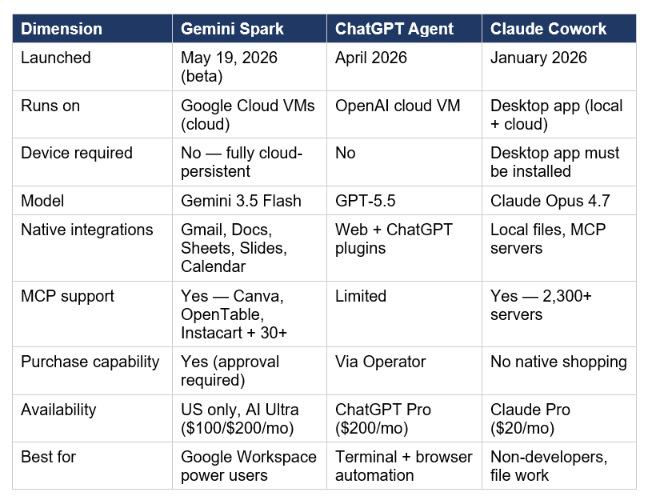
My honest read: Spark has the clearest ecosystem advantage of the three — Google already owns your email, calendar, and documents. If your work lives inside Gmail and Google Docs, Spark has native integrations that ChatGPT Agent and Claude Cowork cannot replicate without custom connectors. Claude Cowork wins on privacy controls and the breadth of MCP ecosystem (2,300+ servers vs Spark's 30+). ChatGPT Agent wins on computer use (OpenAI's OSWorld scores remain the benchmark for desktop automation). Spark wins on zero-friction Google Workspace access and the scale of Google's infrastructure — 19 billion AI tokens per minute processed across Google's products gives them latency and reliability no startup agent platform can match.
For a deeper look at how MCP works as the underlying standard connecting all three of these agents, the full MCP setup guide with real-world examples covers why the protocol matters and how to evaluate any agent's integration depth.
7. Pricing: Who Gets Access and What It Costs
Gemini Spark is gated behind Google AI Ultra — the subscription tier Google restructured at I/O 2026. Two Ultra tiers exist; Spark is available on both, US only, English only at launch.
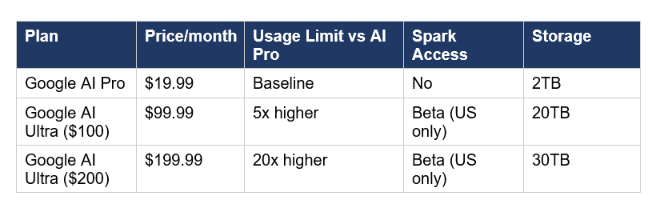
The $100 tier is new — Google introduced it at I/O specifically for developers, technical leads, and knowledge workers. The previous Ultra tier dropped from $250 to $200 with the same capabilities. The $100 plan includes Gemini 3.5 Flash access, 5x higher usage limits in the Gemini app versus Pro, priority access to Antigravity, YouTube Premium, and 20TB cloud storage.
Cost comparison: Spark is significantly more expensive than Claude Cowork, which is included in Claude Pro at $20/month. It is comparable to ChatGPT Pro at $200/month if you go for the top Ultra tier. If you are already paying $20/month for Claude Pro and are considering adding Spark, you are doubling your monthly AI spend. The question is whether Google's native Workspace depth is worth the premium over a Claude Cowork + MCP setup you could configure yourself.
8. The Privacy Problem: What the Onboarding Disclosure Actually Means
Three days before Google I/O, a leaked Gemini app beta screen broke into developer communities. The line everyone screenshotted: "While it is designed to ask for your permission before taking sensitive actions, it may do things like share your info or make purchases without asking."
That is not boilerplate buried in a terms of service. Google put it on the welcome screen. The production version that shipped on May 19 is materially different from the leak — purchases now require explicit approval, and Google has clarified that a complete audit trail exists for every action Spark takes. But the underlying tension the disclosure identified is real: an always-on agent that "needs supervision" is architecturally difficult to reconcile with "always-on."
Three specific risks worth understanding before you enable Spark:
- Data access scope: Spark reads Gmail, Calendar, Docs, Sheets, and Slides by default. You can disable Gemini's access to Workspace apps through Data and Privacy in your Google Account settings — but most users will not know to do this.
- The Thele v. Google LLC lawsuit: A proposed class-action filed in November 2025 in federal court in San Jose alleges Google secretly enabled Gemini across all Gmail, Chat, and Meet accounts in October 2025 without user consent. Google has not commented publicly on the case. This lawsuit is the backdrop to every Spark privacy claim.
- EU AI Act timing: The EU AI Act's consumer-facing AI agent obligations kick in on August 2, 2026. Google has not published a Spark-specific privacy policy as of the keynote. If you are in the EU or handling regulated data, do not enable Spark until that documentation exists.
Hot take: The production permission model is reasonable. Spark asks before sending emails and spending money. The real concern is not what Spark does — it is what Google learns about your work patterns from a 24/7 agent that reads all your mail and documents. That data is more valuable to Google than any subscription fee. If that trade-off concerns you, Claude Cowork's local-first architecture is architecturally better-suited to your threat model.
9. Honest Take: What Works, What Does Not, What Is Missing
What works: the architecture. Running on dedicated Cloud VMs that persist without your device is the right design for a true 24/7 agent. The Antigravity harness brings the same infrastructure Google uses internally — real safety constraints, not marketing copy. The MCP integration model is sound: using the same open standard as Claude and Cursor means Spark can eventually connect to the entire 2,300+ server MCP ecosystem, not just Google-curated partners. And the Workspace integration depth is genuinely unmatched — no other agent has native read/write access to Gmail at the permission level Google does. For a practical comparison of what this depth means in Workspace tasks specifically, the Gemini in Google Workspace 2026 feature guide shows what the pre-Spark baseline looks like.
What does not work yet: everything that is "coming this summer." Chrome integration, custom sub-agents, the macOS desktop client for local file access, Android Halo — none of these exist at launch. What you get on day one is inbox management, meeting briefs, recurring task automation, and three MCP integrations (Canva, OpenTable, Instacart). That is genuinely useful but a narrower capability set than the keynote demos implied.
What is missing: computer use. GPT-5.5 scores above human expert performance on OSWorld desktop automation benchmarks (75%+). Gemini 3.5 Flash has no published computer use capability. If your agentic workflow requires directly interacting with desktop applications — filling forms, clicking buttons, navigating software — Spark cannot do it. ChatGPT Agent is the only major consumer product that ships this at launch.
Contrarian point: the $100/month pricing is aggressive for a beta product with limited integrations. If you are a Google Workspace power user who lives in Gmail and Docs, the value is clear. If you are primarily a developer who uses Claude Code, Cursor, or Windsurf for serious work, Spark adds relatively little that you cannot get from Claude Cowork plus MCP servers at one-fifth the cost.
Frequently Asked Questions
What is Gemini Spark?
Gemini Spark is Google's 24/7 personal AI agent, announced at Google I/O 2026 on May 19, 2026. It runs persistently on dedicated Google Cloud virtual machines — meaning it keeps working when your phone is locked and your laptop is closed. Built on Gemini 3.5 Flash and the Antigravity agent harness, it integrates natively with Gmail, Google Docs, Sheets, Slides, and Calendar, plus third-party services including Canva, OpenTable, and Instacart via MCP. It handles long-horizon tasks like inbox management, meeting briefings, recurring automation workflows, and eventually real-world bookings and purchases.
How much does Gemini Spark cost?
Gemini Spark requires a Google AI Ultra subscription. The new $99.99/month tier (launched at I/O 2026) includes Spark beta access for US subscribers, 5x higher usage limits than AI Pro, 20TB cloud storage, and YouTube Premium. The existing $199.99/month Ultra tier (reduced from $250) also includes Spark with 20x higher usage limits. Spark is not available on the $19.99 AI Pro plan or on free Gemini tiers.
Is Gemini Spark available outside the US?
At launch (May 19, 2026), Gemini Spark is US only, English only, for Google AI Ultra subscribers. Google has not announced an international rollout timeline. The broader Gemini 3.5 Flash model and AI Mode in Search are available globally, but Spark itself remains US-only in beta. EU availability will be shaped by the EU AI Act's consumer agent obligations, which take effect August 2, 2026.
How does Gemini Spark connect to third-party apps?
Spark uses MCP — Model Context Protocol — the open standard originally created by Anthropic in November 2024 and now adopted across Claude, Cursor, Windsurf, VS Code, and 200+ other tools. Each connected app is exposed as an MCP server with structured tool definitions. Spark calls the server, receives the tool list, and executes actions through a sandboxed runtime. Raw credentials are never passed to the language model. At launch, MCP integrations include Canva, OpenTable, and Instacart, with Adobe, Samsung, Spotify, CapCut, GitHub, Notion, and Slack coming over the summer.
Can Gemini Spark make purchases without my permission?
No — in the production version that shipped May 19, purchases require explicit approval. The leaked beta onboarding screen (from May 14, 2026) warned that Spark "may do things like share your info or make purchases without asking," which caused significant concern in developer communities. Google clarified that the production permission model requires user approval for high-stakes actions including spending money and sending external emails. Every transaction creates a full audit trail you can review.
What is Android Halo?
Android Halo is a new UI space in Android — arriving later in 2026 as part of Android 17 — that displays live progress updates from AI agents like Spark at the top of your Android device. It shows which tasks are running, which have completed, and which need your approval before proceeding. Halo is not available at Spark's current beta launch; interim task tracking is done through the Gemini app's redesigned Agent tab, which shows active and scheduled tasks in a two-tab Chat / Agent layout.
How does Gemini Spark compare to Claude Cowork?
They target the same job but differ on architecture and ecosystem. Spark runs in the cloud on Google VMs — no device required. Claude Cowork is a desktop application that runs locally, with MCP connections to external services. Spark has deeper native access to Google Workspace (Gmail, Docs, Sheets, Calendar) at a level no MCP connector can fully replicate. Claude Cowork has access to 2,300+ MCP servers versus Spark's 30+ at launch, and its local-first architecture gives it a stronger privacy posture. Spark costs $100/month minimum; Cowork is included in Claude Pro at $20/month.
Does Gemini Spark work when my phone or laptop is off?
Yes. This is the core architectural differentiator. Spark runs on dedicated Google Cloud virtual machines, not on your device. Once you assign a task, it runs as a persistent cloud process. Your phone can be locked, your laptop closed, the Wi-Fi at home off — Spark continues, checks trigger conditions, and sends you updates when something needs attention or approval.
Recommended Blogs
- What Is MCP (Model Context Protocol)? Complete 2026 Guide
- Build Your First AI Agent and Automation
- Gemini in Google Workspace: Every Feature Explained (2026)
- Claude MCP Setup Guide: Connect Any Tool in 10 Minutes (2026)
- Google AI Studio Vibe Coding: Full Guide (2026)
- Best AI Agent Frameworks in 2026: LangGraph, CrewAI, AutoGen & More
- How to Automate Your Work with AI Agents (No Code) 2026
References
- TechCrunch — Google Introduces Gemini Spark, a 24/7 Agentic Assistant with Gmail Integration, at IO 2026
- 9to5Google — Gemini App Rolling Out Neural Expressive Redesign, 3.5 Flash, 24/7 Spark Agent, & Daily Brief
- Tom's Guide — Google Unveils Gemini Spark: A 24/7 Personal AI Agent
- Google Cloud Blog — Innovations from Google I/O 2026 on Google Cloud
- Google Blog — Everything New in Google AI Subscriptions, Fresh from I/O 2026
- DEV Community — Gemini Spark: Google's 24/7 AI Agent — I/O 2026 Developer Guide
- FindSkill.ai — What Is Gemini Spark? Google's 24/7 AI Agent Explained
- TechTimes — Google Cuts AI Ultra to $100, Launches Gemini Spark Agent and Android XR Glasses at I/O 2026
- AI Tool Analysis — Gemini Spark Leaked: Google's 24/7 AI Agent Days Before I/O 2026

