



Figma stock dropped 7% on April 17, 2026. Not from bad earnings. Not from a scandal. From a single product launch by Anthropic. Meanwhile, Canva was in Los Angeles announcing their biggest platform overhaul in 13 years to a crowd of 6,500 people. Two AI design tools. Same week. And somehow, instead of going to war, they shook hands.
That partnership twist is the story most coverage is missing. Everyone's asking "Canva vs Claude Design" when the real question is what each tool was actually built for, who wins in which scenario, and why the real loser in this story isn't either of them.
What Actually Happened the Week of April 16-17, 2026
Two of the biggest AI design launches in history landed within 24 hours of each other, and they were coordinated, not accidental.
On April 16, Canva unveiled Canva AI 2.0 at Canva Create in Los Angeles. Their own words: "the most significant evolution of our platform since launching in 2013." On April 17, Anthropic launched Claude Design, the first product out of Anthropic Labs, powered by Claude Opus 4.7. It hit #1 on Hacker News with 817 upvotes on its first day, and Google Trends showed the query "claude design" spiking over 900% week-over-week within 48 hours.
Three days before Claude Design launched, Anthropic's Chief Product Officer Mike Krieger, the Instagram co-founder, quietly resigned from Figma's board of directors. The SEC filing said it wasn't due to any disagreement. The timing says something different.
This launch is the clearest signal yet that Anthropic is moving from AI model provider to full-stack product company, competing directly with established software giants. For a deep-dive on exactly what Claude Design does and how to use it, the complete Claude Design guide for non-designers covers the full workflow with real-world examples.
What Is Canva AI 2.0? The Four New Capabilities
Canva AI 2.0 is the platform rebuilding itself around AI agents, not templates. The four foundational capabilities that define it are: Conversational Design, Agentic Orchestration, Object-Based Intelligence, and Living Memory.
Conversational Design means you describe an idea in plain language and receive a fully editable, layered design output. Not a flat image. Not a locked PNG. Individual objects you can click, move, and change without regenerating the whole canvas. That's Object-Based Intelligence at work.
Agentic Orchestration is where Canva's ambition gets interesting. A single prompt can now trigger a multi-step campaign across multiple formats, with Canva's AI coordinating its own tools in the background. The platform integrates with Slack, Gmail, Google Calendar, Zoom, Notion, Google Drive, and HubSpot. You can ask it to turn a Zoom meeting transcript into a sales deck or scan your inbox to draft a morning briefing, without touching a template.
Living Memory is the feature that keeps most teams coming back. Canva learns your brand preferences, colors, fonts, and working patterns across sessions, so every new project starts with your identity already applied, not from a generic blank slate.
The scale behind all of this: Canva processed over 50 trillion tokens in the past year, with March 2026 alone accounting for 10 trillion. Their proprietary AI infrastructure runs 7x faster and at costs 30x lower than comparable frontier models, according to the company. With $4 billion in ARR at end of 2025, 265 million monthly active users, and a $42 billion valuation, Canva is not experimenting. This is a bet-the-company move.
Their pricing is layered: Free tier (limited AI credits), Pro at $15/month, and an AI Pass at $100/month for heavy usage. Canva AI 2.0 launched as a research preview available to the first one million users on the Canva homepage.
What Is Claude Design? Anthropic's First Labs Product
Claude Design is a conversational design tool that turns text prompts, uploaded documents, and codebase links into interactive prototypes, pitch decks, UI wireframes, one-pagers, and marketing visuals. It launched April 17, 2026, as the first product under the Anthropic Labs incubation program.
The tool is powered by Claude Opus 4.7, which shipped one day earlier. Opus 4.7 brought a 3.3x increase in image-pixel processing capacity compared to Opus 4.6, jumping from 1,568px to 2,576px resolution. That upgrade is what makes Claude Design actually work at a professional level, not just as a toy.
The interface is a two-panel workspace: a chat panel on the left where you give broad instructions and upload reference files, and a live canvas on the right where the output renders and updates in real time. You can comment inline on specific elements, edit text directly, use adjustment sliders for spacing, color, and layout, or sketch directly on the canvas with a draw annotation tool.
The standout technical feature is codebase-aware design system application. During onboarding, Claude reads your actual React, Vue, or Svelte components, Figma files, font folders, and logo assets to auto-build a design system. Every project after that applies your brand's colors, typography, and component patterns automatically. Figma AI and Canva Magic Studio cannot do this natively.
Output formats are: PDF, URL, PPTX, standalone HTML, and a direct handoff to Claude Code. That Claude Code handoff is the piece that makes this a closed loop, from exploration to prototype to production code within Anthropic's ecosystem. For the coding side of this workflow, the Claude Code Auto Mode guide explains how the build layer integrates with Design.
Early results from real teams: Brilliant reported that pages requiring 20 or more prompts to recreate in competing design tools needed only 2 prompts in Claude Design. Datadog compressed a week-long brief-mockup cycle into a single Claude Design conversation.
Pricing: Claude Design is included in existing Claude Pro ($20/month), Max ($100-200/month depending on tier), Team, and Enterprise subscriptions with no separate SKU. It runs on a separate quota from chat and Claude Code usage. One honest caveat: PCWorld found that Pro users can drain their weekly design allowance in as little as 30 minutes of heavy use, which makes the $100/month Max tier the realistic minimum for serious work.
Claude Design is not available on the free tier and requires admin activation for Enterprise organizations.
Canva AI 2.0 vs Claude Design: Feature-by-Feature Comparison
The clearest way to understand these tools is to put them side by side. They are optimized for fundamentally different jobs.
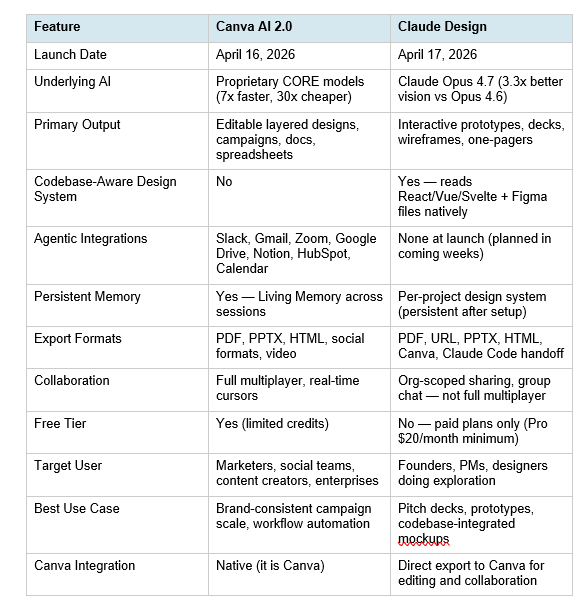
If you're trying to pick the right AI tool stack more broadly for product and development work, the best AI models for frontend UI development in 2026 covers how Claude Design fits alongside other AI coding and design tools.
The Partnership That Changes Everything
Here is the angle most coverage is getting wrong: Canva and Claude Design are not competing. They are integrated, by design, and have been building toward this for two years.
The Canva MCP for Claude launched in July 2025. Since then, millions of users have created Canva designs from within Claude conversations using natural language. On-brand design generation, pulling from Canva Brand Kits, launched inside Claude in January 2026. The April 17 announcement was the next chapter, not the beginning.
The partnership works like this: Claude Design handles the exploratory, conversational front-end of the creative process. Once a design is ready to polish, brand, or collaborate on at scale, it exports directly into Canva's editor where it becomes fully editable and lives inside Canva's ecosystem. From Canva's side, Canva AI 2.0 introduced HTML importing, making Canva the first platform to import interactive HTML content, which includes output from Claude Design, directly into its drag-and-drop editor.
Canva's head of AI products, Danny Wu, framed it plainly: "AI has made it faster than ever to generate a draft or an idea, and with it, the need to refine, adapt, collaborate, and scale that content." Claude starts the idea. Canva finishes the asset. That is not a competitive relationship. That is a supply chain.
For Anthropic, the partnership solves a real gap: Claude has no collaborative editing infrastructure. For Canva, it ensures that every design generated through the world's fastest-growing AI model eventually lands in Canva's ecosystem for refinement. It's the same strategy that made Canva dominant in browser-based design: be the tool that other tools export to.
Who Should Use Which Tool
Use Claude Design if you are a founder who needs a pitch deck by Friday and has never opened Figma. Feed it your brief, target audience, and the one takeaway you want investors to leave with. Generate three deck variants in an hour. Export the winner to PPTX or push it to Canva for final polish.
Use Claude Design if you are a product manager who wants to sketch a feature flow and hand it off without waiting for a designer. Claude Design reads your existing codebase and applies your actual component patterns to every mockup, so the handoff to engineering is clean from the start.
Use Canva AI 2.0 if you are a marketing team that needs to produce 40 social assets for a product launch campaign, all on-brand, across six different formats, pulling content from your Slack threads and existing marketing docs. That is what Agentic Orchestration and Living Memory are built for. Claude Design cannot touch that workflow.
Use Canva AI 2.0 if you already live in Canva and want AI to handle the repetitive parts of your production workflow. The template-to-AI evolution Canva made with 2.0 is substantial. If brand consistency at scale is your problem, Canva now solves it with agents.
My honest take: for most early-stage founders and small product teams, the right answer is both. Claude Design for the first-draft exploration and prototyping. Canva AI 2.0 for the production scale and marketing. The export handoff between them makes that stack genuinely frictionless.
If you want to get more out of Claude Design, the single highest-leverage move is learning how to prompt it precisely. The 150 best Claude prompts guide for 2026 covers the structural patterns that produce the best design outputs from Claude.
What This Means for Figma, Adobe, and the Design Industry
Figma lost 7% of its stock value within hours of Claude Design launching. Adobe also fell. That market reaction tells you what investors think, even if Anthropic's official messaging was careful to use the word "complement" when describing the relationship with existing tools.
The truth is more nuanced than a crash landing for Figma. Professional designers who run design systems, manage component libraries, and do pixel-perfect production work at scale are not going to abandon Figma. Claude Design, by Anthropic's own framing, is not built for them. It is built for the people who were never going to use Figma in the first place: founders, PMs, marketers, and anyone who needs something visual but does not have a design vocabulary.
That is a much larger group. And that is the actual threat. Not that Claude Design replaces Figma for professionals. But that it eliminates the reason to hire a designer for dozens of early-stage, pre-production tasks that previously flowed into Figma projects. The same pattern happened when Canva arrived in 2013. Canva did not kill Photoshop. It eliminated the need for Photoshop for 265 million non-designers.
Google Stitch, which launched on the same week and sent Figma stock down another 12% in the days following, compounds the pressure further. The design tool market is being attacked from three directions simultaneously: Anthropic from the conversational prototyping angle, Google from the Workspace integration angle, and Canva from the workflow automation angle. Figma's response will define the next phase of this market.
For developers choosing between AI coding environments that now include design capabilities, the Cursor 3 vs Google Antigravity IDE comparison shows how design-to-code handoffs are evolving across the full development stack.
Frequently Asked Questions
What is Canva AI 2.0?
Canva AI 2.0 is the largest platform overhaul in Canva's 13-year history, launched April 16, 2026, at Canva Create in Los Angeles. It introduces four core capabilities: Conversational Design (text-to-editable-layout), Agentic Orchestration (multi-step campaign automation), Object-Based Intelligence (editable individual elements, not flat images), and Living Memory (persistent brand and preference recall across sessions). Canva AI 2.0 also connects to Slack, Gmail, Google Calendar, Zoom, Notion, and HubSpot. The initial research preview launched to the first one million users on the Canva homepage.
What is Claude Design by Anthropic?
Claude Design is Anthropic's first product under the Anthropic Labs incubation program, launched April 17, 2026, in research preview. It generates interactive prototypes, pitch decks, UI wireframes, slides, and one-pagers from text prompts, uploaded documents, or codebase links. Powered by Claude Opus 4.7, it features codebase-aware design system application, inline commenting, adjustment sliders, and direct handoff to Claude Code. It is available to Claude Pro ($20/month), Max ($100-200/month), Team, and Enterprise subscribers.
Are Canva AI 2.0 and Claude Design competitors or partners?
They are both. Claude Design exports directly to Canva at launch, and Canva AI 2.0 introduced HTML importing to accept content generated by Claude. The two companies have been building a strategic partnership for two years, starting with the Canva MCP for Claude in July 2025. The intent is for Claude Design to handle exploratory first drafts while Canva handles production polish, brand consistency, and team collaboration.
Can Claude Design replace Canva?
No, not currently. Claude Design has no free tier, no real-time multiplayer collaboration, no social media format optimization, and no workflow integrations with tools like Slack or Gmail. For production-grade brand marketing, campaign scaling, and team-based creative workflows, Canva AI 2.0 is the significantly stronger tool. Claude Design wins for prototyping, pitch decks, and codebase-integrated design system work.
How much does Claude Design cost?
Claude Design is included in existing Claude paid plans with no separate SKU. Access requires Claude Pro ($20/month), Max ($100/month at 5x usage or $200/month at 20x usage), Team, or Enterprise. It runs on a separate quota from Claude chat and Claude Code. Pro users can exhaust their weekly design allowance in under 30 minutes of heavy use, making Max the realistic minimum for consistent work. Enterprise organizations must enable it via admin settings.
What is the biggest difference between Canva AI 2.0 and Claude Design?
Canva AI 2.0 is an agentic workflow platform with persistent memory, deep third-party integrations, and production-grade brand scaling for 265 million existing users. Claude Design is a conversational prototyping tool with codebase-aware design system application, best for generating the first visual draft from a rough idea. Canva builds campaigns. Claude Design builds prototypes. The Canva export from Claude Design is designed to bridge both.
Who is Claude Design built for?
Anthropic specifically names founders, product managers, marketers, and account executives, but the honest answer is anyone who has never used Figma and needed to. Brilliant reported that complex designs requiring 20 or more prompts in other tools needed only 2 in Claude Design. It is for people with ideas and no design vocabulary, who need something polished before they can have a real conversation about visual direction.
What happened to Figma when Claude Design launched?
Figma's stock dropped approximately 7% within hours of Claude Design launching on April 17, 2026. Adobe shares also fell. This followed Mike Krieger, Anthropic's CPO, resigning from Figma's board three days earlier. Figma's stock had already been down nearly 50% over the prior 12 months. Google Stitch, which also launched the same week, sent Figma stock down an additional 12% in the following days.
Recommended Blogs
These are real posts that exist on buildfastwithai.com right now:
- Claude Design: Complete Guide for Non-Designers (2026)
- 150 Best Claude Prompts That Work in 2026
- Best AI Models for Frontend UI Development 2026
- Cursor 3 vs Google Antigravity: Best AI IDE 2026
- Kimi 2.5 Review: Is It Better Than Claude for Coding? (2026)
Cookbook: Build Your Own Claude Design Workflow via API
Want to experiment with Claude Design-style outputs before the tool fully ships to your plan, or build your own AI design pipeline? The Build Fast with AI experiments repo has practical Claude API notebooks that show you how to pipe brand context into Claude for consistent visual outputs.
Start with the gen-ai-experiments cookbook repository on GitHub. The library-cookbooks and apps-and-demos folders have Claude API notebooks you can run in under 30 minutes. Set up your system prompt with your brand context, colors, and component vocabulary, then generate design-ready HTML structures directly from Claude's API. It's the fastest way to understand what codebase-aware design generation actually looks like under the hood.
References
- Anthropic: Introducing Claude Design by Anthropic Labs
- Canva Newsroom: Canva AI 2.0 Launch Announcement
- TechCrunch: Anthropic launches Claude Design
- VentureBeat: Anthropic just launched Claude Design, turns prompts into prototypes
- The Next Web: Canva and Anthropic launch Claude Design for AI-powered visual creation
- Fortune: Canva unveils AI 2.0 agentic design suite
- CMSWire: Canva AI 2.0 Turns the Design Platform Into an Agentic Creative System
- SiliconANGLE: Canva unveils AI 2.0, recasting its platform as an agentic system for work
- Digital Applied: Claude Design by Anthropic Labs — AI Native Design Tool
- SketchTo: Claude Design vs Figma AI vs Canva AI 2.0 2026 Review

