



Best AI Models for Frontend and UI Development in 2026
Every frontend developer I know is using at least three AI tools right now. Not one. Three. And most of them aren't sure which one is actually the best for the specific thing they're trying to build.
The problem isn't a shortage of options. GPT-5.4, Claude Sonnet 4.6, Kimi K2.5, Gemini 3.1 Pro, Vercel v0, Kombai, Google Stitch, UX Pilot -- the list grows every week. Each one claims to be the best. None of them are best at everything.
I spent weeks testing these tools across real projects: React dashboards, landing pages, component libraries, design-to-code conversions. What I found will save you a lot of trial-and-error time. The short version: the right model depends entirely on what you're building, and using one tool for everything is leaving serious quality on the table.
Here's the breakdown you actually need.
Why Choosing the Right AI for Frontend Actually Matters
The wrong model costs you hours of cleanup. A model that writes technically correct code but can't reason about layout, spacing, or component hierarchy will produce code that passes linting but looks terrible in production.
Frontend work is a different discipline from backend coding. It rewards aesthetic judgment, responsive layout logic, component reusability, and design-system awareness. Not all LLMs have these strengths.
From my testing: Claude Sonnet 4.6 consistently produces cleaner component structures and better design reasoning. GPT-5.4 is faster and handles complex logic well. Kimi K2.5 surprises you on visual tasks at a fraction of the cost. Vercel v0 and Kombai are specialized tools built specifically for UI generation and frontend agent workflows, and for those specific jobs, they outperform every general-purpose LLM.
The developers winning with AI in 2026 aren't using one model. They're mixing two or three, each in its strength zone.
Best LLMs for Frontend Coding: Ranked by Real Benchmarks
Gemini 3.1 Pro Preview and Claude Opus 4.6 currently lead the overall coding benchmarks, but for daily frontend work, Claude Sonnet 4.6 is the better pick -- and costs five times less.
Here are the numbers that matter for frontend developers as of April 2026:
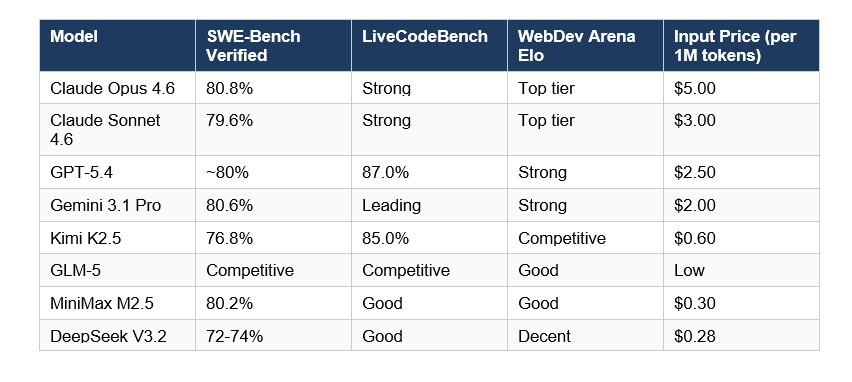
Claude Sonnet 4.6 is my default for daily frontend work. It produces the cleanest React component structures, handles Tailwind CSS idiomatically, and has the best understanding of design systems of any model I've tested. The price-to-performance ratio beats Opus 4.6 by a wide margin for most UI tasks.
GPT-5.4 excels at speed and terminal-based execution. It was specifically trained with improved UI capabilities and image understanding, and the OpenAI team published detailed prompting guidance in March 2026 showing it generates more ambitious, visually polished frontends than its predecessors. If you're using Cursor or Codex CLI, GPT-5.4 is a serious contender.
Gemini 3.1 Pro leads on price-to-performance overall -- 80.6% SWE-bench at $2 per million input tokens. For React-heavy projects on a budget, this is worth testing.
My honest take: if you're building UI every day, run Claude Sonnet 4.6 in your IDE. It gives you the cleanest component code with the least post-generation cleanup.
Best Open-Source Models for UI Development (Kimi K2.5, GLM-5, and More)
Kimi K2.5 is the most significant open-source model release for frontend developers in 2026. It scores 76.8% on SWE-Bench Verified and 85% on LiveCodeBench -- within a few points of closed-source frontier models -- while being fully open-source and priced at $0.60 per million input tokens.
Moonshot AI released Kimi K2.5 on January 27, 2026. The architecture is 1.04 trillion total parameters with a Mixture-of-Experts design that activates only 32 billion per token. It supports 256K context -- 28% larger than Claude's default 200K -- which makes it excellent for large codebase analysis.
What makes Kimi K2.5 special for UI work: its native multimodal architecture allows direct code generation from UI design screenshots. You can drop in a Figma export or a hand-drawn wireframe and get working React code out. Very few models do this well. Kimi K2.5 does.
The Agent Swarm feature coordinates up to 100 specialized sub-agents in parallel. Moonshot AI's internal testing showed 4.5x faster task completion for complex multi-file frontend builds. I haven't fully stress-tested this in production, but for large component library generation it's genuinely impressive.
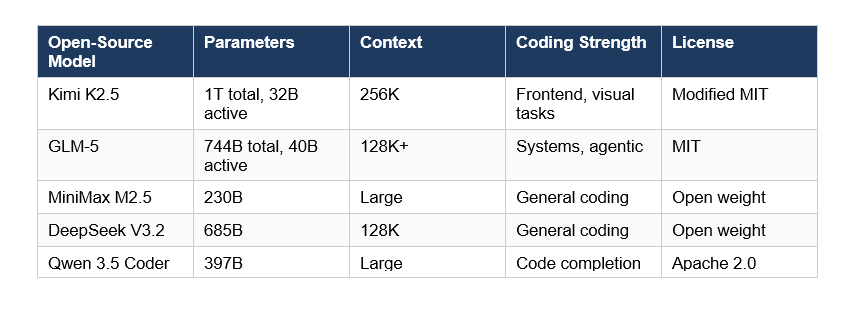
GLM-5 from Z.ai (formerly Zhipu AI) is the highest-ranked open-weights model by Intelligence Index at 50, with 744 billion total parameters. It's strong on systems-level and agentic tasks. For UI-specific work it's capable but less fine-tuned for frontend aesthetics than Kimi K2.5.
For teams that need a self-hostable model for frontend work, Kimi K2.5 is the clear choice. GLM-5 is better if you need deep system-level reasoning alongside your UI generation.
Best AI Tools for UI Code Generation (Vercel v0, Kombai, Google Stitch)
Vercel v0 remains the most mature AI frontend code generator in 2026. It converts text prompts into production-ready React components with Tailwind CSS, supports iterative refinement, and integrates directly into Next.js workflows.
v0 processes prompts through a fine-tuned LLM that identifies UI entities (buttons, modals, grids) and assembles code from pre-trained patterns. The feedback loop is fast: describe a change, get regenerated code. For e-commerce UIs, dashboards, and landing pages it consistently produces deployment-ready output with minimal cleanup.
Kombai is the specialist I'd recommend for teams already using Figma. Multiple developers in my network call it better than Claude Code and Codex for frontend-specific tasks. It reads your existing component library, matches your MUI or Tailwind conventions, and generates code that doesn't try to touch your backend logic. SOC2 certified, never trains on your code.
Google Stitch, launched at Google I/O 2025, converts text prompts, sketches, or screenshots into UI designs using Gemini 2.5 Pro's multimodal capabilities. It exports directly to Figma with properly structured Auto Layouts and named component layers. It's currently free to use, which is remarkable for the output quality it produces.
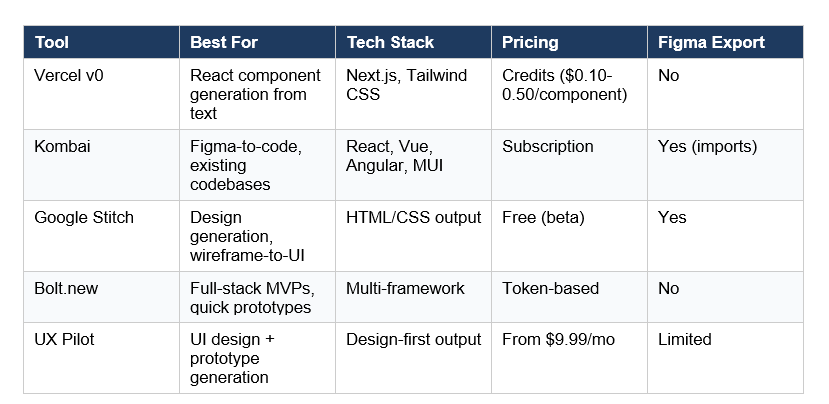
My honest take on these tools: Vercel v0 for quick component prototyping, Kombai for production codebases with design system constraints, and Google Stitch for the design phase before you touch code. These three cover 90% of frontend AI use cases and none of them overlap.
Best AI for UI/UX Design (Not Just Code)
If your goal is UI design rather than code generation, the workflow looks different. The tools above produce code. These tools produce designs you can then hand off to code generation.
UX Pilot specializes in UI design with an AI model trained specifically on UX patterns. It generates polished screens from prompts, supports chat-based editing and image-based generation, and includes an Enhance Prompt option that refines your initial description for better output. For mobile and web app screens it's genuinely the best purpose-built option.
Adobe Firefly + Generative Fill is worth mentioning for UI designers who need commercially safe output. Firefly is trained on licensed content, pricing starts at $9.99/month for 2,000 generative credits. For professional client work where output licensing matters, this is the responsible choice.
Framer AI sits between design and publishing. It generates responsive web layouts and lets you publish directly from the platform. For landing pages it produces solid results. For complex web applications with multiple states and data interactions, it struggles with structure.
The practical workflow I recommend: UX Pilot for wireframing and design exploration, Google Stitch or Kombai for the design-to-code handoff, and Claude Sonnet 4.6 or Vercel v0 for component refinement and iteration.
Model Comparison: GPT-5.4 vs Claude Sonnet 4.6 vs Kimi K2.5 for Frontend
Here's the direct comparison most developers are searching for. I tested all three on identical prompts: building a React dashboard component, converting a Figma screenshot to code, and refactoring a messy CSS grid layout.
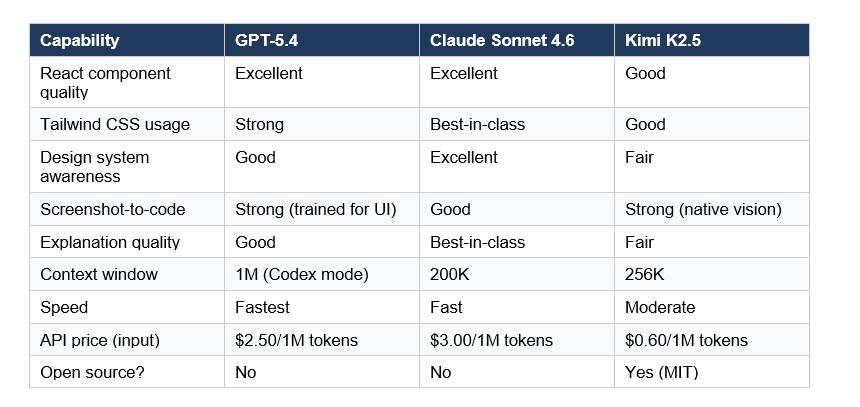
The conclusion from my testing matches what benchmark data suggests: Claude Sonnet 4.6 is the best overall model for frontend work when quality and design system consistency matter. GPT-5.4 wins on speed and handles complex multi-file tasks aggressively. Kimi K2.5 is the choice for cost-sensitive teams or anyone who wants to self-host a frontier-class model.
Contrarian take: I think most teams are overpaying by defaulting to Opus 4.6 for frontend work. Sonnet 4.6 scores within 1.2 percentage points on SWE-bench, handles UI-specific tasks just as well in practice, and costs one-fifth the price. Unless you're doing extremely complex multi-agent architectural work, Sonnet 4.6 is the right call for daily frontend development.
How to Improve AI-Generated UI Quality
The single biggest quality lever is your prompt, not your model. I've seen mediocre prompts produce mediocre UI from Claude Opus 4.6, and well-structured prompts produce production-ready components from Kimi K2.5.
OpenAI's GPT-5.4 design guide (published March 2026) recommends defining your design system upfront before generating anything. Give the model your typography scale, color palette, spacing tokens, and component conventions. Do this at the start of every session. Models default to generic patterns when underspecified -- the Inter font everywhere, the generic rounded cards, the purple gradients. You know exactly what I mean.
Three techniques that consistently improve output quality:
- Attach reference screenshots. GPT-5.4 and Kimi K2.5 both support image inputs. Drop in a Figma export or a screenshot of the design you want to match. The model's output quality jumps significantly.
- Specify constraints explicitly. "Use Tailwind only, no custom CSS. Match the existing Button component's variant system. No new dependencies." This prevents the model from inventing architecture you'll have to rip out.
- Use a low reasoning level to start. GPT-5.4's own documentation recommends starting with lower reasoning intensity for frontend tasks to avoid over-engineering. You can always ask for a more considered pass if the first output is off.
One underrated technique: after generating a component, ask the AI to audit its own output for accessibility issues, responsive behavior at 320px, and design system violations. Claude Sonnet 4.6 is particularly good at this self-review step.
Which AI Should You Actually Use? A Decision Framework
Stop looking for one answer. The question isn't "which AI is best for frontend" -- it's "which AI is best for this specific frontend task."
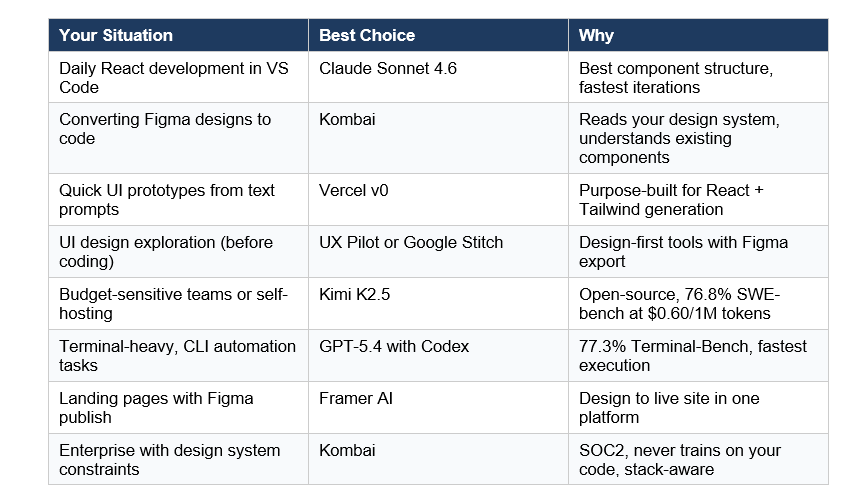
For most independent developers and small teams: use Claude Sonnet 4.6 as your daily driver, Vercel v0 for rapid prototyping, and Google Stitch (free) for design exploration. That stack costs next to nothing and covers everything.
For larger teams with Figma-heavy workflows: Kombai for the design-to-code pipeline, Claude Sonnet 4.6 in the IDE for iteration and refactoring. Add Kimi K2.5 if you want a self-hostable option for sensitive codebases.
Frequently Asked Questions
Which LLM is best for UI coding in 2026?
Claude Sonnet 4.6 ranks as the best all-around LLM for UI coding in 2026, scoring 79.6% on SWE-bench Verified with strong design system reasoning and clean React component output. For cost-sensitive teams, Kimi K2.5 delivers 76.8% SWE-bench performance at $0.60 per million input tokens -- roughly five times cheaper than Claude Sonnet 4.6.
Is Kimi K2.5 open-source?
Yes. Kimi K2.5, released by Moonshot AI on January 27, 2026, is fully open-source under a modified MIT license. The model weights are downloadable from Hugging Face. It supports 256K context, runs in four modes (Instant, Thinking, Agent, Agent Swarm), and has 1.04 trillion total parameters with 32 billion active via Mixture-of-Experts architecture.
What is Kimi K2.5 best at?
Kimi K2.5 is particularly strong at frontend development and visual agentic tasks. Its native multimodal architecture supports direct code generation from UI screenshots. On BrowseComp it scores 60.2, beating GPT-5 (54.9). Its Agent Swarm feature -- coordinating up to 100 sub-agents in parallel -- is unique among open-source models and enables 4.5x faster multi-task completion.
What is the best AI tool for frontend development free?
Google Stitch is the strongest free AI tool for frontend design and generation in 2026. It's powered by Gemini 2.5 Pro, supports both text and image prompts, exports directly to Figma, and includes Standard mode (up to 350 screens monthly) and Experimental mode (50 screens monthly) at no cost. For code generation, Vercel v0 and Bolt.new both offer free tiers.
Which AI is better than Kimi K2.5 for frontend?
For frontend work specifically, Claude Sonnet 4.6 and GPT-5.4 outperform Kimi K2.5 on design system awareness and component quality. Claude Sonnet 4.6 scores 79.6% on SWE-bench (vs Kimi's 76.8%) and has notably better Tailwind CSS and React idiomatic output. However, Kimi K2.5's vision capabilities and 8x lower API cost make it a serious competitor for visual UI tasks.
Which is the best open-source model for UI generation?
Kimi K2.5 is the best open-source model for UI generation as of April 2026. GLM-5 from Z.ai comes second, with an Intelligence Index score of 50 (the highest among open-weights models) and 744 billion total parameters. For self-hosting on constrained hardware, DeepSeek V3.2 at 685B parameters and $0.28 per million tokens is a practical alternative.
What is the best AI for React development?
Claude Sonnet 4.6 is the top choice for React development based on community benchmarks, with Gemini 3.1 Pro Preview scoring 96.0/100 on Rival's frontend leaderboard by community vote. For pure React component generation from text prompts, Vercel v0 is the most purpose-built option. In IDEs like Cursor, GPT-5.4 with Codex performs fastest on multi-file refactoring tasks.
Is Vercel v0 better than Claude for UI generation?
Vercel v0 and Claude Sonnet 4.6 serve different roles. Vercel v0 is optimized specifically for React + Tailwind component generation with an iterative prompt interface -- it's faster and more focused for pure UI tasks. Claude Sonnet 4.6 is more versatile: it handles design system reasoning, accessibility auditing, code explanation, and complex architectural decisions alongside UI generation. Most professional teams use both.
Recommended Reads
If you found this useful, these posts from Build Fast with AI go deeper on related topics:
References
1. Best AI for Frontend Development (2026)
- Kimi K2.5 Review: Is It Better Than Claude for Coding?
- Best LLM for Coding (March 2026)
- Best AI for Coding 2026
- Designing Delightful Frontends with GPT-5.4
- Top 5 AI Frontend Code Generators in 2026 -- Apidog
7. 7 Best AI Tools for Frontend Development 2026 -- eesel AI
- GPT-5.3-Codex vs Claude Opus 4.6 vs Kimi K2.5 -- Build Fast with AI

