



By early 2026, 51% of all code committed to GitHub was either generated or substantially assisted by AI. That statistic gets cited constantly, but what it understates is how different the generation looks compared to 2024. Eighteen months ago, AI autocompleted your next line. Today it plans the architecture, writes the files, runs the tests, catches its own failures, and opens the pull request. You review it and merge. This shift from autocomplete to agentic engineering changed which tools matter. The ones that won are not just better autocomplete engines. They are tools that removed an entire category of developer bottleneck: writing boilerplate, understanding unfamiliar codebases, reviewing 200-line PRs, taking notes in architecture meetings, diagnosing production issues. These are the seven tools that actually changed how engineers work in the twelve months ending August 2026. Each tool is evaluated on the same criteria: what specific workflow problem it solves, what the honest limitations are, who it is and is not right for, and what it costs. No hype, no rankings by feature count.
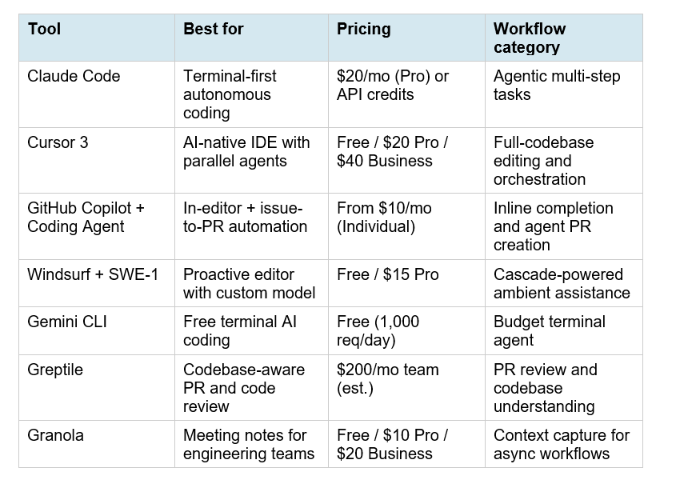
Quick Overview: The 7 Tools
1. Claude Code: The Autonomous Terminal Agent
Claude Code is Anthropic's terminal-first AI coding agent. It runs from the command line, reads your codebase, plans changes, edits files, runs tests, and iterates on failures without needing you to intervene at every step. Bundled into Claude Pro at $20 per month, it became the strongest argument against standalone coding agents priced at $50 or more per month. What it actually does in practice: you give Claude Code a task like 'add OAuth authentication to this API' or 'migrate all SQL queries in this service from the legacy ORM to the new one,' and it works through the implementation autonomously. It does not ask for confirmation on every file edit. It catches test failures and fixes them. It keeps a mental model of the codebase context as it goes. When it finishes, it summarizes what it changed and why.
What changed in mid-2026: Anthropic shipped dynamic workflow support in Claude Code with Claude Opus 4.8 in May 2026. Dynamic workflows let Claude Code plan a large task and fan out execution across parallel subagents, each working on a different component simultaneously. The entire subsystem is then verified against a test suite before Claude Code reports completion. This changed the economics for large engineering tasks: framework migrations and API deprecation passes that previously took multiple days of senior engineering time can be handled in a single Claude Code session.
- Best for: Backend engineers, infrastructure and DevOps engineers, anyone comfortable in the terminal who works on substantial multi-step tasks where the value is getting to a pull-requestable state without manual handholding at each step.
- Limitations: No inline autocomplete (not the use case), terminal interface is not for everyone, cost spikes on very large tasks at API-credit billing rates above the $20 Pro plan usage.
- Not best for: Quick one-line fixes, frontend developers who prefer staying in a GUI editor, or teams where the terminal workflow creates friction for non-engineering stakeholders.
Anthropic's own data: Claude Code generates 65% of Anthropic's internal product code. That is not a benchmark or a synthetic claim. It is the production deployment rate at the company that built it, for the work that built Claude Tag, Sonnet 5, and the tools in this list. For the full benchmark comparison of Claude across model tiers relevant to Claude Code's performance, the Claude Sonnet 5 review covers the SWE-bench Pro, Terminal-Bench 2.1, and agentic benchmark data that determines which model Claude Code routes to for your task.
2. Cursor 3: The AI-Native IDE That Became a Multi-Agent Platform
Cursor 3 shipped on April 2, 2026, and the release represented the biggest philosophical shift since Cursor launched as a VS Code fork. The explicit framing: you are the architect, agents are the builders. Cursor 3 is no longer primarily an AI-enhanced code editor. It is a platform for running multiple AI agents in parallel across different development environments simultaneously. The new Agents Window lets developers run agents across local machines, worktrees, SSH connections, and cloud environments at the same time. Background Agents work in isolated virtual machines on their own Git branches and open pull requests when finished. Cloud Agents can be triggered from Slack, GitHub, or your phone and keep running when your laptop is closed. You can kick off five parallel agent sessions, close your laptop, come back in two hours, and review five draft pull requests.
Composer 2 and Cursor's own model: Cursor launched Composer 2, its in-house model, on March 19, 2026, as the default for many tasks. Composer 2 is more cost-efficient than routing every request to frontier models, which was one of the consistent criticisms of Cursor's previous approach: heavy Claude or GPT usage could make daily costs unpredictable. Cursor also shipped Design Mode, which lets you annotate UI elements directly in the browser to give the agent precise visual targets for frontend work. The overall philosophy has consolidated: Cursor is for developers who want the editor to become the center of AI-assisted work and are willing to learn its workflows deeply to get the most from it.
- Best for: Full-stack developers on medium to large codebases, teams that want to distribute work across parallel agent sessions, engineers who prefer a visual IDE workflow over the terminal.
- Limitations: Requires switching to Cursor from your existing editor (some teams resist this), credit-based pricing replaced unlimited subscriptions in 2026 making cost less predictable at high usage, smaller ecosystem than GitHub Copilot.
- Pricing: Free tier with limited agent usage. Pro at $20 per month. Business at $40 per user per month. Note: Cursor moved to credit-based pricing in 2026; the Auto mode (unlimited) is the key differentiator for power users.
3. GitHub Copilot + Coding Agent: The In-Editor Standard Gets Agentic
GitHub Copilot was always the safe choice: solid autocomplete, no editor switch required, tight GitHub integration, familiar pricing. The 2026 version is meaningfully different from what shipped in 2023. The Copilot Coding Agent reached general availability and added something that changes the comparison against standalone agents like Claude Code: issue-to-PR automation. You create a GitHub issue, assign it to Copilot, and the coding agent picks it up, implements the changes across multiple files, runs the CI pipeline, and opens a pull request. The workflow closes the gap between 'I want this fixed' and 'here is a reviewable PR' without requiring any terminal session or agent conversation. For teams where the GitHub issue is already the unit of work, this is an extremely natural fit.
Multi-model under the hood: GitHub Copilot in 2026 routes to different models depending on the task. Autocomplete, inline completion, and quick questions use efficient smaller models. Complex agentic tasks and code reasoning use frontier models including Claude (via Anthropic's partnership with Microsoft and GitHub). The Copilot Chat interface can be explicitly configured to use different model providers depending on the task. This multi-model architecture is what makes Copilot competitive on quality without incurring frontier model costs for every keystroke.
- Best for: Developers who want AI assistance without switching editors, GitHub-centric teams where the issue tracker is the natural task-assignment unit, organizations that need broad adoption across a mixed-seniority team where workflow disruption is a real concern.
- Limitations: The coding agent does not have the same autonomous depth as Claude Code or Cursor for complex multi-step tasks; it is stronger on scoped single-issue tasks than on large refactors. The inline autocomplete quality is competitive but not the clear leader in 2026.
- Pricing: Individual at $10 per month. Business at $19 per user per month. Enterprise at $39 per user per month.
4. Windsurf + SWE-1: The Proactive Editor with Its Own Model
Windsurf differentiated itself from Cursor with a fundamentally different philosophy about how AI should interact with developers. Cascade, Windsurf's core feature, watches what you are doing and proactively suggests next steps rather than waiting for you to ask. It is less about asking the AI to do things and more about the AI anticipating what you need. This makes Windsurf feel different in practice: less conversational, more ambient. The 2026 version added SWE-1, Windsurf's in-house model launched specifically for software engineering tasks. SWE-1 comes with predictable credit costs, which was a direct response to developer complaints about cost volatility when routing everything to expensive frontier models. Windsurf's pricing significantly undercuts Cursor at comparable capability tiers.
The honest comparison to Cursor: Windsurf has a smaller community and ecosystem than Cursor. Multi-file editing is not as polished as Cursor's Composer. Some users report that Cascade's proactive suggestions are distracting until you tune the settings specifically for your working style. But for developers who prefer ambient AI assistance over explicit agent conversations, Windsurf's model fits the workflow better. The free tier is actually useful rather than being a limited trial, which gives it an advantage for individual developers evaluating paid tools.
- Best for: Developers who want ambient AI that learns their patterns rather than explicit agent conversations, solo developers and small teams where pricing matters more than ecosystem depth.
- Limitations: Smaller community than Cursor or Copilot, Cascade's proactive suggestions need tuning to avoid distraction, multi-file editing polish is behind Cursor's Composer.
- Pricing: Free tier (genuinely useful, not trial-only). Pro at $15 per month. Team plans available. SWE-1 model usage billed on predictable credits.
5. Gemini CLI: The Free Terminal Agent That Nobody Expected
Gemini CLI is Google's open-source terminal AI coding agent. Its launch created a category shift that the AI coding tool market had not seen before: a genuinely capable agentic terminal tool available at 1,000 requests per day for free, with paid usage available at Google AI Studio rates that work out to under $5 per month for most active developers. Before Gemini CLI, the options for terminal-based agentic coding were: Claude Code (excellent but requires Claude Pro at $20 or API credits), Cline (open source, bring your own API key, can get expensive), or Aider (similar model). Gemini CLI changed the calculation by providing a credible free tier on a tool backed by Google DeepMind's 1M-token Gemini 3.1 Flash model.
What it actually does well: Gemini CLI is strong on code generation from natural language descriptions, understanding and navigating large codebases, and multi-file editing tasks. The 1M-token context window available even on the free tier is larger than any other free AI coding tool's context allowance by a significant margin. For developers working on large monorepos or complex multi-service systems where codebase context matters, the context advantage is genuinely significant. The limitations are real: it is not as polished as Claude Code for truly complex multi-step agentic tasks, and the terminal-only interface means it does not fit workflows centered around IDE editors. But for a tool that costs nothing for most use cases, the quality ceiling is surprisingly high.
For teams evaluating Gemini CLI alongside Claude-based options, the best AI models July 2026 guide covers where Gemini 3.1 Flash and Pro fit in the model ranking across coding benchmarks, including the context window and cost comparisons that make Gemini CLI's pricing so unusual in the current market.
- Best for: Budget-conscious developers, open-source contributors, developers in markets where $20/month tool budgets are meaningful, anyone who wants a capable terminal agent without a paid subscription.
- Limitations: Not as deep on complex multi-step agentic tasks as Claude Code, terminal-only, dependency on Google infrastructure and data policies.
- Pricing: Free at 1,000 requests per day via Google AI Studio. Pay-as-you-go at standard Gemini API rates beyond that. Total cost for most active developers: under $5 per month.
6. Greptile: Codebase-Aware Code Review That Actually Understands Your Stack
Greptile solves the problem that autocomplete and editing tools cannot: understanding a specific codebase well enough to review code without breaking hidden assumptions. Most AI coding tools can generate plausible code for standard patterns. Fewer understand your specific codebase's architecture, your team's conventions, the implicit rules that experienced engineers know but that are never written down anywhere. Greptile's specific technical approach is to index your entire codebase, understand the relationships between files and services, and apply that understanding to pull request review. The workflow fit is specific: Greptile runs in the PR workflow, where review and validation already happen. It is not a tool you install in your editor. It is a tool that reads every PR as it opens and produces review comments with the understanding of a senior engineer who has read all the code in the repository. For teams where senior engineer review time is the bottleneck in the shipping cycle, this is the specific tool that removes that bottleneck.
What it catches that Copilot and Cursor miss: The clearest Greptile use cases are: cross-file logic errors where a change in one service breaks an assumption in another; violations of architectural patterns that are consistent across the codebase but never documented; duplicate implementations of logic that already exists elsewhere in the codebase; and security-relevant code patterns that require understanding how the authentication or authorization system works elsewhere to recognize as risky. These are exactly the bugs that junior engineers miss in review and senior engineers catch only because they have read the entire codebase before.
For teams building on top of MCP-connected codebases, Greptile's approach of deep repository indexing connects naturally to the MCP ecosystem described in the Claude MCP setup guide. The same pattern of giving AI models authoritative codebase context applies across both tools.
- Best for: Engineering teams of 5 or more where PR review is the shipping bottleneck, codebases with complex cross-service dependencies where new contributors frequently introduce integration bugs, organizations doing security compliance where consistent code pattern enforcement matters.
- Limitations: Higher price point than individual developer tools, primarily a review tool rather than a generation tool, requires codebase indexing setup which takes time to tune for large repositories.
- Pricing: Individual/small team plans vary. Team pricing at approximately $200 per month or higher depending on codebase size and usage. Enterprise pricing available.
7. Granola: Meeting Notes for Engineering Teams That Actually Transfer Context
Granola is the tool in this list that does not write code. It raised a $125M round at a $1.5 billion valuation in 2026, making it one of the best-funded AI productivity tools in the market. The valuation reflects something real about the problem it solves: the gap between what gets said in a meeting and what actually gets into Jira, the PR description, the architecture doc, or the Slack thread where the next decision happens. Granola runs as a Mac desktop app and listens to your meetings, whether they are in Zoom, Google Meet, Teams, or phone calls. During the meeting, you can add personal notes in a scratchpad alongside the AI transcript. After the meeting, Granola generates structured summaries in whatever template you specify: action items, decisions made, open questions, technical context for a design doc, Jira ticket descriptions, PR context. The AI knows how your team talks about work because it has heard your previous meetings
Why it belongs in a developer workflow list: Engineering teams lose enormous amounts of time to the same failure mode: something was decided in a meeting, the context never made it into the ticket, the engineer implementing it did not have the context, they made a reasonable but wrong assumption, and the resulting PR fails review or ships with a bug. Granola eliminates that failure mode by making the meeting context searchable and structured, and by making it trivially easy to generate the Jira ticket, the PR description, or the architecture decision record from the meeting notes. The Granola $125M round signals that enterprise teams are putting real budget behind this problem. The funding has been noted as extending runway well past the current AI capex cycle, which matters for teams evaluating whether a tool is safe to build workflows around.
- Best for: Engineering teams where cross-functional decisions happen in meetings but need to be transferred into technical documentation; distributed teams where async context transfer is a recurring source of errors; engineering managers who need to produce accurate status updates from multiple concurrent workstreams.
- Limitations: Mac-only (significant limitation for Windows-primary engineering teams), requires the app to be running during meetings to capture audio, works best when meeting participants are somewhat predictable in their discussion patterns.
- Pricing: Free tier for basic usage. Pro at $10 per month. Business at $20 per user per month. Enterprise pricing available.
What These 7 Tools Have in Common
The seven tools above did not win because they added more features to existing categories. They won because each one removed a specific, named bottleneck from the engineering workflow. Claude Code removed the 'manual multi-step coding' bottleneck. Cursor 3 removed the 'one agent at a time' bottleneck. GitHub Copilot's coding agent removed the 'issue-to-PR translation' bottleneck. Windsurf's Cascade removed the 'context switching to ask the AI' bottleneck. Gemini CLI removed the 'can't afford a terminal agent' bottleneck. Greptile removed the 'senior engineer review time' bottleneck. Granola removed the 'meeting context doesn't transfer into technical artifacts' bottleneck.
Three patterns that every tool on this list shares:
- Context depth over feature width. The tools that won in 2026 are the ones that understand the specific codebase, the specific team's patterns, and the specific workflow where the bottleneck is. Generic AI features that work on any input but understand nothing specifically about your situation lost to specialized tools that understand your specific context deeply.
- Asynchronous as a first-class design principle. Every agentic tool on this list is designed for you to kick off work, do something else, and come back to results. The model of waiting at the terminal while the AI generates is disappearing. The model of delegating and reviewing is winning.
- Cost predictability has become a real feature. The shift of Cursor and Windsurf to credit-based pricing in 2026, alongside Gemini CLI's free tier and Claude Pro's bundled access, reflects a market reality: developers who cannot predict what a tool costs cannot adopt it for production workflows. The tools that won figured out how to make their economics explainable.
For the benchmark context showing where each of the underlying models in these tools sits on the July 2026 coding leaderboard, including GPT-5.6 Sol and Terra which are moving toward general availability in the same time window, the best AI models July 2026 complete ranking covers every frontier model with the SWE-bench Pro, TerminalBench 2.1, and pricing data that determines which model your coding tool is routing to.
Recommended Workflow Stacks by Team Type
Solo Developer / Indie Maker (under $50/month budget)
- Primary: Gemini CLI for free terminal agentic tasks, or Claude Code via Claude Pro at $2/month for harder multi-step work
- Editor: Windsurf free tier for ambient AI assistance without additional cost
- Review: GitHub Copilot Individual at $10/month if you need inline completion in your editor
- Total: $0 to $30 per month depending on choice
Engineering Team of 5 to 20 (standard developer tooling budget)
- Primary coding: Cursor 3 Pro at $20 per person per month or GitHub Copilot Business at $19 per user per month
- Agentic heavy tasks: Claude Code via team API access for complex autonomous jobs
- Code review: Greptile for codebase-aware PR review that catches cross-file issues
- Meeting context: Granola at $10 to $20 per person per month
- Total: $50 to $80 per developer per month for a full AI-augmented workflow
Enterprise Engineering (200-plus developers)
- GitHub Copilot Enterprise at $39 per user per month for consistent rollout and audit trail
- Claude Code via Enterprise API for teams with complex autonomous coding workflows
- Greptile for security-sensitive PR review at scale
- Granola Business for engineering manager and cross-functional meeting capture
- GPT-5.6 Terra (pending GA mid-July 2026) as a $2.50-input budget model for high-volume code generation tasks
For teams building their own AI-augmented development infrastructure rather than buying off-the-shelf tools, the GLM-5.2 vs Claude vs GPT-5.6 vs Kimi coding comparison covers the raw model performance and cost that underpins every tool in this list, including the open-weight alternatives for teams that want to self-host their coding model layer.
Frequently Asked Questions
What is the best AI coding tool in August 2026?
There is no single best tool because each solves a different bottleneck. Claude Code is the best autonomous terminal agent for complex multi-step tasks. Cursor 3 is the best AI-native IDE for developers who want to run parallel agents across their full codebase. GitHub Copilot is the best option for teams that want AI assistance without switching editors. Windsurf is the best option for developers who prefer ambient proactive AI over explicit conversations. Gemini CLI is the best free option. Greptile is the best for codebase-aware PR review. Granola is the best for engineering meeting context capture.
Is Claude Code better than Cursor in 2026?
They solve different workflow problems and are better suited to different team profiles. Claude Code is a terminal-first autonomous agent for complex, multi-step tasks where you want to delegate and review. Cursor 3 is an AI-native IDE where AI assistance is integrated into your visual editor at every level, with parallel agent sessions and in-editor context. Developers who live in the terminal and work on substantial backend or infrastructure tasks tend to prefer Claude Code. Developers who want the editor itself to be the center of AI-assisted work tend to prefer Cursor. Many teams use both for different task types.
What did Cursor 3 change compared to earlier versions?
Cursor 3, released April 2, 2026, shifted the product philosophy from an AI-enhanced editor to a multi-agent platform. The Agents Window lets developers run multiple AI agents in parallel across local machines, worktrees, SSH, and cloud environments simultaneously. Background Agents work in isolated VMs on their own Git branches and open pull requests when finished. Cloud Agents continue running after your laptop closes and can be triggered from Slack or GitHub. Composer 2, Cursor's in-house model, launched March 19 as a more cost-efficient default for many tasks. Design Mode added browser-based UI annotation for visual frontend workflows.
What is the Windsurf SWE-1 model?
SWE-1 is Windsurf's in-house model launched specifically for software engineering tasks. It was released as the default model for Windsurf's coding workflows in 2026 with predictable credit-based pricing. SWE-1 is designed to be more cost-efficient than routing all tasks to expensive frontier models, addressing a consistent developer criticism of high cost volatility when AI coding tools use GPT or Claude for every interaction. The model powers Windsurf's Cascade feature, which proactively suggests next steps based on what you are doing in the editor.
Is Gemini CLI really free?
Yes. Gemini CLI offers 1,000 requests per day through the Google AI Studio free tier, backed by the Gemini 3.1 Flash model with its 1M-token context window. This is a genuine, production-useful free tier rather than a limited trial. Pay-as-you-go pricing applies beyond the daily limit at standard Gemini API rates, which work out to under $5 per month for most active developers. The free tier is available without a credit card via a Google account and Google AI Studio access.
What does Greptile do that Copilot and Cursor cannot?
Greptile indexes your entire codebase and understands the relationships between files, services, and implicit architectural patterns. It applies that deep codebase understanding to pull request review, catching cross-file logic errors, violations of architectural patterns, duplicate implementations of existing functionality, and security-relevant code patterns that require understanding the broader codebase context to recognize as risky. Copilot and Cursor are primarily generation and editing tools; they help you write code. Greptile is a review tool; it helps you catch what should not have been written.
Recommended Blogs
- Best AI Models July 2026: Full Ranking by Use Case, Benchmarks, and Price
- Claude Sonnet 5 Review: Benchmarks, Pricing and Is It Worth It? (2026)
- GPT-5.6 Review: Sol, Terra, Luna Features, Benchmarks, and Pricing
- GLM-5.2 vs Claude Opus 4.8 vs GPT-5.6 vs Kimi: Best Coding AI (2026)
- Claude MCP Setup Guide: Connect Any Tool in 10 Minutes (2026)
- AI Coding Tools Collection: Claude Code, Cursor, Codex and Developer AI
Resources & Community
Join our community of 70,000+ AI enthusiasts and learn to build powerful AI applications! Whether you're a beginner or an experienced developer, Build Fast with AI helps you understand and implement AI in your projects.
- Website: buildfastwithai.com
- LinkedIn: Build Fast with AI
- Instagram: @buildfastwithai
- Founder Twitter: @satvikps
- Twitter: @BuildFastWithAI
Agentic AI Launchpad 2026
A structured 6-week cohort program that takes you from AI basics to building and deploying real-world agentic AI systems. Includes live sessions, expert mentorship, project reviews, and a builder community network.
Ready to go from learning to building? Join the next cohort: Agentic AI Launchpad 2026
Free AI Resources
Access free tools, workshops, and micro-learning to keep building:
- AI Workshops: Free resources, upcoming events and past recordings
- Unrot: Learn AI in 5 minutes a day (free micro-learning app)
The AI developer tool landscape is updating every month. Follow @BuildFastWithAI on X to stay ahead of every major tool launch, pricing change, and workflow shift that matters for engineering teams in 2026.
References
- Greptile: Best Developer Productivity Tools 2026: 14 AI Developer Tools Compared
- DataNorth AI: Top 10 Best AI Tools for 2026 (Cursor 3 and Copilot Wave 3 coverage)
- Engineers Garage: The Top AI Tools of 2026 (Claude Code and Cursor market data)
- PEC Collective: 27 AI Tools for Developers in 2026: Tested and Ranked (Claude Code and Windsurf detail)
- The AI Corner: AI Coding Tools 2026: Complete Guide to Every Tool and Workflow
- ToolChase: AI Tools News 2026: Major Launches, Updates, Pricing Changes (Granola $125M round, ChatGPT Pro pricing)
- Composio: Top AI Workflow Automation Tools You Must Not Miss in 2026
- Stack Overflow Blog: DeveloperWeek 2026: Making AI Tools That Are Actually Good
- GitHub Community: Best AI Tools for Developers in 2026 (developer survey thread)
- Anthropic: Claude Tag Announcement (65% code generation data point)
- Cursor Blog: Cursor 3 Launch Post (April 2, 2026)

