




Meta Muse Code Review: Muse Spark 1.2 Coding Agent Tested (2026)
Meta just entered the AI coding wars. Muse Code is a terminal coding agent, launched in beta and powered by the new Muse Spark 1.2 model, that plans, writes, and validates multi-file changes across large codebases. Its headline pitch is price: it undercuts Claude Code and OpenAI Codex by a wide margin. But the number Meta leads with and the number that actually matters are not the same, and this review focuses on the difference.
The honest summary: Muse Code is a capable, aggressively priced coding agent that narrowly beats Codex and Grok Build on Meta's own Terminal-Bench test, but still trails Claude Code with Opus 5. Its standout features are persistent background sub-agents and long-session memory. Its cheapest tier is cheap because you pay with your data. It is a strong value option, not the new performance king.
QUICK ANSWER
Meta Muse Code is a terminal AI coding agent powered by Muse Spark 1.2. It handles complete software engineering tasks across large repos using persistent parallel sub-agents. It scored 82.9% on Terminal-Bench 2.1 in Meta's own testing, ahead of Codex and Grok Build but behind Claude Code at 86.7%. Pricing starts at $1.25 per million input tokens, dropping near $0.10 on a contributor tier where you share your data to train the model.
What Is Meta Muse Code?
Meta Muse Code is a terminal coding agent from Meta Superintelligence Labs that takes on complete software engineering tasks across large repositories. You install it with a single command, give it a goal, and it plans the changes, writes the code across multiple files, and validates the results, aiming to finish complex work with less step-by-step intervention from you.
It sits in the same category as Anthropic's Claude Code and OpenAI's Codex, the terminal-based agents that live in your command line and act on your actual codebase rather than in a chat window. What makes Muse Code notable on arrival is not a new idea, it is Meta shipping a credible entry in this category at a price that pressures everyone else, powered by a model co-trained with the agent itself.
What Is Muse Spark 1.2?
Muse Spark 1.2 is Meta's new coding-focused model that powers Muse Code, and the key detail is that Meta co-trained the model and the agent together. Rather than bolting an agent on top of a general model, Meta tuned Muse Spark 1.2 specifically for the long-horizon, multi-step work that Muse Code does, which is meant to make its planning and validation more reliable inside the agent.
It is also Meta's third model release in roughly four months, following the Muse Spark 1.1 update, which signals how fast Meta is now iterating to catch the coding leaders. The co-training approach is the genuinely interesting technical bet here, because it is the same tight model-and-harness integration that helps Claude Code and Grok Build perform above what their raw models would suggest.
For the model this builds on, see our Muse Spark 1.1 review and where it landed in our Muse Spark vs Fable 5 vs GPT-5.6 vs Grok comparison.
Key Features That Stand Out
Muse Code ships with three features that genuinely differentiate it, plus the low price. Here is what each one actually does for you.
Persistent Background Sub-Agents
This is the flagship feature. Muse Code can spin up multiple sub-agents that work in parallel on different parts of a task, for example building six game elements at once, without them colliding in the main workspace. For large features that break into independent pieces, this parallelism can finish work faster than a single agent grinding through tasks one at a time. It is the most concrete advantage Muse Code has over a basic single-threaded agent.
Long-Session Memory
Muse Code maintains context across sessions rather than forgetting everything when you close the terminal. For multi-day work on a large repo, that persistence means you can pick up where you left off with the agent still aware of earlier decisions, which reduces the re-explaining that makes long agent sessions tedious. Context retention over long horizons is exactly where most coding agents struggle, so this is a meaningful target to aim at.
Plan, Implement, Validate
Muse Code follows a full loop: it plans the change, implements it across the necessary files, then validates the result rather than stopping at a first draft. The validation step is what separates a real engineering agent from a code generator, because catching its own mistakes before handing back is where trust is earned. How well this holds up on messy real-world repos is the true test, and that will become clear as independent users push it in the coming weeks.
Single-Command Install
Muse Code installs and runs from the terminal with a single command, matching the low-friction setup that made Claude Code and Codex easy to adopt. There is no heavy IDE dependency to fight, which lowers the barrier to giving it a real trial on your own project.
Muse Code Benchmarks: The Honest Read
Here is where the marketing and the measurement part ways. Meta says Muse Code matches or beats GPT and Grok, and on the numbers that is true. What Meta does not lead with is that Claude Code still beats Muse Code on the same test, and that every number so far comes from Meta's own evaluation harness.
Table 1: Muse Code benchmark scores (Meta's harness)
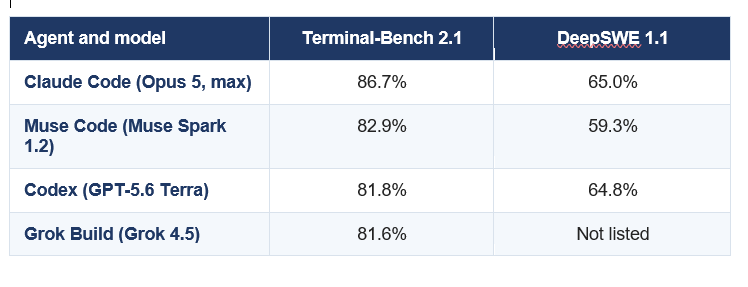
Scores reported by Meta using its own evaluation harness. Not independently verified on the official Terminal-Bench leaderboard as of publication.
Read the table plainly. On Terminal-Bench 2.1, Muse Code scored 82.9%, edging Codex at 81.8% and Grok Build at 81.6%, which is a real and respectable result. But Claude Code with Opus 5 at max effort leads at 86.7%, a clear margin ahead. On DeepSWE 1.1, Muse Code sits third at 59.3%, behind both Opus 5 at 65.0% and GPT-5.6 Terra at 64.8%. So the accurate statement is that Muse Code is competitive with the second tier and trails the leader, not that it beats everyone.
THE CAVEAT THAT MATTERS
Every score here comes from Meta's own testing harness, and neither Muse Spark 1.2 nor its rivals have an independently verified entry on the official Terminal-Bench leaderboard yet. Vendor-run benchmarks favour the vendor, so treat these numbers as a promising signal, not a settled ranking. The honest verdict on performance waits for third-party results.
My take on the numbers: Muse Code is clearly a strong agent, and being within a few points of Claude Code on Meta's first credible try is impressive. But a launch-day, self-reported win over Codex and Grok is a soft claim, and the more useful truth is that Muse Code competes on value, not on topping the leaderboard. Judge it on price and features, because that is where it actually wins today.
For how the leaders compare on coding, see our best coding AI comparison and the Claude Opus 5 review.
Don't just use ChatGPT. Learn to build custom LLM agents, RAG pipelines, and full-stack Agentic AI apps in our intensive 6-week program.
Pricing and the Contributor Tier Catch
Price is where Muse Code makes its strongest case. The standard tier costs $1.25 per million input tokens, $0.15 per million cached input tokens, and $4.25 per million output tokens, and on this tier Meta does not use your prompts to improve its products. Against Claude Code and Codex, that is a genuinely aggressive rate for a frontier-class coding agent.
Then there is the contributor tier, which drops the cost to around $0.10 per million input tokens, described as more than ten times cheaper than the standard rate. The reason it is that cheap is the catch: on this tier you opt in to share your data so Meta can use it to improve the model. For a coding tool, that data is your code, so the real price is not just money, it is the privacy of what you build.
READ THIS BEFORE PICKING THE CHEAP TIER
The $0.10 contributor tier trades your code for the discount. For learning, hobby projects, or open-source work, that trade can be perfectly fine. For proprietary, client, or commercial code, sharing it to train a competitor's model is a serious decision that may breach your own confidentiality obligations. If your code is sensitive, use the standard tier, where Meta states your prompts are not used for training.
The value verdict: on the standard tier, Muse Code is a legitimately cheaper frontier coding agent with your code kept private, and that alone makes it worth a trial. The contributor tier is a great deal only if your code is not sensitive. Meta is clearly using price to buy market share and training data at the same time, which is smart for Meta and fine for you as long as you choose the tier that matches your code's sensitivity.
Muse Code vs Claude Code vs Codex
The three terminal agents now overlap heavily, so the choice comes down to what you value most. Claude Code with Opus 5 is the performance leader on the benchmarks and the most proven on complex real-world repos, and it is the safe pick when quality matters more than cost. OpenAI Codex with GPT-5.6 Terra is the strong all-rounder with deep ecosystem support. Muse Code is the value challenger with the parallel sub-agent trick and the lowest price.
The realistic 2026 picture is that Muse Code does not replace the leader, it pressures the price of the whole category. If you already rely on Claude Code for hard problems, Muse Code is not a reason to switch your critical work today. But for high-volume, cost-sensitive, or parallelizable tasks, Muse Code at standard pricing is a serious option, and its arrival likely pushes Anthropic and OpenAI to compete harder on price, which benefits every developer regardless of which tool they end up using.
For xAI's competing terminal agent, see our Grok Build CLI review, and for the model behind Codex, our GPT-5.6 review.
Who Should Use Muse Code?
Muse Code is a strong fit for developers who want frontier-class agent capability at a lower cost and who have work that breaks into parallel pieces. It is a weaker fit for teams whose top priority is the highest possible accuracy on hard, messy problems, where Claude Code still leads today.
- Use it if you run high-volume or cost-sensitive coding tasks where the per-token price genuinely matters to your budget.
- Use it if your work parallelizes, since the persistent sub-agents are its clearest real advantage over single-threaded agents.
- Use it if you want to test the newest entrant cheaply, especially on the standard tier where your code stays private.
- Be cautious if you handle sensitive proprietary code and are tempted by the contributor tier, because that discount costs you your code's privacy.
- Stay on Claude Code for now if your absolute priority is top accuracy on complex repositories, where the benchmarks still favour it.
How to Install Muse Code
Muse Code is a terminal agent that installs with a single command, following the same pattern as Claude Code and Codex. You install the command-line tool, authenticate with your Meta developer account, choose your pricing tier, and point it at your repository to start giving it tasks.
Because it is in beta, expect rough edges, evolving limits, and changing behaviour, which is normal for a launch-week coding agent. The sensible way to trial it is on a non-critical project first, on the standard tier so your code stays private, and to compare its output on a task you already know well against your current agent. That gives you a real read on quality before you trust it with anything important.
The only comprehensive program designed to take you from basic prompting to building interactive Artifacts, custom integrations, and deploying production-ready code with Claude Code.
Frequently Asked Questions
Q: What is Meta Muse Code?
Meta Muse Code is a terminal AI coding agent from Meta Superintelligence Labs, powered by the Muse Spark 1.2 model. It plans, writes, and validates multi-file code changes across large repositories, using persistent background sub-agents to work on several parts of a task in parallel. It competes directly with Claude Code and OpenAI Codex.
Q: What is Muse Spark 1.2?
Muse Spark 1.2 is Meta's new coding-focused model that powers Muse Code. Meta co-trained the model and the agent together so the model is tuned for long-horizon, multi-step engineering tasks. It is Meta's third model release in about four months, following Muse Spark 1.1.
Q: How much does Muse Code cost?
Muse Code's standard tier costs $1.25 per million input tokens, $0.15 per million cached input tokens, and $4.25 per million output tokens, with your prompts kept out of training. A contributor tier drops the cost to around $0.10 per million input tokens in exchange for sharing your data to improve the model.
Q: Is Muse Code better than Claude Code?
Not on the benchmarks so far. In Meta's own testing, Muse Code scored 82.9% on Terminal-Bench 2.1 while Claude Code with Opus 5 led at 86.7%, and Muse Code also trailed on DeepSWE 1.1. Muse Code wins on price, not peak performance, and those scores are vendor-reported rather than independently verified.
Q: What are persistent sub-agents in Muse Code?
Persistent sub-agents are Muse Code's ability to spin up multiple agents that work in parallel on different parts of a task without colliding in the main workspace, for example building six game elements at once. This can finish large, parallelizable features faster than a single agent working through tasks one at a time.
Q: What is the catch with the cheap Muse Code tier?
The contributor tier is cheap because you opt in to share your data so Meta can train its model on it. For a coding tool, that data is your code. It is fine for hobby or open-source work, but risky for proprietary or client code, so sensitive projects should use the standard tier where prompts are not used for training.
Q: How do you install Muse Code?
Muse Code installs with a single terminal command, then you authenticate with your Meta developer account, choose a pricing tier, and point it at your repository. Since it is in beta, trial it on a non-critical project first, on the standard tier, and compare its output against your current agent before trusting it with important work.
Q: Is Muse Code worth using?
Yes, as a value option worth trialing. Muse Code is a capable agent at a lower price than Claude Code or Codex, with useful parallel sub-agents and long-session memory. It is not the accuracy leader, so keep critical work on Claude Code for now, but for cost-sensitive or parallelizable tasks on the standard tier, it is a strong choice.
Recommended Blogs
- Muse Spark 1.1 review
- Grok Build CLI review
- Best coding AI compared
- Claude Opus 5 review
- Best AI models of July 2026
Resources and Community
Join our community of 70,000+ AI enthusiasts and learn to build powerful AI applications. Whether you are a beginner or an experienced developer, Build Fast with AI helps you understand and implement AI in your projects.
- Website (buildfastwithai.com)
- LinkedIn (Build Fast with AI)
- Instagram (@buildfastwithai)
- Founder Twitter (@satvikps)
- Twitter (@BuildFastWithAI)
Agentic AI Launchpad 2026
A structured 6-week cohort program that takes you from AI basics to building and deploying real-world agentic AI systems. Includes live sessions, expert mentorship, project reviews, and a builder community network.
Ready to go from learning to building? Join the next cohort: Agentic AI Launchpad 2026
Free AI Resources
Access free tools, workshops, and micro-learning to keep building:
Try Muse Code on a project you already know before you trust it with real work. Follow Build Fast with AI for honest, updated reviews of every major AI coding tool.

