



Google Googlebook: The AI Laptop That Replaces Chromebook — Everything You Need to Know
Fifteen years ago, Google launched the Chromebook with a simple premise: a laptop built for a cloud-first world. On May 12, 2026, Google declared that era over.
At The Android Show — a pre-Google I/O preview event — Google unveiled the Googlebook, a new category of premium AI laptops built from the ground up around Gemini Intelligence. The devices are designed by partners including Acer, ASUS, Dell, HP, and Lenovo, and are scheduled to arrive this fall.
The framing from Google is direct: this is not a Chromebook upgrade. It is a rethinking of what a laptop should be when intelligence, not the operating system, becomes the defining feature. Google calls it "an intelligence system" — not an OS.
Here is everything confirmed so far: what Googlebook is, how every major feature works, what OS it runs, how it stacks up against Microsoft's Copilot Plus PCs and Apple's MacBook lineup, who will actually benefit from it, and what it means for the future of the Chromebook.
What Is Googlebook? The Big Announcement Explained
Googlebook is Google's new category of AI-native laptops, announced May 12, 2026 at The Android Show. The devices are designed to run Gemini Intelligence — Google's brand name for its suite of on-device and cloud AI capabilities powered by the Gemini model family — as the primary computing experience, not as an add-on feature.
Alex Kuscher, Google's Senior Director of Laptops and Tablets, put it plainly: "Googlebooks are the first laptops designed from the ground up for Gemini Intelligence, to deliver personal and proactive help when and where you need it."
The design philosophy is captured in one sentence from the announcement: "intelligence is the new spec." Where older laptops competed on CPU benchmarks, RAM, and display quality, Googlebook's primary spec is the depth and breadth of its AI integration. Every major new feature — the cursor, the widget system, the file access — is AI-first by design.
The announcement came as part of Google's pre-I/O Android Show on May 12, with Google I/O 2026 proper running May 19–20. This positions Googlebook for a likely deep-dive showcase at the developer keynote next week, with more hardware, pricing, and software details expected then.
Googlebook's Gemini Intelligence layer builds on the same model family that powers Google's image generation in Nano Banana Pro, video generation in Veo, and deep research in NotebookLM. Understanding the Gemini ecosystem gives you a clearer picture of what Googlebook will actually be able to do at launch.
The OS: Android + ChromeOS Merged Into One
One of the most significant technical facts about Googlebook is what it runs. Googlebooks do not run ChromeOS. They run a new operating system that Google describes as combining "the best of Android and ChromeOS" into a single unified platform.
Android provides the application ecosystem — the Play Store, modern app frameworks, the phone integration layer, and the AI runtime that powers Gemini on-device. ChromeOS provides the Chrome browser, the desktop interface paradigm, and the file system that developers and enterprise users are familiar with.
The result is what Google calls an "intelligence system" rather than a traditional OS. The implication: the operating system's primary job is no longer managing files and running applications. It is orchestrating AI capabilities across your tasks, your data, and your devices. Gemini is not an app on Googlebook. It is the operating environment.
Android boss Sameer Samat confirmed earlier in 2026 that the Android codebase would be the core of the new platform. The Chromebook lineage does not disappear entirely — Google confirmed existing Chromebooks will be supported through their existing update commitments, and Chromebook 2021 and later devices will receive up to 10 years of automatic security updates — but the architectural center of gravity has clearly shifted.
This matters for app compatibility. Since Googlebook runs Android natively, the entire Google Play catalog is available — a massive upgrade from ChromeOS, which had Android app support but with limitations on compatibility and performance for apps that were not optimized for the desktop form factor.
Every Feature Explained: Magic Pointer, Create My Widget, Cast My Apps
Google announced three headline features for Googlebook at The Android Show. Here is exactly how each one works based on the official announcement and confirmed demo details.
1. Magic Pointer
Magic Pointer is Googlebook's most prominent innovation. Instead of a standard cursor that points and clicks, the Magic Pointer turns the cursor itself into an active Gemini interface.
When you wiggle the cursor over anything on screen, Gemini activates and surfaces contextual suggestions based on what you're pointing at. The pointer detects what type of content it's hovering over — a date, an image, a block of text, a file — and offers the most relevant AI actions for that specific content.
Google confirmed three interaction modes: Ask, Compare, and Combine. Examples from the official demo:
- Point at a date in an email → instantly create a calendar event without opening Calendar
- Select two images (a living room and a couch) → visualize how they look together in the same scene using Gemini's image generation
- Select two ad designs in a Dropbox folder → ask Gemini to combine them into a single composition
- Point at a product listing → compare it against others without opening multiple tabs
Alexander Kuscher described the design intent: "As you wiggle and you move over the screen, it will tell you what it can interact with, and contextually offer you the actions that you can do... It really exemplifies how we think about AI as making each interaction more valuable."
Think of Magic Pointer as gesture-based prompting. Instead of switching to a chat interface to ask Gemini a question, you interact with AI by pointing at the thing you want to act on. The friction between intent and execution collapses to a single wiggle.
2. Create My Widget
Create My Widget is a generative UI feature that lets you build custom dashboard widgets by prompting Gemini in plain language. Instead of downloading a widget from an app store, you describe what you want — what information to surface, how you want it organized — and Gemini builds it for you on the spot.
Gemini can pull data from the web and connect directly with your Google apps — Gmail, Calendar, Maps, Drive — to build widgets that aggregate real, personal information. The confirmed example from the demo: planning a family reunion in Berlin generates a widget that automatically pulls in your flight info, hotel details, restaurant reservations, and adds a countdown timer — all in a single dashboard element.
This represents a shift in how software is created for personal use. Instead of browsing an app catalog for a widget that approximates what you want, you describe exactly what you need and Gemini builds it. Every widget is uniquely yours.
3. Cast My Apps + Quick Access
Cast My Apps solves one of the most persistent friction points in cross-device computing: the disconnect between your phone and your laptop. On Googlebook, you can access any Android app running on your phone directly on the laptop's larger screen — in real time, without needing the app installed on the laptop itself.
Quick Access extends this to files. The Googlebook file browser can browse files stored on your phone directly — no transfer, no cable, no cloud sync required. If a file exists on your phone, it can be inserted into work on the laptop instantly.
The practical use case Google highlighted: you're in the middle of focused work on your laptop, you get a Duolingo reminder, you can pop into the lesson from the laptop without switching devices, and get back to your work. Or you get hungry, order food through the DoorDash Android app on the laptop screen, and never break your work flow. Or you received a photo on WhatsApp on your phone and need it in a document — Quick Access surfaces it immediately.
The AI-native desktop computing paradigm Googlebook represents is directly comparable to how tools like Claude Cowork have been approaching AI-first file and task management — AI acting as the orchestration layer rather than just a chat feature layered on top of a traditional OS.
The Hardware: Glowbar, Partners, and Form Factors
Google has not released detailed hardware specifications yet — screen sizes, RAM configurations, storage options, NPU specs, and battery life numbers are all still unconfirmed as of launch day. The full hardware picture will likely come at Google I/O 2026 on May 19 and as partner devices are formally announced closer to the fall launch window.
What has been confirmed:
- Partners: Acer, ASUS, Dell, HP, and Lenovo will build the first Googlebook devices
- Processors: The devices will use AI-focused chips from Intel, AMD, and Qualcomm — specifically featuring powerful NPUs designed for on-device AI processing
- Glowbar: A signature hardware element — a glowing light strip on the laptop lid — that activates when Gemini is triggered. It is described as "unique and functional" and serves as the visual identifier that this is a Googlebook, not a standard laptop
- Form factor: Multiple shapes and sizes will be available at launch, from traditional clamshell to likely 2-in-1 configurations
- Premium positioning: Google explicitly describes these as "premium hardware," signaling a price point above current Chromebooks ($200–$500 range) and likely competing with Microsoft Copilot Plus PCs and mid-to-high-end Windows laptops
The NPU emphasis matters. On-device AI processing — running Gemini features without requiring a cloud round-trip — is essential for Magic Pointer's responsiveness. A cursor that pauses and waits for a server response every time you wiggle it would be unusable. The NPU is what makes the real-time contextual suggestion experience viable.
Googlebook vs Chromebook: What Changes?
The honest answer to "is this just a Chromebook with AI?" is no — but the differences are more architectural than cosmetic, and the surface-level experience will feel evolutionary rather than revolutionary for existing Chromebook users. Here is the real comparison.
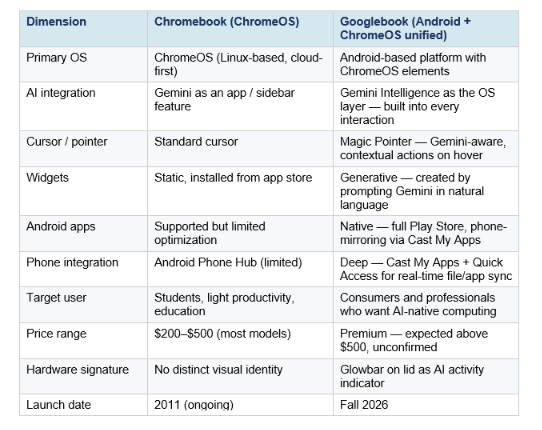
Google confirmed to The Verge that Chromebooks will continue to launch after Googlebook, and existing Chromebooks will receive support through their current update commitments. The two products coexist — at least for now — with Chromebook staying in education and budget segments while Googlebook targets the premium AI PC market.
The practical question for anyone considering Googlebook: do you need the Gemini Intelligence layer deeply integrated, or is Gemini as an app (which you can already use on Chromebook) good enough for your workflow? The Magic Pointer experience is genuinely new. The widget generation is genuinely new. The Cast My Apps seamlessness is a real upgrade. But if you primarily use a laptop for documents and browsing, the baseline experience will feel familiar.
Googlebook vs Copilot Plus PC vs MacBook: AI PC Showdown
Googlebook is entering a market with two well-established AI PC strategies. Microsoft's Copilot Plus PCs have been available since mid-2024, and Apple's MacBook lineup now ships with Apple Intelligence and M4 silicon. Here is how they compare on what actually matters.
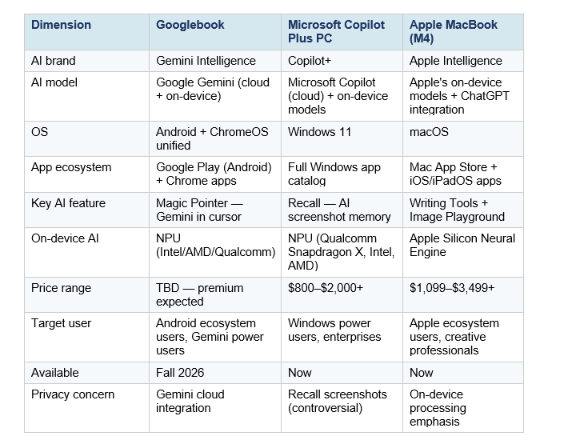
The honest competitive picture: Microsoft got to market first with Copilot Plus and has a much larger enterprise footprint, but Recall (the AI memory feature) has been dogged by privacy controversy since launch. Apple leads on performance-per-watt and on-device privacy but is tightly locked to the Apple ecosystem.
Googlebook's differentiation is the depth of AI integration at the OS level — Magic Pointer is genuinely unlike anything Microsoft or Apple has shipped — and the Android ecosystem advantage. If you live in Google Workspace, use an Android phone, and want AI that can act on what's on your screen without requiring a chat window, Googlebook's architecture is designed for exactly that workflow.
The risk: Google's history with premium hardware categories is checkered. Pixelbook launched in 2017 with premium positioning and was discontinued in 2022. Googlebook needs to avoid that fate. Early signs — the multi-partner launch with Acer, ASUS, Dell, HP, and Lenovo rather than a Google-only device — suggest Google is building an ecosystem this time, not a showcase product.
Gemini Intelligence Beyond Laptops: Phones, Watches, Cars
Googlebook is the flagship device for Gemini Intelligence, but the AI experience is not limited to the laptop. Google announced that Gemini Intelligence is also expanding to high-end Android phones — Samsung Galaxy and Google Pixel devices — starting this summer.
On Android phones, Gemini Intelligence focuses on autonomous multi-step task execution from natural language instructions. Confirmed examples from the announcement:
- Take a photo of a travel brochure → ask Gemini to book the described trip, including flights, hotels, and activities
- Get a parking spot reservation near a concert venue when you tell Gemini the event and location
- Research and compare e-commerce listings in Chrome on mobile without manually opening multiple tabs
- Fill out forms automatically from context Gemini already has about you
The strategic picture: Google is building Gemini Intelligence as a cross-device AI layer that follows you from your laptop to your phone to your car to your watch. The Googlebook is the primary computing surface, but the intelligence is designed to persist and extend across your entire Android ecosystem.
This is Google's answer to Apple's "continuity" — the seamless handoff between iPhone, iPad, and Mac. Google's version is AI-mediated: Gemini knows what you're working on, what you need next, and can act on your behalf across any device. The laptop is just where the most powerful version of that experience lives.
For developers building agentic AI applications that will need to interact with Googlebook's Gemini Intelligence layer, the agentic patterns covered in the Build Fast with AI gen-ai-experiments cookbook provide a starting foundation for understanding how to build on Gemini's capabilities via the API.
What This Means for Developers and AI Builders
For developers, Googlebook is primarily interesting for three reasons: what it signals about the Gemini API roadmap, what on-device AI capabilities will be available through the NPU, and what Googlebook means as a development target.
Gemini API gets a hardware home
Everything Googlebook does — Magic Pointer's contextual suggestions, Create My Widget's generative UI, the multi-step task automation — runs on Gemini models either on-device or via the cloud API. The Googlebook announcement is implicit confirmation that Google is doubling down on Gemini as the API layer that third-party developers will build on. Features like "ask Gemini to combine my ad designs" are user-facing versions of capabilities that will also be accessible to developers through the Gemini API.
On-device AI becomes a first-class development target
Googlebook's NPU is not just for built-in features. Just as Microsoft's Copilot Plus NPU opened up on-device AI APIs for Windows developers, Googlebook's NPU will create a development surface for apps that want to run Gemini capabilities locally. This matters for privacy-sensitive applications (on-device processing means data never leaves the device) and latency-sensitive applications (no cloud round-trip).
Android app developers get a premium laptop surface
Since Googlebook runs Android natively, any Android app automatically runs on Googlebook. But apps optimized for the laptop form factor — larger screens, keyboard and pointer input, multi-window layouts — will have a significant experience advantage. Android developers who invest in responsive, desktop-optimized interfaces now will be ahead when Googlebook ships this fall.
To understand how Gemini Intelligence's multi-step task automation compares to what's already available through AI agents and automation tools like Claude Cowork and the Claude Code desktop agent, reviewing those tools side-by-side gives the clearest picture of what Googlebook is competing against for AI-native productivity workflows.
Frequently Asked Questions
What is a Googlebook laptop?
Googlebook is Google's new category of premium AI laptops, announced May 12, 2026. It runs a unified operating system combining Android and ChromeOS, with Gemini Intelligence deeply integrated throughout the experience — including the cursor, widget system, and device integration features. The first Googlebooks from Acer, ASUS, Dell, HP, and Lenovo will ship in fall 2026.
How is Googlebook different from a Chromebook?
Googlebook runs a new Android-based platform that unifies Android and ChromeOS, rather than ChromeOS alone. It is aimed at premium buyers rather than education and budget markets. The AI integration is fundamentally deeper — Magic Pointer puts Gemini directly into the cursor rather than just providing a Gemini app on the shelf. Chromebooks will continue to exist alongside Googlebooks.
What is the Magic Pointer on Googlebook?
Magic Pointer is an AI-powered cursor that activates Gemini when you wiggle it. Rather than just pointing and clicking, the cursor detects what type of content it's hovering over — a date, an image, a document, a product listing — and surfaces contextual Gemini actions: ask, compare, combine. It lets you interact with AI through gestures rather than switching to a chat interface.
When will Googlebook launch and how much will it cost?
Googlebook devices from Acer, ASUS, Dell, HP, and Lenovo will launch in fall 2026. Pricing has not been announced. Google describes them as "premium hardware," suggesting a price point above current Chromebooks ($200–$500). More details are expected at Google I/O 2026 on May 19–20.
Can Googlebook run Android apps?
Yes. Googlebook runs Android natively, giving it access to the full Google Play Store. Cast My Apps also lets you mirror and run apps from your Android phone on the Googlebook screen directly, without needing the app installed on the laptop.
Will Googlebook replace Chromebook?
Google says both will coexist. Chromebook continues in education and budget segments. Googlebook targets the premium AI PC market. Existing Chromebooks from 2021 and later will receive up to 10 years of automatic security updates. Some Chromebooks may be eligible to transition to the new Googlebook experience, with details coming before the fall launch.
How does Googlebook compare to Microsoft Copilot Plus PC?
Both are premium AI laptops with dedicated NPUs and cloud AI integration. Key differences: Googlebook runs Android + ChromeOS and uses Google Gemini; Copilot Plus PCs run Windows 11 and use Microsoft Copilot. Copilot Plus is available now from multiple manufacturers; Googlebook launches fall 2026. Googlebook's Magic Pointer is a more radical AI integration into the cursor than anything Microsoft has shipped. Copilot Plus has a larger enterprise footprint and fuller Windows app catalog.
Is Googlebook good for developers?
Potentially yes, especially for developers in the Android and Google ecosystem. Googlebook supports full Play Store apps, provides on-device Gemini capabilities via NPU, and runs Chrome for development workflows. The main current question mark is developer tooling — whether command-line development workflows, local servers, and Linux app support (which ChromeOS supported via Crostini) will carry over to the Googlebook platform.
Recommended Blogs
- 20+ Top Nano Banana Pro Use Cases + Gemini 3 AI Prompts
- What Is Claude Cowork? The 2026 Guide You Need
- Claude Code Desktop Redesign: Multi-Sessions + Routines (2026)
- Claude AI Complete Guide 2026: Models, Features, and Pricing Explained
- Every AI Model Compared: Best One Per Task (2026)
- Hermes Agent Is Now #1 on OpenRouter — Here's Why It Matters
References
- Google Blog — Introducing Googlebook, Designed for Gemini Intelligence
- TechCrunch — Google Unveils Googlebook, a New Line of AI-Native Laptops
- 9to5Google — Google Announces Googlebooks with Gemini Intelligence Focus, Coming This Fall
- TechRadar — Google Just Delivered Its First Gemini-Centric Platform in Googlebook
- BGR — Google Is Killing The Chromebook Era With The Reveal Of Something More Powerful
- MacRumors — Google Unveils Googlebook, a New AI Laptop Built Around Gemini
- SiliconANGLE — Google Debuts Gemini Intelligence Automation Features, Googlebook Laptop Series
- The Register — Google Launches Line of Android Laptops Festooned With Gemini AI
- VideoCardz — Google Unveils Googlebook: Android-Powered Laptops With Gemini, Magic Pointer and Glowbar

