



Gemini Omni: Google's Unified AI Video Model Explained (2026)
Google just unified its entire creative AI stack into one model — and it launched free on YouTube Shorts. Announced at Google I/O 2026 on May 19, Gemini Omni is a new family of generative models that accepts text, images, audio, and video as inputs and outputs physics-aware, conversationally editable video. The first model in the family, Gemini Omni Flash, is live today. It is the most consequential AI video launch Google has made since Veo — and it targets a different use case entirely.
This is the complete breakdown: what Omni is, how its architecture differs from Veo 3.1, what the 10-second clip cap actually means, the conversational editing mechanics that separate it from every competitor, and an honest assessment of where it trails Seedance 2.0 and Kling 3.0. For context on how Google's video generation has evolved to reach this point, the complete Veo 3.1 review and API guide at Build Fast with AI covers the model Omni is building on top of.
1. What Is Gemini Omni? The 60-Second Version
Gemini Omni is Google's new "any-to-any" generative model family, announced by Google DeepMind at Google I/O 2026. The headline: feed it any combination of text, images, audio, and existing video — get coherent, physics-aware video out. Then keep editing that video in plain English, one instruction at a time, without re-prompting from scratch.
Google DeepMind CTO Koray Kavukcuoglu described it in the official blog post as a model that can "create anything from any input — starting with video." The "starting with" is deliberate: Omni Flash ships with video output only. Image output and audio output are coming in later releases of the Omni family.
The first model — Gemini Omni Flash — launched simultaneously on May 19 across the Gemini app, Google Flow, and YouTube Shorts. It is free on YouTube Shorts and YouTube Create. Paid access starts at $7.99/month (Google AI Plus). Developer and enterprise API access is "coming in the coming weeks" with no firm date. This is not an update to Veo 3.1 — it is a different product category. Google DeepMind product director Nicole Brichtova put it plainly in a TechCrunch briefing: "It's the next step towards the progression of combining the intelligence of Gemini with the rendering capabilities of our media models." For a deep comparison of where the underlying image model (Nano Banana) fits in Google's generation stack, the Nano Banana 2 vs Nano Banana Pro breakdown explains how Google's image and video generation pipelines are converging.
2. Architecture: How Omni Differs from Veo 3.1
The architectural gap between Omni and Veo 3.1 is the most important thing to understand before evaluating either model. They are not the same product with different names.
Veo 3.1: A Dedicated Video Generation Model
Veo 3.1 is a latent diffusion transformer trained for video synthesis. You prompt it with text or an image, it predicts plausible pixel sequences across frames. The model has excellent cinematic output — 4K resolution, synchronized audio, strong camera movement — but it does not truly understand the world it is rendering. Each edit requires a new generation pass with a modified prompt.
Gemini Omni: A Reasoning Model That Generates Video
Omni fuses three previously separate Google DeepMind systems into one architecture:
- Gemini — the reasoning engine. Understands language, intent, physics, culture, history, and science.
- Veo — the video rendering backbone. Handles frame-level generation quality, motion, and resolution.
- Genie — the world simulation layer. Google's game-world interactive engine that models how objects, environments, and physics behave over time.
- Nano Banana — the image editing layer. The model behind Gemini's conversational image editing ("Nano Banana, but for video" is how Google internally frames Omni).
The result is a model that does not just predict what pixels should appear next — it predicts what should happen given what it understands about the world, then renders accordingly. That is why the physics in Omni demos hold up where dedicated video models produce artifacts on close inspection.
The practical difference: every edit instruction in Omni is understood in the context of everything that came before it. Change the camera angle in step three, and the model knows the characters, lighting, and scene context from steps one and two. There is no "start over." That is a fundamentally different editing model than anything Veo 3.1 supports. For a broader comparison of how Google's AI creative tools fit together, the Gemini in Google Workspace 2026 feature guide covers how Flow, Omni, and Veo integrate at the product layer.
3. Gemini Omni Flash: What Actually Shipped on May 19
Google launched Gemini Omni Flash as the first model in the Omni family. Here is what is live today, what is deliberately held back, and what is coming.
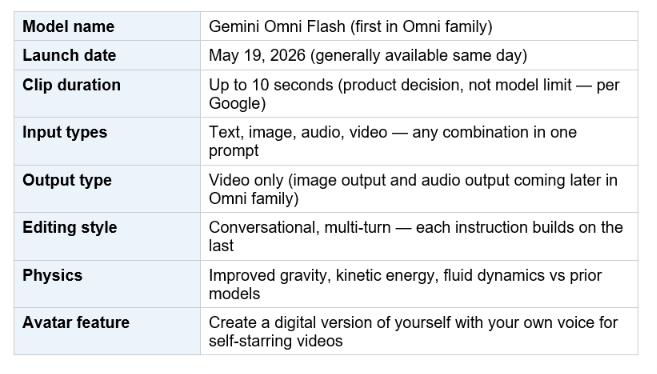
The 10-second cap deserves a clear explanation. Google's DeepMind product team explicitly stated this is a deployment choice, not a model constraint — the model can generate longer clips. The decision to cap at 10 seconds is driven by compute demand management during rollout and a bet that most consumer users start with short social-media-length clips. It will extend over time.
4. Conversational Editing: The Feature That Changes the Workflow
Every other AI video model in 2026 — Veo 3.1, Seedance 2.0, Kling 3.0, Runway Gen-4.5 — works on the same fundamental loop: generate a clip, decide if it is right, re-prompt and regenerate if not. There is no editing of the clip itself; there is only regeneration with better prompts.
Gemini Omni breaks this loop. Once you have a clip, you describe what you want to change in plain language — "shift the camera angle to the left," "make the sculpture out of bubbles," "when the person touches the mirror, make it ripple like liquid" — and Omni reworks the specific element while keeping everything else intact. Characters maintain consistency. Physics persist. The scene remembers.
Google describes five specific editing capabilities that shipped at launch:
- Change the world: Modify specific elements, change a background, transform the entire setting.
- Reimagine the action: Change what is happening in an existing video or shot footage — swap out behaviors, add new objects, transform moments.
- Refine across turns: Run multiple rounds of natural language edits; each builds on the last without starting over.
- Generate explainers: Take a short text prompt and generate a claymation, stop-motion, or narrative-driven visual explainer with accurate physical behavior.
- Reference everything: Give it a character image, an audio file, and a video style reference simultaneously — it reasons across all three to produce one output.
The honest caveat from Google's own team: editing prompts need to be specific, not vague. DeepMind research engineer Gabe Barth-Maron told TechCrunch that "editing prompts will need to be highly specific, otherwise Omni risks over-editing or unintentionally altering elements the user wanted to keep." You are not handing this a Photoshop selection layer. You are giving it a description, and it interprets that description against the whole frame. Precision of language matters more here than in generation. Developers building agentic workflows on top of Omni will want to look at the Google AI Studio and Antigravity 2.0 developer guide for how to chain Omni with other Gemini models once the API ships.
5. Access and Pricing: Who Gets It and What It Costs
Gemini Omni Flash has the broadest consumer rollout of any AI video model to date. Google is using YouTube's distribution as its go-to-market — putting Omni in front of YouTube's 2.7 billion monthly active users at zero marginal cost to the user.
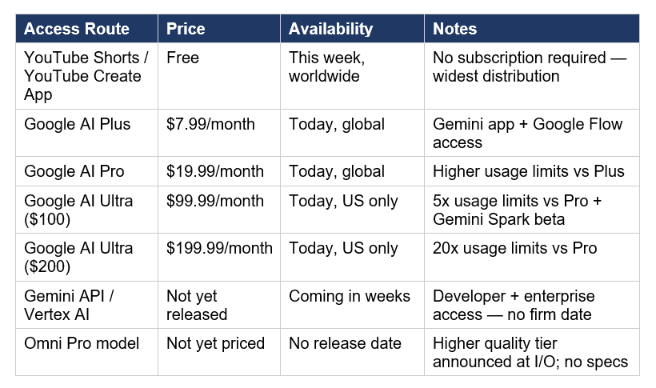
The YouTube Shorts distribution is the strategically underestimated part of this launch. OpenAI pulled Sora from consumer access in April 2026, ceding the consumer video generation space. Google's response is to ship Omni free inside the platform where YouTube Shorts creators already live. This is not a feature — it is a market capture play. Three weeks after OpenAI retreated, Google is putting multimodal video generation in front of hundreds of millions of creators at zero friction.
6. Gemini Omni vs Veo 3.1 vs Seedance 2.0 vs Kling 3.0
The 2026 AI video landscape has four serious production tools. Here is where Omni Flash actually fits, based on what has shipped — not what is teased for later.
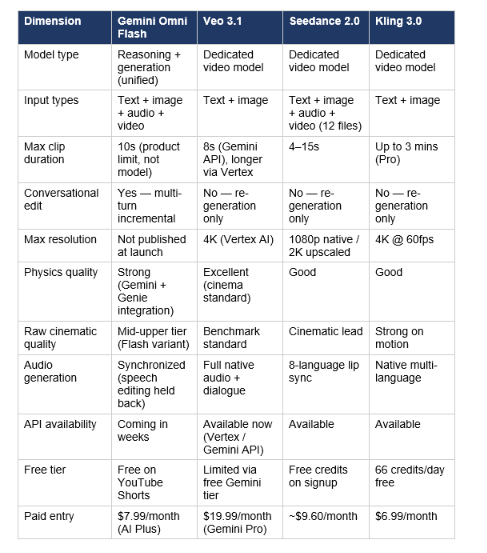
Honest read: Omni Flash's raw cinematic visual quality sits below Seedance 2.0 and Sora 2 (API-only, deprecated September 2026) at launch. Independent testers have consistently placed Seedance 2.0's frame quality a full tier above Omni Flash. The gap that matters is the editing model: no competitor offers conversational multi-turn editing that holds character and physics state across turns. That is a genuine architectural differentiation — not a roadmap promise. For developers who need production-grade video quality today without waiting for the API, Veo 3.1 via Vertex AI remains the most stable enterprise route. Omni Flash is the right choice for consumer-facing and social media workflows where the editing loop matters more than maximum fidelity.
7. Use Cases: What Omni Flash Is Built For
Google explicitly positioned Omni Flash as a consumer tool in the I/O briefings. Nicole Brichtova: "We definitely did focus on making this easy to use for consumers. Not many video models have breached that chasm with consumers, so this is our play to do that."
Social Media and Short-Form Content
- YouTube Shorts: Free access + native portrait-mode optimization. Largest immediate distribution channel.
- "Personalized memes" — DeepMind engineer Gabe Barth-Maron's literal framing. Remix personal videos, insert yourself into scenarios, transform moments into shareable content.
- Brand short-form: Render product visuals, slogans, and branding elements directly into AI-generated clips without post-production.
Video Remixing and Editing
- Take existing footage and modify specific elements: replace a background, change the setting, swap a prop, transform physics.
- Object replacement via natural language: "replace the cup on the table with a vase" — the model executes directly.
- Scene rewriting: Regenerate specific portions of a clip without redoing the entire segment.
Explainer and Educational Content
- Complex ideas made visual: generate a claymation explainer of protein folding from a short text prompt.
- Multimodal reference stacking: give it an image, an audio reference, and a text prompt simultaneously for a single coherent output.
Personal Avatars
The Avatars feature lets you record a short video to authorize use of your own voice and likeness. Omni can then generate videos that look and sound like you — for personal memes, content, or self-presentation. Google's consent model requires explicit recording authorization, placing it in direct competition with Synthesia's enterprise avatar platform.
Developers who want to build Omni-powered workflows before the official API ships can build toward it now using the broader Gemini stack. The gen-ai-experiments cookbooks at Build Fast with AI include Gemini API notebooks that will transfer directly to Omni endpoints once Google publishes the OpenAPI spec — the model call structure is identical.
8. Safety: SynthID, Audio Holdback, and the Deepfake Question
Google's safety architecture for Omni is more explicit than anything in the Veo 3.1 launch. Three policies ship with the model:
SynthID Watermarking (Mandatory)
Every video generated with Gemini Omni carries Google's imperceptible SynthID digital watermark plus C2PA Content Credentials. The watermark is non-optional — there is no API flag to remove it. It is verifiable through the Gemini app, Gemini in Chrome, and Google Search. As of May 2026, SynthID has marked over 100 billion AI-generated images and videos. OpenAI, ElevenLabs, and Kakao have adopted the standard.
Audio and Speech Editing: Deliberately Withheld
Omni Flash supports generating synchronized audio from scratch. It does not support editing or swapping audio and speech in existing videos — what Google calls the "riskiest feature" the architecture supports. The stated reason: Google is "still working to test this and better understand how we can bring this capability to users responsibly." In plain terms: voice cloning inside video is the core deepfake risk vector, and Google has explicitly chosen not to ship it at launch.
Content Policy
- Recognizable celebrity likenesses and copyrighted characters are blocked by safety filters.
- The Avatar feature requires the user to explicitly record consent video before their likeness can be used.
- Google's AI Content Detection API on Agent Platform (also launched at I/O 2026) can identify AI-generated content from both Google and other major models — putting verification capability in the hands of enterprises and content platforms.
9. Honest Take: What Works, What Does Not, What Is Missing
What actually works: the architecture is genuinely new. A reasoning model that generates video and edits it through conversation — not just regenerates on a new prompt — represents a different category of tool from Veo 3.1, Seedance, or Kling. The physics handling is noticeably better than earlier Flash-tier models. The free YouTube Shorts distribution is a smarter go-to-market move than any other AI video platform has executed.
What does not work yet: the developer story is missing. There is no API, no model card with published benchmarks, no pricing tier for enterprise production. VentureBeat's enterprise coverage put it plainly — Omni Flash is "only available to individual users through Google's AI subscription plans." If your use case requires building a product on top of this model, you are waiting. Veo 3.1 via Vertex AI is the production-stable choice until the Omni API ships. The current AI video generator landscape comparison at Build Fast with AI covers how Omni fits into the broader field of consumer and developer video tools.
What is missing: raw cinematic quality at the Flash tier. Independent testers are consistent — Omni Flash's generation quality trails Seedance 2.0 and Kling 3.0 on pure visual fidelity. The 10-second cap is a real workflow constraint for anyone producing content beyond memes and social clips. Long-form video, multi-minute sequences, and complex narrative production are not this model's domain yet.
Hot take: Google's real move here is not the model quality — it is distribution. YouTube Shorts has 70 billion daily views. Putting a free AI video editor inside the platform where creators already live is how you build a user base fast. Omni Flash at YouTube Shorts scale will generate more model feedback in a month than any paid-tier model gets in a year. That feedback loop is how Google will close the quality gap against Seedance and Kling 3.0. For the developer community, the watch item is the API release date and whether Omni Pro's benchmarks justify switching production workflows from Veo 3.1 (which remains the API-stable choice) once Omni Pro spec sheets land.
Frequently Asked Questions
What is Gemini Omni?
Gemini Omni is Google's new "any-to-any" generative model family, launched at Google I/O 2026 on May 19, 2026. It accepts text, images, audio, and video as inputs and generates video output — with conversational, multi-turn editing that preserves character consistency and physics across edits. The first model in the family, Gemini Omni Flash, is live today in the Gemini app, Google Flow, and free on YouTube Shorts and YouTube Create App.
How is Gemini Omni different from Veo 3?
Veo 3.1 is a dedicated video generation model: you prompt it, it generates a clip, you re-prompt if you want changes. Gemini Omni fuses Gemini's reasoning engine with Veo's rendering capabilities plus DeepMind's Genie world simulation and Nano Banana image editing layers. This makes Omni a reasoning model that generates video rather than a video model — it understands context, physics, and intent across multi-turn edits without regenerating from scratch.
Is Gemini Omni free?
Gemini Omni Flash is free on YouTube Shorts and the YouTube Create App, with that rollout beginning this week (May 2026). Paid access starts at $7.99/month (Google AI Plus) for use in the Gemini app and Google Flow. Higher usage limits are available on AI Pro ($19.99/month), AI Ultra $100 ($99.99/month), and AI Ultra $200 ($199.99/month).
When is the Gemini Omni API available?
Google confirmed developer and enterprise API access is "coming in the coming weeks" as of the May 19, 2026 announcement — no firm date given. Enterprise customers on Google Cloud / Vertex AI will get access alongside or shortly after the Gemini API. Until the API ships, the only access routes are the Gemini app, Google Flow, YouTube Shorts, and YouTube Create.
Why is Gemini Omni Flash capped at 10 seconds?
Google explicitly stated this is a deployment decision, not a model technical limitation. The cap exists to manage compute demand during broad rollout and because Google believes most consumer users start with short, social-media-length clips. DeepMind product director Nicole Brichtova told TechCrunch the limit will extend over time as infrastructure scales and usage patterns become clearer.
Can Gemini Omni edit speech and audio in existing videos?
No — audio and speech editing of existing videos is deliberately withheld at launch. Omni Flash can generate synchronized audio from scratch in new videos and supports the Avatar feature for self-voice videos. But editing or replacing dialogue and audio in existing footage remains off by default. Google stated it is "still working to test this and better understand how we can bring this capability to users responsibly" — the core concern being voice-cloning-based deepfake risk.
How does conversational editing work in Gemini Omni?
You generate a base clip, then describe changes in plain English: "move the scene to a beach," "make the mirror ripple like liquid when touched," "shift the camera angle to the left." Omni reworks the specific element while maintaining character consistency, object physics, and scene context across all prior turns. You do not re-generate from a new prompt — the model builds on what came before. The caveat: prompts need to be specific and descriptive; vague instructions risk over-editing unintended elements.
Does Gemini Omni video quality beat Seedance 2.0?
No — at the Flash tier, independent reviewers consistently place Gemini Omni Flash's raw cinematic quality one tier below Seedance 2.0 and Kling 3.0. One tester described it as "solid mid-to-upper tier" with strong prompt adherence but explicitly noted that visual fidelity lags ByteDance's model. Omni's distinct edge is conversational editing and architectural integration with Gemini reasoning — neither Seedance nor Kling offers multi-turn editing that preserves physics and character state. Google has teased Omni Pro for a future release, which is expected to narrow or close the quality gap.
Recommended Blogs
- Google Veo 3.1 Review (2026): Lite vs Fast, Pricing, Prompts & API Guide
- Nano Banana vs Nano Banana Pro vs Nano Banana 2: Which Google AI Image Model Wins?
- Google AI Studio Vibe Coding: Full Guide (2026)
- Best AI Models May 2026 Leaderboard — GPT-5.5, Claude Opus 4.7, Gemini 3.5 Flash
- SuperGrok Video & Image Generation (2026): Speed, Pricing Math & Comparison
- Gemini in Google Workspace: Every Feature Explained (2026)
Want to build your own AI video pipelines using Gemini Omni and Veo? Join Build Fast with AI's Gen AI Launchpad — 8 weeks, 100+ tutorials, live sessions, and 30,000+ builders. New cohort open at buildfastwithai.com.
References
- Google DeepMind — Introducing Gemini Omni (Official Blog Post, May 19 2026)
- TechCrunch — Google's Gemini Omni Turns Images, Audio, and Text into Video — and That's Just the Start
- VentureBeat — Google Unveils Gemini Omni 'Any-to-Any' AI Model: What Enterprises Should Know
- WaveSpeed Blog — Gemini Omni Flash Shipped: What Actually Launched
- Technobezz — Google Launches Gemini Omni Flash Model That Generates Video with Synchronized Audio
- 9to5Google — Gemini Omni: The 'Create Anything' Model Starts Today with Lifelike Video
- AI Video Bootcamp — What Is Gemini Omni? Google's New AI Video Model, Explained
- TechTimes — Google Launches Gemini Omni Video Model, but Holds Back Its Riskiest Feature

