



Google Veo 3.1 Review (2026): Pricing, Prompts, Lite vs Fast Explained
I spent last week generating cinematic 4K videos from plain text prompts and paying less than a dollar per clip. That alone should tell you how fast this space is moving.
Google released Veo 3.1 in October 2025, and just expanded the family with Veo 3.1 Lite on March 31, 2026 - cutting developer costs in half.This immediately signals freshness to both readers and Google., and the conversation in every AI community immediately shifted. Not because video AI is new, but because Veo 3.1 is the . This was true in Oct 2025 but audio is now standard. Reframe as: 'Veo 3.1 remains the only model in the space that generates 48kHz synchronized dialogue, not just background sound. more precise, still differentiating. not an afterthought. You get synchronized dialogue, sound effects, and ambient soundscapes baked directly into the generation process. No separate audio track. No post-production band-aid.
If you've been watching the AI video space and wondering which model actually deserves your attention in 2026, this breakdown covers everything: features, real pricing, how it compares to Sora 2 and Kling 3.0, and how to get started with the API today.
What Is Google Veo 3.1?
Veo 3.1 is Google DeepMind's most advanced AI video generation model, released on October 14, 2025, capable of producing high-fidelity 8-second videos in 720p, 1080p, or 4K resolution, with natively generated audio.
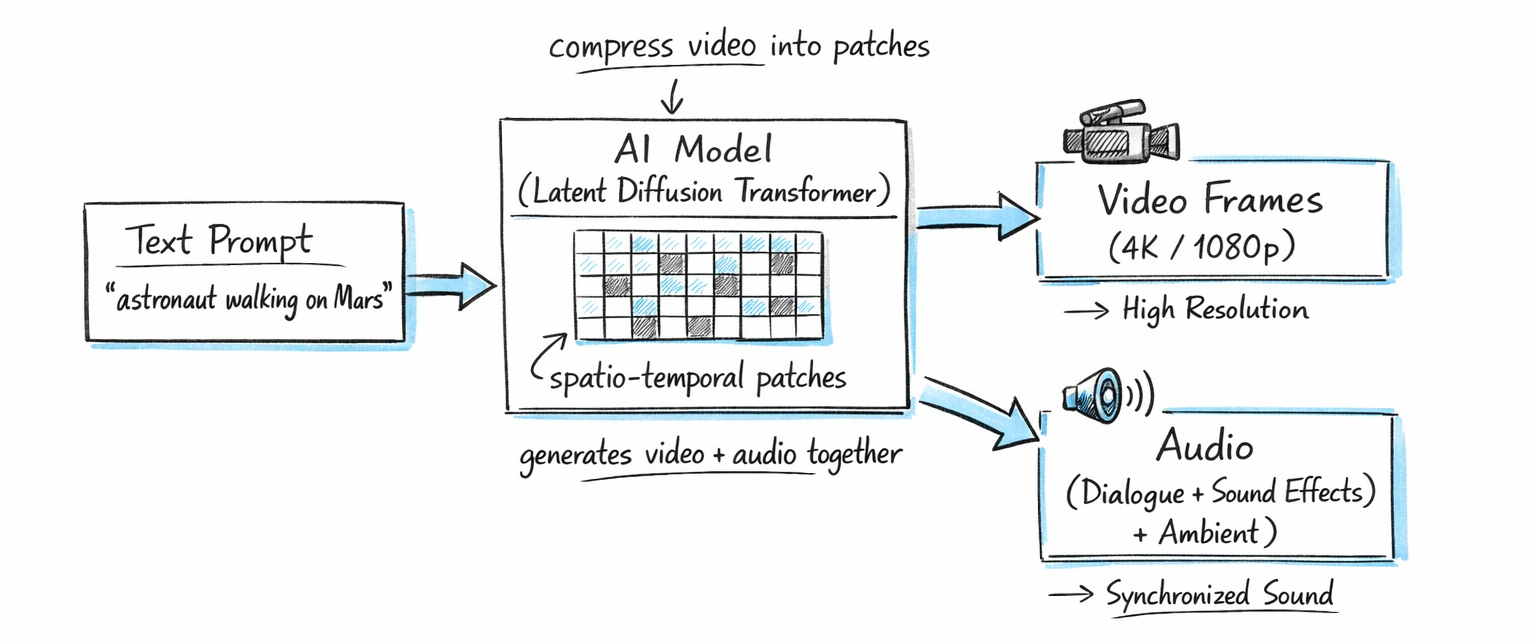
It builds on Veo 3 (announced at Google I/O in May 2025) with substantial upgrades across audio quality, cinematic control, image-to-video capability, and resolution options. The model uses a latent diffusion transformer architecture, compressing video data into spatio-temporal patches instead of working with raw pixels. That's what makes it efficient enough to generate 4K output without the wait times you'd expect.
You can access Veo 3.1 via the Gemini app, Google Flow (the filmmaking tool), the Gemini API (developer access), Vertex AI (enterprise), and third-party platforms like Higgsfield and Freepik. It's also embedded in YouTube Shorts for short-form creators and in Google Vids for business teams. I covered how Google Vids integrates Veo 3.1 for Workspace users in the Gemini in Google Workspace guide.
One sentence that matters: Veo 3.1 is the first practical AI video model to generate synchronized audio at 48kHz directly from a text prompt, with lip-sync accuracy within 120ms.
Key Features That Set Veo 3.1 Apart
Here's what actually changed from Veo 3 to Veo 3.1, beyond the version number.
Native Audio Generation
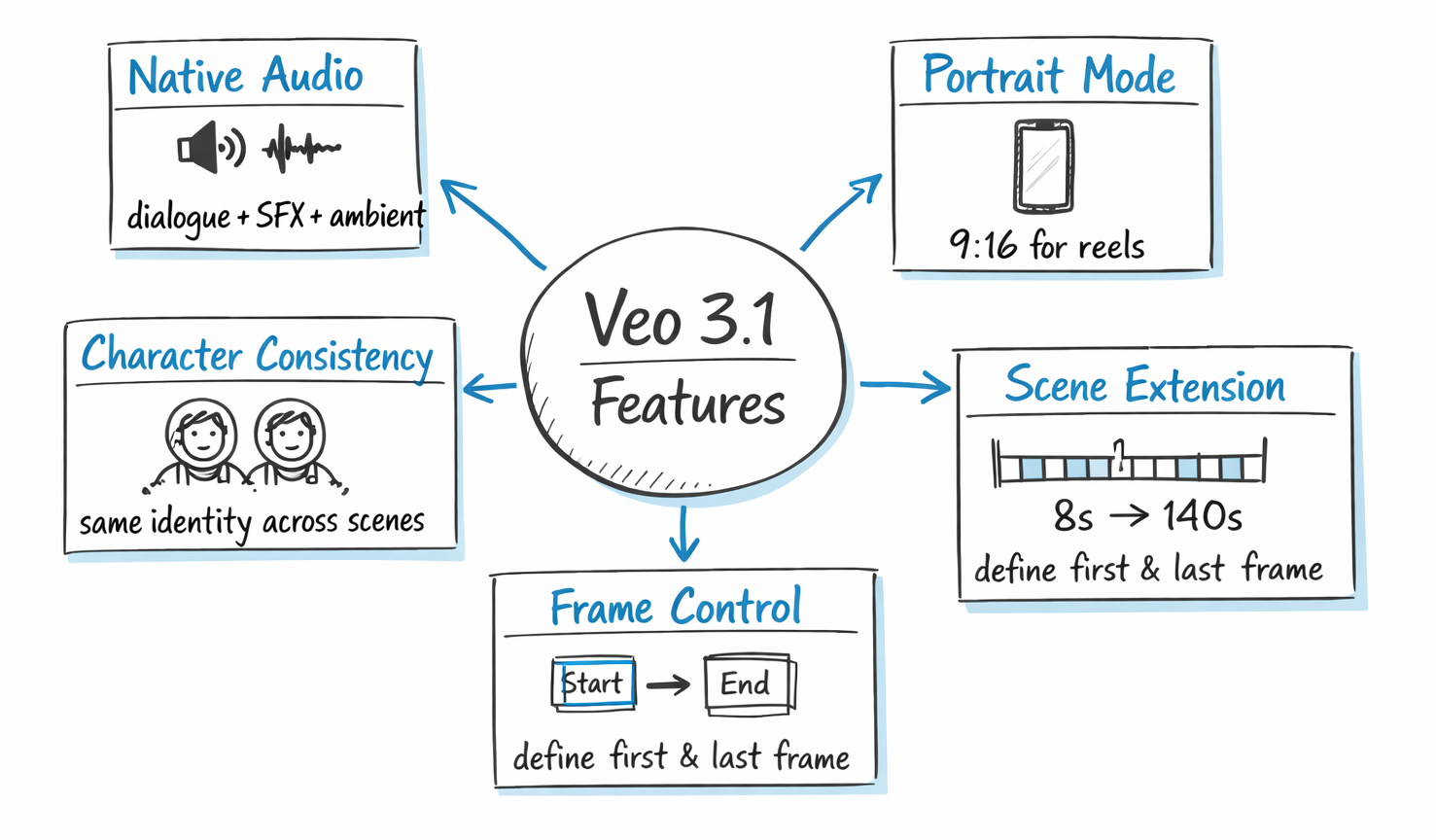
Most AI video models either generate silent video or bolt on audio after the fact. Veo 3.1 generates three types of audio simultaneously: dialogue and speech (synced to character lip movements), sound effects (matched to on-screen action), and ambient audio (environmental soundscapes). The quality runs at 48kHz, which is professional-grade. You still might want post-production polish for broadcast work, but it's a solid production foundation out of the box.
Portrait Mode and Resolution Flexibility
Veo 3.1 now supports both landscape (16:9) and portrait (9:16) output. That second one matters a lot for creators focused on YouTube Shorts, TikTok, and Instagram Reels. You can generate natively vertical videos without cropping or reformatting. Resolution options are 720p, 1080p, and 4K, with higher resolutions adding to latency and cost.
Ingredients to Video: Character Consistency
This is the feature I've seen get the most attention from creators. You can upload up to three reference images of a character, product, or object. Veo 3.1 analyzes them and maintains consistent visual identity across scenes, angles, and settings. That's genuinely hard to do in AI video. Combine it with background and object reuse across scenes, and you can start telling a coherent narrative instead of generating isolated clips.
Scene Extension Up to 140 Seconds
The base clip is 8 seconds. But Veo 3.1's scene extension lets you chain up to 20 extensions, creating videos exceeding 140 seconds. Each extension analyzes the final second of your previous clip (all 24 frames), tracking character position, lighting, camera angle, and motion trajectories before generating the next segment. For professional workflows, this makes Veo 3.1 competitive on duration, where Sora 2 caps at 25 seconds per generation.
Frame-Specific Generation
You can now specify the first frame, last frame, or both when generating a video. This level of scene control is what separates a creative tool from a toy. It means you can define exactly where a shot starts and ends rather than hoping the model picks the right moment.
SynthID Watermarking:
All Veo 3.1 videos contain an invisible digital watermark verifiable at Google's SynthID platform — important for commercial and compliance use cases.
For more on how Veo feeds into Google's larger AI ecosystem, the NotebookLM Cinematic Video Overview guide walks through how Gemini and Veo work together in pipeline workflows.
Veo 3.1 Fast vs. Veo 3.1 Quality: Which Mode Should You Use?
Veo 3.1 comes in two variants: Fast (lower cost, quicker output) and Quality/Standard (higher fidelity, higher cost). The Fast mode cuts cost roughly in half while maintaining strong quality for most use cases.
Here's how I think about it practically:
- Use
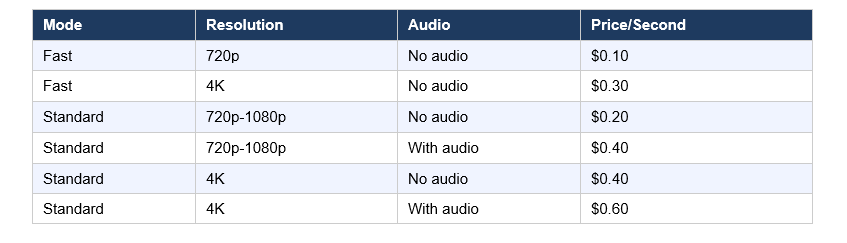
Veo 3.1 Fast when you're iterating on prompts, testing concepts, generating social media content, or working with tight budgets. At $0.10/second for 720p, it's the lowest official cost for any Google video generation.
- Use
Veo 3.1 Quality when the output is for a client deliverable, a campaign hero video, or anything that needs to stand up to professional scrutiny. The 4K with audio option at $0.60/second is expensive, but for a 5-second clip that would have cost thousands in traditional production, the math still holds up.
My take: fast mode for 80% of work, quality mode for the final 20% that ships. That's the rational workflow, and most professional creators I've talked to have landed in the same place.
Veo 3.1 Lite — What It Is and Who It's For
Google's most cost-effective video model, released March 31, 2026. Less than 50% the cost of Veo 3.1 Fast, with similar generation speed.
Supports:
720p and 1080p
4s, 6s, 8s clips
Text-to-video and image-to-video
Does NOT support:
4K
Scene extension
Best for:
Developers building high-volume apps like social media automation, ads, and content pipelines.
Best Prompt Formulas for Veo 3.1
Sweeping drone shot of a lone hiker crossing a fog-covered mountain ridge at dawn, cinematic realism, shallow depth of field. Audio: wind, footsteps, ambient birdsong.
Close-up of a barista pouring latte art in a warm café, slow motion, golden hour lighting. Audio: coffee machine, soft jazz.
Product reveal shot, clean white background, smooth camera push-in, professional lighting. Audio: subtle unboxing sound.
Veo 3.1 Pricing: What It Actually Costs
Here is the actual pricing breakdown as of March 2026, across resolution and audio settings:Here is the updated pricing breakdown as of April 2026, including the new Veo 3.1 Lite tier and the Veo 3.1 Fast price reduction effective April 7:
Last updated: April 2026
The Gemini Advanced subscription gives you access through the app at around $20/month, with generation limits. For high-volume work, the API is the better route. Third-party platforms like fal.ai offer Veo 3.1 access at slightly different rates, which can work out cheaper for specific workflows.
A 5-second clip at Standard with audio costs exactly $2.00. For context: in traditional production, 5 seconds of professional video with synced audio could easily cost $500 or more. Even at the highest tier, AI video generation is orders of magnitude cheaper. The pricing isn't the barrier anymore. The creative skill of prompt writing is.
How to Use Veo 3.1: Access Options and API Quickstart
Veo 3.1 is available through six main channels as of 2026: the Gemini app (consumer), Flow (filmmaking tool), YouTube Shorts (short-form creators), Google Vids (enterprise), the Gemini API (developers), and Vertex AI (cloud enterprise).
For developers, the model string is veo-3.1-generate-preview, accessed via the Gemini API. Here's the basic Python setup:
from google
import genai from google.genai
import types  client = genai.Client()
 operation = client.models.generate_videos(
   model="veo-3.1-generate-preview",
  prompt="Your prompt here",
config=types.GenerateVideosConfig( resolution="1080p",   ), )
For reference image usage (Ingredients to Video), you pass up to three images in the reference_images parameter. For scene extension, you pass the previously generated video in the video field.
In the Gemini app and Flow, no code is needed. You log in, craft your prompt, optionally upload reference images, and generate. New users on Flow get free credits to start. For most non-developers, that's the right entry point.
Want to understand how to write better AI prompts before diving into video generation? The Gemini URL Context guide covers prompt-grounding strategies that transfer directly to video generation work.
Veo 3.1 vs. Sora 2 vs. Kling 3.0 vs. Seedance 2.0
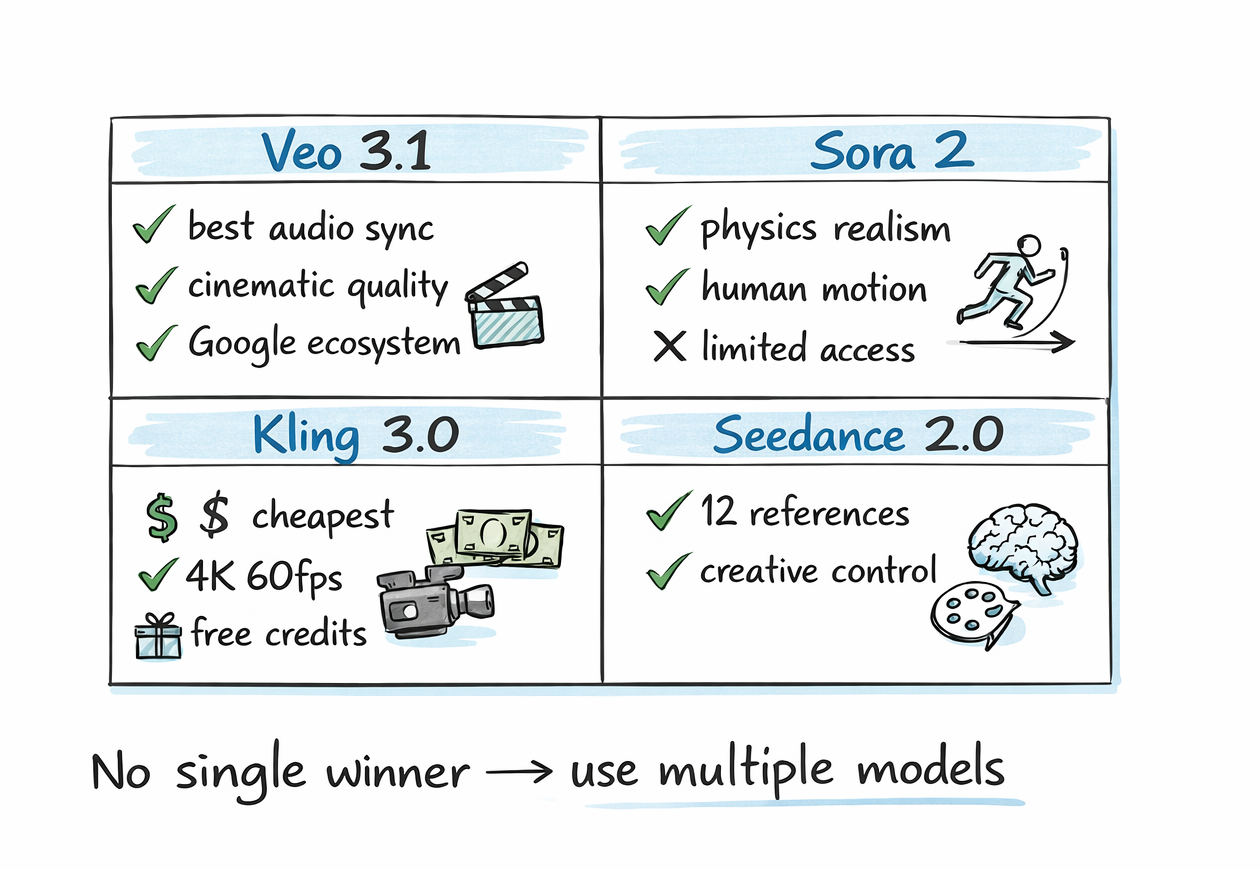
The AI video landscape in 2026 has five serious players — and the field shifted in late March when OpenAI paused consumer access to Sora, leaving Veo 3.1 as the most production-stable option for developers. Here's where they each actually stand, without the marketing language:
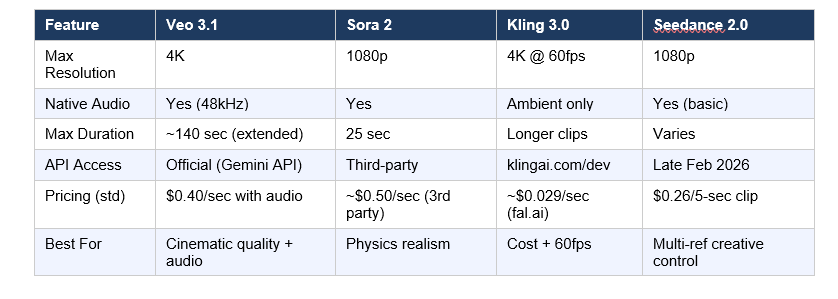
Veo 3.1 wins on: cinematic quality, native audio synchronization, official API stability, and Google ecosystem integration. It ranks first on both MovieGenBench and VBench for image-to-video quality as of early 2026.
Sora 2 wins on: physics simulation, human motion realism, and prompt adherence for narrative complexity. The caveat is access. As of March 2026, the official API opened to all developers, but third-party resellers still dominate the developer ecosystem for cost reasons.
Kling 3.0 wins on: cost efficiency (roughly $0.029/second through providers like fal.ai), a genuine free tier with daily credits, and 4K at 60fps for the smoothest motion. For high-volume ad production, Kling is hard to argue against on pure economics.
Seedance 2.0 wins on: creative input flexibility. Supporting up to 12 reference files (images, video clips, and audio) is unprecedented. If your workflow starts with rich reference material, Seedance 2.0 gives you the most fine-grained creative control.
My honest take: I don't think there's a single winner here. The professional workflow in 2026 is multi-model. Kling for social iterations, Veo 3.1 for hero content, Sora 2 when physics accuracy is non-negotiable. Paying loyalty to one model is a creative limitation, not a smart strategy.
What Veo 3.1 Gets Wrong (Honest Criticism)
No review is useful without honest criticism. Here's what Veo 3.1 still struggles with.
The 8-second base clip limit is real friction. Yes, you can extend to 140 seconds via chaining. But each extension requires a new API call, new prompt, and careful continuity management. For quick, non-extended content, 8 seconds isn't a lot to work with.
4K video extension isn't supported. Scene extension works only at 720p. If you need long-form 4K content, you're currently stuck stitching clips manually in post-production.
The official API pricing is genuinely expensive for high volumes. At $0.40/second for 1080p with audio, generating 100 videos per week would cost roughly $3,200/month. Kling at $0.029/second through fal.ai does the same volume for around $232/month. For budget-conscious teams, this gap is not trivial.
And I'll say the quiet part out loud: free access is limited. Gemini Advanced at $20/month gives you generation credits, but power users will hit limits fast. The free tier is essentially non-existent for serious video work, unlike Kling 3.0 which offers daily free credits without a credit card.
Who Should Be Using Veo 3.1 Right Now
Veo 3.1 is the right choice for creators and teams where audio-visual quality and Google ecosystem integration matter more than cost per clip.
Specifically:
- Filmmakers and narrative creators who need character consistency across scenes and cinematic color science. Veo 3.1's output is closest to traditional film standards.
- Marketing teams producing hero content, where a single brand video justifies the premium and needs to look polished without extensive post-production.
- Developers building video-generation apps who need a reliable, officially supported API with Google Cloud's infrastructure guarantees behind it.
- Google Workspace users already in the Gemini app, Flow, or Google Vids ecosystem, where Veo 3.1 is deeply integrated.
- YouTube Shorts creators who want native portrait-mode video with synchronized audio without any format conversion.
If you're a solo creator on a tight budget running high-volume iterations, Kling 3.0 makes more financial sense. No shame in that. The right tool depends on the job, not brand loyalty.
For a broader picture of how Google's AI tools are being used in production workflows, I'd recommend reading the Nano Banana Pro use cases guide to see how image generation and video generation are increasingly used together in the same pipeline.
Want to build AI-powered video apps and workflows?
Join Build Fast with AI's Gen AI Launchpad, an 8-week structured program to go from 0 to 1 in Generative AI.
Register here: buildfastwithai.com/genai-course
Frequently Asked Questions
What is Google Veo 3.1?
Veo 3.1 is Google DeepMind's most advanced AI video generation model, released in October 2025. It generates 8-second videos at up to 4K resolution with natively synchronized audio, including dialogue, sound effects, and ambient soundscapes. It is accessible via the Gemini API, Gemini app, Google Flow, YouTube Shorts, Google Vids, and Vertex AI.
What is Veo 3.1 Fast, and how does it differ from the standard model?
Veo 3.1 Fast is the lower-cost, faster-processing variant of the model. It costs $0.10/second for 720p output versus $0.40/second (with audio) for the standard version at 1080p. Fast mode is best for iterative prompt testing and social media content. The standard Quality mode delivers superior cinematic fidelity and is the right choice for hero or client-facing video production.
How much does Veo 3.1 cost?
Veo 3.1 pricing via the official Gemini API starts at $0.10/second for Fast mode at 720p. Standard mode ranges from $0.20/second (no audio, 720p-1080p) to $0.60/second (with audio, 4K). A 5-second 1080p clip with audio costs $2.00. Gemini Advanced subscribers get access through the app for around $20/month with generation limits.
Is Veo 3.1 available for free?
Veo 3.1 does not have a meaningful free tier for production use. Gemini Advanced ($20/month) includes some generation credits, but heavy users will exhaust them quickly. Google Flow offers free credits to new users for testing. For truly free AI video generation, Kling 3.0 offers daily free credits without requiring a credit card.
Is Veo 3 limited to 8 seconds?
The base generation is 8 seconds, but Veo 3.1's scene extension capability allows chaining up to 20 clips, creating videos that exceed 140 seconds total. Each extension analyzes the final second of the previous clip to maintain visual continuity. Note that 4K resolution is not available for scene extension, which is currently limited to 720p.
How does Veo 3.1 compare to Sora 2?
Veo 3.1 leads Sora 2 on official API access, native audio generation (synchronized at 48kHz), maximum video duration (140 seconds via extension vs. 25 seconds for Sora 2), and resolution (4K vs. 1080p). Sora 2 has an edge in physics simulation accuracy and human motion realism. Veo 3.1 is also the safer choice for developers who need a stable production API, as Sora 2 access has relied heavily on third-party resellers through early 2026.
What are the best prompt tips for Veo 3.1?
The most effective Veo 3.1 prompts follow a structure of [Cinematography] + [Subject] + [Action] + [Context] + [Style]. Example: 'Sweeping drone shot of a lone astronaut walking across a red desert at golden hour, cinematic realism, shallow depth of field.' Specify dialogue in quotation marks for the model to generate matching lip-synced speech. For scene extensions, prompt natural progressions rather than abrupt cuts to maintain continuity across clips.
How does Veo 3.1 handle character consistency across scenes?
Veo 3.1's Ingredients to Video feature lets you upload up to three reference images of a character, product, or object. The model uses these as a visual guide to maintain consistent appearance across different scenes, settings, and camera angles. This includes consistent facial features, clothing, and object identity, making coherent multi-scene narratives possible without manual compositing.
Recommended Reads
If you found this useful, these posts from Build Fast with AI go deeper on related topics:
References
- Generate Videos with Veo 3.1 in Gemini API - Google AI for Developers (March 2026)
- Introducing Veo 3.1 and New Creative Capabilities in the Gemini API - Google Developers Blog (October 2025)
- Veo 3.1 Ingredients to Video: New Video Generation Model Updates - Google Blog (January 2026)
- What Is Google Veo 3.1? The Flagship AI Video Model from Google - MindStudio (February 2026)
- Best AI Video Generators in 2026 - fal.ai (February 2026)
- Seedance 2.0 vs Kling 3.0 vs Sora 2 vs Veo 3.1: Complete 2026 AI Video Comparison - LaoZhang AI Blog (February 2026)
- Veo - Google DeepMind - Google DeepMind
Build with Veo 3.1 Lite — Google Developers Blog (March 31, 2026):

