



On June 30, 2026, Google made Gemini Omni Flash available to developers for the first time through the Gemini API and Google AI Studio. The model had already launched to consumers at Google I/O on May 19, 2026, but without a developer API, it was a consumer product, not a production tool. The June 30 API launch changes that. Gemini Omni Flash (model ID: gemini-omni-flash-preview) generates and conversationally edits video at $0.10 per second of output, which puts a 10-second clip at roughly one dollar. That price matches Veo 3.1 Fast at the same resolution. What it adds that Veo 3.1 does not have is the ability to refine and edit that video in plain English, one instruction at a time, without re-prompting from scratch. Change the background. Swap the product. Relight the scene. Adjust the camera angle. Each instruction builds on the previous output without losing context. This review covers everything the June 30 API launch revealed: how the architecture works, what conversational editing actually does in practice, the pricing table against Veo's family, what the 10-second and 720p ceilings actually mean, what partners are reporting from early access, and the real limitations you will hit in production.
1. What Is Gemini Omni Flash?
Gemini Omni Flash is the first model in Google's Gemini Omni family, a new generation of generative AI models designed to accept any combination of text, images, audio, and video as inputs and produce high-quality, physics-aware video as output. The model architecture combines Gemini's multimodal reasoning capabilities with Google's video generation technology into a single unified model rather than a pipeline of separate specialized tools. Google DeepMind CTO Koray Kavukcuoglu described the family's ambition at Google I/O as a model that can 'create anything from any input, starting with video.' The 'starting with' is deliberate. Omni Flash ships today with video output. Image output and audio output capabilities are planned for future releases in the Omni family. The consumer launch happened on May 19, 2026 at Google I/O, simultaneously rolling to the Gemini app, Google Flow, and YouTube Shorts. The June 30, 2026 API launch brings it to developers through the Gemini API, Google AI Studio, and the Gemini Enterprise Agent Platform. The API model string is gemini-omni-flash-preview.
One strategic context worth understanding: inside the Gemini app, Gemini Omni Flash has replaced Veo as the default video generation backend for Plus, Pro, and Ultra subscribers. Veo 3.1 remains available for developers through the Gemini API and Vertex AI, and it is not going away for production use. But the consumer video generation experience is now Omni Flash. For the full Veo 3.1 feature and pricing breakdown that predates this Omni launch, the Veo 3.1 review on Build Fast with AI covers the Veo family's capabilities, pricing tiers, and API guide in detail.
2. Architecture: The World Model Difference
The key architectural distinction between Gemini Omni Flash and Veo 3.1 is not resolution or speed. It is world understanding. Veo 3.1 is a specialized video generation model optimized for high-fidelity output from text prompts and reference images. Gemini Omni Flash is built on Gemini's unified transformer architecture, which means it has Gemini's multimodal reasoning, world knowledge, and contextual understanding built in, not bolted on. Google DeepMind explains this in the model card: Omni Flash is a 'transformer-based model with native multimodal support for text, vision, video and audio inputs.' The training data included audio, video, image, and text with text captions at different levels of detail, semantically deduplicated and filtered for compliance, safety, and quality. The practical effect of this unified architecture is what Google calls a 'world model' capability: when you ask Omni Flash to 'add rain and make it look like a stormy Tokyo street,' the model does not just overlay a rain texture on existing pixels. It re-reasons the physical relationship between the subject, the new environment, the light source, and the wetness of surfaces, because it has internalized physical laws from its training data rather than pattern-matching rain textures.
This world simulation foundation is what enables consistent multi-turn editing. When an edit instruction is applied in step three, the model knows the characters, lighting, and scene context from steps one and two. It is not losing memory of prior state between instructions. This is architecturally different from how Veo 3.1 handles edits, which requires a prompt-then-re-generate approach rather than a true conversational modification of existing output. For context on how this compares to ByteDance's approach in Seedance 2.5 and Kuaishou's approach in Kling 3.0, the Seedance 2.5 vs Veo 3.1 vs Kling 3.0 comparison covers the architectural trade-offs across all three approaches.
3. Conversational Editing: The Feature That Defines Omni
Conversational video editing is the capability that differentiates Gemini Omni Flash from every other AI video model available via API in July 2026. It deserves precise explanation because the phrase 'conversational editing' is used loosely across the industry but what Omni does is technically specific. With Gemini Omni Flash, after generating an initial video clip, you can issue natural-language modification instructions that are interpreted against the full context of everything generated so far. The model maintains session history through the Interactions API. A sequence might look like this: generate a product video with a white background; then 'change the background to a Scandinavian kitchen'; then 'make it golden hour lighting'; then 'add a glass of water next to the product.' Each instruction builds on the previous state without losing the camera angle, the product identity, the character consistency, or the audio. There is no 'start over' prompt required. Specific editing operations supported include: character or product swaps, camera angle adjustments, relighting and color grading, style transfers, adding or removing objects, and text synchronization with on-screen actions. The model also maintains original audio and video tracks while applying edits, rather than replacing the entire clip. This is the capability that enterprise content teams have been waiting for. Marketing and L&D departments that produce the most videos in large organizations previously needed an LLM for scripting, a text-to-image model, an image-to-video model, a separate lip-sync tool, and a voice-over tool — five separate tools chained together. Omni Flash compresses that into a single conversation.
One current limitation: the Interactions API supports stacking up to three sequential edits while maintaining session context. Beyond three edits in a sequence, context may degrade. This is a deployment configuration rather than a model limit, per Google's developer documentation, and is expected to increase over time.
4. Core Capabilities: What Gemini Omni Flash Can Do
Video Generation from Any Input
Gemini Omni Flash accepts text descriptions, images (up to seven images as references), and video clips (up to three clips of three seconds each or less) as inputs, or any combination of these. From these inputs it generates 3 to 10 second clips at 720p resolution in landscape (16:9) or portrait (9:16) aspect ratio, with native audio generated alongside the video.
Native Audio Generation
Every video Gemini Omni Flash produces includes synchronized audio generated natively rather than added as a post-processing step. This means the model reasons about what sound belongs in the scene based on the visual content, camera movements, and physical environment depicted. Footsteps, ambient environments, object sounds, and music-like elements are all generated by the model itself. Audio reference inputs are not yet supported in the June 30 API version (they are planned), but audio output is live on all generations.
World Knowledge and Physics Simulation
The Gemini foundation brings historical, scientific, and cultural knowledge into video generation. The I/O 2026 demonstration of a claymation protein folding explainer illustrated this: the model could generate scientifically accurate visual representations of molecular biology concepts because it has internalized that knowledge from training, not because it was given a reference image. Physics simulation covers object dynamics, lighting interactions, fluid behavior, and gravity in the generated clips.
Text and Graphics Synchronization
Gemini Omni Flash renders legible text and graphics directly into video, with kinetic typography synchronized to on-screen movements. For advertising use cases, product labels, pricing text, and call-to-action overlays can be generated as part of the video rather than added in post-production. This is one of the capabilities Google highlighted specifically in its Cloud blog, alongside character and product swaps and dynamic style transfers. For the image generation parallel, the Nano Banana 2 Lite review covers how the same text synchronization capabilities work in the still image domain, and how the two models chain together.
Multimodal Referencing
Unlike text-only video generators, Omni Flash accepts images as reference material to guide generation. Upload product photography, character sheets, background environments, or style reference images alongside your text prompt. The model synthesizes these references into the video generation, maintaining product identity, character appearance, and environmental consistency with the uploaded assets. This is particularly valuable for brand content where product accuracy is non-negotiable.
5. Pricing: Omni Flash vs the Veo 3.1 Family
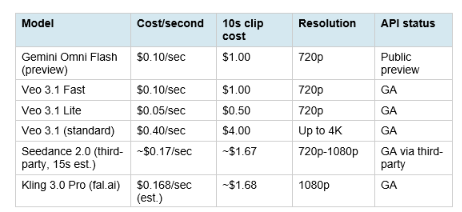
The pricing alignment with Veo 3.1 Fast at $0.10 per second is deliberate. Google is not undercutting Veo 3.1; it is positioning Omni Flash as the conversational-editing alternative at the same price point as Veo's speed tier. The implicit message: if you need 4K or maximum cinematic fidelity, pay for Veo 3.1 standard at $0.40 per second. If you need conversational multi-turn editing with native audio at a cost-efficient price, use Omni Flash at $0.10. The VentureBeat analysis put it precisely: 'Omni Flash costs $0.10 per second of generated 720p video. That matches Veo 3.1 Fast at the same resolution, runs double Veo 3.1 Lite, and undercuts standard Veo 3.1 by three-quarters.' Google Cloud VP of Product Management Michael Gerstenhaber called it 'one of the most aggressively priced models of its kind' in the launch announcement.
6. The Nano Banana 2 Lite Pipeline: Image to Video
Google's recommended production workflow on June 30 combines Nano Banana 2 Lite (gemini-3.1-flash-lite-image) for rapid image generation with Gemini Omni Flash for video animation and editing. The economics of this pipeline are worth spelling out explicitly because they change the cost calculus for high-volume creative production. Step 1: Generate a base image with Nano Banana 2 Lite in approximately 4 seconds at $0.000034 per image. This gives you a reference visual that captures the product, character, or scene you want to animate. Step 2: Pass that image as a reference input to Gemini Omni Flash to animate it into a video at $0.10 per second of output. A 5-second animated product clip costs $0.50. Step 3: Optionally, apply conversational edits via the Interactions API to refine the animation, adjust elements, or apply style changes. Up to three sequential edits maintain full session context.
Total cost for a 5-second product video including image generation: approximately $0.500034. Under $0.51. Google built an Omni Product Studio demo app to demonstrate this pipeline, converting static AI-generated images into what it describes as 'cinematic e-commerce videos.' The Interactions API maintains session history for multi-turn workflows, enabling stacked editing without losing product or character consistency across iterations. Logan Kilpatrick, Google's AI Studio and Gemini API lead, described the combination: "I also expect Omni to open up a whole new category of video use cases like Nano Banana itself did!" The pipeline is available immediately in Google AI Studio as a remixable demo application that developers can use as a starting point for production implementations.
7. Where to Access Gemini Omni Flash
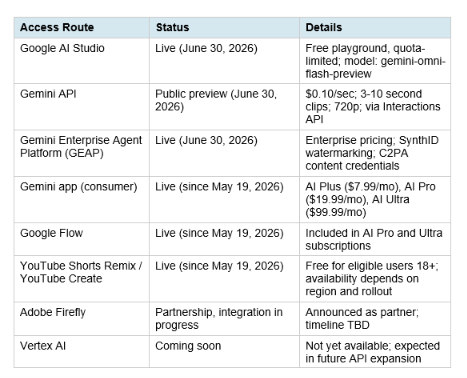
The C2PA content credentials and SynthID watermarking on all enterprise outputs are default-on for GEAP deployments. This matters for enterprise buyers who need provenance tracking and audit trails on generated assets for compliance, brand safety, and legal purposes.
8. Early Partner Reactions: WPP, Adobe, and More
Google shared partner testimonials from WPP, Adobe, and others who received early access to Gemini Omni Flash before the June 30 public API launch. The consistent themes from enterprise early adopters reveal what the model actually delivers in production rather than in controlled demos. Elav Horwitz, Chief Innovation Officer at WPP, described their experience integrating Omni Flash into WPP Open, WPP's agentic marketing platform: "Gemini Omni Flash's multi-modal capabilities, allowing for seamless image, audio, and video input references, combined with intuitive conversational editing, represent a leap forward for controlled AI production. Teams have tested asset localization, precise product swaps, and dynamic style transfers for clients. We are thrilled to partner with Google Cloud to continually push the boundaries of AI-driven creativity."
Matt Chotin, Senior Director of Product at Adobe, announced that Gemini Omni Flash and Nano Banana 2 Lite would be integrated into Adobe Firefly: "These new models build on Adobe's strategy to deliver our pro-grade tools and the industry's top creative AI models in a connected workflow, giving creators flexibility and control over how they bring their creative ideas to life."
These testimonials all reflect the same pattern: Omni Flash is valuable not as a solo tool but as an editing and refinement layer within existing production workflows. WPP's focus on 'asset localization' and 'product swaps' is the enterprise version of the same capability that consumer creators are using for character swaps and style transfers in YouTube Shorts.
9. Limitations: Honest Assessment of What Is Missing
Google's own model card is unusually transparent about current limitations, which deserves direct quotation and clear framing for developers planning production deployments.
- 10-second clip cap: Clips are currently limited to 3 to 10 seconds. Google DeepMind's Nicole Brichtova explicitly stated this is a deployment choice, not a model constraint. The model can generate longer clips. This cap manages compute demand at launch and is expected to increase as the preview matures.
- 720p only: There is no 1080p or 4K option in the current preview. This is a real ceiling for premium brand work, broadcast production, or large-screen display. Veo 3.1 standard at $0.40 per second supports 4K; Omni Flash does not yet.
- No audio reference input: The API schema accepts video references up to 3 seconds, but Google explicitly states 'video references are accepted by the API schema but are not correctly processed by the model at this time.' Audio references are not yet supported at all, though audio output is generated with every clip.
- Character consistency limitations: Google's model card specifically notes that 'maintaining complete consistency throughout edits, generating scenes with complex motion, or rendering perfectly accurate text remains a challenge.' Character drift across scene changes or camera movements is documented as a current limitation.
- Three-edit Interactions API cap: The Interactions API maintains session history for up to three sequential edits. Beyond that, context may degrade. This is a practical limitation for complex multi-step editing sessions.
- No real people: Content safety filters block video generation or editing involving real people's names or likenesses. Attempting to reference named real individuals returns 'Input blocked: Sorry, we can't create videos with real people's names or likenesses.' This is consistent with Google's deepfake prevention approach.
- Preview status: Gemini Omni Flash is in public preview, not general availability. Rate limits are more restrictive than GA models, and the model may change behavior before reaching stable GA.
Hot take: the 10-second cap and 720p ceiling are the only limitations that matter for most commercial workflows. Social video, advertising, product content, internal training videos, and email marketing all operate comfortably within 10 seconds and 720p. The missing functionality matters for broadcast, premium brand work, and long-form narrative content, which Veo 3.1 standard is still the right choice for. The character consistency limitation is the one to watch most carefully in production testing before committing.
10. Gemini Omni Flash vs Veo 3.1 vs Seedance 2.5 vs Kling 3.0
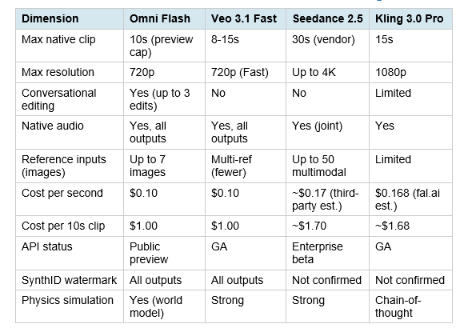
The direct competitive insight: Omni Flash and Veo 3.1 Fast are priced identically, but conversational editing is the differentiator Veo 3.1 cannot match. If you need 4K, choose Veo 3.1 standard. If you need 30-second native single-pass clips, choose Seedance 2.5 (once public). If you need the lowest cost per clip at competitive quality, Veo 3.1 Lite at $0.05 per second is cheaper than Omni Flash. The specific Omni Flash use case is: conversational multi-turn editing, multimodal reference input, and world-knowledge-grounded generation, all at the same price as Veo 3.1 Fast. For the complete AI video model comparison covering Seedance 2.5 specifically against Veo and Kling, the Seedance 2.5 vs Veo 3.1 vs Kling 3.0 head-to-head covers all three across ten competitive dimensions.
11. Safety Model: SynthID, Prohibited Use, and IP Questions
Gemini Omni Flash applies Google's standard Generative AI Prohibited Use Policy to all uses of the model. Every output is watermarked with SynthID, Google's pixel-level invisible watermarking technology that is not removable via compression or format conversion and is verifiable through the Gemini app, Gemini in Chrome, and Google Search. The SynthID watermark has now been applied to over 100 billion AI-generated images and videos across Google's products since launch. For developers, SynthID on all enterprise API outputs is default-on alongside C2PA content credentials, which provide a human-readable provenance record that can be verified independently of Google's tools. This dual-layer approach (invisible cryptographic watermark plus readable metadata) is the most comprehensive content provenance stack of any major AI video model available via API in 2026.
The IP risk that TechRadar documented in June 2026 testing deserves honest treatment: Gemini Omni Flash could be prompted into generating videos resembling well-known superhero and entertainment IP characters when prompted carefully, despite the model's content filters. This is the same IP leakage challenge faced by every major generative model. Google's SynthID watermarking addresses provenance but not the underlying IP question: if a generated clip is visually similar to protected characters, SynthID proves it was AI-generated but does not resolve whether its distribution is legal. Teams producing commercial content should verify outputs against brand standards and IP clearance requirements before distribution, regardless of which AI video model generates them. The real people filter is strict and consistent: the model blocks content involving named individuals. Google's model card notes that Omni is capable of changing people's speech as part of video editing, but that this capability is deliberately restricted 'while Google studies safer release paths.' This suggests speech editing and voice cloning are on the roadmap but behind deliberate safety gates.
12. What Is Coming: The Omni Roadmap
Google was explicit at the June 30 launch about capabilities currently in development and coming to Gemini Omni Flash and the broader Omni family via the Gemini Enterprise Agent Platform API. According to the Google Cloud blog, support for the following is 'available soon': audio references as inputs, video references longer than 3 seconds, last frame control, scene extension, and higher resolution output beyond 720p. Gemini Omni Pro is also confirmed as the next model in the Omni family, positioned above Flash for more demanding professional use cases, analogous to how Nano Banana Pro sits above Nano Banana 2 standard. No specs, pricing, or timeline for Omni Pro have been disclosed as of the June 30 launch. The Vertex AI rollout for Omni Flash has not been announced with a timeline, which means the enterprise Kubernetes-native deployment path that many large organizations rely on for AI model integration is not yet available. Developers building production pipelines at scale should plan for GEAP as the interim enterprise deployment path while waiting for Vertex AI support.
Google Flow, the creative filmmaking platform that uses Omni Flash as its video backend, also received parallel updates on June 30: a Flow Agent for brainstorming and batch generation, a custom Tools feature for shareable no-code workflows, and Flow Music support for music video creation and style transformation. For teams building creative AI tools and workflows, the gen-ai-experiments video and multimodal API notebooks have working Python implementations for Gemini API video generation, including the Interactions API patterns relevant to Omni Flash's conversational editing workflow.
Frequently Asked Questions
What is Gemini Omni Flash and how is it different from Veo 3.1?
Gemini Omni Flash (gemini-omni-flash-preview) is Google's new AI video generation and editing model that combines Gemini's multimodal reasoning with video generation in a single unified model. The key difference from Veo 3.1 is conversational editing: after generating a video, you can issue natural-language modification instructions that build on each other without re-prompting from scratch. Veo 3.1 uses a prompt-then-regenerate approach. Omni Flash uses a multi-turn conversational editing approach. Both cost $0.10 per second at their speed tiers. Veo 3.1 supports up to 4K resolution; Omni Flash is currently 720p only.
How much does Gemini Omni Flash cost?
Gemini Omni Flash is priced at $0.10 per second of generated video output. A 5-second clip costs $0.50. A 10-second clip (the current maximum) costs $1.00. This matches Veo 3.1 Fast at the same resolution and is significantly cheaper than Veo 3.1 standard ($0.40 per second). In Google AI Studio, access is free with quota limits for development and testing. Consumer access is included in Google AI subscription plans starting at $7.99 per month.
What is conversational video editing in Gemini Omni Flash?
Conversational video editing allows you to modify a generated video by issuing natural-language instructions that build on each other, maintaining the context of previous edits. After generating an initial clip, you can issue instructions like 'change the background to a rain-soaked Tokyo street,' then 'add warm amber lighting,' then 'add a glowing logo to the product.' Each instruction is applied to the current state of the video without losing character consistency, audio, or camera continuity. The Interactions API maintains session history for up to three sequential edits.
What is the Gemini Omni Flash model ID?
The API model string is gemini-omni-flash-preview. Use this in the Gemini API, Google AI Studio, and the Gemini Enterprise Agent Platform. The model is in public preview status as of June 30, 2026. Rate limits are more restrictive during preview than they will be at general availability.
Can Gemini Omni Flash generate video from images?
Yes. Gemini Omni Flash accepts up to seven images as reference inputs, either alone or combined with text prompts and video clips. It can animate still images into video clips, maintain product or character identity from reference photographs, apply style references from uploaded images, and combine multiple reference images into a coherent generated scene.
What are the current limitations of Gemini Omni Flash?
Current limitations in the June 30 public preview: maximum clip length is 10 seconds; resolution is 720p only (no 1080p or 4K); audio reference inputs are not yet supported though audio output is included on all clips; video reference inputs are accepted by the API schema but not processed correctly yet; character consistency across scene changes and complex motion is limited; Interactions API supports up to three sequential edits; real people's names and likenesses are blocked by content safety filters; the model is preview-only with restricted rate limits.
What happened to Veo inside the Gemini app?
Inside the Gemini consumer app, Veo has been replaced by Gemini Omni Flash as the default video generation backend for AI Plus, AI Pro, and AI Ultra subscribers. Veo 3.1 is not gone. It remains available to developers through the Gemini API, Vertex AI, and the Gemini Enterprise Agent Platform. The change only affects the Gemini app's consumer-facing interface. For developers building with the API, Veo 3.1 and Omni Flash are both available simultaneously for different use cases.
How does Gemini Omni Flash pair with Nano Banana 2 Lite?
Google recommends chaining Nano Banana 2 Lite (gemini-3.1-flash-lite-image) for rapid image generation with Gemini Omni Flash for animation and editing. Generate a base image with Lite in approximately 4 seconds at $0.000034 per image, then pass it as a reference input to Omni Flash to animate it into a video at $0.10 per second. A 5-second animated product video costs approximately $0.50 total. The Interactions API maintains session context for up to three sequential edits across the combined pipeline. Google provides a remixable demo app in AI Studio demonstrating this product-image-to-cinematic-video workflow.
Recommended Blogs
- Nano Banana 2 Lite Review: Fastest AI Image Generator? Benchmarks, Pricing and Worth It (2026)
- Google Veo 3.1 Review: Pricing, Lite vs Fast, API and Prompts Guide
- Gemini Omni: Google's AI Video Model Explained (2026)
- Seedance 2.5 vs Veo 3.1 vs Kling 3.0: Best AI Video Model (July 2026)
- AI Image and Video Generation Collection: Best Models and Tools 2026
- Krea 2 Open Source Review: Raw, Turbo, and LoRA Fine-Tunin
Resources & Community
Join our community of 70,000+ AI enthusiasts and learn to build powerful AI applications! Whether you're a beginner or an experienced developer, Build Fast with AI helps you understand and implement AI in your projects.
- Website: buildfastwithai.com
- LinkedIn: Build Fast with AI
- Instagram: @buildfastwithai
- Founder Twitter: @satvikps
- Twitter: @BuildFastWithAI
Agentic AI Launchpad 2026
A structured 6-week cohort program that takes you from AI basics to building and deploying real-world agentic AI systems. Includes live sessions, expert mentorship, project reviews, and a builder community network.
Ready to go from learning to building? Join the next cohort: Agentic AI Launchpad 202
Free AI Resources
Access free tools, workshops, and micro-learning to keep building:
- AI Workshops: Free resources, upcoming events and past recordings
- Unrot: Learn AI in 5 minutes a day (free micro-learning app)
Google's creative AI stack is moving fast. Follow @BuildFastWithAI on X to stay ahead of every Gemini Omni update, API launch, and AI video benchmark that matters for creators and developers.
References
- Google: Start Building with Nano Banana 2 Lite and Gemini Omni Flash (official developer blog, June 30, 2026)
- Google Cloud: Nano Banana 2 Lite and Gemini Omni Flash Available (Cloud blog with WPP and Adobe quotes)
- Google DeepMind: Gemini Omni Flash Model Card (architecture, safety, limitations)
- VentureBeat: Google's Gemini Omni Flash Hits the API, Turning Enterprise Video Production into a Conversation
- SiliconAngle: Google's Gemini Omni Flash and Nano Banana 2 Lite Support Slick Media Content Creation at Lower Costs
- The Decoder: Google Launches Nano Banana 2 Lite and Gemini Omni Flash for Video via API
- ExplainX: Gemini Omni Flash Video Generation and Conversational Editing (June 30, 2026)
- AI Weekly: Google Launches Gemini Omni Flash and Nano Banana 2 Lite (pricing analysis)
- PixVerse: Gemini Omni Flash Guide: Prompts, Safety Risks, SynthID and Workflow
- Atlas Cloud: What Is Gemini Omni? Features, Pricing, How to Access It
- Build Fast with AI: Gemini Omni: Google's AI Video Model Explained (May 2026 launch context)
- Google Gemini API: Release Notes (June 30 changelog confirming gemini-omni-flash-preview launch)
Digital Applied: Nano Banana 2 Lite and Gemini Omni Flash: Image to Video Pipeline Analysis

