





Krea 2 Open Source Review: Raw, Turbo, LoRA Fine-Tuning and What It Means for Builders
Krea AI just handed the open-source image generation community something it has been waiting for: a 12-billion-parameter Diffusion Transformer trained from scratch on billions of real images, no synthetic data in the pretraining mix, ranked #1 among independent lab text-to-image models on Artificial Analysis and #6 globally, released as two complementary open weights checkpoints under a license that allows commercial use for individuals and small teams. The release ships as Krea 2 Raw and Krea 2 Turbo, designed as a paired system from the start: Raw is the undistilled mid-training checkpoint built for LoRA training and post-training research; Turbo is the 8-step distilled inference engine that runs those LoRAs at 2K resolution in 2 seconds on consumer hardware. The community response was immediate. Within hours of the Hugging Face drop, Krea 2 was running in ComfyUI, quantized variants were appearing in the community, Ostris had integration live, and the first wave of style experiments were circulating on X. This review covers the architecture, both models in depth, the fine-tuning workflow, the license, the safety model, and what this release actually means for developers and creative teams building on open image models in 2026.
1. What Is Krea AI and Why This Release Matters
Krea AI is a San Francisco-based AI creative tools startup founded in 2022 by Víctor Perez and Diego Rodriguez Prado. The company started as a polished UI layer orchestrating third-party generative AI models, raised an aggregate $83 million from Andreessen Horowitz, Bain Capital Ventures, Pebblebed, Abstract Ventures, and Gradient Ventures, and grew its user base to 30 million people across 191 countries by June 2026. The Krea 2 foundation model was announced on May 12, 2026, as Krea's first image model built entirely from scratch rather than fine-tuned from someone else's base. The public API followed, then LoRA support in the Krea platform, then the Artificial Analysis ranking. The open weights release of June 24, 2026 is the culmination of that arc: Krea deliberately evolving from a SaaS aggregator into a media research lab with its own frontier model that it is now releasing to the community. Why this matters: the open-source image generation space has been dominated by Stable Diffusion derivatives and FLUX variants for two years. Krea 2 is the first top-10 globally ranked image model from an independent lab that is releasing open weights with a commercially permissive license at this scale. That combination of quality, openness, and commercial access is rare.
For context on where open-source image models fit in the broader AI image and video generation landscape, the AI Image and Video Generation collection on Build Fast with AI tracks the most important model releases, tool updates, and creative AI developments as they happen.
2. The Architecture: 12B DiT Built from Scratch
Krea 2 is a 12-billion-parameter Diffusion Transformer (DiT). The architecture departs from the multi-stream configurations common in other large image models in favor of a single-stream transformer block design where attention and MLP layers are shared natively between text and image tokens. The practical benefit is structural simplicity that makes the research pipeline easier to iterate and scale.
Key architectural choices:
- Single-stream transformer blocks with shared attention and MLP layers across text and image tokens
- SwiGLU MLP layer at 4x expansion factor for computational efficiency
- Grouped-Query Attention (GQA) combined with gated sigmoid attention for efficient large-batch training
- Qwen Image VAE for image encoding and decoding
- Qwen3-VL 4B text encoder with multi-layer feature aggregation for richer prompt understanding
- Internal Representation Alignment (iREPA) applied during early training to accelerate convergence, then decoupled to allow independent structural representation development
The data pipeline is one of the most interesting parts of the technical report. Krea used no AI-generated images in the pretraining mix, which is a deliberate and meaningful choice. Their finding: even a small proportion of synthetic images introduces biases into the output distribution because synthetic images are easier to learn, effectively capping model quality. Krea built in-house classifiers to filter synthetic images out at every stage.
The captioning pipeline runs in stages: an OCR model extracts visible text from each image, a captioning model combines OCR output with available metadata to produce enriched natural-language captions incorporating world knowledge, and then a cheaper LLM reformats captions into multiple lengths and formats. This multi-stage approach produces caption diversity that trains the model to understand a wide range of prompting styles, from natural language to tags to detailed JSON.
3. Krea 2 Raw: The Trainer's Model
Krea 2 Raw is not a finished product model. It is an undistilled checkpoint captured directly from the mid-training stage of the larger Krea 2 Medium development cycle, before any post-training alignment, RLHF, or aesthetic distillation was applied.
What that means in practice: Raw retains a vast, uncurated latent space. It is diverse and malleable in ways that fully post-trained models are not. That makes it poorly suited for out-of-the-box generation quality, but highly suited for structural training work. When you train a LoRA on Raw, the absence of post-training alignment means your fine-tuning has room to move the model significantly toward the style, subject, or aesthetic you are targeting. Post-trained models resist fine-tuning in ways that undistilled bases do not.
Raw model technical specs for running via the Hugging Face diffusers library:
- Pipeline: Krea2Pipeline in torch.bfloat16 precision
- Inference steps: 52 steps at guidance scale 3.5 for full quality
- Compute: heavy footprint; not recommended for interactive generation; suited for training compute budgets
- Use case: LoRA training, post-training research, custom model development
Hot take: Raw is the most strategically interesting part of this release for the builder community. Most model releases open-source the finished inference checkpoint. Krea is releasing the mid-training base that lets researchers and fine-tuners work with the model before it got baked into a specific aesthetic direction. That is a genuinely unusual level of openness for a frontier image model, and it gives the community far more room to take Krea 2 in directions Krea itself has not explored.
4. Krea 2 Turbo: The Inference Engine
Krea 2 Turbo is the production inference checkpoint, distilled from a fully post-trained RL checkpoint. Where Raw is diverse and malleable, Turbo is fast and polished. Where Raw produces high variation between outputs, Turbo produces consistent, high-quality results on demand.
Turbo specifications:
- 8-step distilled checkpoint for fast inference
- Native 2K resolution generation on consumer hardware
- 2-second generation speed, making it among the fastest open-source image models available
- Wide aesthetic range: photographic portraits, anime, editorial macro, cinematic stills, digital paintings, and experimental directions
- Runs in bfloat16 or fp8 (quantized) via ComfyUI standard diffusion nodes
The 2-second generation speed at 2K resolution is the number that immediately caught the community's attention. Most open image models at this quality level require 20 to 50 steps and significantly longer wall-clock time on consumer GPUs. Krea 2 Turbo's 8-step distillation brings it into the same speed tier as FLUX.1-schnell and similar fast-inference models, while maintaining significantly more aesthetic range and instruction-following fidelity.
The ComfyUI team published a dedicated setup guide confirming that both Krea 2 RAW and Turbo load through standard diffusion model nodes in ComfyUI 0.26.0 or later. The text encoder (Qwen3-VL 4B) loads via the CLIPLoader node with type set to krea2. Quantized fp8 and nvfp4 variants are already available from the community on Hugging Face, making Krea 2 Turbo accessible on 8GB and 12GB VRAM GPUs. For developers wanting to build image generation pipelines using Python APIs, the gen-ai-experiments image generation and diffusion notebooks cover practical implementation patterns for integrating open-weight models via the diffusers library.
Don't just use ChatGPT. Learn to build custom LLM agents, RAG pipelines, and full-stack Agentic AI apps in our intensive 6-week program.
5. The Train-on-Raw, Run-on-Turbo Workflow
The most important workflow concept in this release is the paired design of Raw and Turbo. Krea explicitly built these two checkpoints to work together, and the LoRA transfer behavior between them is what makes that pairing practically powerful.
The workflow:
- Train your LoRA on Krea 2 Raw. The undistilled base gives your fine-tuning room to move the model significantly. You are working with a malleable latent space rather than fighting against post-training alignment.
- Apply the trained LoRA on Krea 2 Turbo for inference. LoRAs trained on Raw are specifically designed to transfer strongly to Turbo. The fine-tuning you did on the base expresses clearly in the fast inference model.
- Generate at 2K in 8 steps with your custom style, character, or subject, running on consumer hardware at 2-second speed.
This Raw-to-Turbo LoRA transfer is the key technical claim that distinguishes Krea 2 from models where fine-tuning the base and running distilled inference are separate workflows with unpredictable compatibility. Krea designed this as an end-to-end system.
Recommended tooling for LoRA training on Krea 2 Raw, per Krea's own GitHub documentation: the Ostris AI Toolkit and standard HuggingFace diffusers fine-tuning workflows are both supported. Day-one integrations are also live in platforms like Fal and SGLang.
6. Benchmarks and Rankings: Where Krea 2 Stands
The benchmark picture for Krea 2 is strong on the quality metrics that matter most for creative use cases, with important nuance worth understanding.
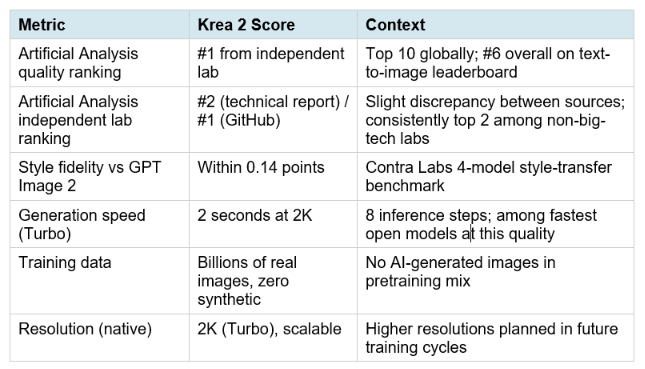
The Artificial Analysis ranking deserves precise reading. The GitHub README cites #1 among independent lab models. The technical report says #2 among independent labs and top 10 globally. Both are confirmed by Krea's own release notes, which state #1 from an independent research lab and #6 globally on the text-to-image leaderboard at different points. The minor discrepancy likely reflects different evaluation time windows. Either way: top-2 among independent lab models, top-10 globally, from an image model that is now free to download and commercial for small teams.
The style fidelity comparison with GPT Image 2 is striking. Within 0.14 points in a four-model style-transfer benchmark puts Krea 2 in direct competition with OpenAI's closed proprietary model on a creative quality dimension, at open weights with a commercial license. That gap will close further as the community trains LoRAs on specific styles.
For a broader look at how Krea 2 positions against other image generation models including Seedream 3.0, FLUX variants, and Midjourney in 2026, the best AI image generation tools comparison 2026 covers head-to-head quality, speed, and cost benchmarks across the full landscape.
7. Running Krea 2 Locally: ComfyUI, SGLang, and Diffusers
ComfyUI
Both Krea 2 RAW and Turbo load in ComfyUI 0.26.0 or later via standard diffusion model nodes. Update to the latest ComfyUI version, download the workflow from the ComfyUI template library, and follow the note in the workflow to place model files in the correct model directory. The safetensors files go in the diffusion_models folder; the Qwen3-VL 4B text encoder goes in text_encoders as qwen3vl_4b_fp8_scaled.safetensors; the Qwen Image VAE goes in the vae folder.
The ComfyUI community has already produced quantized variants including fp8 and nvfp4 versions of Turbo and four official style LoRAs from Krea: coolblue, darkbrush, plasmoid, and warmpastel are available as .safetensors files in the community Hugging Face repo. These four LoRAs demonstrate the style transfer quality achievable with the Raw-to-Turbo workflow.
SGLang
Day-0 support landed in SGLang at launch. If you are running Krea 2 in a serving context for higher-throughput inference, SGLang is the recommended path for GPU-optimized batch generation.
Python Diffusers
For direct Python integration, Krea 2 runs via the HuggingFace diffusers library using Krea2Pipeline in torch.bfloat16. Set OSS_RAW and OSS_TURBO environment variables to the paths of your downloaded safetensors files. Raw runs at 52 steps with guidance scale 3.5 for research-quality output. Turbo runs at 8 steps for production inference.
Hardware Requirements
Krea 2 Turbo in bfloat16 requires a GPU with at least 16GB VRAM for comfortable operation. The fp8 quantized version from the community brings this down to approximately 10 to 12GB, and the nvfp4 variant is targeting 8GB cards. RAM: 16GB or more system RAM recommended. Storage: approximately 24GB for the full bfloat16 Raw and Turbo checkpoints combined; quantized versions reduce this meaningfully.
8. The Community License: What You Can and Cannot Do
The Krea 2 Community License is the governance document that defines who can use these weights for what. Understanding it precisely matters before building anything commercial on top of Krea 2.
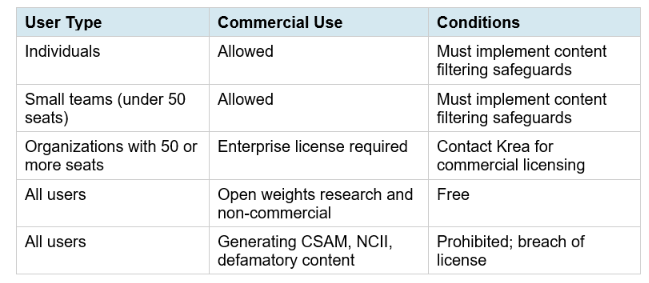
The content filtering requirement is a meaningful compliance obligation. The license explicitly requires deployers to implement technical safeguards to prevent the generation of unlawful materials, non-consensual intimate imagery (NCII), CSAM, or defamatory assets. Deployers who fail to implement required safeguards are in breach of the license. Krea's hosted products use a combination of proprietary and third-party input and output classifiers. Third-party deployers need to implement their own equivalent layer.
Hot take: the 50-seat threshold for enterprise licensing is a smart structure. It keeps the model free and commercially usable for the solo developer, the small studio, and the research team while capturing revenue from the large enterprise deployments that can afford it. This mirrors the approach Llama 4 and Mistral have taken, and it has proven to drive significantly more ecosystem adoption than pure non-commercial open source.
The only comprehensive program designed to take you from basic prompting to building interactive Artifacts, custom integrations, and deploying production-ready code with Claude Code.
9. Safety Model and Content Policy
Krea conducted multiple rounds of internal and external safety evaluations before release, including adversarial testing designed to assess the model's resilience to attempts to elicit harmful or policy-violating outputs. The training pipeline applied targeted fine-tuning to reduce susceptibility to harmful content generation in response to both direct and adversarial prompts.
One note worth addressing directly: within hours of the Krea 2 release, posts appeared on X claiming that the model generates high-quality anatomy and that a community ComfyUI node (ComfyUI-ConditioningKrea2Rebalance on GitHub) could be used to bypass safety filters. This is factual information that circulates with any open-weights release, and Krea's license explicitly anticipates it: the Community License requires all deployers to implement content filtering measures. The existence of bypass techniques in the community does not change the legal or ethical obligations of anyone building a product on top of Krea 2.
Krea's hosted platform continues to use input and output classifiers to block policy-violating content. The open weights release does not include those classifiers, which is why the license makes deployer-side filtering mandatory rather than optional.
10. Who Should Use Krea 2 and For What
LoRA Trainers and Fine-Tuners
Krea 2 Raw is the most interesting open-source fine-tuning base released in 2026. The undistilled mid-training checkpoint gives you a malleable latent space with genuine room to push the model toward custom styles, characters, and subjects. If you are building a custom image model for a specific brand, product, or aesthetic, start here.
Creative Studios and Agencies
Krea 2 Turbo at 2K resolution in 2 seconds on consumer hardware changes the economics of local image generation for creative production. Campaign concepts, editorial directions, brand exploration, product imagery, and early design iterations no longer require cloud API calls with per-image costs. Teams under 50 people can run this commercially for free under the community license.
Developers Building Image Generation Products
For developers building image generation into products, Krea 2 Turbo via the diffusers library, ComfyUI, or SGLang gives you a top-10 globally ranked model at open weights. The 50-seat license threshold means you can prototype and scale to small commercial deployments before needing an enterprise arrangement. The Krea API is also available for teams who want the model without running their own inference infrastructure. For a step-by-step implementation guide to building image generation pipelines with Python, the Agentic AI Launchpad 2026 course covers diffusion model integration, API wrappers, and production deployment patterns in its AI applications module.
Researchers
The release of a mid-training checkpoint from a top-10 globally ranked image model under a permissive license is genuinely useful for the research community. Post-training research, alignment experiments, capability evaluation, and scaling studies all benefit from access to a base that has not been baked into a specific post-trained direction. The iREPA training technique and the no-synthetic-data pretraining decision both deserve independent study.
The ComfyUI Community
Day-0 ComfyUI support, four official style LoRAs already published, and a community already producing quantized variants means Krea 2 Turbo is immediately practical for anyone with an existing ComfyUI workflow setup. The aesthetic range, from photographic to anime to editorial macro, is broader than most models at this speed tier, which makes it useful across a wider range of creative projects.
Frequently Asked Questions
What is Krea 2 Raw and how is it different from Krea 2 Turbo?
Krea 2 Raw is an undistilled mid-training checkpoint with no post-training alignment, RLHF, or aesthetic distillation applied. It is diverse and malleable, making it ideal for LoRA training and post-training research but not suited for direct high-quality generation. Krea 2 Turbo is an 8-step distilled checkpoint distilled from a fully post-trained RL checkpoint. It produces consistent, high-quality images at 2K resolution in 2 seconds. The intended workflow is to train LoRAs on Raw and run them on Turbo for fast inference.
Is Krea 2 free to use commercially?
Yes for individuals and teams under 50 seats, under the Krea 2 Community License. All users must implement content filtering safeguards to prevent generation of unlawful content. Organizations with 50 or more seats require an Enterprise license from Krea. Research and non-commercial use is free for all users regardless of organization size.
How do I run Krea 2 in ComfyUI?
Update ComfyUI to version 0.26.0 or later. Download the Krea 2 workflow from the ComfyUI template library. Download the krea2_raw_bf16.safetensors and krea2_turbo_bf16.safetensors files from Hugging Face and place them in your ComfyUI diffusion_models folder. Download the Qwen3-VL 4B text encoder (qwen3vl_4b_fp8_scaled.safetensors) and place it in text_encoders. Download the Qwen Image VAE and place it in the vae folder. Load the text encoder in CLIPLoader with type set to krea2. Both Raw and Turbo then load through standard diffusion model nodes.
How do I train a LoRA on Krea 2 Raw?
Krea recommends using the Ostris AI Toolkit or standard HuggingFace diffusers fine-tuning workflows. Train your LoRA on the Krea 2 Raw checkpoint, targeting the style, subject, or character you want to capture. Once trained, apply the LoRA to Krea 2 Turbo for fast inference. LoRAs trained on Raw are specifically designed to transfer strongly to Turbo, so you get the fine-tuning quality from Raw at Turbo's 8-step 2K generation speed.
What hardware do I need to run Krea 2 locally?
Krea 2 Turbo in bfloat16 requires approximately 16GB VRAM. Community fp8 quantized variants bring this down to approximately 10 to 12GB. nvfp4 variants target 8GB VRAM. System RAM of 16GB or more is recommended. Storage for the full bfloat16 Raw plus Turbo checkpoints is approximately 24GB combined; quantized versions are smaller. Turbo generates at 2K in approximately 2 seconds on a modern GPU at full precision.
How does Krea 2 rank against FLUX and other open image models?
Krea 2 ranks #1 among independent lab text-to-image models on Artificial Analysis and #6 globally on the text-to-image leaderboard. In a Contra Labs 4-model style-transfer benchmark, Krea 2 Large scored within 0.14 points of GPT Image 2 on style fidelity. Krea 2 Turbo generates at 8 steps, which puts it in the same speed tier as FLUX.1-schnell, while covering a wider aesthetic range and offering a more commercially permissive license than FLUX at this quality level.
What is the Krea 2 Community License?
The Krea 2 Community License allows individuals and teams with fewer than 50 seats to use the model commercially, provided they implement content filtering to prevent generation of unlawful materials including CSAM, NCII, and defamatory content. Organizations with 50 or more seats need an Enterprise license. Research and non-commercial use is free for all. The license is available on the Krea 2 Hugging Face page and in the GitHub repository.
Was Krea 2 trained on AI-generated images?
No. Krea explicitly excluded AI-generated images from the pretraining data mix. The technical report explains this as a deliberate quality decision: synthetic images are easier to learn than real images, and even a small proportion introduces biases that impose an upper bound on model quality. Krea built in-house classifiers to filter synthetic images at every stage of the training pipeline. The training set consists of billions of real images with enriched captions produced through a multi-stage OCR and captioning pipeline.
Recommended Blogs
- AI Image and Video Generation Collection
- Best AI Image Generation Tools 2026: FLUX, Midjourney,
- Open-Source LLMs and Image Models
- FLUX.1 Review: Open Source Image Model Benchmarks
- AI Industry News and Trends: Model Releases and Open Source
- How to Fine-Tune Image Models with LoRA
Resources & Community
Join our community of 70,000+ AI enthusiasts and learn to build powerful AI applications! Whether you're a beginner or an experienced developer, Build Fast with AI helps you understand and implement AI in your projects.
- Website — buildfastwithai.com
- LinkedIn — Build Fast with AI
- Instagram — @buildfastwithai
- Founder Twitter — @satvikps
- Twitter — @BuildFastWithAI
Agentic AI Launchpad 2026
A structured 6-week cohort program that takes you from AI basics to building and deploying real-world agentic AI systems. Includes live sessions, expert mentorship, project reviews, and a builder community network.
Ready to go from learning to building? Join the next cohort → Agentic AI Launchpad 2026
Free AI Resources
Access free tools, workshops, and micro-learning to keep building:
- AI Workshops — Free resources, upcoming events & past recordings
- Unrot — Learn AI in 5 minutes a day (free micro-learning app)
Open-source AI image generation is moving fast. Follow @BuildFastWithAI on X to stay ahead of every model drop, LoRA release, and ComfyUI update that matters for builders.
References
- Krea AI — Official Krea 2 Open Source Page
- Krea AI — Krea 2 Technical Report
- Krea AI — Krea 2 Release Notes and Artificial
- GitHub — krea-ai/krea-2: Official Inference Code
- Hugging Face — krea/Krea-2-Turbo
- Hugging Face — Comfy-Org/Krea-2
- VentureBeat — Enterprise-grade AI Image Generation
- ComfyUI Newsletter — Krea 2 Open-Source Models

