
On April 28, 2026, I woke up to one of the most significant product announcements in AI's recent push into creative industries. Anthropic launched 9 Claude connectors for professional creative software, simultaneously partnering with Adobe, Blender, Autodesk, Ableton, Splice, Affinity by Canva, SketchUp, Resolume Arena, and Resolume Wire. All in one day. All available immediately across every Claude plan, including Free.
This is not a chatbot talking about your tools. Claude now works inside them.
I've spent the past 24 hours digging into every connector, reading the setup docs, tracking the community reaction, and thinking through what this actually means for developers, 3D artists, music producers, and designers. Here is the full breakdown.
What Are Claude Connectors?
Claude connectors are integrations built on the Model Context Protocol (MCP) that let Claude access, read, and act inside external software tools. Instead of copying data out of your app and pasting it into a chat window, Claude connects directly to the platform, reads the live context, and executes tasks from within your workflow.
MCP is an open standard Anthropic developed in 2024 for connecting AI models to external tools, data sources, and workflows. Think of it as a universal adapter. A connector is a specific implementation of that protocol for a named platform, like Blender or Photoshop.
If you want to understand how MCP works at the technical level before setting up any connector, the MCP Workshop in the Build Fast with AI experiment notebooks covers the protocol from first principles with hands-on implementation examples.
The key distinction: connectors are different from Claude Code, different from Claude Cowork, and different from Claude Design. Each serves a different user. Connectors are for creatives who already know their professional tools and want AI assistance inside those tools, not as a replacement for them.
My take: this is the right architecture. The worst AI integrations I've seen are the ones that pull you out of your workflow to interact with a chatbot. The best ones meet you where you are. Connectors do exactly that.
The Full List: All 9 Claude Creative Connectors Explained
All nine connectors launched on April 28, 2026 and are available immediately across all Claude plans. Here is what each one actually does, because the marketing language glosses over some important differences.
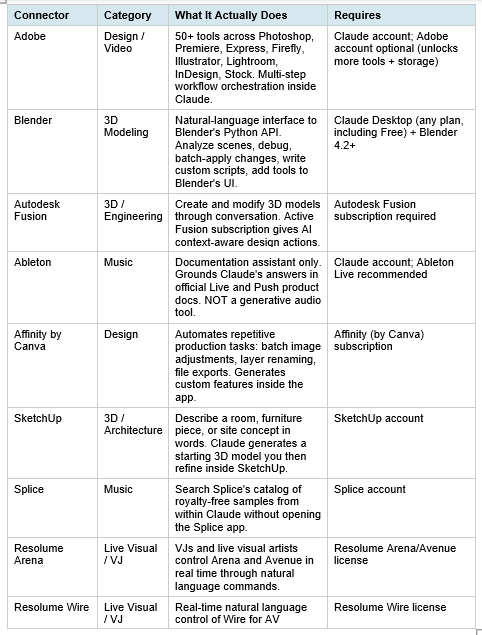
A few things worth flagging about this table. First, the Ableton connector is frequently described as AI for music production, but that oversells it. It is a documentation assistant: you ask it questions about Live and Push and it pulls from official Ableton docs. Useful? Yes. Generative audio composition? No.
Second, the Blender connector is the most technically interesting because it exposes Blender's full Python API to Claude. That means Claude is not just answering questions about Blender, it can actually execute code inside your scene. Which brings serious power and serious responsibility.
Speaking of Claude inside professional tools, if you want to understand how Anthropic's broader product strategy has evolved from chat to agentic workflows, the What Is Claude Cowork guide gives helpful context on where connectors fit in the larger Claude ecosystem.
How to Set Up the Blender Connector (Step-by-Step)
The Blender connector is the most requested setup based on community reaction after the announcement. Here are the exact steps. You need two things: Claude Desktop (any plan including Free) and Blender 4.2 or later (free at blender.org).
Step 1: Add the Blender Connector in Claude Desktop
• Open Claude Desktop and sign in to your account
• Go to Customize in the left sidebar
• Click the Connectors tab, then the + button
• Click Browse connectors and search for 'Blender'
• Click Add to install the connector
Step 2: Install the Blender Add-on
• Open the Blender MCP Server page in a browser alongside Blender
• Download the official add-on file from the Blender connector setup page
• In Blender: go to Edit > Preferences > Add-ons > Install
• Select the downloaded add-on file and enable it
Step 3: Connect Each Session
• Open your Blender project
• Press N to open the 3D View sidebar
• Find the BlenderMCP panel and click 'Connect to Claude'
• The Blender tools will now appear in Claude Desktop under the connector icon
A practical note: you need to re-connect each time you open a new Blender session. This is not a bug. It is a design choice that keeps Claude from accessing Blender scenes without explicit permission each time.
Also worth knowing: because the Blender connector is built on the open MCP standard, it works with other MCP-compatible clients, including Claude Code, Cursor, VS Code, and Windsurf. Blender's commitment to open source and interoperability is reflected in this design decision, and Anthropic explicitly joined the Blender Development Fund as a corporate patron to support continued development of the Python API that makes this possible.
For developers who want to go deeper on writing Python scripts to automate Blender scenes through Claude, check out the How to Build Claude-Powered RAG from Scratch notebook as a starting reference for understanding how Claude processes and executes tool calls through structured context.
How to Set Up the Adobe for Creativity Connector
The Adobe connector gives Claude access to more than 50 tools across Creative Cloud, including Photoshop, Premiere, Express, Firefly, Illustrator, Lightroom, InDesign, and Stock. Unlike the Blender connector, an Adobe account is optional but recommended.
Guest Access vs. Signed-In Access
You can use approximately 40 standard Adobe tools without an Adobe account at all, directly in chat. Signing in with a free or paid Adobe account unlocks higher usage limits, access to more tools, Creative Cloud storage for your assets, and continuity across sessions.
Setup Steps
- Open Claude at claude.ai or Claude Desktop and sign in
- In the left sidebar, click Customize
- Select the Connectors tab, then click the + button
- Click Browse connectors, search for 'Adobe for creativity,' and click it
- Click Install and confirm the connection
- Sign in with your Adobe account to unlock higher limits (optional but recommended)
For Teams and Enterprise
An enterprise admin must enable third-party connectors under Organization Settings before members can use the full experience. Owners can also provision the connector organization-wide. This is a meaningful friction point for enterprise rollout, but standard for any serious production environment.
I think the dual-mode access (guest vs. signed-in) is smart product design. It lowers the barrier to try, while giving Adobe a clear incentive to push users toward account creation. For serious creative work you would use a paid Creative Cloud account anyway, so in practice this distinction will matter mostly to students and casual users.
What Claude Can Actually Do Inside These Tools
Anthropic outlined four major use cases. I want to be concrete about each one, because the marketing language can make these feel more powerful than they currently are for some tools.
1. Learning and Mastering Complex Software
Claude acts as an on-demand tutor inside the tool you are using. Ask it to explain a modifier stack in Blender, walk through a synthesis technique in Ableton, or demonstrate an unfamiliar Photoshop filter. This works well for all connectors but is where the Ableton connector currently lives entirely: it is an education tool grounded in official documentation, not a creative tool.
2. Extending Tools with Code
This is where Claude Code plus a connector becomes genuinely powerful. Claude Code can write custom shaders, script procedural animations, generate parametric 3D models, and produce documented code you can reuse. The Blender connector is the clearest example: Claude can write Python that adds entirely new tools to Blender's interface, not just automate existing ones.
3. Bridging Tools in a Pipeline
Claude can translate formats, restructure data, and keep assets synchronized across projects that span multiple applications. The multi-connector workflow is the compelling use case here. A music producer could search samples in Splice, pull them into Ableton, and manage the project through Claude without switching contexts. A 3D artist could describe a concept in SketchUp, refine it in Blender, and batch-process assets across the scene.
4. Handling Repetitive Production Work
Batch-processing assets, setting up project scaffolding, applying procedural changes across a scene. For Affinity by Canva, this is the core value proposition: batch image adjustments, layer renaming, and file exports that would take hours manually are described in natural language and executed in seconds.
If you want prompts specifically designed to get better results from Claude in creative and analytical tasks, the 150 Best Claude Prompts guide covers prompting strategies that apply directly to connector-based workflows.
Don't just use ChatGPT. Learn to build custom LLM agents, RAG pipelines, and full-stack Agentic AI apps in our intensive 6-week program.
The Strategic Picture: Why Anthropic Is Doing This
This connector launch did not happen in isolation. Eleven days earlier, on April 17, 2026, Anthropic launched Claude Design, powered by Claude Opus 4.7. That product sent Figma's stock down 7% on launch day and wiped roughly $1.2 billion from Figma's market cap in a single session. Anthropic's CPO Mike Krieger had resigned from Figma's board three days before the announcement.
Claude Design targets non-designers who need to get from an idea to something visual quickly. The creative connectors target the opposite end of the market: professionals who already know their tools and want AI assistance inside them. Together, Anthropic is approaching the creative software market from both ends simultaneously.
There is also a data angle. Anthropic's consumer plans allow model training on opt-in user interactions. Creative workflows inside Blender, Photoshop, and Ableton would generate domain-specific training data on 3D modeling, music production, and design processes that competitors would struggle to replicate. This is a long-term play, not just a feature release.
The academic partnerships with Rhode Island School of Design, Ringling College of Art and Design, and Goldsmiths University of London are part of the same strategy. Students who learn creative computation with Claude embedded in their workflow become professionals who expect Claude to be embedded in their workflow. Anthropic is building habits at the formation stage.
For context on how Claude's connector approach compares to OpenAI's curated plugin ecosystem, the OpenAI Codex 2026 full review covers that competitive landscape in detail, including how MCP-based integrations differ architecturally from OpenAI's approach.
What Creatives Are Actually Saying (The Honest Reaction)
The reaction across the AI and creative communities on X and Reddit was sharply divided. I think both sides are right, which tells you something important about where these connectors currently sit.
The Enthusiasm Is Legitimate
Many creators described the approach as the 'right direction' for AI: embedded in existing tools rather than functioning as a separate chatbot experience. The multi-connector pipeline possibilities sparked real excitement. The idea that Claude could chain Splice to Ableton to a Blender asset pipeline with no manual handoffs is genuinely compelling for production workflows.
Developers showed particular interest in the Blender connector's Python API exposure. The ability to write scripts that add new UI tools directly to Blender's interface, not just automate existing operations, puts Claude closer to a co-developer than an assistant.
The Skepticism Is Also Legitimate
Critics made three valid points. First, some demo examples showed tasks that experienced users could accomplish faster with keyboard shortcuts or existing workflows. If Claude takes 30 seconds of natural language back-and-forth to do something a power user does in 2 keystrokes, it is not saving time for that user.
Second, there are skill atrophy concerns. A Blender user who relies on Claude to generate Python scripts for procedural modeling may never develop the coding knowledge needed to troubleshoot or customize those scripts. The connectors currently have no built-in educational component to mitigate this risk.
Third, pricing and latency questions remain open. Production use requires knowing what requests cost, how much API overhead the connector adds to a real-time workflow, and what happens when Claude makes a destructive change inside your project. The Blender connector currently executes arbitrary Python code inside your scene, which is powerful but requires you to save your work before every Claude interaction.
My honest read: these connectors are closer to powerful beta features than production-ready tools for professional studios right now. That changes fast. But the early adopters who build workflows around them today will have a significant advantage in 6 months when they are more polished.
Frequently Asked Questions
What are Claude connectors?
Claude connectors are integrations built on the Model Context Protocol (MCP) that allow Claude to access and act directly inside external software tools. Rather than requiring you to copy data between apps, Claude connects to the platform, reads the live context inside your project, and can execute tasks on your behalf. Anthropic launched 9 creative software connectors on April 28, 2026.
Do I need a paid Claude plan to use creative connectors?
No. All 9 creative connectors launched on April 28, 2026 are available across all Claude plans, including the Free plan. The Blender connector specifically requires Claude Desktop (any plan, including Free) and Blender 4.2 or later. The Adobe connector offers guest access to approximately 40 tools without an Adobe account; signing in with a free or paid Adobe account unlocks more tools and higher usage limits.
How do I connect Claude to Blender?
You need Claude Desktop (any plan, including Free) and Blender 4.2 or later. In Claude Desktop, go to Customize > Connectors, search for 'Blender,' and click Add. Then install the official MCP add-on inside Blender via Edit > Preferences > Add-ons. Each time you work, open your Blender scene and click 'Connect to Claude' in the BlenderMCP sidebar panel (N key > sidebar).
What can Claude do inside Blender?
Claude can analyze and debug entire Blender scenes, batch-apply changes to objects in a scene, write Python scripts that add new tools to Blender's interface, clean unused data from scenes, and explain complex modifier or Geometry Nodes setups. The connector exposes Blender's full Python API, which means Claude can execute arbitrary code inside your scene. Save your work before each Claude interaction.
Is the Claude Blender connector open source?
Yes. The Blender connector is built on the open Model Context Protocol and the Blender developers created the official MCP implementation. Because it uses MCP, other LLMs beyond Claude, including other MCP-compatible AI clients, can also connect to Blender through this protocol. Anthropic joined the Blender Development Fund as a corporate patron to support the Python API development.
What is the difference between the Claude Adobe connector and Adobe Firefly?
Adobe Firefly is Adobe's in-house AI model built directly into Creative Cloud apps for tasks like generative fill in Photoshop and AI video generation in Premiere. The Claude Adobe connector brings Claude, a general-purpose AI model, to work alongside Adobe's tools from within the Claude interface. They can coexist: Firefly handles generative image tasks inside Photoshop while Claude handles workflow orchestration, copy, project planning, and multi-step production tasks across 50+ Creative Cloud tools from within Claude.
Can Claude automate Photoshop tasks?
Yes, through the Adobe for Creativity connector. Claude can generate layer adjustments, apply filters, retrieve design assets from Creative Cloud libraries, resize and reformat videos for different social platforms, and orchestrate multi-step workflows across Photoshop, Premiere, Express, Firefly, and other Adobe apps. Describe what you want to create and the connector orchestrates the execution across the relevant tools.
Does the Ableton connector let Claude compose or generate music?
No. The Ableton connector is a documentation assistant, not a generative music tool. It grounds Claude's answers in official Ableton Live and Push product documentation. You can ask it questions like 'how do I set up sidechain compression in Live 12' or 'what is the best way to warp vocal samples,' and it will pull accurate answers from Ableton's official docs. It does not compose music, generate MIDI, or interact with your Live project directly.
Recommended Blogs
These are real posts from Build Fast with AI that give you deeper context on the Claude ecosystem:
The only comprehensive program designed to take you from basic prompting to building interactive Artifacts, custom integrations, and deploying production-ready code with Claude Code.
References
- Anthropic — Claude for Creative Work (Official Announcement)
- Adobe Blog — Adobe for Creativity Connector Launch
- Anthropic Docs — Using the Blender Connector in Claude
- Adobe Developer — Getting Started with Adobe for Creativity
- 9to5Mac — Anthropic Releases 9 Claude Connectors for Creative Tools
- Glitchwire — Anthropic Brings Claude to Photoshop, Blender, and Ableton
- GitHub — BlenderMCP: Blender + Claude via Model Context Protocol
- Anthropic Support — Get Started with Custom Connectors Using Remote MCP