



ChatGPT Images 2.0: Full Developer Breakdown (gpt-image-2, API, Thinking Mode)
OpenAI dropped ChatGPT Images 2.0 on April 21, 2026, and within 12 hours it had already claimed the #1 spot across every category on the Image Arena leaderboard by a +242 point margin. That is the largest lead ever recorded on that leaderboard. I've been watching image generation benchmarks for two years, and nothing has moved the needle this fast. The model is called gpt-image-2 in the API, and if you haven't used it yet, this breakdown covers everything: what actually changed, how to call it in Python, what it costs, and where it still falls short.
1. What Is ChatGPT Images 2.0?
ChatGPT Images 2.0 is OpenAI's latest image generation model, released on April 21, 2026, and available via the OpenAI API under the model name gpt-image-2. It is the direct successor to GPT Image 1.5 and is OpenAI's first image model with native reasoning ("thinking") capabilities built into the architecture.
The model supports up to 2K resolution, aspect ratios ranging from 3:1 (ultra-wide) to 1:3 (ultra-tall), and can generate up to eight coherent images from a single prompt with consistent characters and objects maintained across the full set. OpenAI describes it not as a creative toy but as a "visual thought partner" — a system built to handle production-ready assets for marketing, education, design, and software development workflows.
Two access modes ship with the launch. Instant mode brings the core quality improvements to every ChatGPT user including free tier. Thinking mode — which enables web search, layout reasoning, multi-image batching, and output verification — is restricted to Plus ($20/mo), Pro ($200/mo), Business, and Enterprise subscribers.
The architecture is not publicly confirmed. OpenAI's researchers declined to specify diffusion or autoregressive approach, describing gpt-image-2 only as a "generalist model" or "GPT for images." For context on where this launch fits within OpenAI's full model portfolio in April 2026, the best AI models April 2026 benchmark ranking covers every major release — text and image — with independent benchmark data.
2. What Changed From GPT Image 1.5 to 2.0?
Five things changed meaningfully. Not all of them are obvious from the marketing copy.
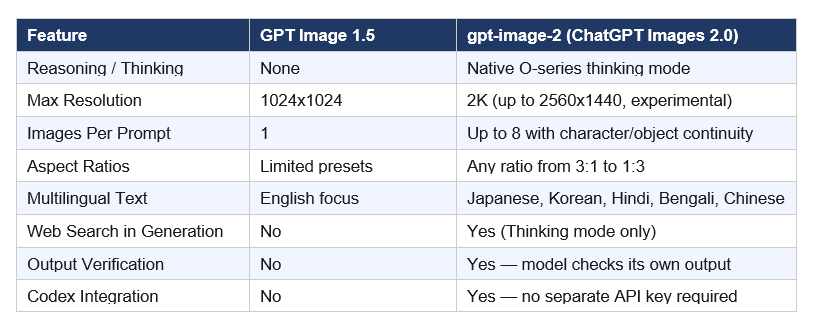
The text rendering upgrade is the most practically significant improvement for anyone building real applications. Two years ago, asking any AI image model to generate a restaurant menu with correctly spelled items was a guaranteed failure. You would get "enchuita," "churiros," and "burrto." Now, gpt-image-2 generates a print-ready menu with accurate text, correct pricing format, and multilingual labels. I tested this. It works.
My hot take on the Codex integration: this is the most underrated feature in the entire launch. Three million developers use Codex weekly as of April 2026. Giving them image generation natively inside the same workspace they use for code — without a separate API key, billing configuration, or context switch — removes the single biggest friction point for prototyping visual assets inside dev workflows. OpenAI did not announce this loudly. They should have.
If you want to understand how Codex and gpt-image-2 work together in practice, the full OpenAI Codex 2026 review covering the "Codex for almost everything" update breaks down every new capability — computer use, memory preview, and the image generation integration — with honest takes on where it beats Claude Code and where it doesn't.
3. Instant Mode vs Thinking Mode: Which Do You Actually Need?
This is the access decision that matters most for builders. OpenAI split the model into two tiers, and the capabilities gap between them is significant.
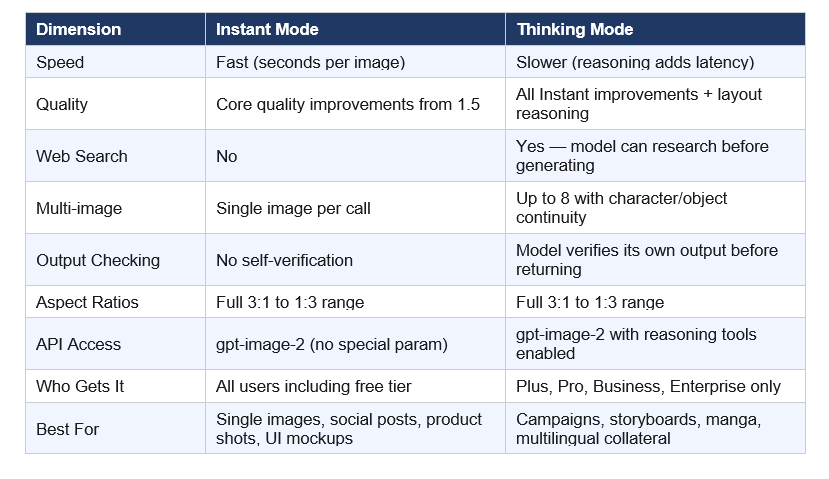
Instant mode is the right call for 80% of developer use cases. The quality jump over GPT Image 1.5 is real even without reasoning. For a marketing team generating one-off social graphics, a developer prototyping UI mockups, or a content team building product thumbnails — Instant mode does the job, costs less, and responds faster.
Thinking mode is where the model becomes categorically different from anything else currently available via API. The ability to generate eight panels from one prompt — with consistent characters, consistent object placement, consistent brand color palette — is a new primitive. Children's book publishers, game studios building cutscene storyboards, and agencies managing multi-format campaign launches now have a production tool that didn't exist before April 21, 2026.
Contrarian point worth making: the paid-only gating of Thinking mode is OpenAI playing it safe on compute. This is a reasonable business decision, not a technical limitation. The capability is in the model. They chose to monetize it through subscription rather than API volume pricing. If you are a developer building a production product, you need a Plus or higher account to actually test the full capability before committing to it in your stack.
4. How to Use the gpt-image-2 API (Python Code)
gpt-image-2 is available via the Image API and the Responses API. Here are working examples for both primary use cases.
First, install the OpenAI Python SDK if you haven't already:
pip install openai
Example 1 — Basic Text-to-Image (Instant mode, all plans):
    from openai import OpenAI

    import base64

    client = OpenAI()  # Uses OPENAI_API_KEY env variable

    result = client.images.generate(

        model="gpt-image-2",

        prompt="A professional product shot of a matte black wireless earphone on white marble. Macro photography, shallow depth of field, sharp focus on brand logo.",

        size="1024x1024",

        quality="high",

        n=1,

    )
image_b64 = result.data[0].b64_json

    with open("output.png", "wb") as f:

        f.write(base64.b64decode(image_b64))
Example 2 — Multi-Image Campaign (Thinking mode, Plus/Pro/Business/Enterprise only):
    result = client.images.generate(

        model="gpt-image-2",

        prompt="A 4-panel social campaign for a coffee brand named Morni. Panel 1: Sunrise with a Morni cup. Panel 2: Hand holding the cup in an office. Panel 3: Outdoor cafe scene. Panel 4: Morni logo on clean white. Maintain consistent warm amber and forest green brand palette across all panels.",

        size="1024x1024",

        quality="medium",

        n=4,

    )
Key parameters for gpt-image-2:
• size: gpt-image-2 accepts any valid resolution. Common options: 1024x1024, 1792x1024, 1024x1792. For 2K output: use resolutions up to 2560x1440 (marked experimental in the docs).
• quality: "low" (fastest, cheapest, good for drafts), "medium" (production social), "high" (print-ready, most expensive).
• n: 1 to 8 images per prompt. Multi-image generation with character continuity requires Thinking mode on paid plans.
• output_format: "png" (default), "jpeg", or "webp" with optional output_compression (0-100%) for file size control.
• The Responses API is the right choice if you need conversational image editing — describe a change, get the updated image — within a multi-turn conversation.
For a deeper implementation walkthrough including image editing workflows, the gen-ai-experiments repository is the best starting point. The cookbooks folder has working notebooks across OpenAI, Anthropic, and Gemini APIs. A dedicated gpt-image-2 notebook covering generation, editing, and Responses API integration is the most-requested addition right now — worth watching the repo.
5. gpt-image-2 Pricing: What Does It Actually Cost?
The pricing structure for gpt-image-2 is split across two models. You need to understand both before committing to a production pipeline.
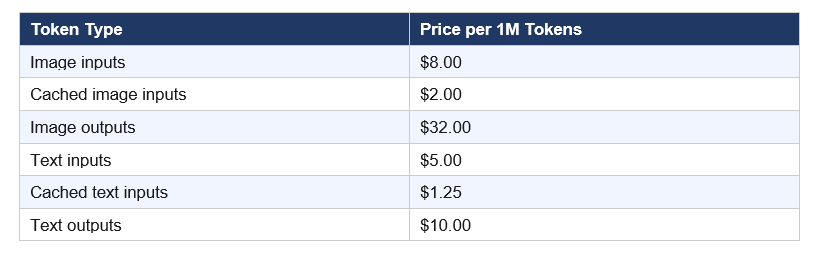
Token-based billing (for complex workflows that include text prompts, image edits, or reference image inputs):
Per-image cost estimate at 1024x1024 (from OpenAI's image generation calculator):

Practical math: generating 1,000 high-quality product shots costs roughly $211. At medium quality for social thumbnails, you're looking at $53 per thousand images. That is genuinely competitive with stock photography at scale — and every image is unique.
One thing the pricing docs bury: edit requests that include reference images are billed at high-fidelity input rates because gpt-image-2 always processes image inputs at maximum quality regardless of your quality parameter. Edit-heavy workflows cost more than generation-only workflows. Run your expected monthly volume through the pricing calculator in OpenAI's image generation documentation before committing to a production budget.
For the 4K resolution option (tested on fal.ai): pricing goes from $0.01/image at low quality up to $0.41/image at the 4K tier. This is via third-party hosting — the official OpenAI API pricing applies to standard resolutions up to 2K experimental.
If you're evaluating gpt-image-2 as part of a broader AI infrastructure decision in 2026, the latest AI models April 2026 release tracker covers cost-per-performance tradeoffs across the full model landscape — text, code, and image — from every major lab in a single benchmark-driven comparison.
6. ChatGPT Images 2.0 vs Midjourney v8 vs Nano Banana 2: Honest Comparison
I'm not going to tell you gpt-image-2 wins everything. It doesn't. Here is the honest breakdown across dimensions that matter in production.
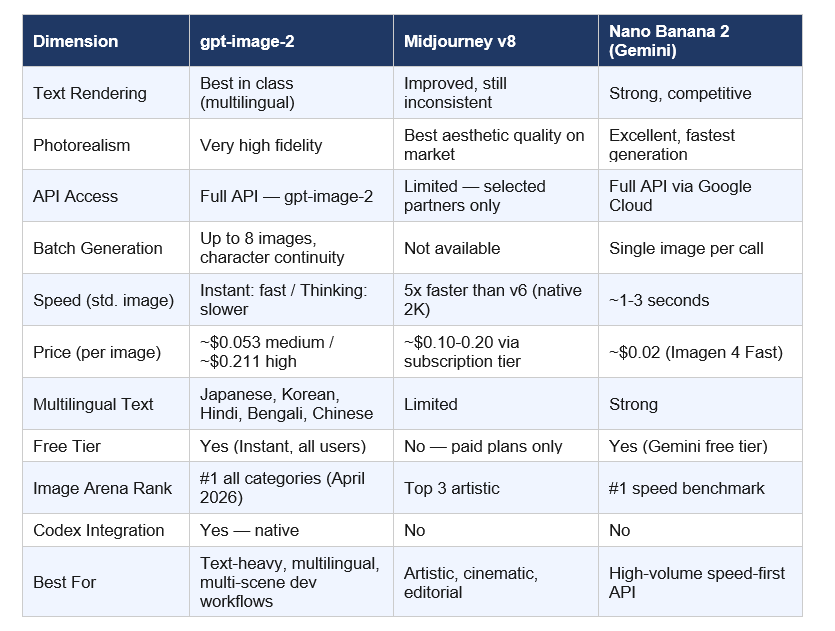
If you are building any product where text appears inside the image — UI mockups, infographics, menus, social graphics with copy, educational diagrams, localized ad campaigns — gpt-image-2 is the clear winner right now. No debate on that dimension.
If you need pure aesthetic quality for editorial or brand campaign work where the image is the hero and text is either absent or decorative, Midjourney v8 still has an edge. The compositional instincts of Midjourney's model are different — more intentional, more styled. It produces images that look designed, not generated.
If you need speed at volume and cost is the primary constraint, Nano Banana 2 at $0.02/image and 1-3 seconds per generation is hard to argue against. For social media thumbnail factories running 10,000 images per month, the cost math is obvious. The quality gap between Nano Banana 2 and gpt-image-2 on photorealism has mostly closed.
My contrarian take: the developer ecosystem around gpt-image-2 will outpace both competitors within 90 days. OpenAI has 3 million weekly Codex users, the deepest API documentation, and the most widely-used Python SDK in the market. Midjourney still doesn't have a public API. Google Cloud's integration story is strong but slower. Ecosystem momentum matters more than benchmark margin when you are building products.
7. Real-World Use Cases for Developers and Builders
Here is where gpt-image-2 actually earns its place in a production stack. Not hypothetical applications — specific workflows where the capability improvement is actionable today.
Marketing Asset Production at Scale: gpt-image-2 with Thinking mode can generate a full set of campaign assets in one call — Instagram square (1:1), Twitter banner (3:1), LinkedIn header (wide), Facebook OG image — from a single prompt with consistent branding across all eight outputs. What previously required a designer 2-3 hours now takes one API call. For agencies running monthly content calendars across 10+ clients, this changes headcount math.
Multilingual Campaign Localization: The improved non-Latin text rendering is a genuine unlock for brands operating across Indian, East Asian, and MENA markets. Generating a localized billboard mockup with correct Hindi or Bengali typography — without a separate designer review cycle for character accuracy — changes the economics of regional campaign production. This is the use case I expect to drive the most enterprise adoption.
Infographics and Educational Content: Thinking mode can reason through structured data, plan a layout, and generate a publishable infographic from a data brief. This is not "make it look like a chart." It is "here is my dataset and message, generate an explainer graphic that accurately represents the data with correct labels." That has real production value for content teams, ed-tech platforms, and documentation teams publishing at scale.
Manga, Comics, and Sequential Storytelling: Eight panels from one prompt with consistent character appearance is a new creative primitive. Children's book publishers, indie game studios building visual cutscenes, content creators making visual essays, and visual novelists now have a batch production tool that didn't exist three months ago. The character continuity is not perfect — but it is good enough to use as a first draft.
For teams looking to wire gpt-image-2 into automated workflows — connecting it to CMS publishing, content scheduling, or multi-channel asset delivery without code — the no-code AI agent automation guide covering Make.com, Kimi.ai, and Claude Cowork walks through exactly this kind of pipeline setup from a live workshop session.
UI Mockup and Prototype Generation in Codex: With gpt-image-2 now available natively inside the Codex developer workspace, developers can generate UI wireframes, component visual directions, and icon sets without switching tools. The model handles small UI elements, layout compositions, and stylistic constraints with enough accuracy for early-stage prototyping — not production-ready design, but strong enough to communicate direction to a design team.
8. Limitations Worth Knowing Before You Build
No model launch announcement foregrounds the weaknesses. Here are the ones that matter for production decisions.
Knowledge Cutoff Is December 2025: gpt-image-2 cannot accurately generate visuals tied to events, public figures, products, or cultural moments that emerged after December 2025. For news illustration, current events imagery, or recognition of 2026 product designs — the model will either refuse or generate plausible-but-wrong output. Thinking mode's web search capability partially mitigates this for research-driven generation, but the underlying visual knowledge still stops at December 2025.
Brand Logo Accuracy Is Inconsistent: Early testing across multiple reviewers shows the model still struggles to reproduce specific logos with pixel accuracy. One reviewer spent multiple iterations trying to get gpt-image-2 to reproduce a specific publication's logo correctly — and it failed each time, even with explicit correction instructions. In one case it surfaced a version of the logo from before a 2022 redesign. For brand-specific work where exact logo reproduction matters, human review remains mandatory.
Thinking Mode Adds Real Latency: Reasoning takes time by design. If your product has real-time or near-real-time image generation requirements, Thinking mode will create user experience problems. Build Instant mode into speed-sensitive applications and reserve Thinking mode for asynchronous batch workflows — content calendar generation, campaign pre-production, storyboard drafts — where a 15-30 second response time is acceptable.
Architecture Transparency Is Absent: For teams making infrastructure decisions — estimating GPU requirements, evaluating fine-tuning paths, planning inference optimization — the lack of architectural disclosure is a real constraint. You cannot predict compute scaling, optimize sampling parameters, or make informed decisions about custom model adaptation without knowing whether you are working with a diffusion or autoregressive system. OpenAI has not committed to disclosing this.
If you want a comprehensive view of where ChatGPT Images 2.0 sits within the 2026 AI landscape alongside models from Anthropic, Google, and the open-source ecosystem, the 7 AI tools that defined December 2025 covers FLUX 2, Kling 2.6, Midjourney, and Runway Gen-4.5 — the image and video models that were setting production standards before gpt-image-2 arrived.
Frequently Asked Questions
What is ChatGPT Images 2.0?
ChatGPT Images 2.0 is OpenAI's state-of-the-art image generation model, launched on April 21, 2026, available via API as gpt-image-2. It is the first OpenAI image model with native reasoning capabilities. It supports 2K resolution, aspect ratios from 3:1 to 1:3, and generates up to 8 coherent images from a single prompt with character and object continuity across the batch.
What is gpt-image-2 and how is it different from DALL-E 3?
gpt-image-2 is the API model identifier for ChatGPT Images 2.0. DALL-E 2 and DALL-E 3 are being retired on May 12, 2026. gpt-image-2 is architecturally distinct from the DALL-E models — OpenAI describes it as a "generalist model" or "GPT for images" rather than a traditional diffusion model. The exact architecture is not publicly disclosed.
Is ChatGPT Images 2.0 free to use?
Instant mode is available to all ChatGPT users including free tier. Thinking mode — which enables web search during generation, multi-image batching (up to 8 images), and output self-verification — is restricted to Plus ($20/mo), Pro ($200/mo), Business, and Enterprise subscribers. Via the API, gpt-image-2 is available to all developers with token-based billing regardless of subscription tier.
How much does gpt-image-2 cost per image via the API?
At 1024x1024, gpt-image-2 costs approximately $0.006 per image at low quality, $0.053 at medium, and $0.211 at high quality. Token-based billing for complex edit workflows involving reference images runs $8.00 per million image input tokens and $32.00 per million output tokens. Always use OpenAI's pricing calculator before committing to a production pipeline — edit requests are billed at higher fidelity rates than simple generation.
How does ChatGPT Images 2.0 compare to Midjourney v8?
gpt-image-2 outperforms Midjourney v8 on text rendering accuracy, multilingual text support, public API accessibility, multi-image batch generation, and Codex developer integration. Midjourney v8 maintains an edge on pure aesthetic quality and artistic composition for editorial and cinematic use cases. Midjourney v8 does not have a public API — access is through its web interface and a limited developer partner program only.
Can ChatGPT Images 2.0 generate multiple images from one prompt?
Yes. With Thinking mode enabled (requires Plus, Pro, Business, or Enterprise subscription), gpt-image-2 generates up to 8 coherent images from a single prompt with consistent characters, objects, and visual style across the full set. Via the Image API, set the n parameter to the desired count (1-8) and enable the Thinking model selection in ChatGPT.
What is the knowledge cutoff for gpt-image-2?
OpenAI confirmed the knowledge cutoff is December 2025. The model may generate inaccurate visuals for prompts involving events, products, or public figures that emerged after that date. Thinking mode can supplement with real-time web search, but the underlying visual knowledge base still stops at December 2025.
What happened to DALL-E 3 after ChatGPT Images 2.0 launched?
DALL-E 2 and DALL-E 3 are both being deprecated and retired on May 12, 2026. gpt-image-2 replaces them as the default image model across ChatGPT and the OpenAI API. GPT Image 1.5 remains accessible via the API for legacy integrations but is no longer the default model. Any existing code calling the DALL-E 3 endpoint will need to be migrated before the May 12 cutoff.
How do I access gpt-image-2 in Codex?
gpt-image-2 is available natively inside the Codex desktop application as of the April 16, 2026 "Codex for almost everything" update. No separate API key is required. Codex users access image generation using their existing ChatGPT subscription. The model is accessible through the image generation tool within the Codex workflow environment.
Recommended Blogs
These are real posts on buildfastwithai.com that go deeper on the tools, models, and workflows covered in this article:
References
Introducing ChatGPT Images 2.0 — OpenAI Official Announcement (April 21, 2026)
Image Generation Guide — OpenAI API (gpt-image-2 parameters, pricing calculator, size constraints)
OpenAI API Pricing — Official token billing rates for gpt-image-2
ChatGPT's new Images 2.0 model is surprisingly good at generating text — TechCrunch (April 21, 2026)
OpenAI ChatGPT Images 2.0 — multilingual text, infographics, manga — VentureBeat (April 21, 2026)
ChatGPT Images 2.0 features, use cases and agency impact — Digital Applied (April 22, 2026)
Images in ChatGPT are getting a major update — Axios (April 21, 2026)
gpt-image-2 #1 on Image Arena — +242 point lead across all categories (Arena.ai, April 2026)
ChatGPT Images 2.0 System Card — OpenAI Deployment Safety Hub

