


Build with AWS AI: Bedrock, Kiro & Amplify (2026 Guide)
88% of companies are already using AI in at least one business function. That number is from McKinsey. And yet, when I look at how developers actually build and ship software, most of them are still doing it the old way.
The gap between knowing AI exists and actually deploying production apps with it has never been more expensive. AWS closed a big chunk of that gap in 2025 and 2026 with three tools that genuinely change the workflow: Bedrock, Kiro, and Amplify Gen 2.
In a recent Build Fast with AI live workshop, Avinash Karthik (Software Manager, AWS Amplify) and Salih Guler (Senior Developer Advocate, AWS) walked 350+ developers through the entire stack live, from prompt to deployed production app in under an hour. I'm going to break down everything they covered, with the technical details you actually need.
This is not a summary. It's a working guide.
Watch the Full Workshop (Recommended)
If you want to see everything in action — from idea → code → deployed app in under 60 minutes — watch the full workshop recording below.
In this session, AWS experts walk through:
- Building an AI app using Bedrock
- Using Kiro for spec-driven development
- Deploying with Amplify Gen 2
- Real-world debugging and deployment flow
⚡ This is the fastest way to understand the full workflow end-to-end.
1. Why AWS AI Adoption Is Accelerating in 2026
AI adoption is no longer optional for enterprises. 88% of organizations globally are using AI in at least one business function, and 40% are already seeing measurable productivity and efficiency returns, according to Deloitte. The strategy question is not whether to adopt, it's how fast you can move.
Three data points from the workshop stood out:
- 60% of companies have appointed a Chief AI Officer, making AI a C-suite priority rather than an IT initiative
- 45% of companies now list generative AI tools as their primary budget item, above infrastructure and traditional software
- Agentic AI and multi-agent systems are receiving the majority of enterprise GenAI spending in 2026
The companies that are moving fastest are not the ones with the biggest teams. They're the ones using the right tools. That's what this guide covers.
2. AWS's Three-Pillar AI Strategy Explained
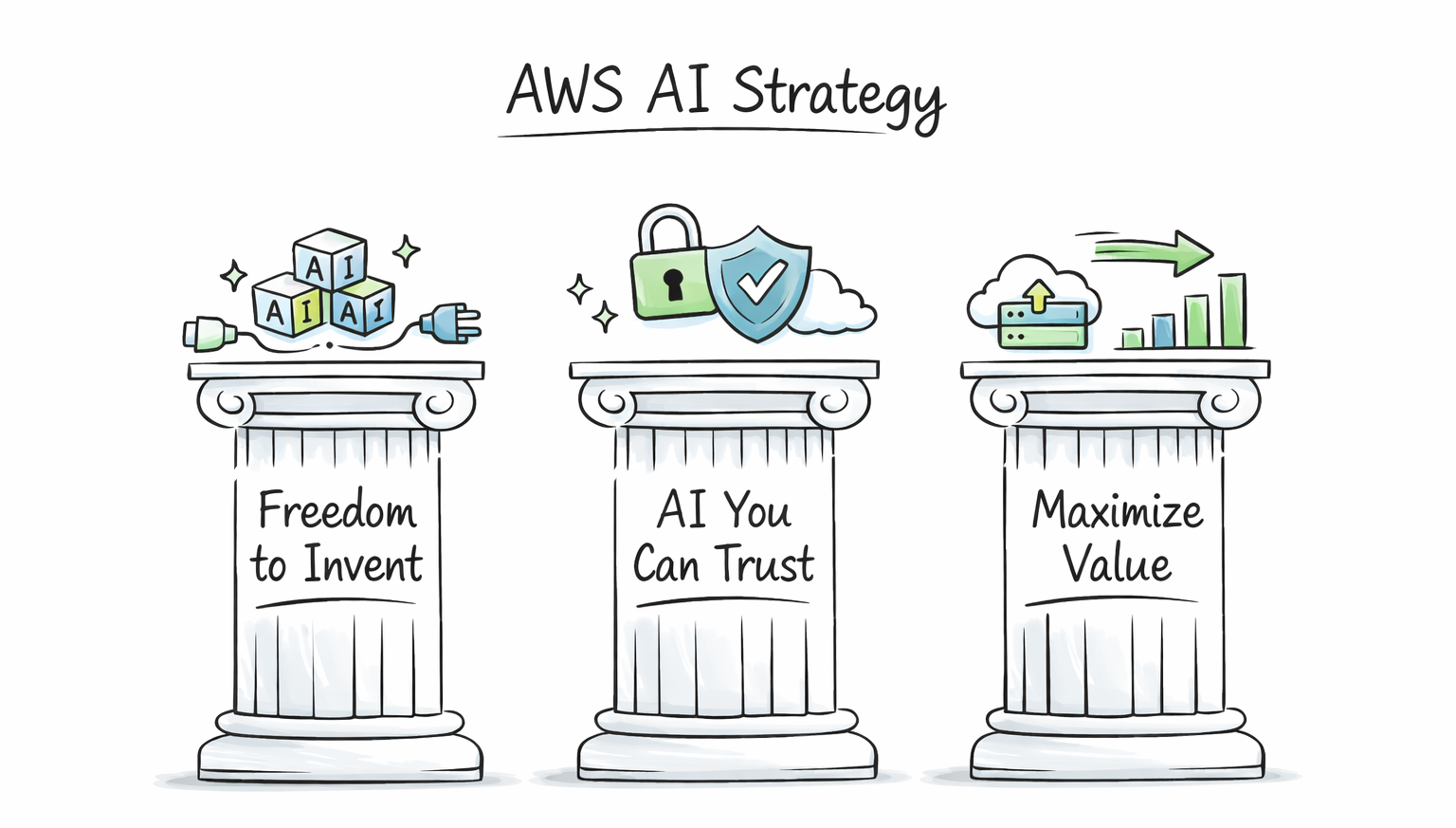
AWS did not stumble into AI. They've been building toward a specific strategy: from custom silicon chips (Trainium, Inferentia) all the way up to application-layer tools like Kiro and Amazon Q. Avinash broke it down into three pillars:
Pillar 1: Freedom to Invent
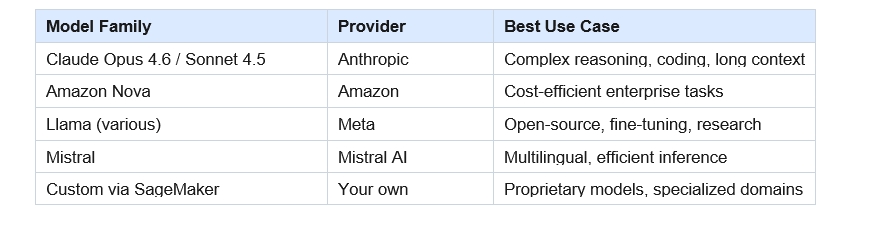
AWS gives you genuine choice. Bedrock alone offers 100+ foundation models from providers including Anthropic (Claude), Amazon (Nova), Meta (Llama), Mistral, and several open-source models. You are not locked into one vendor or one model.
AWS also supports open protocols: MCP (Model Context Protocol) and A2A (Agent-to-Agent). Agents you build on AWS can connect to any external service, not just AWS services. That interoperability is a real differentiator.
Pillar 2: AI You Can Trust
Security and governance are built in from day one. Models in Bedrock run inside your own AWS account and VPC. IAM policies control access at a granular level. Compliance certifications cover the major enterprise standards.
This matters enormously for regulated industries like finance, healthcare, and government. Many AWS enterprise customers chose Bedrock specifically because they can run models without sending data to a third-party API endpoint.
Pillar 3: Maximizing Value
Most companies can build an AI demo in a week. Getting that demo to production takes months. AWS is specifically investing in collapsing that timeline to weeks or days. Kiro and Amplify Gen 2 are the main tools in that effort.
3. Amazon Bedrock: What's New and What Matters
Bedrock has had a massive update cycle since the start of 2025. Here are the three launches that matter most right now:
Bedrock Agent Core (GA October 2025)
Agent Core is the platform for building, deploying, and operating AI agents at scale. Key specs:
- Agents can execute tasks for up to 8 hours continuously
- Full session isolation between agent runs
- Built-in gateways for MCP and A2A protocol connections
- Native observability: you can monitor what your agents are doing in production
- Agent memory: agents can learn and store data while executing long tasks
The 8-hour execution window is significant. Most AI agent frameworks time out at minutes. Agent Core is designed for real-world enterprise workflows that span hours, not seconds.
Multi-Agent Orchestration
Bedrock's multi-agent system lets you create networks of specialized agents, coordinated by a supervisor agent. Think of it as a software team: one supervisor (manager) coordinating multiple specialized agents (frontend dev, security, QA, etc.).
The supervisor handles routing, coordination, and workflow execution. Specialized agents focus on one domain each. This architecture produces significantly better results than single-agent systems for complex tasks.
Model Catalog: 100+ Foundation Models
Bedrock added 30+ models in the last 3 months alone. The current lineup includes Claude Opus 4.6, Claude Sonnet 4.5, Amazon Nova, Meta Llama, Mistral, and a growing selection of open-source models. If you need a custom model that is not in the catalog, SageMaker and NovaForge let you bring your own model and host it on AWS infrastructure.
4. AWS Kiro: The AI IDE That Changes How You Develop
Kiro launched in 2025 and is AWS's answer to Cursor, with a fundamentally different development philosophy. Where most AI IDEs focus on fast code generation, Kiro focuses on structured, production-ready development.
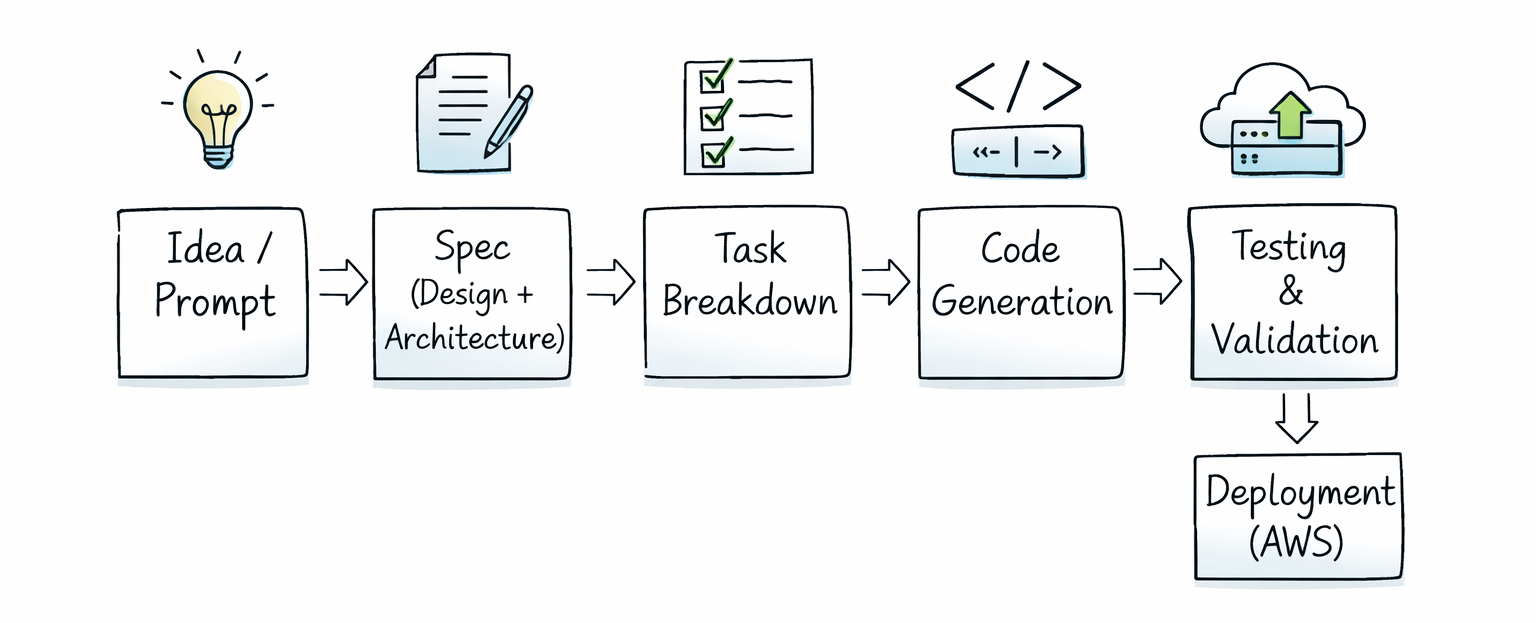
The core difference: Kiro uses spec-driven development. You don't just ask it to write code. You describe your requirements, Kiro creates a structured design doc, breaks it into tasks, and executes them systematically. The output is documented, consistent, and production-ready by default.
Kiro's Core Features
Spec-Driven Development
Spec mode works in three phases: first, it defines the technology and architecture; second, it creates a detailed project definition; third, it generates and executes tasks. Because the planning phase is structured and explicit, the output has a higher determinism level than vibe-only approaches. The confidence in what gets built is measurably higher.
Steering Files
Steering files are markdown files that encode your organization's coding conventions, security rules, and architectural decisions. Kiro reads them and generates code that follows your standards automatically. Salih showed his steering file during the demo: it had 8 rules covering TypeScript strictness (no 'any' type), commit conventions, testing commands, and file creation preferences.
If your team has spent years defining best practices, put them in a steering file. Your AI assistant will follow them without being reminded every session. Steering files are the equivalent of your Confluence knowledge base, but actually read by the agent.
Agent Hooks
Agent hooks run automated workflows at specific points in your development cycle. For example: every time you update an OpenAPI spec, a hook can automatically regenerate client libraries. Or every time you commit code in a multilingual app, a hook can trigger translation updates. These repeatable operations save real time at scale.
Native MCP Support
You can add MCP server configurations directly in Kiro. Once configured, Kiro can query those servers during development without burning unnecessary context on multiple roundtrip calls. The AWS MCP Power (more on this below) is a great example of using this efficiently.
Kiro Powers (Context-Efficient Tool Access)
Kiro's context window fills up fast if you're not careful. MCP servers can consume a lot of context if used naively. Kiro Powers solve this by packaging pre-built knowledge, SOPs, and tool routing into compact, on-demand context. The AWS Amplify Power, for example, tells Kiro exactly which tool to call and which SOP to follow, without burning context on multiple documentation lookups.
LSP Integration
Kiro uses Language Server Protocol to understand your project structurally, not just as raw text. It doesn't process your entire codebase as context. It actually understands what's going on: types, imports, call graphs. This is faster and more accurate than the naive approach of dumping all your code into a prompt.
Kiro vs Cursor vs Claude Code
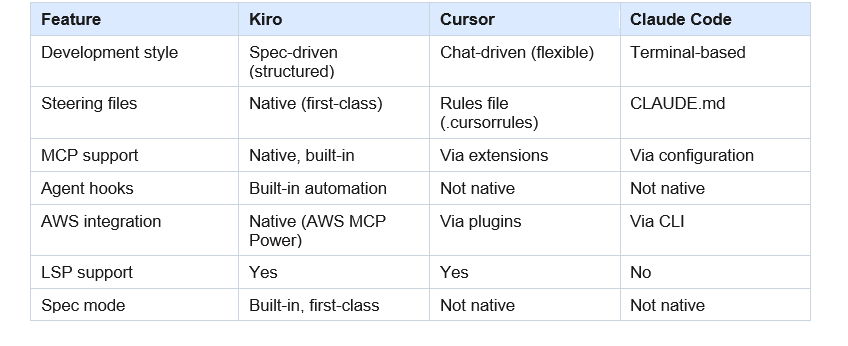
5. AWS MCP Server: One Unified Gateway to 200+ AWS Services
Before AWS MCP Server, connecting an AI agent to AWS required separate tools for each service: one for S3, one for Lambda, one for CDK. Each had limited functionality and required separate configuration. AWS MCP Server consolidates all of that into a single interface.
What's inside AWS MCP Server:
- 15,000+ AWS APIs covered across 200+ AWS services
- 10+ embedded knowledge sources: documentation, best practices, framework guidance, domain-specific knowledge
- 30+ pre-built Agent SOPs (Standard Operating Procedures) for complex multi-step tasks
- Natural language access: your agent calls any AWS API using plain English
- Remote server: always up-to-date, no local installation, no maintenance required
- Free to use
Agent SOPs are the standout feature. For complex multi-step tasks where LLMs tend to produce inconsistent results, SOPs provide a structured playbook the agent follows. AWS has published 30+ specialized SOPs covering common deployment, configuration, and infrastructure tasks.
The practical result: your agent doesn't just access AWS, it understands AWS. It can answer questions about services, look up documentation, and follow proven procedures, all through one MCP connection.
Want to see this entire workflow live?
Watch the full Build Fast with AI workshop here:
6. Live Demo: From Idea to Production in Under 60 Minutes
Avinash walked through the complete flow live during the workshop. Here's the exact process, step by step.
Step 1: Generate the App with Lovable
Avinash used Lovable (a vibe coding tool) to generate a community website for Build Fast with AI. The prompt specified: activity feed, meetup page with RSVP functionality, a community forum, a point system based on activity, and specific technical choices (Vite, React, shadcn/ui, Radix).
Prompt quality matters here. A vague prompt forces the LLM to make architectural decisions, which burns token capacity that should go toward code quality. A specific prompt removes ambiguity and produces better output. Lovable built the full app in under 5 minutes.
Important caveat: the app used mock data at this stage. No backend, no database. Just a front-end running in the browser.
Step 2: Push to GitHub
From Lovable, Avinash connected GitHub directly and pushed the project. This took seconds and gave Kiro a clean starting point to pull from.
Step 3: Open the Project in Kiro
Kiro cloned the repository, analyzed the project using LSP, and identified it as a React TypeScript app using Vite with shadcn components and mock data. No manual configuration needed.
Step 4: Ask Kiro What to Do
Avinash typed a natural language question into Kiro: what does AWS recommend for deploying this website? Kiro queried the AWS MCP Server, which returned the top 5 relevant documentation hits. The recommendation: AWS Amplify Hosting as the simplest path, or S3 plus CloudFront for more infrastructure control.
Step 5: Deploy to AWS Amplify via Kiro
Kiro handled the full deployment:
- Built the React app and created a production ZIP file
- Called the AWS MCP Server using natural language: deploy this to AWS Amplify
- The MCP server translated this into the correct AWS API calls
- Created an Amplify app, obtained a pre-signed upload URL, and uploaded the ZIP
- Triggered the deployment and polled for status
- Returned a live production URL
Total time from Kiro opening the project to a live URL: under 5 minutes. The URL is production-ready, hosted on AWS infrastructure that scales to millions of users automatically.
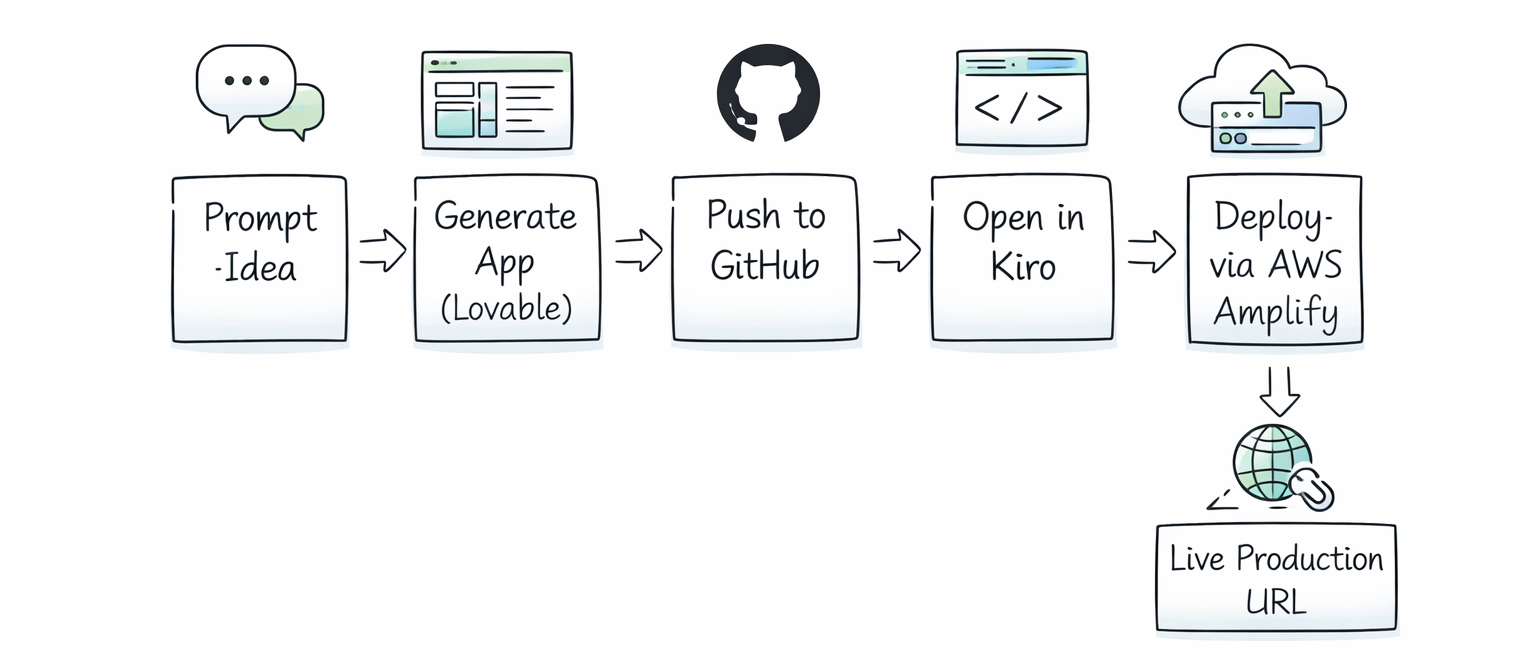
7. AWS Amplify Gen 2: Migrating from Mock Data to Real Backend
Salih took the same app concept (with the same prompt) and demonstrated a more advanced workflow: migrating the mock data to a real cloud backend using Amplify Gen 2, then adding authentication.
What is AWS Amplify?
AWS Amplify is a full-stack development platform for building mobile and web applications with cloud backends. Amplify Gen 2 (the current version) lets you define your backend using TypeScript, which is then automatically provisioned on AWS. It handles authentication, data models, storage, and API generation.
The Migration Workflow
Salih's prompt to Kiro was: this app uses mock data, migrate everything to Amplify Gen 2, add authentication using Amplify UI libraries, and make all feed/forum/meetup data available to every authenticated user.
Kiro's execution had three phases:
- Backend phase: installed Amplify Gen 2 libraries, defined the authentication and data schema in TypeScript, configured user pool settings
- Deployment phase: ran the Amplify sandbox deployment command, which provisions the actual AWS backend resources (Cognito user pool, DynamoDB tables, AppSync API)
- Frontend connection phase: updated the React components to use Amplify data clients instead of mock data, integrated the Amplify UI auth components
The deployment hit a snag during the live demo: the Cognito user pool was created with self-signup disabled. Kiro caught this automatically (because Salih had set a rule requiring npm run build to succeed before committing), searched the AWS documentation, identified the issue, and redeployed with the correct configuration. No manual debugging required.
Amplify UI Authentication
Rather than writing a custom auth flow from scratch, Kiro used Amplify's pre-built UI components. These handle the entire authentication experience: sign-up, sign-in, email verification, MFA configuration. The components are built for Cognito and connect automatically once the backend is configured.
By the end of the demo, Salih had a running app with real user accounts, real cloud data, and working authentication, all from a vibe-coded starting point.
One honest note from the demo: the AI chat feature they tried to add at the end (an AI assistant that queries the app's meetup data) didn't complete cleanly in the time available. That's a real-world reminder that complex features still take iteration, even with AI tooling.
8. Spec-Driven Development: The New Software Lifecycle
Salih spent time explaining how AI has changed the software development lifecycle (SDLC). The old cycle: plan, analyze, design, develop, test, deploy, maintain. The new cycle looks similar but operates very differently.
How the AI-Augmented SDLC Works
- Plan: write a proper spec in markdown, define goals AND non-goals, specify tech stack, set acceptance criteria
- Analyze: use AI tools for research and problem definition, review outputs before proceeding
- Design and architecture: you make the architecture decisions, AI builds to your spec
- Build: AI executes the implementation under your direction
- Verify: run tests, check outputs against acceptance criteria
- Deploy and monitor: AI-assisted deployment, human monitoring and iteration
The most important shift: you are in the driver's seat. Salih made this point bluntly: if you let the agent run unsupervised and go get lunch, you may come back to a circular debugging loop. AI tools are powerful because humans direct them well, not because they run autonomously.
Writing Effective Specs
A spec for AI-assisted development should include:
- Clear goals (what you want to build) and explicit non-goals (what the agent should NOT do)
- Technology choices: specify frameworks, libraries, and constraints
- Executable test commands: tell the agent how to verify its own work
- Acceptance criteria: what does success look like?
- Phased tasks: break complex work into sequential, verifiable phases
Negative prompting matters as much as positive prompting. The more specific you are about what not to do, the less token capacity the agent wastes on bad decisions.
SkillMD and AgentMD Files
These are context management tools. AgentMD (equivalent to CLAUDE.md in Claude Code, or .cursorrules in Cursor) is a project-level readme for your agent. It tells the agent the key facts about the project, conventions, and constraints.
SkillMD is different: it's an entry point to a collection of detailed guides. Rather than loading all knowledge upfront, SkillMD uses progressive disclosure to load only the relevant context for the current task. This keeps your context window healthy on long sessions.
9. Prompting Tips That Actually Matter for AI Development
Avinash made a point about prompting that I think every developer should internalize: the LLMs running your agents typically have 100K to 200K token context windows. Every token spent on a decision is a token taken away from code quality.
When you give a vague prompt, the model has to decide what features to build, what architecture to use, how many components to create, and what the design should look like. Every one of those decisions burns context. The output suffers.
Practical Prompting Guidelines
- Be explicit about technology choices: don't make the agent pick between React and Vue, tell it which one
- Specify what NOT to build: negative prompting prevents scope creep
- Break large requests into phases: let the agent complete and commit one phase before starting the next
- Set verifiable exit criteria: 'do not commit until npm run build passes' is a rule that prevents partial, broken work
- Cancel and reiterate: if you see the agent spiraling, cancel the current task and rephrase rather than letting it continue
- Check context usage: Kiro shows a context percentage indicator; if you're at 70%+, start a new session for the next major task
Avinash also mentioned prompts.dev and the AWS Marketplace for pre-built prompts. Both are worth checking before building a new prompt from scratch. There is no reason to solve a problem that has already been solved.
Want to build AI agents and deploy full-stack apps like these?
Join Build Fast with AI's Gen AI Launchpad: an 8-week structured program to take
you from zero to production-ready AI builder.
Register Here
Frequently Asked Questions
What is AWS Kiro and how is it different from Cursor?
AWS Kiro is an AI-powered IDE that uses spec-driven development to produce structured, production-ready code. Unlike Cursor, which is primarily chat-driven and flexible, Kiro creates formal design documents and task breakdowns before writing code. Kiro also has native AWS MCP Server support, built-in agent hooks for automated workflows, and LSP integration for deeper project understanding.
What is Amazon Bedrock and what models does it support?
Amazon Bedrock is AWS's managed AI platform for accessing foundation models without managing infrastructure. It offers 100+ models from providers including Anthropic (Claude Opus 4.6, Sonnet 4.5), Amazon (Nova), Meta (Llama), and Mistral. Models run inside your AWS account and VPC, not on shared third-party infrastructure. Bedrock added 30+ new models in Q1 2026 alone.
What is AWS MCP Server and how does it work?
AWS MCP Server is a unified remote server that gives AI agents natural language access to all 200+ AWS services and 15,000+ AWS APIs. It includes 10+ embedded knowledge sources (documentation, best practices, domain guides) and 30+ pre-built Agent SOPs for complex tasks. It requires no local installation, is always up-to-date, and is free to use.
What is spec-driven development in Kiro?
Spec-driven development is Kiro's approach to building software: instead of writing code immediately from a chat prompt, Kiro first creates a structured design document that defines goals, architecture, and tasks. It then executes those tasks sequentially with built-in verification. This produces more consistent, documented, and production-ready output compared to vibe coding alone.
What is AWS Amplify Gen 2 used for?
AWS Amplify Gen 2 is a full-stack development platform for building web and mobile applications with cloud backends. It lets developers define authentication (Cognito), data models (DynamoDB via AppSync), and storage (S3) using TypeScript, which Amplify then automatically provisions on AWS. It includes pre-built UI components for auth flows and connects to the frontend through generated client libraries.
Can Kiro deploy apps to AWS automatically?
Yes. When connected to AWS MCP Server, Kiro can analyze your project, determine the appropriate AWS deployment strategy, build your application, and deploy it to services like AWS Amplify, all through natural language instructions. In the Build Fast with AI demo, Avinash went from a Kiro prompt to a live production URL in under 5 minutes.
What is the difference between Bedrock and Kiro?
Amazon Bedrock is infrastructure: it hosts foundation models and provides APIs for building AI agents and applications. Kiro is an IDE: a development environment that uses AI to help you write, test, and deploy code. Kiro can use Bedrock models internally, and can deploy applications that call Bedrock APIs, but they operate at different layers of the stack.
How do steering files work in Kiro?
Steering files are markdown files stored in your Kiro project that define coding conventions, security requirements, testing commands, and architectural constraints. Kiro reads them automatically and generates code that follows your rules without needing reminders each session. They are equivalent to .cursorrules in Cursor or CLAUDE.md in Claude Code, but Kiro treats them as first-class configuration.
Recommended Reads
If you found this useful, these posts from Build Fast with AI go deeper on related topics:
- Claude Code vs Codex: Which Terminal AI Tool Wins in 2026?
- 7 AI Tools That Changed Developer Workflow (March 2026)
- Claude Code Auto Mode: Unlock Safer, Faster AI Coding (2026 Guide)
- Every AI Model Compared: Best One Per Task (2026)
- What Is Perplexity Computer? The 2026 AI Agent Explained

