


What Is Google Pomelli AI? Full Review, Features & Honest Take (2026)
I spent half of last Tuesday switching between Google Docs, Canva, and a spreadsheet to get three Instagram posts out the door for a single campaign. Three tools. One campaign. That is not a workflow - that is a tax on your time.
Google noticed. On October 28, 2025, Google Labs and Google DeepMind quietly dropped Pomelli: a free AI marketing tool that scans your website, builds a brand profile it calls Business DNA, and generates social media campaigns, ad creatives, product photography, and even animated videos - all in one place.
As of March 9, 2026, Pomelli just expanded from 4 countries to over 170. That includes India. So if you have been staring at the "not available in your region" error, that is over now.
Here is my honest breakdown of what Pomelli actually does, where it wins, where it falls flat, and how it stacks up against Canva, Jasper, and Adobe Express.
1. What Is Google Pomelli AI?
Google Pomelli is a free AI-powered marketing tool from Google Labs, built in partnership with Google DeepMind, that analyzes your website and automatically generates on-brand social media campaigns, ad creatives, and product photography.
Launched on October 28, 2025, Pomelli targets small and medium-sized businesses (SMBs) that do not have in-house design teams or marketing agencies. The core idea is simple: instead of manually uploading brand assets and selecting templates, you give Pomelli your website URL. It scans your site and builds what Google calls a Business DNA profile - your brand colors, fonts, tone of voice, and visual style - automatically. Then it generates content grounded in that profile.
Think of it as Canva meets ChatGPT, but trained specifically on your brand rather than on generic templates.
I want to be clear about one thing right away: Pomelli is NOT a Google Ads tool. It does not push content directly to Instagram, Facebook, or LinkedIn. You download the assets and post them manually. That is a real gap, and I will come back to it.
Quotable stat: 73% of small businesses struggle with consistent brand messaging across digital channels, according to the Small Business Digital Alliance. Pomelli was built to fix exactly that.
2. How Google Pomelli Works (3 Steps)
Pomelli's workflow is refreshingly simple. You do not need design experience. You do not need to upload a brand kit. The entire setup takes under five minutes.
Step 1: Enter Your Website URL
Go to labs.google.com/pomelli and sign in with your Google account. Enter your business website URL. Pomelli scans your public pages - homepage, blog posts, product pages, existing images - and extracts your brand identity.
The system works best with websites that have substantial text content and a consistent visual style. If your site is mostly stock images or has no clear color scheme, the output quality will drop. You can also supplement the scan with additional brand images if you have them.
Step 2: Get Your Business DNA Profile
After the scan (usually takes a few minutes), Pomelli generates your Business DNA profile. This includes:
- Your primary, secondary, and accent color palette
- Your brand fonts and typography preferences
- Your tone of voice - formal, casual, technical, accessible
- Visual style extracted from your existing imagery
Every piece of content Pomelli generates is anchored to this profile. In testing, users reported that the system picked up subtle word choices and color preferences that even they had not explicitly defined. That is the DeepMind language understanding doing the heavy lifting.
Step 3: Generate and Edit Your Campaign Assets
Pomelli suggests campaign ideas based on your Business DNA. You can pick from those suggestions or type your own prompt - something like "summer sale for running shoes" or "new product launch post for Instagram." The tool then generates multiple variations in roughly 30 to 90 seconds.
You can edit outputs using natural language commands directly in the tool. Tell it to make the text larger, change the background, or restyle to match a different image. You then download the assets and post them manually on your platforms of choice.
3. Google Pomelli Features in 2026
Pomelli launched with solid core functionality in October 2025, but Google has moved fast with updates. Here is where the product stands as of March 2026.
Business DNA (Core Feature)
The automatic brand extraction is Pomelli's biggest differentiator. No other tool in this category scans your website and builds a complete brand profile without manual input. Canva requires you to upload logos and set colors yourself. Jasper requires manual brand training. Pomelli does it in minutes from your URL alone.
Social Media Content Generation
Pomelli generates platform-ready content for Instagram, Facebook, X/Twitter, LinkedIn, YouTube thumbnails, Google Ads, and email banners. You can generate roughly 10 post variations in about 60 seconds - approximately 30 to 40 percent faster than typical Canva workflows, based on user-reported test data.
Pomelli Animate (Launched January 2026)
Animate, launched in January 2026, is powered by Veo 3.1 - Google DeepMind's advanced video generation model. It transforms your static marketing visuals into on-brand animated videos with one click. This is the feature that separates Pomelli from tools that handle static graphics only.
Pomelli Photoshoot (Launched February 19, 2026)
This is the feature that went viral. Photoshoot uses Nano Banana - Google's image generation model - to transform ordinary product photos taken with a smartphone into professional-grade studio and lifestyle images in seconds. The announcement hit 23 million views on X within days of launch.
You upload your product photo, select a template (studio or lifestyle), add a prompt, and Pomelli generates studio-quality imagery that matches your brand aesthetic. For a small jewelry brand or a local cafe, this replaces a photography budget that could easily run into the thousands.
The output is grounded in your Business DNA, so generated product images stay visually consistent with everything else you create in Pomelli.
Natural Language Editing (February 2026 Update)
Since the February 2026 update, you can edit generated content using plain English commands. Tell the tool to change your background to a forest scene, transfer the style of one image to another, or adjust prompt accuracy. These additions close the gap with Canva's editing capabilities, though Pomelli still lacks Canva's depth of template library and drag-and-drop precision.
4. Is Google Pomelli Available in India?
Yes. As of March 9, 2026, Google Pomelli is available in India and over 170 countries and territories worldwide.
Google Labs made the official announcement on March 9, 2026, expanding from the original four-country beta (US, Canada, Australia, New Zealand) to a global rollout. India is included in this expansion.
Important caveat: Pomelli currently supports English only. If your target audience is Hindi, Tamil, Bengali, or any other Indian language, you will need to use the tool in English for now. Google has not announced a timeline for multilingual support.
To access Pomelli from India: visit labs.google.com/pomelli, sign in with your Google account (must be 18 or older), and start with your website URL. No waitlist, no invitation required, no credit card.
5. Google Pomelli vs Canva vs Jasper vs Adobe Express
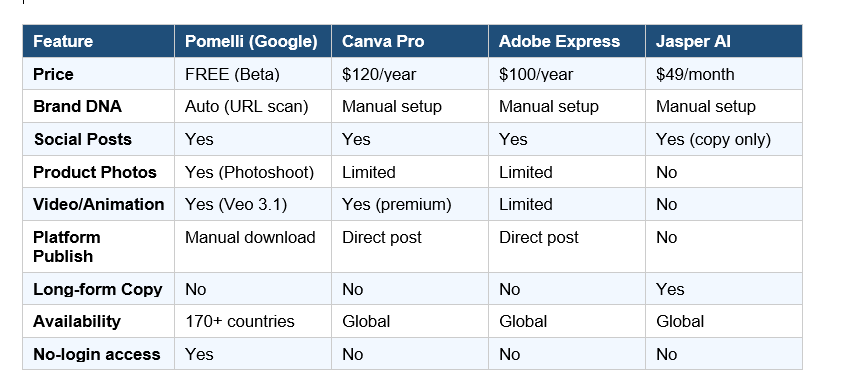
This is the question everyone is asking, so here is the honest breakdown. I am not going to tell you Pomelli wins everywhere - it does not. But the pricing gap alone makes the comparison interesting.
Pomelli vs Canva
Canva is more comprehensive. It massive template library, direct social media posting, video editing, and a proven design interface. For presentations, one-off posters, and professional design work, Canva wins.
Pomelli's edge is automation. You do not pick a template and fill it in. Pomelli extracts your brand and generates content already tailored to it. In a test of a 5-asset campaign (3 social posts, 1 ad, 1 email banner), a Pomelli-first workflow completed in 1 hour 23 minutes versus 2 hours 5 minutes with Canva alone - a 33% time saving, with the biggest gains coming from automated copy consistency rather than design speed.
My take: Use both. Pomelli for fast, brand-consistent first drafts. Canva for precise visual refinement. The tools are complementary, not competitive.
Pomelli vs Jasper
Jasper is a long-form copywriting tool. It excels at blog posts, email sequences, and detailed brand narratives. Pomelli focuses on social media campaigns and visual assets. Jasper starts at $49 per month. Pomelli is free.
If you need blog content, email marketing copy, or long sales pages, Jasper is the better choice. If you need brand-consistent social posts and product imagery at speed, Pomelli does it for nothing - and does it in a fraction of the time.
Pomelli vs Adobe Express
Adobe Express costs roughly $100 per year and gives you serious design tools, Creative Cloud integration, and a professional editing experience. It is built for people with design skills or teams with design resources.
Pomelli is built for business owners who hate design. No design experience needed. No Creative Cloud subscription. Just your website URL and an idea.
6. Google Pomelli Pricing: Is It Really Free?
Yes - Pomelli is completely free during the public beta phase. No credit card. No usage limits on generations. No waitlist. You access it at labs.google.com/pomelli with your Google account.
As of March 2026, Google has not announced any monetization plan or post-beta pricing. The smart money says Google will eventually move to a freemium model - possibly integrating Pomelli into Google Workspace or bundling it with Google Ads. But right now, you get unlimited generations, Business DNA profiling, Animate, and Photoshoot for zero cost.
To put this in dollar terms: Pomelli saves you $120 to $180 per year compared to Canva Pro or Adobe Express - and includes studio-quality product photography that neither competitor offers at any price tier.
My contrarian point: Free betas do not last forever. Google has a long history of building experimental tools and then sunsetting them (Google+, Stadia, Inbox). I would use Pomelli aggressively while it is free and build a plan for what happens if pricing arrives or the experiment ends.
7. Honest Limitations: What Pomelli Cannot Do Yet
No tool is perfect, and Pomelli has real gaps you should know about before you build your workflow around it.
- No direct publishing:No direct publishing.
You cannot post directly to Instagram, Facebook, LinkedIn, or anywhere else from Pomelli. Every asset requires a manual download and upload. If you are managing 20+ posts per week, this gets tedious fast. Pair Pomelli with Buffer or Hootsuite to handle scheduling.
- English only:English only.
The Business DNA extraction and all content generation work in English only. If you serve a non-English speaking audience, Pomelli is not yet useful for your primary content.
- Weak-website problem:Weak-website problem.
If your website has minimal text, random stock photos, inconsistent fonts, or no clear brand identity, Pomelli's Business DNA extraction will produce mediocre results. The tool is only as good as the brand signals it can extract. Fix your website first, then run it through Pomelli.
- No content calendar:No content calendar or scheduling.
Pomelli is a creation tool, not a management platform. There is no calendar view, no approval workflow, no team collaboration features. It is a starting point, not an end-to-end content operation.
- Beta quality:Beta quality inconsistencies.
This is still an experimental product. Output quality can be inconsistent. Some generations will feel template-influenced rather than genuinely brand-specific, particularly in early testing. The February 2026 update improved this significantly, but it still happens.
8. How to Use Google Pomelli Step by Step
Getting started takes about five minutes. Here is the exact process.
- Go to labs.google.com/pomelli in your browser.
- Sign in with your Google account. You must be 18 or older.
- Enter your business website URL. Pomelli will scan your site and build your Business DNA profile.
- Review your Business DNA. If something looks off - wrong colors, wrong tone - you can refine the profile manually before generating content.
- Choose a campaign idea from Pomelli's suggestions or type your own prompt.
- Browse generated variations. Use natural language commands to edit (change background, resize text, alter style).
- Download your final assets and upload them to your platforms manually.
For Photoshoot: upload a product photo, select a template (studio or lifestyle), add a prompt describing the background or setting, and let Pomelli's Nano Banana model generate your studio-quality imagery.
9. Who Should (and Should Not) Use Pomelli
Pomelli is ideal for:
- Solopreneurs and freelancers creating their own marketing content
- Small businesses without in-house design or marketing teams
- E-commerce brands launching products regularly and needing consistent imagery
- Local businesses (cafes, salons, retail stores) that need professional social content fast
- Agencies exploring AI tools for client content creation workflows
Pomelli is not the right fit for:
- Large marketing teams with established creative processes and approval workflows
- Brands needing video content beyond short social animations
- Businesses whose primary audience speaks a non-English language
- Anyone needing long-form copywriting - blogs, email sequences, sales pages
- Teams that need direct social media scheduling and publishing baked in
My honest recommendation: if you are a small business owner spending more than 3 hours per week on social content creation, run your website through Pomelli today. The worst case is that it saves you 30 minutes. The best case is that it replaces half your content workflow.
Frequently Asked Questions About Google Pomelli AI
What is Google Pomelli AI?
Google Pomelli is a free experimental AI marketing tool from Google Labs and Google DeepMind, launched on October 28, 2025. It analyzes your website URL to build a Business DNA profile (brand colors, fonts, tone of voice) and then generates on-brand social media campaigns, ad creatives, product photography, and animated videos. Access it at labs.google.com/pomelli.
Is Google Pomelli free to use?
Yes, Pomelli is completely free during its public beta phase. There is no credit card required, no waitlist, and no usage limit on generations. Google has not announced post-beta pricing as of March 2026, but paid tiers are expected when the product exits beta.
Is Google Pomelli available in India?
Yes. On March 9, 2026, Google expanded Pomelli from its original four-country beta to over 170 countries and territories, including India. Access requires a Google account and users must be 18 or older. The tool currently supports English only, with no announced timeline for Hindi or other Indian language support.
What is Google Pomelli used for?
Pomelli is used to create on-brand social media marketing content without design experience. Specific use cases include generating Instagram posts, Facebook ads, YouTube thumbnails, Google Ads creatives, email banners, animated brand videos (Animate feature), and professional product photography from smartphone images (Photoshoot feature).
How does Google Pomelli work?
Pomelli works in three steps: (1) Enter your website URL and Pomelli scans your site to extract your brand identity into a Business DNA profile. (2) Pomelli suggests campaign ideas tailored to your brand, or you type your own prompt. (3) Pomelli generates multiple content variations in 30 to 90 seconds, which you can edit using natural language commands and then download.
What is Google Pomelli Photoshoot?
Pomelli Photoshoot, launched on February 19, 2026, uses Google's Nano Banana image generation model to transform ordinary product photos taken with a smartphone into professional-grade studio and lifestyle imagery. Users upload a product photo, select a template, add a prompt, and Pomelli generates studio-quality product images consistent with their Business DNA brand profile.
How is Pomelli different from Canva?
The key difference is automation. Canva requires users to manually set up brand kits, choose templates, and fill in content. Pomelli automatically extracts your brand identity from your website URL and generates complete, brand-consistent assets without manual template selection. Pomelli is also free in beta, while Canva Pro costs $120 per year. However, Canva has a larger template library, direct social media publishing, and more precise design controls.
Which countries is Google Pomelli available in?
As of March 9, 2026, Google Pomelli is available in over 170 countries and territories globally, including India, the United States, Canada, Australia, the United Kingdom, Japan, and most of Europe. The tool is English-only during the current beta phase, regardless of the user's country.
Does Pomelli post directly to social media platforms?
No. Pomelli generates and allows you to download marketing assets, but it does not have direct publishing integration with Instagram, Facebook, LinkedIn, X/Twitter, or any other platform. You download the assets and manually upload them to your platforms. For scheduling, pair Pomelli with a tool like Buffer or Hootsuite.
Ready to Stop Wasting Hours on Social Content?
Pomelli is live, free, and now available in India and 170+ countries. Go to labs.google.com/pomelli, drop in your website URL, and see what your Business DNA looks like. It takes five minutes. If the output surprises you, subscribe for more honest breakdowns of AI tools that are actually worth your time.
Stay Updated If this breakdown helped, subscribe to Build Fast With AI for weekly breakdowns of the latest AI tools, honest reviews, and practical guides for founders and marketers. New posts drop every week.
Internal References
Nano Banana vs Nano Banana Pro vs Nano Banana 2: Which Google AI Image Model Wins?
AI in 2026: Your Survival Guide to the Fourth Year of Generative AI
References

