



ChatGPT Personal Finance: How It Works, Setup, Privacy & What It Means for Your Money (2026)
For years, 200 million people have been typing questions into ChatGPT that they would never ask their financial advisor out loud: Why am I always broke before month-end? Can I actually afford a house right now? Am I spending too much on subscriptions I don't use? ChatGPT has been answering those questions with generic advice — 'automate your savings' and 'track your spending' — because it had no window into anyone's actual financial life.
That changed on May 15, 2026.
OpenAI launched a new personal finance experience inside ChatGPT for Pro subscribers in the United States. Connect your bank accounts, see a real-time spending dashboard, and ask ChatGPT questions based on your actual transaction data — not generic best practices. The feature runs on GPT-5.5 Thinking, OpenAI's most capable publicly available reasoning model, which set a benchmark record on FrontierMath Tier 4 (doctorate-level math) and scored 60% on a custom FinanceAgent evaluation built with 50+ financial professionals.
Here is everything you need to know: how it works, how to set it up, what it can and cannot do, the real privacy questions worth asking, and whether it's actually better than the budgeting tools you're already using.
1. What Is the ChatGPT Personal Finance Feature?
The ChatGPT personal finance feature is a new integration that lets you securely link your bank accounts, credit cards, and investment portfolios directly to ChatGPT through Plaid — the same financial data infrastructure used by Venmo, Robinhood, Chime, and most major fintech apps. Once connected, ChatGPT transforms from a generic money advisor into a personal one that actually knows what's in your accounts.
This is not a budgeting app. It does not replace your bank. The core shift is that ChatGPT moves from offering category-level advice ('spend less on dining') to specific, contextualized insights based on your real transaction history ('you spent $340 on dining in April, up from your $220 average — want me to flag which nights drove the spike?').
🏦 The Numbers Behind the Launch
200 million people already ask ChatGPT financial questions every month. 12,000+ financial institutions supported at launch. 64% of consumers who have used AI for finances say it improved their ability to evaluate financial products (Plaid 2025 Fintech Effect Report). OpenAI worked with 50+ financial professionals to build a custom benchmark for GPT-5.5's financial reasoning.
The feature came one month after OpenAI's acquisition of the team behind Hiro, a personal finance startup backed by Ribbit Capital, General Catalyst, and Restive Ventures. OpenAI didn't confirm whether the entire feature was built by the Hiro team, but confirmed their finance expertise was central to the launch.
The strategic picture is harder to miss than OpenAI is letting on. The company launched ChatGPT Health earlier this year for medical queries. Now it's launching ChatGPT Finances. The pattern is clear: OpenAI is building a super-app layer — one conversational interface to replace the specialized apps people currently juggle for every category of their lives.
2. How to Set It Up (Step-by-Step)
Setup is available today for ChatGPT Pro subscribers ($100/month) in the United States, on web and iOS. Android is not yet listed as supported. Here is the exact process:
- Find the Finances section. In the ChatGPT sidebar, look for a 'Finances' option and select 'Get started.' Alternatively, type @Finances, connect my accounts in any ChatGPT conversation.
- Link accounts through Plaid. ChatGPT guides you through Plaid's secure account linking flow. You authorize access using your bank's login credentials — ChatGPT never handles your banking password directly.
- Wait for initial sync. Once authenticated, ChatGPT begins syncing and categorizing your transaction data. This may take a few minutes for the first load.
- View your dashboard. After syncing, you'll see a financial dashboard showing spending by category, subscriptions, portfolio performance, upcoming payments, and liabilities.
- Start asking questions. Ask in plain English: 'Where am I spending the most money?' or 'Can I afford to increase my 401k contribution by $200/month?' or 'Help me understand where I can save for a home down payment.'
- Set financial context. Add personal goals — saving for a house, paying off debt, reaching a target investment balance — so ChatGPT incorporates them into its ongoing advice.
⚙️ To Remove Your Accounts
Go to Settings > Apps > Finances to disconnect specific accounts. Once disconnected, synced data is removed from ChatGPT within 30 days. You can also view and delete financial memories directly from the Finances page. Private/temporary chats cannot access your financial data at all.
3. What ChatGPT Can and Cannot Do With Your Financial Data
This is the section most headlines get wrong in both directions — overhyping the capabilities and under-representing the real limitations. Here is the actual picture.
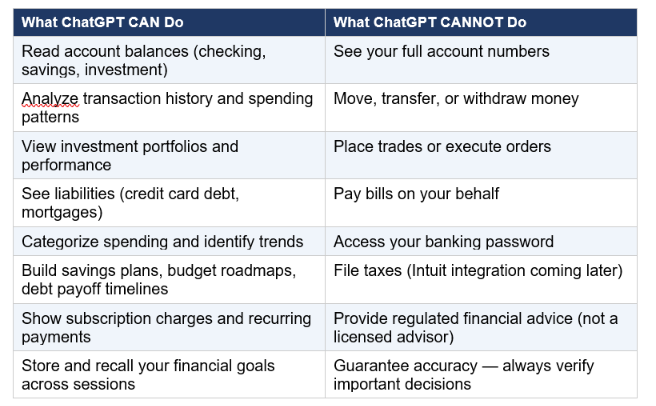
The data access is read-only by design. The security layer is Plaid's tokenized authentication system, which means your bank credentials never touch OpenAI's servers — the same architecture used by most major fintech apps. The practical limitation is that this is an AI, not a regulated financial advisor. ChatGPT can be wrong, especially on tax implications, investment projections, and anything requiring jurisdiction-specific financial knowledge.
My contrarian observation: the 'it cannot move money' reassurance matters less than people think. The more significant thing ChatGPT will know after you connect your accounts is your complete financial profile — balances, debt levels, investment behavior, and spending patterns. That's valuable intelligence regardless of whether the AI can act on it. The question isn't 'can ChatGPT steal from me?' It's 'am I comfortable with OpenAI holding this profile?' That's a different and harder question. Developers building their own AI finance applications can explore the agent patterns behind this kind of tool in the OpenAI Agents framework overview.
4. Privacy and Security: The Real Questions to Ask
The privacy concerns around this launch are real, and they deserve a direct answer — not dismissal. Here are the five questions worth asking before you connect your accounts, with honest answers based on what OpenAI has disclosed.
Will my financial data be used to train ChatGPT models?
There is an opt-in setting labeled 'Improve the model for everyone' that, if enabled, allows financial conversations to feed back into OpenAI's training pipeline. If you have already turned off the 'improve the model' toggle in ChatGPT's data controls settings, that applies to the financial experience as well. If you have not checked your settings, check them now before connecting accounts. By default, Pro users' data controls follow whatever preference they've previously set.
How long does OpenAI keep my financial data after I disconnect?
OpenAI states that synced data is deleted within 30 days after you disconnect an account. The memories ChatGPT saves about your financial situation can be viewed and deleted manually from the Finances page at any time. The 30-day window is the honest answer — there is a lag between disconnection and full deletion.
What if someone else gains access to my ChatGPT account?
Anyone with access to your ChatGPT login can see your connected financial data — not your account numbers, but your balances, transaction history, and debt profile. This is a real concern for shared devices, family accounts, or accounts with weak passwords. OpenAI recently introduced stronger authentication tools for ChatGPT, including multi-factor authentication. If you use this feature, enable MFA. Treat your ChatGPT login with the same security discipline as your banking login.
Is Plaid itself secure?
Plaid is the same financial data infrastructure used by Venmo, Coinbase, SoFi, Betterment, and most major fintech apps in the US. It uses encrypted, permission-based data sharing and does not store your banking credentials. Plaid's security track record is well-established in the industry. The connection infrastructure is not the weak point — the weak point is the data sitting in OpenAI's systems once the connection is made.
What has Germany's BaFin said about this?
Germany's financial regulator BaFin issued a warning this week — coinciding with the launch — that advanced AI systems are creating 'substantial' cyber risks for financial institutions, particularly as AI tools become capable of identifying software vulnerabilities faster than humans. BaFin was not commenting specifically on ChatGPT's feature, but the timing and the general warning about AI-financial integration are relevant context for anyone considering connecting accounts.
⚠️ Bottom Line on Privacy
ChatGPT cannot steal your money or see your account numbers. The real risk is profile aggregation — OpenAI will hold a complete financial profile on you if you connect accounts. Whether that's acceptable depends on your trust level with OpenAI, your data controls settings, and how you weigh the convenience against the exposure. It's a reasonable tradeoff for some users and not for others. Both positions are defensible.
5. ChatGPT vs Mint, YNAB, Copilot Money: How It Compares
Before deciding whether to add ChatGPT to your financial toolkit, it helps to know where it stands against the dedicated budgeting tools it's entering competition with.
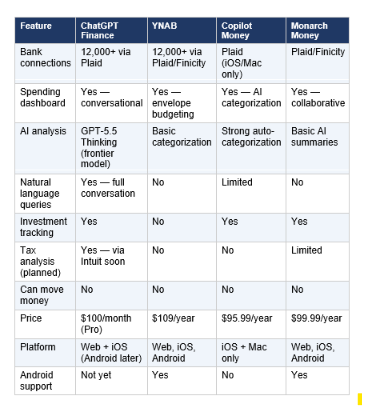
The honest assessment: ChatGPT Finance is not trying to replace YNAB or Copilot Money. It's adding conversational intelligence on top of financial data — something dedicated budgeting apps have not done well. YNAB's strength is behavioral change: it makes you assign every dollar a job, which builds financial discipline. Copilot's strength is AI auto-categorization so you stop cleaning up transaction labels manually. ChatGPT's strength is that you can ask open-ended questions and get answers calibrated to your actual situation.
Where ChatGPT has a clear advantage over all of them: the underlying model. GPT-5.5 Thinking is the most capable reasoning model of any consumer finance tool available today. The ability to ask 'given my income, spending, and debt, what's the fastest path to a $50K emergency fund?' and get a multi-step, personalized plan — not a generic calculator result — is genuinely new. Perplexity launched a competing financial research product around the same time, built on its Computer agent architecture — that one is more research-oriented, less focused on personal transaction data.
6. What's Coming Next: Intuit, Plus Users, and the Roadmap
OpenAI has been explicit about what's next for the feature. Here's what's confirmed and what's still speculative.
Intuit integration (confirmed, timeline TBD)
Intuit — the company behind TurboTax, QuickBooks, and Credit Karma — is coming to ChatGPT Finance. This integration will enable two capabilities that current competitors don't offer: tax impact analysis ('what happens to my tax bill if I sell these shares this year?') and credit card approval odds ('what's my likelihood of approval for the Chase Sapphire Preferred given my credit profile?'). The Intuit integration is the feature that makes ChatGPT Finance genuinely differentiated from every budgeting app on the market — budgeting apps don't touch tax estimation.
Plus and free user rollout (confirmed, phased)
OpenAI has confirmed plans to expand the feature to Plus users ($20/month) after collecting feedback from Pro users. The company has not given a timeline. OpenAI said it plans to eventually make the feature 'available to everyone,' which could eventually include the free tier, but that's the furthest-out scenario. The phased approach suggests they are taking the regulatory and security surface area seriously — financial data is categorically different from other types of user information in terms of liability.
Expanded institution coverage
Plaid already covers 12,000+ institutions. Future updates will expand the supported data types beyond checking, savings, and investments — Plaid has indicated it is working to add business accounts, identity verification integration, and mortgage data.
The super-app play
The finance feature joins ChatGPT Health (launched January 2026) as the second major specialized vertical inside ChatGPT's expanding ecosystem. OpenAI's strategy — building specialized tools on top of a single conversational AI layer rather than separate products — mirrors what Codex did for developer workflows. The finance and health verticals, combined with coding, shopping, and browsing, add up to something that looks increasingly like a super-app — a single interface for most of a user's high-value daily tasks.
7. Who Should Use It — and Who Should Wait
Use it if you are...
- A ChatGPT Pro subscriber who already trusts OpenAI with your data and wants real-time, personalized financial insights
- Someone who has never stuck with a budgeting app because dashboards feel like work — the conversational interface is genuinely lower friction
- Interested in investment analysis and portfolio questions, not just spending tracking — ChatGPT Finance covers both, unlike most budgeting apps
- Self-employed or a freelancer dealing with income variability — asking 'given this month's income, how should I allocate across savings, taxes, and business expenses?' is exactly what the conversational format handles well
- Planning a major financial decision (home purchase, early retirement calculation, debt payoff strategy) and want a thinking partner who knows your actual numbers
Wait if you are...
- Not on the ChatGPT Pro plan ($100/month) — the feature requires Pro; Plus users will get access later
- Not comfortable with OpenAI holding a complete financial profile — that's a reasonable position and the feature is not for everyone
- Based outside the US — the feature is US-only at launch with no announced international timeline
- An Android user who needs mobile access — iOS only for now
- Looking for behavioral budgeting discipline (zero-based budgeting, envelope tracking) — YNAB does that better, and that's by design
My honest take: the feature is genuinely interesting for the first time, not because ChatGPT got smarter about finance, but because it's getting access to your actual data. Generic advice was always ChatGPT's weak point for financial questions. A model that knows you spent $640 on subscriptions last month and $280 on takeout can give you advice worth acting on. A model that doesn't know those numbers can only tell you to spend less on things — which you already know.
Frequently Asked Questions
What is the ChatGPT personal finance feature?
The ChatGPT personal finance feature, launched on May 15, 2026 for US-based Pro subscribers, lets users securely connect bank accounts, credit cards, and investment portfolios to ChatGPT through Plaid. Once connected, users see a real-time dashboard of spending, subscriptions, portfolio performance, upcoming payments, and liabilities — and can ask ChatGPT questions based on their actual financial data rather than generic advice.
How do I connect my bank account to ChatGPT?
Open the 'Finances' section from the ChatGPT sidebar and select 'Get started,' or type @Finances, connect my accounts in any conversation. ChatGPT guides you through Plaid's secure account linking process. Your banking credentials are never stored by OpenAI — Plaid handles the authentication using encrypted, permission-based connections. The feature is currently available on ChatGPT web and iOS only.
Is it safe to connect my bank account to ChatGPT?
ChatGPT cannot see your full account numbers, move money, pay bills, or place trades. The connection is read-only via Plaid, the same infrastructure used by Venmo, Robinhood, and most major fintech apps. The real security consideration is that OpenAI holds your financial profile — balances, transaction history, debt levels, investment behavior. This is not a hacking risk but a data governance question. Make sure multi-factor authentication is enabled on your ChatGPT account, and review your data controls settings before connecting.
Can ChatGPT see my full account number?
No. OpenAI has confirmed that ChatGPT cannot see full account numbers through the Plaid integration. ChatGPT can see your balances, transaction history, investment portfolio, recurring payments, and liabilities, but not the raw account identifiers. This is a deliberate constraint in Plaid's permission architecture.
When is ChatGPT personal finance coming to Plus users?
OpenAI has confirmed plans to expand the feature to Plus users ($20/month) after collecting feedback from the Pro preview. No specific timeline has been announced. The company said it wants to 'learn from real-world use, improve the experience, and expand thoughtfully.' Given OpenAI's cadence on other feature rollouts, a Plus expansion in Q3 or Q4 2026 is a reasonable expectation — but that is not confirmed.
What data does ChatGPT collect from my bank?
ChatGPT can collect: checking and savings account balances, transaction history and categorized spending, recurring payment and subscription data, payroll deposits and transfers, investment account data (portfolio performance and asset allocation), and liabilities such as credit card debt and mortgages. It cannot collect full account numbers, banking login credentials, or any information outside what you explicitly authorize through Plaid.
How do I remove my bank account from ChatGPT?
Go to Settings > Apps > Finances in ChatGPT to disconnect specific accounts. Once disconnected, synced data is removed from ChatGPT within 30 days. You can also view and manually delete financial memories from the Finances page at any time. Private and temporary chats in ChatGPT cannot access your financial data.
Is ChatGPT better than YNAB or Copilot Money for budgeting?
It depends on what you need. YNAB is better for behavioral budgeting discipline — its zero-based budgeting system is the most effective tool available if you want to change spending habits. Copilot Money is better for clean AI auto-categorization with minimal maintenance (iOS/Mac only). ChatGPT Finance is better for open-ended, personalized financial reasoning — asking multi-step questions about your real financial situation and getting tailored answers. The three tools solve different problems and are not direct replacements for each other. ChatGPT Finance requires $100/month (Pro), making it significantly more expensive than YNAB ($109/year) or Copilot ($95.99/year) for users who are not already on Pro.
What is Plaid and is it trustworthy?
Plaid is a financial data connectivity platform used by more than 12,000 financial institutions and most major fintech apps in the US, including Venmo, Robinhood, Chime, SoFi, Coinbase, and Betterment. It handles bank connections using encrypted, permission-based authentication — your banking password is never stored by the fintech app, only by Plaid via a tokenized system. Plaid is the industry standard for consumer fintech connections in the United States and is generally considered reliable infrastructure. OpenAI's partnership with Plaid follows the same integration pattern used across the fintech industry.
Recommended Blogs
- Best AI Models May 2026: GPT-5.5, Claude Opus 4.7, and the Full Leaderboard
- OpenAI Codex for (Almost) Everything: The Full 2026 Review
- What Is Perplexity Computer? The 2026 AI Agent Explained
- What Is OpenAI Agents? Build Your First AI Agent
- Claude AI 2026: Models, Features, Desktop & More
References
- TechCrunch — OpenAI launches ChatGPT for personal finance (May 15, 2026)
- Plaid — What ChatGPT's new experience signals for digital finance
- Engadget — ChatGPT will offer personalized financial advice (May 15, 2026)
- 9to5Mac — OpenAI just released new personal finance features for ChatGPT (May 15, 2026)
- SiliconAngle — OpenAI previews personal finance features in ChatGPT Pro
- Bloomberg — OpenAI, Plaid to Bring Tailored Financial Guidance to Masses
- The Logical Indian — ChatGPT Wants Your Bank Data: The AI Gold Rush Is Entering Personal Finance
- IBTimes UK — OpenAI Wants ChatGPT to View Your Bank Accounts, But Keeps Mum on Data Use
- MakeUseOf — ChatGPT's new banking feature: convenient, but the privacy cost is steep

