



10 Best AI Agents of May 2026 That Actually Boost Productivity (Tested & Ranked)
Here's a number that should stop you mid-scroll: McKinsey puts the productivity impact of AI agents at $4.4 trillion. Gartner says 15% of day-to-day work decisions will be made autonomously through agentic AI by 2026. The enterprise AI tool market alone crossed $58 billion in spend this year. Those numbers don't matter if you're still copy-pasting between tabs, manually scheduling meetings, and googling things you could just ask.
The difference between the people riding this wave and the ones watching it isn't budget — it's tool selection. The $60/month stack in this guide covers research, coding, automation, meeting notes, and scheduling. The tools listed here are available today, work without writing code (mostly), and have documented productivity impact — not theoretical capability. No frameworks, no demos, no 'coming soon.'
This guide focuses on directly usable AI agents — tools you can open, connect, and get value from this week. If you want to build custom multi-agent systems, the AI Agent Frameworks collection at Build Fast with AI covers LangGraph, CrewAI, AutoGen, and the full builder stack. This post is about what's already built.
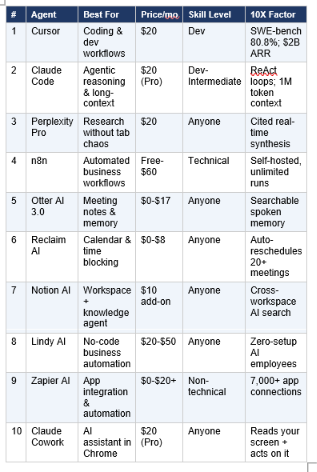
Quick Verdict: 10 AI Agents Ranked
💻 #1 — Cursor
The AI-native IDE that turned 'vibe coding' into a $2 billion business
Cursor reached $2 billion in annual recurring revenue in 2026 — the clearest market signal that AI coding agents have crossed from novelty into necessity. It's not a plugin you bolt onto VS Code. It's an entirely rebuilt IDE with AI at the architectural center: multi-file editing, inline code generation, a chat panel that understands your full codebase, and an agent mode that can implement entire features from a plain-English description.
What It Actually Does
- Agent mode: describe a feature, Cursor plans and implements across multiple files
- Tab completion: context-aware suggestions that understand your codebase, not just the current file
- Composer: orchestrate changes across an entire project from a single prompt
- @-references: pull in docs, files, or web pages as context mid-conversation
Real Productivity Workflow
Scenario: You need to add authentication to a Next.js app. Instead of reading docs and writing middleware manually: open Cursor, type 'Add JWT auth to this app using the existing User model in /models/user.ts. Follow the existing pattern in /middleware/auth.ts.' Cursor reads both files, generates the new code, updates the relevant routes, and shows you a diff. Review and approve.
Pros
- The most complete AI coding environment available — SWE-bench 80.8% with agent scaffold
- Understands multi-file project context, not just the open file
- Tab completion trains on your corrections and gets smarter over sessions
Cons
- Developer tool — requires comfort with code; not for non-technical users
- Heavy token usage on large codebases can burn through quota quickly
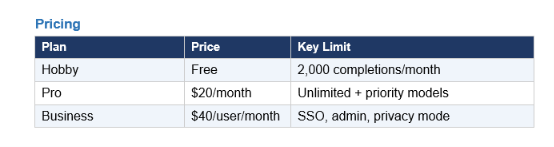
- Privacy mode (no code logging) requires Business plan
✅ Verdict: The best AI tool for developer productivity, period. If you write code professionally, this $20/month saves multiple hours weekly on routine implementation tasks.
🤖 #2 — Claude Code
The agentic reasoning engine — for developers and power users who outgrew tab completion
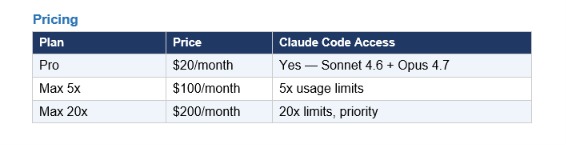
Claude Code is Anthropic's terminal-based coding agent that runs a ReAct loop — reason, act, observe, iterate — until the goal is complete. Unlike Cursor's IDE-first approach, Claude Code is terminal-native. You describe a goal in plain English, and it plans the approach, writes the code, runs it, reads the error, fixes it, and continues until the task is done or it needs a decision. With a 1M token context window, it can hold an entire codebase in a single session. It powers GitHub Copilot's coding agent by default. For a full breakdown, see the Claude AI 2026 complete guide.
What It Actually Does
- Terminal agent: reads files, runs commands, fixes errors, iterates autonomously
- 1M token context: processes entire codebases without chunking
- Claude.md: repo-level instructions that persist across sessions
- Hooks: automation triggers before/after tool use for CI/CD integration
- Multi-agent: spawn parallel sub-agents for concurrent tasks
Real Productivity Workflow
Scenario: You need to refactor a 3,000-line Python module and add unit tests. Open Claude Code, type 'Refactor payment_processor.py for single responsibility. Each extracted function needs a pytest test with edge cases. Don't change the public API.' Claude reads the file, plans the decomposition, extracts the functions, writes the tests, runs them, fixes failures, and delivers a complete diff. A task that would take a senior developer 4 hours takes 25 minutes with oversight.
Pros
- Plain-English agent instructions — no node wiring or workflow configuration
- Built-in debugging: paste a screenshot of an error, Claude investigates autonomously
- Skills transfer directly to Gemini CLI, Codex, and future agents
Cons
- Terminal familiarity required — not a point-and-click tool
- Agentic loops can consume tokens quickly on complex tasks
- Scheduling/background runs less mature than n8n (improving with Hooks)
✅ Verdict: Best for developers and technical knowledge workers who need genuine reasoning, not just code completion. The upgrade from Cursor's IDE-first model is the ReAct loop — Claude Code adapts; Cursor executes.
🔍 #3 — Perplexity Pro
The research agent that killed the 14-tab research session
Google has a problem: its search results in 2026 are a minefield of SEO spam, affiliate links, and content-farm listicles. Perplexity bypasses all of it. Type your research question, get a synthesized answer with inline citations from real sources — primary papers, official documentation, government sites — and click through only when you need to verify. It's not a chatbot with search bolted on. It's a research agent that synthesizes first and shows sources second.
What It Actually Does
- Answer engine: synthesizes real-time web data into cited, structured answers
- Deep Research: multi-source reports with 20+ search queries and a full bibliography
- File upload: ask questions about PDFs, reports, or datasets alongside web data
- Model choice on Pro: switch between GPT-5.5, Claude Sonnet 4.6, Gemini 3.1 Pro
- Threaded context: follow-up questions build on prior answers without re-explaining
Real Productivity Workflow
Scenario: Competitor analysis before a pitch. Instead of 14 open tabs: ask Perplexity 'Build a comparison table of [Competitor A] vs [Competitor B] enterprise pricing, citing official documentation from 2026.' It returns a formatted table with inline citations. If a number looks off, click the footnote. Total time: 4 minutes. Old way: 45 minutes.
Pros
- Every claim has a clickable citation — no hallucinated references
- Deep Research mode produces report-quality multi-source synthesis
- Fastest research workflow for any fact-based task
Cons
- Not for creative or generative tasks — it's a research tool, not a writing assistant
- Deep Research mode is slower (5-10 minutes for complex queries)
- Weaker on very niche technical topics where primary sources are sparse
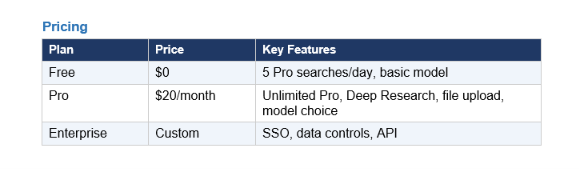
✅ Verdict: Non-negotiable for anyone who does research professionally. Perplexity Pro at $20/month replaces hours of Google search sessions weekly for analysts, writers, and founders.
⚙️ #4 — n8n
The automation backbone — for technical teams who want AI workflows without per-task pricing
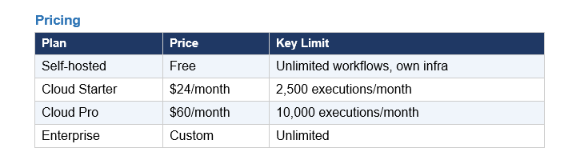
n8n is the open-source answer to Zapier, with one critical difference: you can self-host it for free on a $6/month VPS and run unlimited workflows with zero per-task fees. In 2026, it added a genuine AI Agent node that runs LangChain-powered ReAct loops — not just LLM API calls in a pipeline, but actual goal-oriented agents that use tools, check results, and retry when things go wrong. The visual canvas makes complex multi-step workflows auditable in a way that code-only solutions aren't.
What It Actually Does
- AI Agent node: LangChain-powered agents with memory, tools, and ReAct reasoning
- 600+ app integrations: Slack, Gmail, Notion, Salesforce, GitHub, and more
- Webhook triggers, cron jobs, retry logic: production-grade scheduling built in
- MCP support: Claude and other models can orchestrate n8n through natural language
- Self-hosted free option: run unlimited workflows on your own server
Real Productivity Workflow
Lead enrichment pipeline (real example from production): A new lead submits a form. n8n triggers, scrapes the company website, passes the text to Claude Sonnet to summarize their tech stack, queries a vector database for the most relevant case study, and routes the draft to a human Slack channel if confidence is below threshold. If confidence is high, sends automatically. This workflow replaces 20-30 minutes of manual research per lead.
Pros
- Self-hosted free tier makes it the best value automation platform available
- Visual canvas shows entire workflow at a glance — debuggable by the team
- Production scheduling built in: cron, webhooks, retry logic from day one
Cons
- Requires Docker or server comfort for self-hosting — not a no-code tool
- Debugging complex 40-node workflows with silent API failures is painful
- AI agent capabilities less mature than Claude Code for complex reasoning tasks
✅ Verdict: The best automation platform for technical teams. Self-hosted free tier + unlimited runs beats Zapier's economics for any team processing more than 1,000 tasks/month.
🎙️ #5 — Otter AI 3.0
Search for your spoken memory — across every meeting you've ever had
Otter AI 3.0 adds something no meeting tool had before: a conversational layer over your entire meeting history. Ask 'In our February call with the client, what did they say about budget timeline?' and it searches every transcript it's ever recorded and surfaces the exact quote. It's search for your spoken memory — which turns out to be one of the most practically valuable things an AI can do for knowledge workers who live in meetings.
What It Actually Does
- Real-time transcription: speaker-separated, accurate during live calls on Zoom, Meet, or Teams
- Smart Summary: decisions made, action items, open questions — auto-generated by call end
- Otter AI Chat: ask questions across all past transcripts
- Slack/Salesforce/Google Drive integration: push summaries to your tools automatically
- Action item tracking: assigns tasks to attendees and tracks completion
Real Productivity Workflow
Scenario: Weekly engineering sync with 8 attendees. Otter joins as a silent participant, transcribes in real time, and by the time the call ends has posted a summary to the team Slack: 3 decisions made, 5 action items with owners, 2 open questions. Two weeks later, a new team member asks why you deprecated Node 18. A Slack bot queries Otter and returns the exact transcript quote from the architecture meeting. No one has to reconstruct context from memory.
Pros
- The conversational memory layer across transcripts is genuinely unique
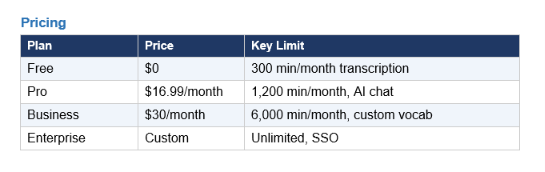
- Free tier is generous enough for individuals
- Integrates with Slack, Salesforce, Notion, HubSpot
Cons
- Accuracy drops on heavy accents, technical jargon, or cross-talk
- Dedicated meeting note tools like Fireflies can outperform in specific CRM contexts
- Meeting joins as bot participant — some clients find this off-putting
✅ Verdict: Essential for anyone who has more than 5 meetings per week and later needs to recall what was decided or agreed. The transcript memory feature alone justifies the Pro plan.
📅 #6 — Reclaim AI
The scheduling agent that protects your time so you don't have to
Reclaim AI does exactly one thing, and it does it with almost magical precision: it protects your calendar. Tell it your habits — deep work, lunch, gym, a 20-minute walk — and it schedules them automatically around incoming meetings. When a conflict lands, it reschedules the habit intelligently instead of letting it disappear. One real example from testing: a week with 14 meetings, and Reclaim compressed most of them into two windows, leaving two full focused mornings intact. No manual intervention.
What It Actually Does
- Habit protection: auto-schedules recurring commitments around meeting requests
- Task time blocking: connects your task list and finds real calendar time for the work
- Smart scheduling links: offers slots to external people based on actual priorities
- Slack sync: updates your status automatically based on calendar events
- Buffer scheduling: adds travel/prep time around meetings automatically
Real Productivity Workflow
Scenario: You have a 3-hour coding project due Friday and a calendar full of meetings. Add the task to Reclaim with the deadline and priority. It analyzes your week, finds two 90-minute focused blocks that don't conflict with existing meetings, and schedules them with 'Do Not Disturb' protection. If a meeting gets added, Reclaim moves the blocked time rather than deleting it. The work gets done without you manually rearranging your schedule.
Pros
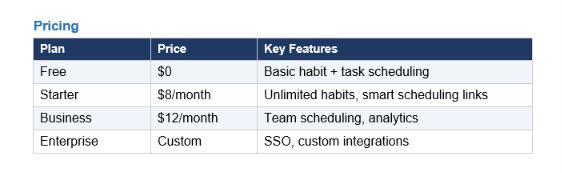
- Free tier is genuinely useful — unlimited calendar connections
- Requires zero manual calendar management once configured
- Habit protection alone is worth more than the $8/month
Cons
- Google Calendar only (Microsoft 365 support is limited)
- Initial setup takes 30-60 minutes to teach it your priority hierarchy
- Cannot block time for tasks it doesn't know about
✅ Verdict: Best ROI for any knowledge worker who uses Google Calendar and has more meeting demands than hours. At $8/month, it's the most underpriced productivity tool on this list.
📝 #7 — Notion AI
The workspace agent — when your knowledge base and AI live in the same place
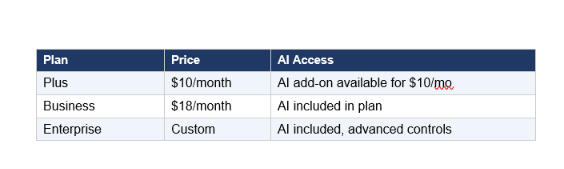
Notion AI's 2026 advantage is architectural: the AI knows everything in your workspace. It can reference your project plans, past meeting notes, and team wikis when it answers questions or generates content — something no general-purpose AI can replicate without document uploads. Ask 'Summarize Q1 goals from the last team meeting and list any open tasks from the product roadmap page' and it synthesizes across both. That context awareness is what separates it from Claude or ChatGPT for teams already in Notion.
What It Actually Does
- Workspace search: cross-page, cross-database AI search with cited answers
- AI writing: drafts, edits, and rewrites content aware of your existing pages
- Auto-fill: fills database properties based on linked page content automatically
- Meeting capture: transcribes and summarizes calls (integrates with calendar)
- Web research: Perplexity-style live web queries from inside Notion (beta)
Real Productivity Workflow
Scenario: Weekly status update. Instead of opening 6 different project pages and copying bullet points: ask Notion AI 'Write a weekly update covering this week's progress on the Q2 product roadmap, our top 3 blockers, and next week's priorities.' It reads your roadmap database, this week's task completions, and any pages tagged with 'blocker' — and writes the update. What used to take 30 minutes takes 3.
Pros
- AI that knows your workspace context — unmatched by external AI tools
- Uses both GPT-4.1 and Claude Sonnet 4.6 — Notion picks best for each task
- No context switching — one tool for notes, projects, and AI
Cons
- Value depends entirely on how thoroughly your team uses Notion — garbage in, garbage out
- For heavy SEO or marketing copy, dedicated tools outperform
- Meeting transcription still in beta — Otter AI is more mature for that specific use
✅ Verdict: Best for teams already living in Notion. If your docs and projects are there, Notion AI delivers more relevant outputs than any external AI because it knows your context.
🤝 #8 — Lindy AI
The no-code AI employee builder — when you want agents without the engineering
Lindy's pitch is blunt: AI employees you don't have to build. Instead of configuring workflows, you pick a use case (Email Manager, Meeting Notes, Research Assistant, Calendar Manager), connect your accounts, and it starts working. Zero visual canvas, zero node wiring, zero technical setup. The killer feature is that the most common workflows are pre-built and production-tested — you're not building from scratch, you're deploying something that already works.
What It Actually Does
- Email Manager: drafts replies, sorts inbox, follows up on unanswered threads
- Meeting Notes: joins calls, summarizes, creates and assigns action items
- Calendar Manager: schedules meetings, handles conflicts, manages booking links
- Research Assistant: finds information, compiles reports, monitors competitors
- Custom Lindies: build your own agent from templates with plain-language instructions
Real Productivity Workflow
Scenario: You receive 80 emails per day and spend 2 hours managing your inbox. Connect Lindy's Email Manager to Gmail. It reads every incoming email, drafts a reply in your voice for each one that needs a response, flags the 5 that need your direct attention, and auto-sends the routine confirmations and acknowledgements. First-week result in documented user cases: inbox time from 2 hours to 20 minutes daily.

Pros
- Zero technical setup — connects and runs in minutes for common use cases
- Pre-built AI employees for the most common workflows are mature and production-ready
- Non-technical users get genuine agent capability without learning automation tools
Cons
- Less customizable than n8n or Claude Code for complex or unusual workflows
- $49.99/month Pro plan is the steepest on this list relative to use case breadth
- Building custom Lindies beyond templates requires more configuration than advertised
✅ Verdict: Best for non-technical knowledge workers who want real automation without touching a workflow builder. Email Manager alone recovers the subscription cost in time saved.
🔗 #9 — Zapier AI
The universal connector — when you just need your apps to talk to each other with AI
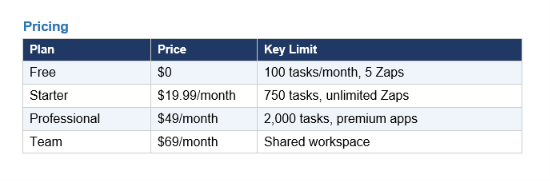
Zapier's strength is not sophistication — it's breadth. 7,000+ app integrations, a free tier, and a no-code interface mean that the automation you need (even if it's simple) can be built without hiring an engineer. In 2026, Zapier added an AI Copilot that lets you describe what you want in plain English instead of configuring triggers and actions manually. It also supports MCP, meaning Claude can orchestrate Zapier workflows through natural language. That combination — 7,000 apps plus AI orchestration — makes it the glue layer that holds most small business tech stacks together.
What It Actually Does
- Zaps: simple trigger → action automations across 7,000+ apps
- AI Copilot: describe your automation in plain English, Copilot builds it
- Tables: lightweight database that Zaps can read/write without a separate DB
- Canvas: visual multi-step workflow builder for complex automations
- MCP integration: Claude can trigger and manage Zapier workflows directly
Real Productivity Workflow
Scenario: Every time a new form submission comes in, add it to a Notion database, send a Slack notification, create a follow-up task in Asana, and send the contact a welcome email from Gmail. Without Zapier: a developer builds this manually. With Zapier: describe the flow to AI Copilot, connect the four apps, and it runs in 10 minutes. No code.
Pros
- 7,000+ integrations — if your app exists, Zapier connects to it
- No-code AI Copilot makes automation genuinely accessible to non-technical users
- Free tier is a real starting point for simple automation
Cons
- Per-task pricing gets expensive at scale — n8n self-hosted wins at high volume
- Less capable than n8n for complex, branching, stateful AI agent workflows
- AI Copilot builds simpler automations well; complex logic still requires manual config
✅ Verdict: Best for non-technical teams that need app integration without developer involvement. Free tier is genuine. For high-volume technical teams, n8n is the better long-term choice.
🌐 #10 — Claude Cowork
The AI agent that reads your screen and works inside your existing tools
Claude Cowork is Anthropic's AI assistant that runs in your browser and can read what's on your screen, take actions on web pages, and carry context from your open tabs. Unlike Claude.ai in a chat window, Cowork sees your current context — the email you're reading, the spreadsheet you're building, the document you're editing — and acts on it. The full Claude AI guide covers how Cowork fits alongside Claude Code in the full Anthropic ecosystem.
What It Actually Does
- Screen reading: Claude can see and reference what's open in your browser tabs
- Web actions: fills forms, clicks elements, extracts data from pages
- Cross-tab context: pull information from multiple open pages into one task
- Document analysis: read and act on docs, PDFs, spreadsheets in browser
- Memory: remembers preferences and patterns across sessions
Real Productivity Workflow
Scenario: You have a competitor's pricing page open and your own pricing spreadsheet. Without switching tools: ask Cowork 'Compare their enterprise tier features to ours and flag anything where we're meaningfully behind.' It reads both tabs, generates a comparison, and highlights the gaps — without you copying a single piece of data manually.
Pricing
Included in Claude Pro ($20/month) alongside Claude Code. The Pro plan gives access to both Sonnet 4.6 and Opus 4.7, Cowork, and Claude Code — the most complete AI productivity platform at the $20 price point.
Pros
- No copy-paste from other tabs — Cowork reads your screen directly
- Works inside your existing tools without replacing them
- Bundled with Claude Pro — no additional subscription cost
Cons
- Chrome-only currently — no Firefox, Safari, or Edge support
- Complex multi-app workflows are less capable than dedicated n8n or Zapier automations
- Screen-reading raises privacy considerations in sensitive enterprise environments
✅ Verdict: Best for knowledge workers who want AI assistance inside their existing browser workflow without building automations. The Pro bundle makes this an easy addition if you're already on Claude.
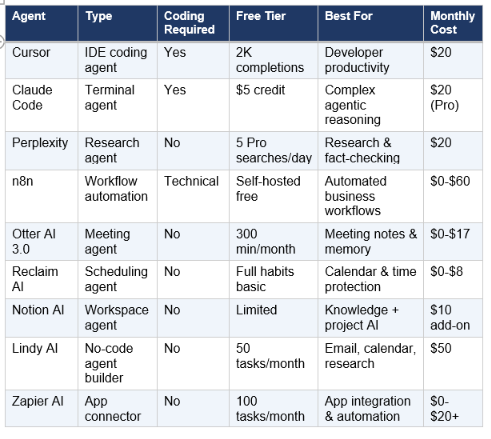
Full Comparison: AI Agents Side by Side
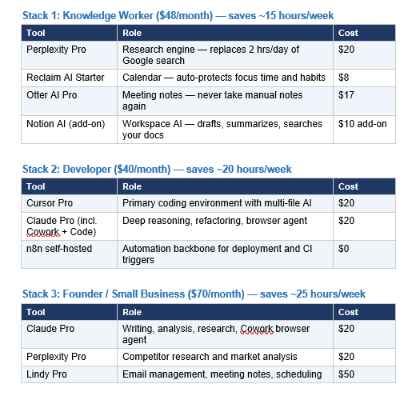
The Productivity Stacks That Actually Work in 2026
Don't try to use all 10. Here are three tested configurations matched to specific work profiles.
For advanced teams who want to build custom agents on top of these tools, the AI Agent Frameworks collection covers LangGraph, CrewAI, AutoGen, and how to wire multi-agent systems into production. The tools above are the ready-to-use layer. The frameworks are the build-your-own layer.
Frequently Asked Questions
What is the best AI agent for productivity in 2026?
It depends on your primary bottleneck. For developers: Cursor Pro ($20/month) for IDE-integrated coding. For research: Perplexity Pro ($20/month) for cited real-time synthesis. For meeting-heavy knowledge workers: Otter AI 3.0 (free to $17/month) for searchable meeting memory. For calendar control: Reclaim AI ($8/month). For automation without code: Lindy AI for individuals, n8n self-hosted for technical teams. The optimal stack for most knowledge workers is Perplexity + Reclaim + Otter at $45/month.
What is the difference between an AI chatbot and an AI agent?
A chatbot answers questions. An AI agent takes actions. A chatbot responds to your message. An agent plans a sequence of steps, uses external tools (search, code execution, file access), checks results, handles failures, and iterates until the goal is complete. Claude.ai in a browser tab is a chatbot. Claude Code running in your terminal, reading files, executing code, and fixing errors automatically is an AI agent. Zapier triggers are automations. n8n with an AI Agent node running a goal-oriented loop is an AI agent. The distinction matters because the productivity leverage is in the agents, not the chatbots.
Is Claude Code better than n8n for automation?
They solve different problems. Claude Code uses a ReAct loop — it reasons adaptively, makes decisions, and handles novel situations. n8n is deterministic — it runs the same defined steps in the same order every time. n8n wins for always-on, scheduled, production background automation (daily reports, CRM updates, webhook processing). Claude Code wins for complex, judgment-heavy tasks where the path isn't fully known upfront (refactoring, research, debugging). The best setups in 2026 use both: n8n for the predictable automation backbone, Claude Code for the tasks that require actual reasoning.
Are there free AI agents for productivity?
Yes — several tools on this list have genuinely useful free tiers. n8n is free if you self-host, covering unlimited workflows. Reclaim AI's free tier covers basic habit and task scheduling. Otter AI's free tier includes 300 minutes of transcription per month. Perplexity's free tier gives 5 Pro searches per day. Claude.ai's free tier now includes Claude Sonnet 4.6 with file creation and connectors. For a developer, the n8n free self-hosted + Perplexity free + Otter free combination covers substantial productivity gains at $0/month.
Is Cursor worth $20/month for developers?
At $2 billion in ARR, the market has already voted. The more useful question is whether it's worth it for you specifically. If you write code more than 3 hours per week, the answer is almost certainly yes — Cursor's multi-file agent mode and intelligent tab completion save multiple hours on implementation tasks weekly. If you're a casual developer or primarily work in one file at a time, GitHub Copilot Pro at $10/month is a more cost-appropriate choice. For professional developers: Cursor Pro. For occasional coders: GitHub Copilot or Claude Code on demand.
How do I build a productivity AI agent stack on a budget?
Start with the free tiers: n8n self-hosted (free) + Perplexity free (5 Pro searches/day) + Otter AI free (300 min/month) + Reclaim AI free (basic habits) + Claude.ai free (Sonnet 4.6). This covers research, automation, meeting notes, and calendar management at $0/month. When you identify which tool is your primary bottleneck, upgrade that one first. Most people find Perplexity Pro ($20/month) is the highest-ROI first upgrade because research time is a daily cost. Add Reclaim Starter ($8/month) second for calendar protection. Total upgraded stack: $28/month.
Final Verdict: The 10X Productivity Play
The honest truth about AI agents in 2026: the gap between people using them and people not using them is growing faster than it has in any previous technology cycle. McKinsey's $4.4 trillion productivity impact estimate assumes broad adoption — the early adopters are already capturing outsized value.
But more tools is not the answer. The biggest productivity killer in 2026 is tool overload — paying for six subscriptions, managing five logins, and spending the time saved on the overhead of managing the tools themselves. The three-tool stacks in this guide are deliberate for that reason.
Start with the biggest bottleneck in your day — that's the tool worth paying for first. For most knowledge workers, it's research (Perplexity) or meeting follow-up (Otter). For developers, it's coding (Cursor). For founders, it's email and scheduling (Lindy + Reclaim). For technical teams building automation, it's workflow orchestration (n8n). Pick the one, use it for 30 days, then add the next. The compound effect of two or three well-used agents is larger than the theoretical value of ten poorly-used ones. For teams ready to build beyond these tools, the AI Agent Frameworks guide and the Best AI Models May 2026 leaderboard are the natural next steps.
Recommended Blogs
References
- McKinsey Global Institute — The economic potential of generative AI
- Gartner — Agentic AI forecast 2026
- Fello AI — 25 Best AI Agents in 2026
- Digitpatrox — 15 Best AI Productivity Tools Tested in Production
- AI Maker Substack — Claude Code vs n8n 8-Category Comparison
- MindStudio — Claude Code vs n8n Agentic Workflows Comparison
- Vucense — Best AI Productivity Tools 2026 Ranked by Use Case
- NxCode — Best AI Tools 2026 Complete Ranking

