



OpenAI Codex Is Now on Mobile: What Developers Need to Know (2026)
On May 14, 2026, OpenAI did something that sounds small but has real workflow implications: Codex — their cloud-based AI coding agent — is now available inside the ChatGPT mobile app on iOS and Android. The kicker? It's in preview, but rolled out to all ChatGPT plans, including the free tier. If you've ever had a long-running Codex task stall while you stepped away from your laptop, your phone just became the solution.
This isn't about typing code on a tiny screen. It's about approving agent decisions, reviewing diffs, redirecting running tasks, and monitoring terminal output — all from wherever you are. Here's everything you need to know.
1. What OpenAI Codex Actually Is
OpenAI Codex is a cloud-based software engineering agent that can work on multiple tasks in parallel — writing features, fixing bugs, running tests, and proposing pull requests — all inside isolated cloud sandbox environments preloaded with your repository. It is not a code completion tool like Copilot. It's closer to delegating a task to a junior developer who runs it in the background and comes back when it needs a decision.
Codex is powered by codex-1, a version of OpenAI o3 optimized for software engineering via reinforcement learning on real-world coding tasks. If you want to understand the broader agent architecture it sits inside, the OpenAI Agents framework overview on Build Fast with AI covers how agents, handoffs, and runners fit together.
In practice, Codex spans four surfaces: the Codex app (desktop), the Codex CLI (terminal), IDE extensions, and now ChatGPT — all connected through your ChatGPT account. The mobile launch fills the last obvious gap in that surface coverage.
2. What the Mobile Launch Changes for Developers
The core developer problem Codex solves is long-running tasks that hit decision points. You kick off a refactor, Codex runs for 15 minutes, then pauses because it found a breaking change in a shared utility and needs your call. Before May 14, 2026, that meant being chained to your keyboard or losing momentum.
The mobile app changes that loop. Here's what you can do from your phone:
- View real-time screenshots and terminal output from active Codex tasks
- Approve or deny pending commands without returning to your desk
- Review code diffs and redirect task scope with a typed reply
- Start entirely new Codex tasks from mobile and monitor them remotely
- Work across all active threads — not just one task at a time
OpenAI's framing is direct: "Start something from a computer at home and then go out to the coffee shop and approve the final output over your matcha." Axios captured that quote in their coverage, and it's actually an accurate summary of the workflow. The agent keeps running on your Mac, devbox, or remote server. Your phone is the control surface.
This is meaningfully different from mobile coding apps that ask you to type. It's asynchronous agent control — the same multi-agent, fire-and-delegate paradigm described in the best AI coding agents comparison for 2026, now made portable.
3. How to Set It Up
Setup is intentionally low-friction. OpenAI designed this to take under five minutes. Here's the exact process as of May 2026:
Requirements
- macOS with the latest Codex desktop app installed and running
- ChatGPT mobile app (iOS or Android) updated to the latest build
- Any ChatGPT plan — Free, Go, Plus, Pro, Business, or Enterprise
- Windows host support is listed as "coming soon" by OpenAI
Steps
- Update the ChatGPT mobile app on iOS or Android to the latest version
- Update the Codex desktop app on macOS to the latest build
- Open the ChatGPT mobile app — look for a Codex entry in the navigation
- Sign in with your ChatGPT account (same credentials as desktop)
- Your active desktop Codex threads will appear — tap any to monitor or control it
If you don't see a Codex entry in the mobile app, you're on an older build. Force an app store update. The relay layer that connects your phone to the running desktop session is handled by OpenAI's infrastructure — there's no manual port forwarding or SSH tunnel setup required.
One important note: the mobile pairing currently works only with the macOS Codex desktop app as the host. The Codex CLI and IDE extensions are not part of the mobile pairing flow in this preview release. For Windows-only shops, this is a wait.
4. Codex Hooks: The Underrated Feature in This Release
The mobile launch got all the attention, but Hooks — now stable as of this release — may be the more durable productivity unlock for serious developers.
Hooks are lifecycle automation scripts you configure in your Codex setup. They run at specific events during the agent workflow:
- PreToolUse — run a validator before Codex executes a command
- PostToolUse — scan outputs or log results after tool execution
- UserPromptSubmit — check prompts for secrets or sensitive data before they leave your machine
- Stop — trigger a memory write or summarization when a session ends
In practice, Hooks let you do things like: automatically reject any Codex action that touches production credentials, log all agent conversations to an internal observability system, create persistent memory files from completed sessions, or run your test suite after every code edit before Codex proceeds.
Hooks are configurable inline in config.toml or via a hooks.json file, and plugins can bundle their own hooks. If you're building agents at scale — the kind described in the AI agent frameworks guide covering LangGraph, CrewAI, and AutoGen — Hooks give you a programmable safety and automation layer that didn't exist before. This is not a minor feature.
My honest take: Hooks are what turns Codex from a capable coding agent into something you can actually trust in regulated or high-stakes environments. The HIPAA compliance announcement makes more sense once you understand that Hooks give healthcare engineering teams the validation layer they need to check what data the agent is touching before it executes.
5. Codex vs Claude Code: The Remote Control Race
OpenAI did not invent mobile-connected agentic coding in May 2026. Anthropic shipped Remote Control for Claude Code in February 2026 — four months earlier — giving Claude Code users the ability to monitor and manage running agent sessions from their phones. This mobile Codex launch is OpenAI's direct response.
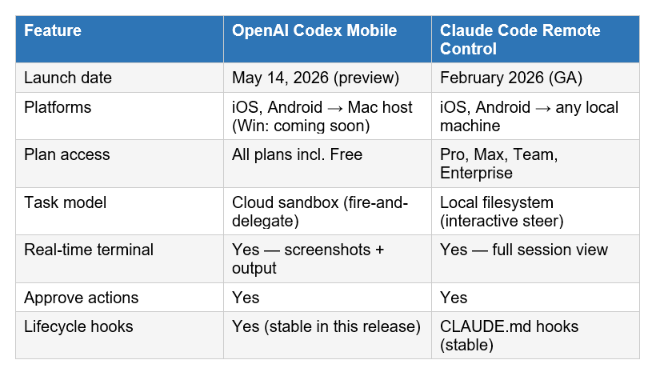
The architectural difference matters more than the feature list. Codex runs tasks in isolated cloud sandboxes — your local filesystem is never touched. Claude Code runs locally with real access to your environment. For a detailed benchmark-by-benchmark breakdown including SWE-Bench, Terminal-Bench, and cost analysis, the Claude Code Agent View vs Codex comparison covers exactly this tradeoff.
The practical split: Codex mobile is better for fire-and-forget delegation where you check in periodically. Claude Code Remote Control is better if you want to actively steer multiple parallel sessions. Many developers are running both in the same workflow in 2026 — routing long-horizon isolated tasks to Codex and interactive refactors to Claude Code.
6. Who Should Care About This
Not every developer needs mobile Codex control. Here's the realistic breakdown of who this matters for:
It matters if you run long-horizon coding tasks
Database migrations, large-scale refactors, multi-file feature builds — anything that takes 20+ minutes and hits decision points. If your Codex tasks routinely pause waiting for you, mobile control gives back meaningful time.
It matters if you work across time zones or split environments
Remote SSH is now generally available alongside this launch, meaning Codex can detect hosts from your SSH config and run threads inside remote devboxes or servers. Combined with mobile, you get a fully location-independent coding workflow. If you're exploring the economics of running agents at scale, the OpenClaw + Kimi K2.5 cost comparison shows how to optimize for cost in high-volume agent scenarios.
It matters for healthcare and regulated industries
The HIPAA compliance announcement is real. Hospitals and healthcare engineering teams can now deploy Codex in local environments under ChatGPT with HIPAA-eligible data handling. The mobile control layer means compliance-constrained teams don't have to choose between portability and data protection.
It probably doesn't matter if you only use Codex for short tasks
If your Codex sessions finish in under five minutes, you're probably already at your desk when they complete. The mobile workflow adds the most value for async, long-running delegation — not for quick code Q&A.
7. The Risks Worth Naming
Axios surfaced the most important concern in their coverage, and I think it deserves direct acknowledgment: approving agent actions from a phone, while multi-tasking, on a small screen, introduces a real risk of errors.
Agent approval flows assume you read the diff carefully before saying yes. That assumption is harder to maintain on a 6-inch screen between meetings. A missed context or a reflexive approval of an action that touches a shared utility could create downstream problems that take longer to fix than the time you saved.
The mitigation is exactly what Hooks enable: configure PreToolUse validators that block certain classes of actions (production writes, credential access, large-scale file deletions) so that your "quick approve on the go" use case never touches the dangerous operations. Think of Hooks as the equivalent of code review guardrails for agent workflows. If you're unfamiliar with how these automation patterns work at the framework level, the Hermes Agent architecture breakdown shows how persistent memory and self-improving skills reduce the cognitive load of agent supervision over time.
My recommendation: use mobile control for monitoring and low-stakes approvals. Keep high-stakes confirmations — production deployments, schema changes, anything touching real user data — for your desktop where you can see the full context. The feature is genuinely useful. The risk is real. Both can be true.
Frequently Asked Questions
What is OpenAI Codex and how does it work?
OpenAI Codex is a cloud-based AI coding agent that executes software engineering tasks — writing features, fixing bugs, running tests, submitting pull requests — in isolated sandbox environments preloaded with your codebase. It runs in the background, pauses when it needs a human decision, and resumes once you respond. It's powered by codex-1, a specialized version of OpenAI o3.
Is OpenAI Codex available on the free ChatGPT plan?
Yes — as of May 14, 2026, the Codex mobile preview is available to all ChatGPT plans including Free and Go in supported regions. Rate limits will apply after the preview period, and flexible pricing for additional usage will be introduced. Pro users ($200/month) get unlimited access to Codex.
How do I set up Codex on my iPhone or Android?
Update both the ChatGPT mobile app and the Codex desktop app on macOS to their latest versions. Sign in with your ChatGPT account on mobile — your active Codex threads will appear automatically. No manual configuration or port forwarding is required. Windows host support is coming soon.
What are Codex Hooks and why do they matter?
Hooks are lifecycle automation scripts that run at specific events in the Codex workflow — before or after tool use, on prompt submission, or when a session stops. They let you add validators, log conversations to internal systems, scan prompts for secrets, and create persistent memory. They're configurable in config.toml and are now stable (not experimental) as of May 2026.
How is Codex different from Claude Code?
Codex runs tasks in isolated cloud sandboxes — your local filesystem is never directly accessed. Claude Code runs locally with real filesystem access, making it better for interactive, steer-as-you-go workflows. Codex excels at fire-and-forget delegation for long tasks; Claude Code excels at active multi-session parallel development. Both have mobile remote control, though Claude Code launched it four months earlier.
Does Codex work on Windows?
The Codex desktop app runs on Windows, but the mobile pairing feature — which lets your phone connect to a running Codex session — currently requires a macOS host. Windows mobile pairing support is listed as "coming soon" by OpenAI as of the May 2026 launch.
Can Codex write and run code while I'm away from my computer?
Yes — that's the core use case. Codex runs in OpenAI's cloud sandbox on a clone of your repository, executes tasks autonomously, and pauses when it needs a decision. With mobile, you can approve those decisions from anywhere and let the task resume. Your local machine doesn't need to stay on.
What is the HIPAA compliance update for Codex?
OpenAI simultaneously announced HIPAA-compliant use of Codex for local environments inside ChatGPT. This allows hospitals and healthcare engineering organizations to use Codex on protected health information under HIPAA-eligible data processing agreements — opening AI-assisted coding to a category of teams that couldn't use it before.
Recommended Blogs
- Claude Code Agent View: Manage Multiple AI Agents in One Dashboard
- GPT-5.3-Codex vs Claude Opus 4.6 vs Kimi K2.5: Full Benchmark Comparison
- What Is OpenAI Agents? Build Your First AI Agent
- Best AI Agent Frameworks in 2026: LangGraph, CrewAI, AutoGen and More
- Hermes Agent Is Now #1 on OpenRouter: Architecture and Rivalry Explained
- Cheap Claude Alternative for AI Agents: 8× Less Cost, Same Results
The agentic coding landscape is moving fast. Follow Build Fast with AI for weekly breakdowns of every tool, benchmark, and workflow shift that matters for developers building with AI.
References
- OpenAI — Introducing Codex (original research preview launch)
- OpenAI — Codex for (almost) Everything: Full Agent Update
- OpenAI Developers — Codex Changelog (May 2026)
- OpenAI Developers — Hooks Documentation
- TechCrunch — OpenAI says Codex is coming to your phone
- Axios — OpenAI brings Codex to your phone
- Kingy AI — Codex Just Landed in the ChatGPT Mobile App: Full Breakdown

