


What Is KV Cache in LLMs and Why Does It Matter?
By Satvik Paramkusham, Founder of Build Fast with AI
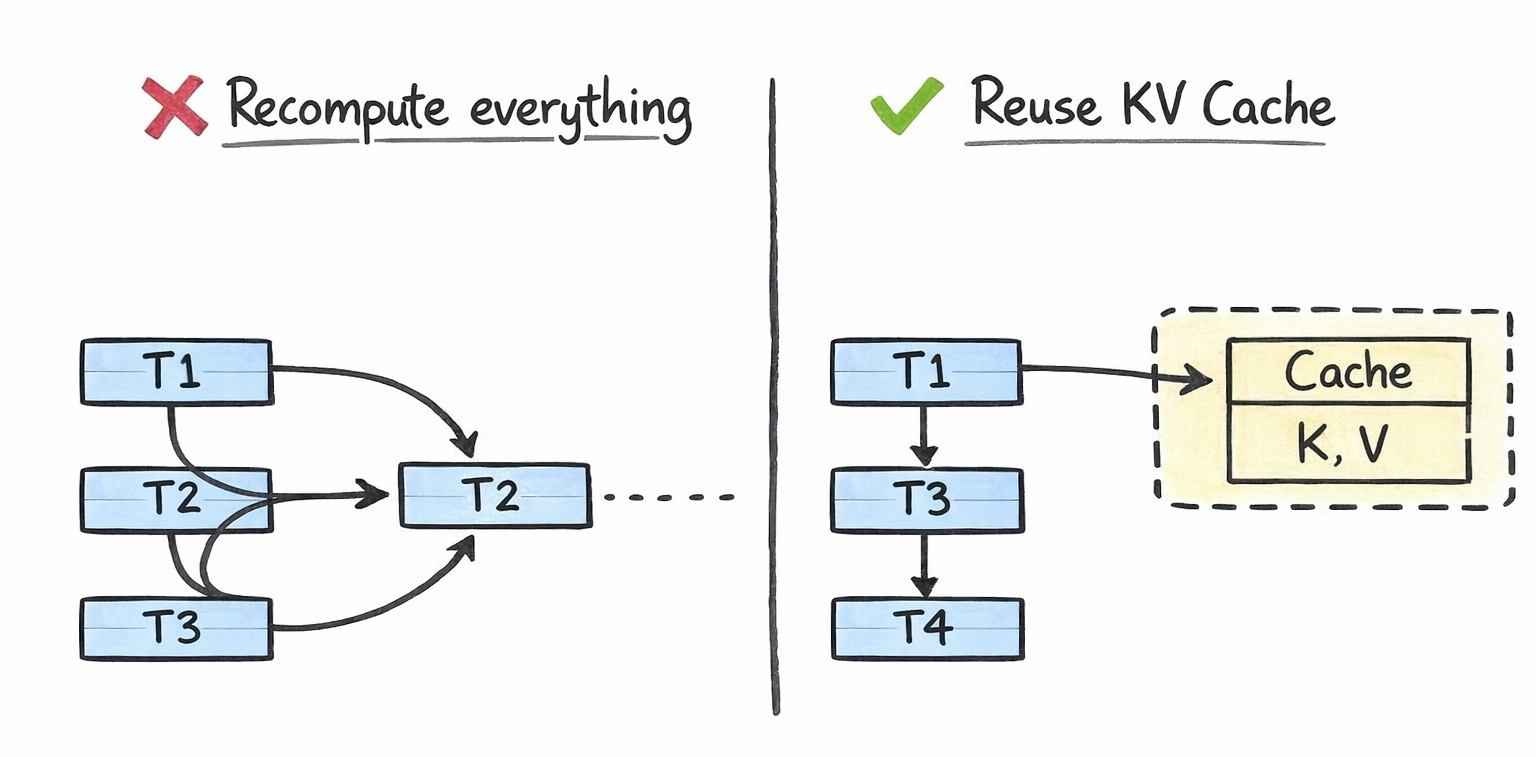
Every time you chat with ChatGPT, Claude, or Gemini, the model generates your response one token at a time. Each new token requires the model to look back at every previous token in the conversation to decide what comes next. Without any optimization, this means the model would redo the same calculations over and over again for tokens it has already processed. For a 4,000-token conversation, generating token #4,001 would require recomputing attention across all 4,000 previous tokens from scratch.
This is wildly inefficient. And it's exactly the problem that the KV cache solves.
The KV cache (key-value cache) is one of the most important optimization techniques in LLM inference. It stores intermediate computations from previous tokens so the model can reuse them instead of recomputing them at every step. The result is dramatically faster text generation. It's also one of the biggest memory bottlenecks in production AI systems today, consuming anywhere from hundreds of megabytes to hundreds of gigabytes of GPU memory depending on the model and context length.
If you're building, deploying, or even just using LLMs, understanding the KV cache is essential. Let's break it down.
How LLMs Generate Text Token by Token
Large language models like GPT-4, Llama, and Gemini are autoregressive. This means they generate text one token at a time, where each new token depends on all the tokens that came before it.
Here's the process: you give the model a prompt like "The weather today is". The model processes this entire prompt, computes attention across all tokens, and predicts the next token, say "sunny". Now the input becomes "The weather today is sunny", and the model processes the full sequence again to predict the next token. This repeats until the response is complete.
The critical operation here is the attention mechanism, introduced in the original "Attention Is All You Need" paper by Vaswani et al. in 2017. During attention, each token is transformed into three vectors: a query (Q), a key (K), and a value (V). The model computes attention scores by multiplying the query of the current token against the keys of all previous tokens. These scores determine how much each previous token should influence the current prediction. The values are then weighted by these scores to produce the final output.
The key insight is this: when generating token #4,001, the query vector changes (it's for the new token), but the key and value vectors for tokens #1 through #4,000 are exactly the same as they were in the previous step. Recomputing them is pure waste.
What Is the KV Cache?
The KV cache is a memory buffer that stores the key and value vectors from all previously processed tokens across every attention layer in the model. Instead of recomputing K and V for the entire sequence at every generation step, the model computes them once, stores them in the cache, and reuses them for all future steps.
Here's what happens step by step during text generation with a KV cache:
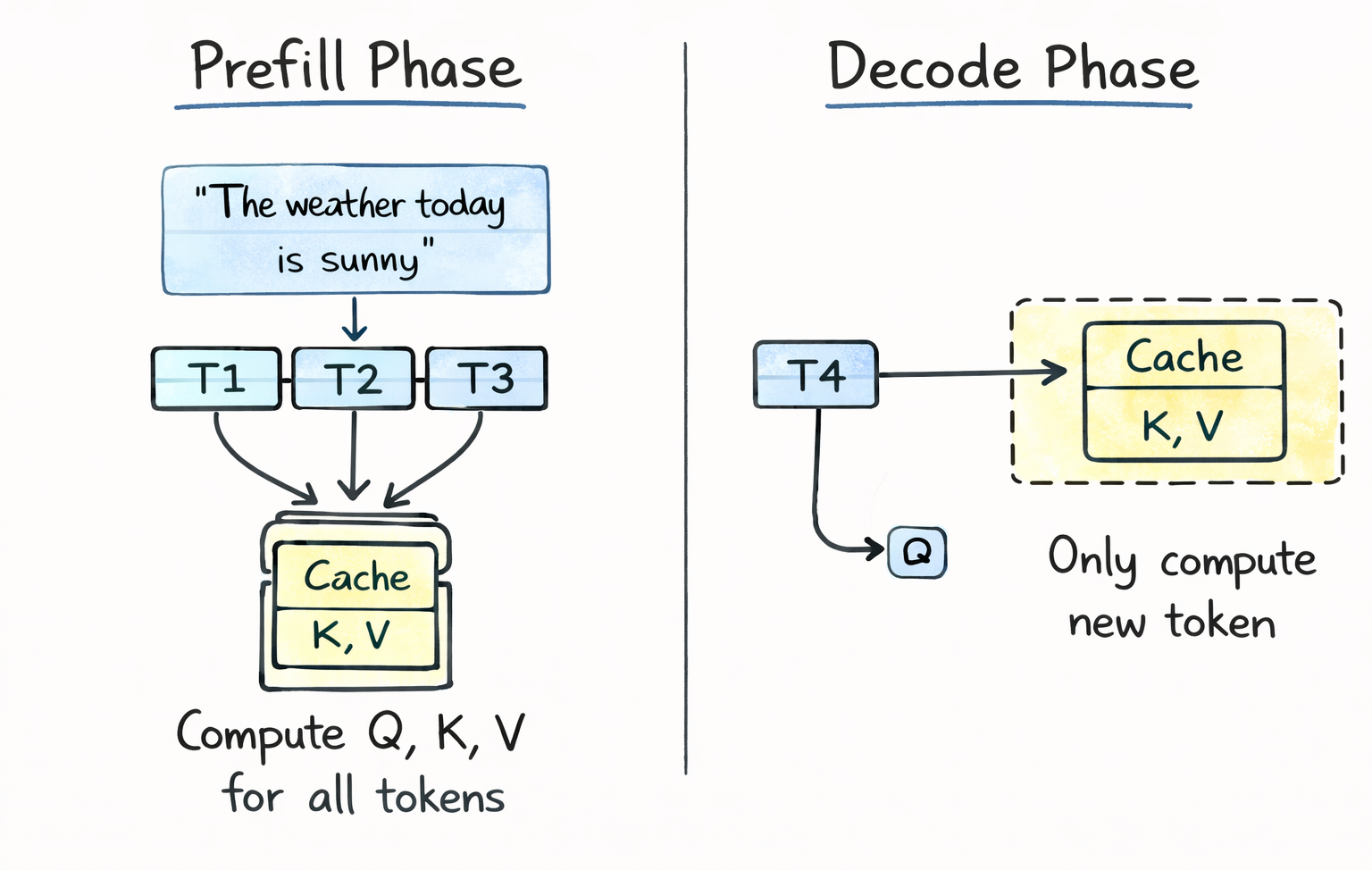
Prefill phase: The model processes your entire input prompt in parallel. It computes Q, K, and V for every token, generates the first output token, and stores all the K and V vectors in the cache. This is why you sometimes notice a small pause before the first token appears in ChatGPT or Claude.
Decode phase: For each subsequent token, the model only needs to compute Q, K, and V for the single new token. It retrieves all previous K and V vectors from the cache, computes attention between the new query and all cached keys, and produces the output. The new K and V vectors are then appended to the cache for the next step.
Without the KV cache, attention computation scales quadratically with sequence length, because every token must attend to every other token from scratch. With the KV cache, it scales linearly, because only the new token's interactions need to be computed. This is the fundamental trade-off: you trade GPU memory (to store the cache) for GPU compute (to avoid redundant calculations). In production, this trade-off is almost always worth it.
How Much Memory Does the KV Cache Use?
The KV cache can consume a surprising amount of GPU memory, and understanding the math is crucial for anyone deploying LLMs.
The formula for KV cache memory per token is:
Memory per token = 2 x num_layers x num_kv_heads x head_dim x precision_bytes
The "2" accounts for both the key and value tensors. Let's plug in real numbers for some popular models.
For Llama 3 8B with Grouped Query Attention (GQA), which uses 8 KV heads instead of the full 32, each token occupies about 0.1 MB in the cache at FP16 precision. That sounds small, but fill up the full 8,192-token context window and you're looking at roughly 1.1 GB just for the KV cache of a single request.
For Llama 2 7B without GQA, each token consumes about 0.5 MB in the cache. At the same 8K context, that's around 4 GB per request.
For larger models, the numbers get serious fast. A 70B parameter model serving a 32,000-token context can consume 80+ GB of KV cache memory for a single request. That's more than the entire capacity of an NVIDIA A100 80GB GPU, and it's just the cache, not the model weights.
When you factor in batching (serving multiple users simultaneously), the picture gets even more demanding. A 70B model serving a batch of 32 requests at 8K context needs roughly 640 GB of KV cache alone. At this scale, the KV cache often exceeds the model weights in total memory consumption.
This is why KV cache optimization has become one of the most active research areas in AI infrastructure.
Why the KV Cache Is a Bottleneck
The KV cache creates three major challenges for production LLM systems.
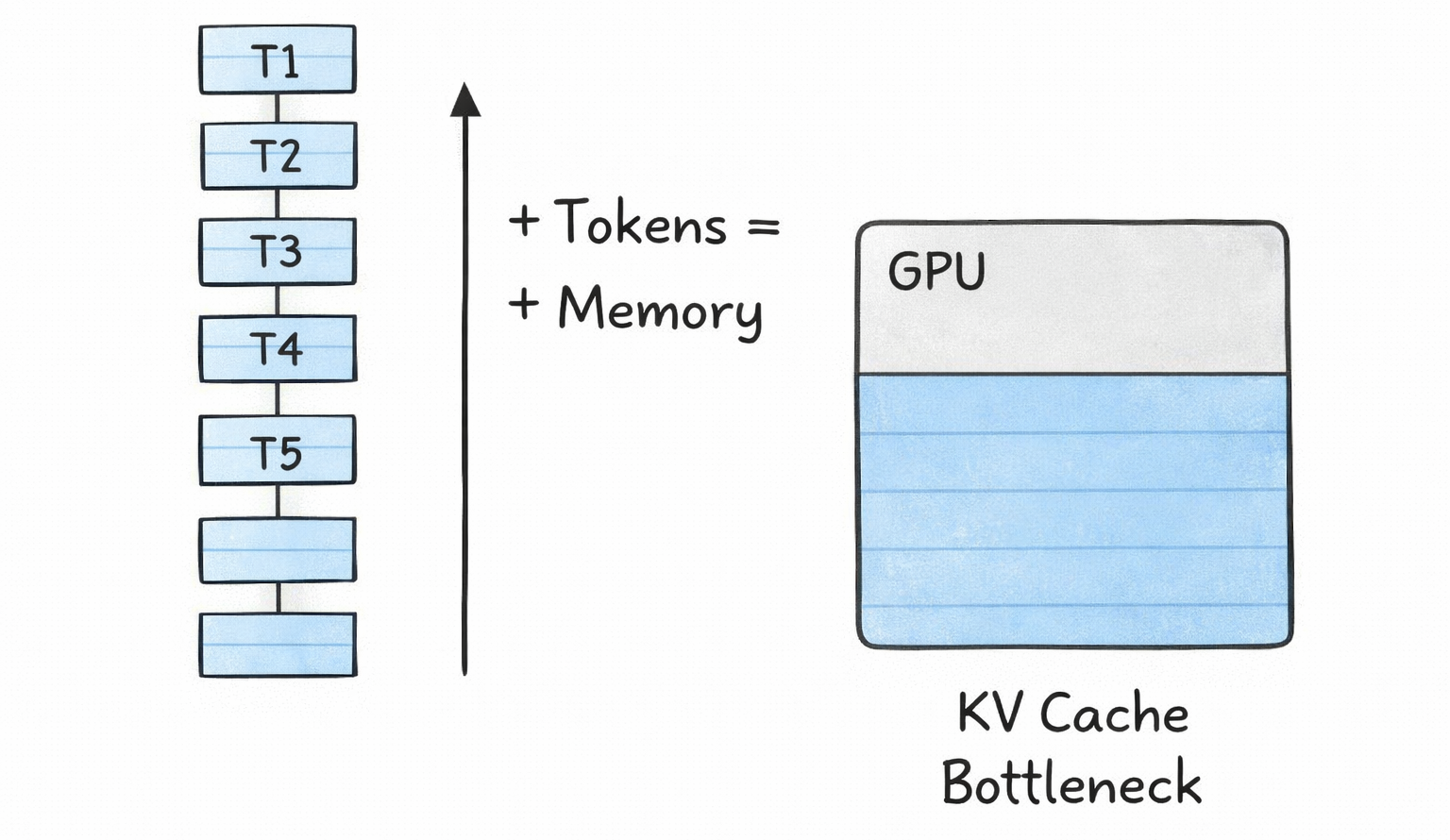
Memory pressure. As context windows grow (GPT-4 supports 128K tokens, Gemini supports up to 1M tokens), the KV cache grows linearly with sequence length. This directly limits how many concurrent users you can serve and how long your context windows can be. Every additional token in every active request costs memory.
Memory fragmentation and waste. Traditional KV cache implementations pre-allocate memory for the maximum possible sequence length for every request. If you allocate space for 4,096 tokens but a user only generates 200, the remaining 3,896 slots sit empty but reserved. Research from the vLLM team showed that naive memory management could lead to 60-80% of allocated KV cache memory being wasted.
Scaling constraints. For long-context applications like retrieval-augmented generation (RAG), coding assistants, and multi-turn agentic workflows, the KV cache becomes the dominant cost driver. Infrastructure teams have to decide between shorter context windows, fewer concurrent users, or more expensive GPU hardware.
This is not a theoretical problem. It directly affects the cost and performance of every AI product you use today.
KV Cache Optimization Techniques
The AI industry has developed several techniques to address the KV cache bottleneck. These operate at different levels of the stack, from model architecture to memory management to compression.
Grouped Query Attention (GQA) reduces the KV cache at the architecture level. In standard multi-head attention, every attention head maintains its own set of key and value vectors. GQA groups multiple query heads to share a single set of keys and values. Llama 2 70B and Llama 3 use GQA with an 8:1 ratio, meaning 8 query heads share 1 KV head. This reduces the KV cache size by 8x compared to standard multi-head attention with minimal quality loss (less than 0.2% in most benchmarks). GQA is now the default in nearly all modern open-source LLMs.
Multi-Query Attention (MQA) takes this further by having all heads share a single KV pair. It offers the most aggressive cache reduction but can sacrifice more model quality. It's less common in recent models than GQA.
Sliding Window Attention (SWA) limits the cache to only the most recent W tokens. Mistral 7B uses this with a window size of 4,096. Older tokens are evicted from the cache entirely. This caps memory usage regardless of sequence length, but means the model can't attend to information beyond the window. It's effectively trading long-range context for memory efficiency.
PagedAttention, introduced by the vLLM framework, revolutionized KV cache memory management. Instead of pre-allocating contiguous memory for the maximum sequence length, PagedAttention divides the cache into fixed-size blocks (typically 16 tokens per block) and allocates them on demand as sequences grow. A block table maps logical positions to physical GPU memory locations, similar to how operating systems manage virtual memory. This reduced memory waste from 60-80% to under 4%, enabling 2-4x throughput improvements. PagedAttention is now supported by all major inference frameworks including vLLM, HuggingFace TGI, NVIDIA TensorRT-LLM, and LMDeploy.
KV cache quantization compresses the cached tensors to lower precision formats. Instead of storing keys and values in FP16 (2 bytes per parameter), you can quantize to FP8 (1 byte) or INT4 (0.5 bytes), cutting memory by 2-4x. vLLM supports FP8 KV cache quantization natively on NVIDIA Hopper and Blackwell GPUs. More advanced methods like Google's TurboQuant (ICLR 2026) compress KV caches down to 3 bits with zero accuracy loss, achieving 6x memory reduction, while Nvidia's KVTC achieves up to 20x compression using PCA-based techniques.
KV cache offloading moves inactive cache data from GPU memory to CPU RAM or even SSD storage. When a user pauses mid-conversation, their cache can be offloaded to free GPU memory for active requests and reloaded when they return. NVIDIA reports up to 14x faster time-to-first-token compared to recomputing the cache from scratch. Frameworks like LMCache implement multi-tiered caching hierarchies (GPU, CPU DRAM, local disk) to extend effective memory capacity by 10-50x.
Prefix caching identifies when multiple requests share common prefixes (like identical system prompts) and shares the cached KV data across requests instead of duplicating it. This is particularly valuable for RAG applications and chat systems with consistent system prompts. vLLM's Automatic Prefix Caching feature can achieve 87%+ cache hit rates for prefix-heavy workloads.
How to Calculate KV Cache Size for Your Model
If you're deploying an LLM, you need to estimate your KV cache memory requirements before provisioning hardware. Here's the practical formula:
Total KV cache memory = 2 x num_layers x num_kv_heads x head_dim x precision_bytes x max_seq_len x batch_size
For a concrete example, let's calculate for Llama 3.1 70B with GQA (8 KV heads), 80 layers, head dimension of 128, FP16 precision, 8,192-token context, and a batch size of 32:
→ Per token: 2 x 80 x 8 x 128 x 2 bytes = 327,680 bytes (~0.3 MB) → Per request (8K context): 0.3 MB x 8,192 = ~2.6 GB → Full batch (32 requests): 2.6 GB x 32 = ~83 GB
That's 83 GB just for the KV cache. The model weights for Llama 3.1 70B in FP16 are about 140 GB. So the KV cache for a modest batch of 32 users at 8K context is already more than half the size of the model itself.
A practical rule of thumb: reserve 40-60% of your GPU memory for the KV cache, with the remainder split between model weights and activations. For an 80GB H100 running a model with tensor parallelism across 2 GPUs, you'd have roughly 30-35 GB per GPU available for cache after loading weights.
What's Next for KV Cache Technology
KV cache optimization is one of the fastest-moving areas in AI research right now. Two major compression methods are being presented at ICLR 2026 in April: Google's TurboQuant (6x compression, zero accuracy loss, no calibration needed) and Nvidia's KVTC (up to 20x compression using transform coding). Both represent generational improvements over KIVI, which was the standard baseline since ICML 2024 with its 2.6x compression ceiling.
On the infrastructure side, Nvidia's Dynamo inference engine is building cluster-scale KV cache management with its KV Block Manager, enabling cache coordination across multiple machines. Projects like llm-d (a collaboration between IBM, Google, and Red Hat) are bringing KV cache-aware routing to Kubernetes, directing requests to pods that already hold relevant cached context.
The direction is clear: KV cache management is maturing from a single-node optimization into a full production infrastructure layer, complete with tiered storage, intelligent routing, and aggressive compression. For anyone building AI systems at scale, understanding and optimizing the KV cache isn't optional. It's the single biggest lever you have for cost, latency, and throughput.
Want to master LLM inference optimization and build production AI systems?
Join Build Fast with AI's Gen AI Launchpad, an 8-week structured bootcamp to go from 0 to 1 in Generative AI.
Register here: buildfastwithai.com/genai-course
Frequently Asked Questions
What is KV cache in large language models?
The KV cache (key-value cache) is a memory buffer that stores previously computed key and value tensors from the attention mechanism during LLM inference. Instead of recomputing these tensors for all tokens at every generation step, the model stores them once and reuses them, reducing attention computation from quadratic to linear complexity.
How much memory does the KV cache use?
KV cache memory depends on the model size, context length, precision, and batch size. For Llama 3 8B with GQA at FP16, each token uses about 0.1 MB. For a 70B model serving 32 requests at 8K context, the cache alone requires roughly 83 GB, often exceeding the model weights themselves.
What is PagedAttention and how does it help?
PagedAttention is a memory management technique introduced by the vLLM framework that divides the KV cache into fixed-size blocks allocated on demand, similar to OS virtual memory. It reduces memory waste from 60-80% to under 4%, enabling 2-4x throughput improvements. It's now supported by vLLM, TGI, TensorRT-LLM, and other major inference frameworks.
What is the difference between GQA and MQA for KV cache optimization?
Grouped Query Attention (GQA) groups multiple query heads to share a single set of key-value pairs, reducing the KV cache by the grouping ratio (typically 4-8x). Multi-Query Attention (MQA) has all heads share one KV pair for maximum reduction. GQA is more common in modern models like Llama 3 because it better balances cache savings with model quality.
How do TurboQuant and KVTC compress the KV cache?
Google's TurboQuant (ICLR 2026) uses polar coordinate transformation and 1-bit error correction to compress KV caches to 3 bits with zero accuracy loss and 6x memory reduction. Nvidia's KVTC uses PCA-based decorrelation and entropy coding to achieve up to 20x compression with less than 1% accuracy drop. TurboQuant requires no calibration while KVTC needs a one-time per-model calibration step.
Recommended Blogs
If you found this useful, these related articles from Build Fast with AI cover topics worth reading next:
References
Mastering LLM Techniques: Inference Optimization - NVIDIA Technical Blog
Understanding and Coding the KV Cache in LLMs from Scratch - Sebastian Raschka
Efficient Memory Management for Large Language Model Serving with PagedAttention - arXiv (vLLM)
Techniques for KV Cache Optimization in Large Language Models - Omri Mallis
KV Caching Explained: Optimizing Transformer Inference Efficiency - Hugging Face Blog
LLM Inference Series: KV Caching, a Deeper Look - Pierre Lienhart
KV Cache Optimization: Memory Efficiency for Production LLMs - Introl Blog

