



OpenAI just cut the price of accurate transcription by 25% and added a feature that fixes the one thing that always broke speech-to-text: getting the hard words right. The company released two new audio models in the API, GPT-Transcribe for completed audio files and GPT-Live-Transcribe for low-latency live streams, and GPT-Transcribe now transcribes 1,000 minutes of audio for $4.50 while scoring a 3.31% word error rate.
The number that matters more than the price is the new context system. You can now hand the model a topic description, a list of exact keywords, and language hints before it transcribes, which is how you finally get product names, acronyms and account numbers spelled correctly. This review covers what both models are, how accurate they really are including the honest caveats, the pricing, and step-by-step Python, Node and cURL code you can copy today.
The one-line verdict: GPT-Transcribe is the new default for batch transcription if you already use OpenAI, cheaper and more accurate than before, with a context system that genuinely helps on hard audio. GPT-Live-Transcribe brings the same quality to real-time streams. Just test on your specific audio first, because transcription accuracy varies wildly by domain.
What Are GPT-Transcribe and GPT-Live-Transcribe?
GPT-Transcribe and GPT-Live-Transcribe are OpenAI's next-generation speech-to-text models in the API, released in 2026. GPT-Transcribe handles asynchronous transcription of completed audio files and batch workloads, while GPT-Live-Transcribe is built for low-latency live transcription of streaming audio. Both understand context better and transcribe real-world audio more accurately across accents and languages.
The improvements target exactly where older models failed: short phrases, numbers, specialized terminology, and speech with loud background noise. If you have ever watched a transcription API confidently mangle a product SKU or a medical term, these models are OpenAI's answer. GPT-Transcribe uses the model ID gpt-transcribe and works through the standard transcriptions endpoint, so migrating from Whisper or GPT-4o Transcribe is usually a one-line change.
Table 1: The two new models at a glance
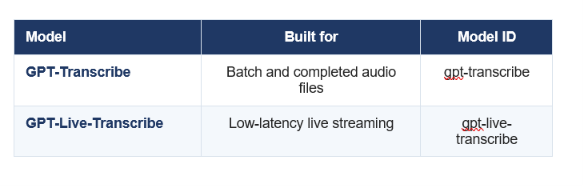
Both accept the same context inputs. GPT-Live-Transcribe was still being independently benchmarked at launch.
GPT-Transcribe vs GPT-Live-Transcribe
Choose GPT-Transcribe for recorded files and GPT-Live-Transcribe for real-time audio. The split is simple: one is optimized for accuracy and throughput on audio that already exists, the other for speed on audio arriving right now.
Table 2: Which model to use
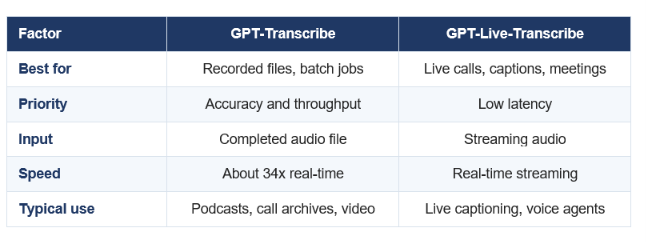
If a human is watching the transcript appear, use Live. If you are processing a file, use GPT-Transcribe.
Simple rule: recorded means GPT-Transcribe, live means GPT-Live-Transcribe. The batch model processes audio at roughly 34 times real-time, so a one-hour recording transcribes in under two minutes, which is why it is the right tool for archives and pipelines.
Accuracy and Benchmarks
GPT-Transcribe scores 3.31% on the Artificial Analysis word error rate benchmark, ranking ninth overall and improving 0.7 percentage points over its predecessor GPT-4o Transcribe. Lower is better on word error rate, so 3.31% means roughly 3 wrong words per 100, which is strong for general audio.
Table 3: Accuracy snapshot
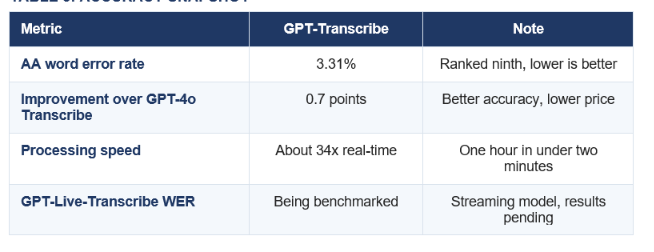
Word error rate depends heavily on audio type. General benchmarks flatter every model.
THE HONEST ACCURACY CAVEAT
Transcription accuracy collapses on hard audio, and no headline number tells you how a model does on your audio. Independent testing of the prior GPT-4o Transcribe won clean short-clip benchmarks like LibriSpeech at 3.1% but jumped to 43.8% word error rate on messy financial earnings calls. The new context system is designed to close exactly that gap, but you must test on your real recordings before trusting any percentage.
My take: a 3.31% benchmark is a great starting point and a terrible stopping point. Run 10 of your own hardest audio files through it before you commit, because the difference between clean and noisy audio can be a 10x swing in errors.
Pricing
GPT-Transcribe costs $4.50 per 1,000 minutes of audio, a 25% reduction from its predecessor. That works out to $0.0045 per minute, or about $0.27 per hour of audio, which is aggressive pricing for a top-tier model.
Table 4: What GPT-Transcribe costs
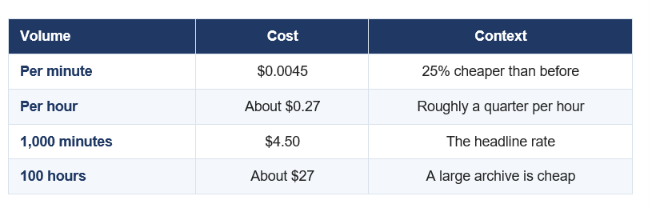
A 25% price cut with better accuracy is the rare launch where you pay less and get more.
The economics matter for volume work. Transcribing a 40-hour archive of customer calls costs under $11, and a daily pipeline of a few hundred hours stays in the low hundreds of dollars a month. For most teams, the model quality now matters far more than the price, which was not true two years ago.
For how OpenAI's broader model lineup and pricing looks this month, our GPT-5.6 Sol, Terra and Luna review covers the flagship side of the same API.
The Context System That Boosts Accuracy
The biggest upgrade is that GPT-Transcribe accepts three kinds of context before it transcribes, which is how you fix the hard words. You pass a prompt describing the recording, a list of keywords that may appear, and language hints for multilingual or code-switching audio.
Table 5: The three context inputs
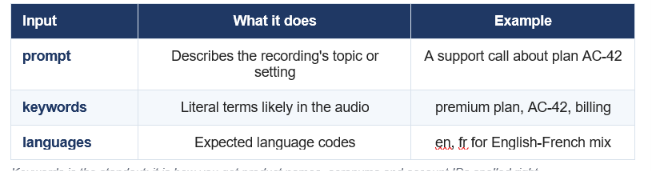
Keywords is the standout: it is how you get product names, acronyms and account IDs spelled right.
Why this matters more than the benchmark: the keywords input is the single most useful transcription feature OpenAI has shipped. Feeding the model your product names, medical terms or ticker symbols up front is what turns a plausible-but-wrong transcript into a usable one. It is the difference between AC-42 and a see forty two.
Don't just use ChatGPT. Learn to build custom LLM agents, RAG pipelines, and full-stack Agentic AI apps in our intensive 6-week program.
How to Use GPT-Transcribe: Step by Step
Getting a transcript takes about five lines of code. Here is the full path from install to a transcript with context, in Python, Node and cURL.
Step 1: Install the SDK and set your ke
bash
pip install openai
export OPENAI_API_KEY="your-key-here"
Step 2: Transcribe a file in Python
python
from openai import OpenAI
client = OpenAI()
audio_file = open("audio.wav", "rb")
transcription = client.audio.transcriptions.create(
    model="gpt-transcribe",
    file=audio_file
)
print(transcription.text)
Step 3: Transcribe in Node.js
javascript

import fs from "fs";
import OpenAI from "openai";
const openai = new OpenAI();
const transcription = await openai.audio.transcriptions.create({
  file: fs.createReadStream("audio.wav"),
  model: "gpt-transcribe",
});
console.log(transcription.text);
Step 4: Or use cURL
bash

curl --request POST \
  --url https://api.openai.com/v1/audio/transcriptions \
  --header "Authorization: Bearer $OPENAI_API_KEY" \
  --header 'Content-Type: multipart/form-data' \
  --form file=@/path/to/audio.mp3 \
  --form model=gpt-transcribe
Step 5: Add context for hard audio
This is the step that separates a rough transcript from a production one. Pass a prompt, keywords and language hints to lock in the terms that matter.
python
transcription = client.audio.transcriptions.create(
    model="gpt-transcribe",
    file=audio_file,
    prompt="A customer support call about the premium plan and account AC-42.",
    extra_body={
        "keywords": ["premium plan", "AC-42", "billing"],
        "languages": ["en", "fr"],
    }
)
print(transcription.text
SUPPORTED FORMATS AND LIMITS
GPT-Transcribe accepts mp3, mp4, mpeg, mpga, m4a, wav and webm, up to 25 MB per file. For longer recordings, split the audio into chunks (the PyDub library automates this by duration) or use a streaming approach for continuous audio.
For runnable end-to-end examples you can adapt, the cookbooks in gen-ai-experiments include audio and API integration notebooks.
Live Streaming Transcription Code
For partial results as audio processes, set stream to true and iterate over the events. This is how you build live captions or a voice agent that reacts before the speaker finishes.
python (streaming)
stream = client.audio.transcriptions.create(
    model="gpt-transcribe",
    file=audio_file,
    stream=True,
)
for event in stream:
    print(event)
javascript (streaming)
const stream = await openai.audio.transcriptions.create({
  file: fs.createReadStream("speech.wav"),
  model: "gpt-transcribe",
  stream: true,
});
for await (const event of stream) {
  console.log(event);
}
For true low-latency live audio from a microphone or a phone call, GPT-Live-Transcribe is the model built for that job, delivering transcript deltas as the audio arrives rather than after a file completes. The streaming code shape is the same, and you point it at your live audio source instead of a file.
GPT-Transcribe vs Whisper
GPT-Transcribe is more accurate than Whisper on real-world audio and adds the context inputs Whisper never had, but Whisper still wins on two specific features: word-level timestamps and translation to English. Pick based on what your app actually needs.
Table 6: GPT-Transcribe vs Whisper
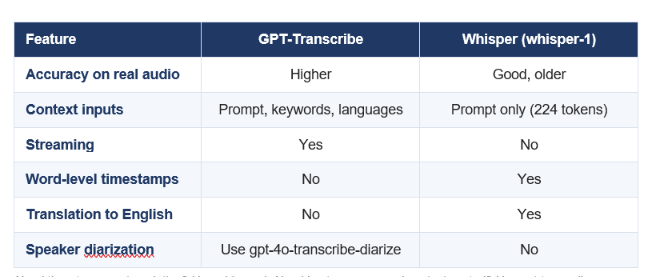
Need timestamps or translation? Use whisper-1. Need best accuracy and context control? Use gpt-transcribe.
My recommendation: default to GPT-Transcribe for accuracy and the keyword control, and keep whisper-1 in your toolkit specifically for jobs that need word-level timestamps or built-in English translation. For speaker labels, reach for gpt-4o-transcribe-diarize, which returns who-said-what segments.
Best Use Cases and Limitations
GPT-Transcribe fits any workflow that turns recorded speech into text at scale, while GPT-Live-Transcribe fits anything real-time. The context system makes both especially strong for domain-specific audio full of names and jargon.
Call center archives: transcribe and analyze recorded support calls, with account numbers and product names locked in via keywords.
Meeting and podcast notes: batch transcribe recordings at 34x real-time for cheap, searchable text.
Medical and legal: feed specialized terminology as keywords to cut the errors that make generic transcription useless in these fields.
Live captions and voice agents: GPT-Live-Transcribe powers real-time captioning and agents that respond mid-sentence.
The limitations are worth naming. Accuracy still varies sharply by audio quality, so budget time to test on your real recordings. There are no word-level timestamps, so use whisper-1 if you need them. The 25 MB file limit means long recordings need chunking. And GPT-Live-Transcribe's independent accuracy numbers were still pending at launch, so validate it on your own live audio before shipping.
Verdict, 9 out of 10: GPT-Transcribe is the new default for OpenAI users doing batch transcription, cheaper and more accurate with a genuinely useful context system, and GPT-Live-Transcribe extends that to real-time. I dock one point only because accuracy on hard audio still needs your own testing and timestamps require a fallback to Whisper. For most transcription work in 2026, start here.
For where these models sit in OpenAI's full 2026 lineup, see our best AI models July 2026 ranking and the every major AI model roundup.
The only comprehensive program designed to take you from basic prompting to building interactive Artifacts, custom integrations, and deploying production-ready code with Claude Code.
Frequently Asked Questions
Q: What is GPT-Transcribe?
GPT-Transcribe is OpenAI's speech-to-text model for asynchronous transcription of completed audio files and batch workloads, released in 2026. It scores 3.31% on the Artificial Analysis word error rate benchmark, costs $4.50 per 1,000 minutes, and accepts context inputs like keywords and language hints to improve accuracy on hard audio.
Q: What is the difference between GPT-Transcribe and GPT-Live-Transcribe?
GPT-Transcribe is optimized for accuracy and throughput on recorded audio files and batch jobs, processing at about 34x real-time. GPT-Live-Transcribe is built for low-latency live transcription of streaming audio, such as live captions or voice agents. Use recorded audio with GPT-Transcribe and real-time audio with GPT-Live-Transcribe.
Q: How much does GPT-Transcribe cost?
GPT-Transcribe costs $4.50 per 1,000 minutes of audio, which is $0.0045 per minute or about $0.27 per hour. That is a 25% price reduction from its predecessor GPT-4o Transcribe, while also improving accuracy by 0.7 percentage points.
Q: How accurate is GPT-Transcribe?
GPT-Transcribe scores a 3.31% word error rate on the Artificial Analysis benchmark, roughly three wrong words per hundred, ranking ninth overall. Accuracy varies sharply by audio type, though, so clean audio scores far better than noisy audio like earnings calls, which is why the context inputs and your own testing matter.
Q: Is GPT-Transcribe better than Whisper?
On real-world accuracy and context control, yes. GPT-Transcribe is more accurate and adds keyword and language hints that Whisper lacks. Whisper still wins for word-level timestamps and translation to English, so keep whisper-1 for jobs that specifically need those two features.
Q: How do I use GPT-Transcribe in Python?
Install the openai package, then call client.audio.transcriptions.create with model set to gpt-transcribe and your audio file, and read transcription.text. To improve accuracy, add a prompt describing the recording plus keywords and languages through the extra_body parameter.
Q: What audio formats does GPT-Transcribe support?
GPT-Transcribe supports mp3, mp4, mpeg, mpga, m4a, wav and webm, up to 25 MB per file. For longer recordings, split the audio into smaller chunks using a tool like PyDub, or use a streaming approach for continuous audio.
Q: Does GPT-Transcribe support live streaming?
Yes. Set stream to true to receive partial transcript results as the audio processes. For true low-latency live audio such as phone calls or microphone input, use GPT-Live-Transcribe, the model built specifically for real-time streaming transcription.
Recommended Blogs
Resources and Community
Join our community of 70,000+ AI enthusiasts and learn to build powerful AI applications. Whether you are a beginner or an experienced developer, Build Fast with AI helps you understand and implement AI in your projects.
- Website (buildfastwithai.com)
- LinkedIn (Build Fast with AI)
- Instagram (@buildfastwithai)
- Founder Twitter (@satvikps)
- Twitter (@BuildFastWithAI)
Agentic AI Launchpad 2026
A structured 6-week cohort program that takes you from AI basics to building and deploying real-world agentic AI systems. Includes live sessions, expert mentorship, project reviews, and a builder community network.
Ready to go from learning to building? Join the next cohort: Agentic AI Launchpad 2026
Free AI Resources
Access free tools, workshops, and micro-learning to keep building:
Cheaper, more accurate transcription with keyword control is a real upgrade. Copy the code above, test it on your own audio, and follow Build Fast with AI for hands-on coverage of every major model release.