



Topaz Astra 2: The AI Video Upscaler That Listens to Prompts
Most video upscalers make one decision for your entire clip and call it done. Topaz Astra 2, launched in April 2026, breaks that mold entirely — it lets you type a prompt, dial in creativity from 1 to 5, and tune sharpness independently. For AI filmmakers who spend hours generating clips in Seedance 2.0, Kling, or Runway, this is the missing final step that turns a decent output into a polished one.
What Is Topaz Astra 2?
Topaz Astra 2 is the next-generation creative video upscaling model from Topaz Labs, released in late April 2026. It builds on the original Astra — which launched in June 2025 as the world's first creative video upscaler — and introduces three new user-controlled parameters: a prompt field, a Creativity slider (1–5), and a Sharpness slider (1–5). Unlike legacy upscalers that sharpen pixel edges uniformly, Astra 2 uses these inputs to imagine and synthesize new visual detail, not just interpolate what's already there.
It runs exclusively in the cloud via the Topaz Labs web app and API — no desktop download, no local GPU required. CEO Eric Yang has been transparent about why: the model is simply too large and computationally expensive to run locally, even on high-end hardware. For teams already building cloud-based AI video pipelines, that's actually a feature, not a limitation.
What's New: The Three Controls That Change Everything
The headline upgrade in Astra 2 is the addition of three interlinked controls available under the Creative mode. Here's what each one does:
1. Creativity (Scale 1–5)
This slider controls how much the model is allowed to invent new visual information beyond what exists in the source clip. At level 1, Astra 2 behaves conservatively — enhancing existing detail without significantly altering the footage's original look. At level 5, the model is effectively reimagining what the scene could look like at higher resolution, synthesizing textures, surfaces, and lighting cues from scratch. For AI-generated video that already contains some visual artifacts or soft areas, pushing creativity to 3–4 tends to produce the best results.
2. Sharpness (Scale 1–5)
Independent of creativity, the sharpness dial controls edge definition and fine-detail rendering. A high sharpness setting without a corresponding creativity level can produce an over-processed, artificial look — the kind of "AI-sharp" feel that immediately reads as machine-generated. The power move here is calibrating sharpness just below creativity: use creativity 4, sharpness 3, and let the model decide which edges deserve emphasis based on the scene content.
3. The Prompt Field
This is the most novel addition and the one that requires the biggest mindset shift. The prompt in Astra 2 is descriptive, not instructive. You're not telling the model what to do — you're telling it what the scene is. "Cinematic wide shot of a crowd at sunset, warm golden light, shallow depth of field" will produce meaningfully different upscaling results than leaving the prompt blank. The model uses your description to calibrate its synthesis decisions, particularly in ambiguous regions like crowd scenes, landscapes, and stylized AI-generated environments.
Thinking about how prompt engineering applies to creative tools? The AI tools roundup for developers in December 2025 covered the broader trend of prompt-driven creative pipelines — Astra 2 is the video upscaling embodiment of that same shift.
Astra 2 vs Astra 1: What Actually Changed
Here's a direct feature comparison between Astra 1 and Astra 2 across the dimensions that matter most for working AI filmmakers:
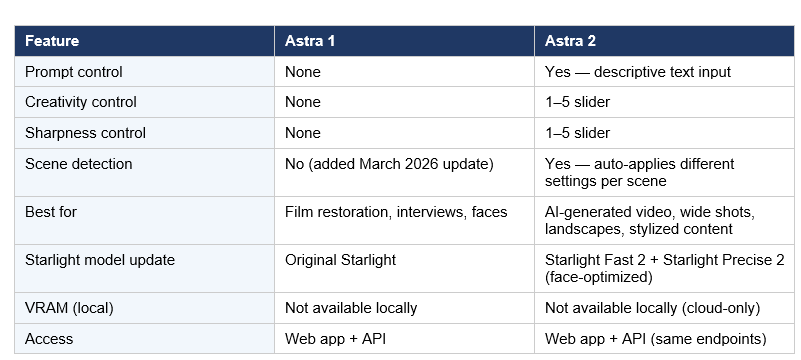
The most operationally important addition is scene detection. Astra 2 can now automatically apply different enhancement settings to different parts of the same clip — no manual keyframing, no one-size-fits-all filter. A clip that opens on a face close-up and then cuts to a wide landscape no longer requires you to split the video and process each segment separately.
How to Use Astra 2 Prompts Effectively
The most common mistake with Astra 2's prompt field is treating it like a Midjourney instruction. Writing "make this look cinematic" or "enhance the colors" does very little. The model isn't executing a command — it's using your text to build contextual understanding of what is in the frame.
Here are prompt patterns that consistently produce better results:
• Scene description with lighting: "Aerial drone shot of a coastal city at dusk, soft orange and purple sky, distant horizon"
•Subject + environment + texture: "Close-up of a human face with natural skin texture, soft window light, slight film grain"
• Style + mood: "Fantasy forest environment, detailed foliage, dappled sunlight through canopy, painterly and organic"
• Crowd/wide shot: "Large crowd at an outdoor concert, depth of field, warm stage lighting, individual faces visible in the foreground"
What to avoid: vague aesthetic directions, camera instructions ("zoom in", "cut to"), color grading language ("warmer tones"), or anything that describes what you want the output to look like rather than what is currently in the scene.
If you want to go deeper on building automated video enhancement workflows through the Topaz API, the gen-ai-experiments cookbook repository is the right starting point — batch upscaling notebooks with API call patterns are a natural next addition to that library.
Best Use Cases for Astra 2 in 2026
Astra 2's Creative mode is not the right tool for every video. It has clear strengths and a clear ceiling. Here's where it excels and where you should use Precise mode (or Topaz Video AI for desktop) instead:
Strong Fit: AI-Generated Video
Clips from Seedance 2.0, Kling, Runway Gen-4.5, and similar models often carry resolution artifacts, soft focus, or inconsistent textures. Astra 2's creative synthesis is specifically designed for this class of content — the prompt field lets you describe the intended scene so the model's hallucinated enhancements stay on-theme rather than going rogue.
Strong Fit: Wide Shots and Crowd Scenes
This is where legacy upscalers completely fall apart. Crowd scenes have tens of thousands of non-repeating elements — individual faces, clothing, shadows — that a sharpening filter cannot reconstruct. Astra 2's scene-aware synthesis handles these by treating the crowd as a semantic object rather than a collection of pixels to sharpen.
Strong Fit: Landscape and Nature Footage
The combination of descriptive prompts and creativity level 3–4 produces highly convincing foliage, terrain, and atmospheric detail in landscape shots — the kind of organic complexity that traditional upscalers render as smooth mush.
Poor Fit: Talking Head Interviews and Face-Focused Content
Use Precise mode with Starlight Precise 2 for this. That model is specifically tuned for natural skin texture and facial accuracy. Running a face through Creative mode at high creativity can produce uncanny results — technically sharp, but not photorealistic.
If you're evaluating AI video tools for a production pipeline, the March 2026 developer tools roundup covers the broader landscape of AI-native creative infrastructure that Astra 2 fits into.
Pricing and Access: What You're Actually Paying For
Astra operates on a credit-based pricing model. Access is through the Topaz Labs web app (topazlabs.com/astra) and the API for programmatic workflows. Topaz has not made per-minute pricing publicly precise at launch — the cost is billed in credits that scale with clip length, resolution target, and the processing intensity of the selected model.
The NeuroStream update from March 2026 (which reduces VRAM usage by up to 95%) applies to Topaz's desktop Video AI product, not to Astra's cloud pipeline. If you need local processing for privacy or cost reasons, Topaz Video AI with desktop models is still the right route — Astra 2 is optimized for cloud workflows where model size constraints don't apply.
For builders new to the AI tools ecosystem who want foundational context on evaluating platforms like this, the top AI-powered developer tools overview is a solid place to start before committing to any subscription.
My Take: Is the Prompt Control Worth It?
Hot take: prompt-controlled upscaling is one of those features that sounds like marketing until you actually use it on AI-generated content — and then it's indispensable. The moment your upscaler has contextual understanding of what it's enhancing, you stop fighting artifacts and start directing the enhancement.
The honest criticism is that Astra 2 is still a cloud-only, credit-based product, which means it's genuinely difficult to test before committing to a subscription at meaningful volume. The lack of transparent per-minute pricing is frustrating for studios that need to budget production costs precisely. Magnific and Runway offer different pricing structures that may suit certain teams better purely from an accounting standpoint, even if Astra 2's output quality beats them on AI-generated content.
The bottom line: if a significant portion of your video production pipeline runs through AI generators — Seedance 2.0, Kling, Runway, or similar — Astra 2 is currently the most purpose-built upscaling option on the market. The prompt field is not a gimmick. Scene detection alone saves hours in post-production for long-form content. This is the tool that closes the gap between AI-generated and broadcast-ready.
Frequently Asked Questions
What is Topaz Astra 2?
Topaz Astra 2 is a cloud-based AI video upscaling model released in April 2026 by Topaz Labs. It adds prompt-based input and Creativity/Sharpness sliders (each 1–5) to the Astra platform, enabling context-aware synthesis of new visual detail rather than simple pixel sharpening.
What does the Astra 2 prompt field do?
The prompt is a descriptive input — not an instruction. You describe what is in your scene (subject, environment, lighting, mood), and the model uses that context to make better synthesis decisions, particularly in complex areas like crowd scenes, landscapes, and AI-generated footage. It does not change what happens in the video; it helps the model understand what's already there.
How is Astra 2 different from Astra 1?
Astra 2 adds three new controls (prompt, Creativity slider, Sharpness slider) that were absent in the original. It also benefits from Starlight Fast 2 for speed and Starlight Precise 2 for face-focused accuracy. Scene detection — added in the March 2026 update — is available in Astra 2 and allows different enhancement settings to apply automatically to different parts of the same clip.
Is Topaz Astra 2 free?
No. Astra 2 operates on a credit-based subscription through Topaz Labs. Exact per-minute pricing has not been made fully transparent at launch, but a free trial allows testing before commitment. Check topazlabs.com for current plan pricing.
Is Astra 2 good for AI-generated video from tools like Seedance 2.0 or Kling?
Yes — this is explicitly the target use case for Astra 2's Creative mode. The prompt field lets you describe the intended scene so the model's synthesis stays on-theme. AI-generated video often has resolution artifacts, soft areas, and inconsistent textures that creative upscaling handles far better than traditional sharpening-based approaches.
Can I run Topaz Astra 2 locally?
No. Astra 2 is cloud-only, accessed via the web app or API. The model is too large to run on consumer hardware. Topaz Video AI (desktop) remains the option for local processing, though it uses different models and lacks the prompt-control feature.
What creativity level should I use in Astra 2?
For AI-generated content, levels 3–4 tend to produce the best results. Level 1–2 is conservative and behaves closer to legacy upscalers. Level 5 is best for highly stylized or animated content where aggressive synthesis is acceptable. Always pair creativity with a slightly lower sharpness setting to avoid the over-processed look.
What is NeuroStream and does it affect Astra 2?
NeuroStream is a Topaz Labs VRAM optimization announced in March 2026 that reduces GPU memory usage by up to 95%, enabling large AI models to run locally on consumer GPUs. It applies to Topaz Video AI (desktop), not to Astra's cloud pipeline, which doesn't have VRAM constraints in the same way.
Recommended Blogs
• 7 AI Tools That Changed Development (December 2025 Guide) — Build Fast with AI
• 7 AI Tools That Changed Development (March 2026) — Build Fast with AI
• AI Weekly Recap Week 50: 7 AI Tools Shaping Development — Build Fast with AI
• Top 11 AI-Powered Developer Tools Transforming Workflows in 2025 — Build Fast with AI
• What Is Perplexity Computer? The 2026 AI Agent Explained — Build Fast with AI
• Google AI Studio Vibe Coding: Full Guide (2026) — Build Fast with AI

