





Wispr Flow Review 2026: Features, Pricing, Free Plan, and Is It Worth It?
Voice dictation tools have promised to replace typing for thirty years. Most have failed the daily use test. Wispr Flow is different, and the data backs that up: over 40% month-over-month growth in early 2026, $81 million in total venture funding including a $30 million Series A from Menlo Ventures, and a user base that includes professionals in the top 1% of usage dictating 70,000 or more words across 35 or more applications. The reason it has caught on where others failed is not just transcription accuracy. It is what happens after transcription. Wispr Flow runs your speech through multiple AI layers simultaneously, stripping filler words, correcting self-interruptions, applying intelligent punctuation, and adapting the writing tone to match whichever app you are typing into. A Slack reply comes out casual. The same thought dictated into Gmail arrives as a properly structured professional email. No mode switching. No cleanup. Just speak, and polished text appears where your cursor is. This review covers every feature, every plan, every platform, and gives you a clear answer on whether Wispr Flow is worth it for your specific workflow in 2026.
1. What Is Wispr Flow?
Wispr Flow is a system-wide AI dictation application built by Wispr AI, a San Francisco startup founded in 2021 by Tanay Kothari (CEO) and Sahaj Garg, both former Apple and Meta engineers. The product runs as a background app on your device, activates via a keyboard shortcut or the wake word "Hey Flow," captures your voice, processes it through a multi-layer AI pipeline, and pastes clean, formatted text directly into whatever application your cursor is in. It works in every app with a text input: Slack, Gmail, Notion, ChatGPT, Claude, Cursor, Windsurf, VS Code, Word, Docs, WhatsApp, iMessage, and hundreds more. No copy-paste, no window switching, no reformatting. Your words land in the right place, in the right format, immediately. The founding thesis is that speaking is four times faster than typing for most people, and that AI post-processing now makes dictated text as accurate and well-formatted as carefully written prose. Wispr Flow is the tool that makes that equation true in everyday professional use.
For context on where AI voice tools sit in the broader productivity AI landscape in 2026, the AI Applications and Use Cases collection covers real-world AI tools helping professionals move faster across writing, research, coding, and communication.
2. How Wispr Flow Works: The Technology Behind It
Most dictation tools transcribe your words verbatim and leave the cleanup to you. Wispr Flow's architecture is fundamentally different. When you speak, four things happen simultaneously:
- Transcription layer: cloud-based speech recognition converts your voice to raw text. Baseten's published infrastructure case study documents sub-700ms p99 latency, using a fine-tuned Llama model for AI post-processing.
- Cleanup layer: filler words are removed automatically. Every "um," "uh," "like," and "you know" disappears. Self-corrections are resolved: saying "let's meet Tuesday, actually Wednesday" produces "let's meet Wednesday."
- Formatting layer: punctuation, capitalization, paragraph breaks, and list structures are inserted based on your speech cadence. You do not need to say "period" or "new paragraph."
- Context layer: the app reads your current active window and adapts tone accordingly. Slack message comes out casual. Gmail draft comes out formal. Notion page matches your existing writing style. The same words, intelligently reformatted.
The context layer is what makes Wispr Flow feel like a writing partner rather than a transcription tool. The AI is not just recording what you say. It is understanding where you are and what kind of writing that context requires, then producing output that fits.
The clipboard fallback is a small detail worth noting: if the AI post-processing ever fails to paste text directly, Wispr Flow copies the result to your clipboard automatically. Nothing is ever lost mid-dictation.
3. Core Features: A Complete Breakdown
AI Auto Cleanup
The cleanup system operates at four levels, switchable in Settings: None (raw verbatim transcript), Light (filler words only), Medium (fillers plus light punctuation), and High (full reformatting and tone adaptation). An Undo AI Edit button reveals the raw transcript for any dictation, so you can always see exactly what you said and revert if the AI cleanup changed something you wanted to keep.
A Personalized Style setting added in 2026 lets you configure tone per app category, from Very Casual to Formal, giving you control over exactly how aggressively Wispr Flow reformats for each context.
Command Mode (Pro)
Command Mode is the feature most Pro users describe as the one they cannot go back from. Highlight any text in any application, hold the hotkey, and speak an editing instruction: "make this more concise," "translate to Spanish," "turn this outline into a paragraph," "add bullet points," "rewrite this more formally." The AI rewrites the selection in place. No copy-paste to an AI chatbot, no tab switching, no reformatting. You edit your own documents by talking.
Snippets
Snippets let you expand short spoken phrases into longer text instantly. Say "my calendar link" and the full scheduling URL appears. Say "my email signature" and the complete formatted signature pastes in. Say "startup pitch" and a prepared paragraph lands wherever your cursor is. Snippets are stored in your account and sync across devices. The current limitation is that trigger phrases must match exactly, which is worth knowing upfront. A future update with AI-inferred snippet intent would make this feature significantly more flexible.
Clipboard History
Every dictation session is saved in a clipboard-style history inside Wispr Flow. If something fails to paste correctly, or if you want to retrieve what you said two minutes ago, it is all there. For fast-moving workflows where you dictate continuously across multiple applications, this safety net is more useful than it sounds.
Auto Flow (Chat Mode)
Auto Flow detects natural speech pauses and auto-submits short responses in chat applications without requiring you to manually trigger submission. This works particularly well for Slack, WhatsApp, and iMessage where quick back-and-forth messaging is the norm. In longer dictation sessions, pause sensitivity is adjustable to avoid premature submission if your natural speaking rhythm includes longer pauses.
Developer Mode
Wispr Flow includes a dedicated developer workflow with native integrations for Cursor, Windsurf, and VS Code. File Tagging automatically references files when you mention them by voice during a dictation session. Variable Recognition understands code syntax in context. For engineers who dictate AI prompts, code comments, documentation, or PR descriptions, this mode removes the gap between speaking technical language and having it transcribed accurately. If you want to understand how to build voice-first AI workflows from scratch, the gen-ai-experiments voice and audio notebook has working implementations with Whisper and Deepgram that are directly relevant to how cloud-based voice processing works under the hood.
Multi-Language Support
Wispr Flow supports over 100 languages with on-the-fly detection and switching. You do not need to change language settings when switching between English and Spanish in the same session. The detection is automatic. Colleagues who operate across multiple languages consistently report this as one of the most seamless multilingual dictation experiences available, with accurate switching and no grammar correction issues that plague simpler language-switching implementations.
Usage Stats and Streaks
Wispr Flow tracks your total words dictated, your active streak, and the number of applications you have used it in. Pro users in the top 1% are regularly dictating 70,000 or more words across 35 or more applications. For users building a voice-first workflow, these stats are a useful gauge of how embedded the tool has become in daily work.
Cross-Device Sync
One Pro subscription covers every device you own. Custom dictionary, Snippets, Personalized Style settings, and clipboard history sync automatically between Mac, Windows, iPhone, and Android. Cross-device sync is rare in the dictation category. Most tools require separate purchases or separate accounts per platform. Wispr Flow treats all your devices as a single workspace.
4. Wispr Flow Platform Support: Mac, Windows, iPhone, Android
Wispr Flow is the only major AI dictation tool available on all four platforms simultaneously in 2026. Here is the current state of each:
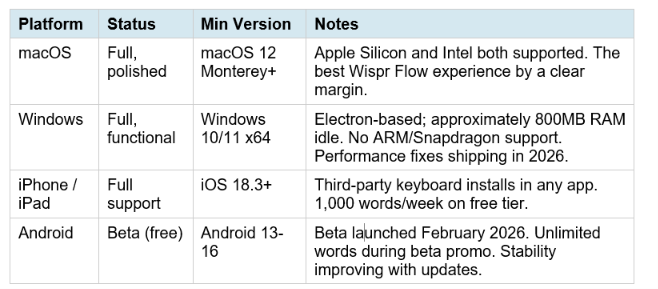
Beta launched February 2026. Unlimited words during beta promo. Stability improving with updates.
The macOS build is the most polished and the one Wispr Flow was clearly designed around first. The Windows application is fully featured but carries a heavier resource footprint than a native Windows app would; Wispr has been shipping performance improvements throughout 2026 and the gap has narrowed meaningfully from the early builds. Android in beta is functional but not daily-driver stable for everyone yet.
Linux is not currently supported. There is no announced roadmap date for a Linux app.
Don't just use ChatGPT. Learn to build custom LLM agents, RAG pipelines, and full-stack Agentic AI apps in our intensive 6-week program.
5. Wispr Flow Pricing: Every Plan Explained
Wispr Flow offers four tiers. All plans include Privacy Mode, HIPAA BAA in-app signing, custom dictionary, and 100+ language support.
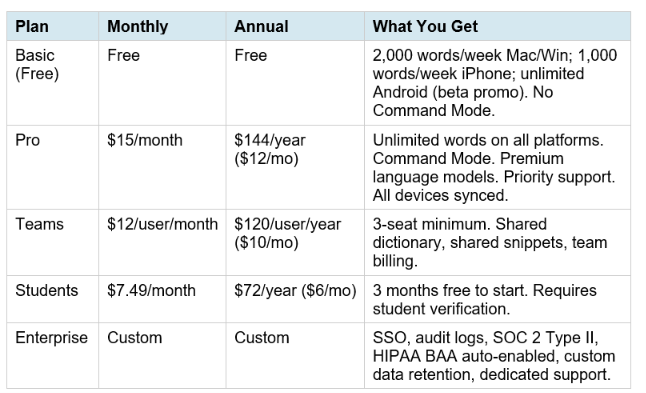
SSO, audit logs, SOC 2 Type II, HIPAA BAA auto-enabled, custom data retention, dedicated support.
The Pro plan is the right choice for any professional who dictates more than a few emails a day. At 40 words per minute, which is average typing speed, 2,000 words is 50 minutes of equivalent typing. For someone dictating throughout the workday, the free cap is typically exhausted within two to three working days.
For developers and founders building AI-powered workflows on top of voice tools, the AI Automation and No-Code collection covers how to combine voice AI inputs with n8n, Make.com, and other automation platforms to build faster end-to-end pipelines.
The ROI math is straightforward for daily users. Speaking runs at 150 to 200 words per minute. Typing averages 40 words per minute. For a professional drafting 3,000 words of email, Slack messages, and documentation per working day, Wispr Flow converts a 75-minute typing task into a 15 to 20 minute dictation session. At any reasonable hourly rate, $12 per month pays for itself in the first working day of each billing cycle.
The Teams plan is worth using when you have three or more people dictating regularly. The shared dictionary ensures technical terms, product names, and brand vocabulary stay consistent across the whole team without anyone manually adding words individually. Shared snippets mean standard responses, boilerplate, and templates only need to be written once and are available to everyone.
6. How to Get Wispr Flow Free
There are four legitimate ways to use Wispr Flow at no cost:
- Basic Plan (no credit card required): download Wispr Flow from wisprflow.ai, create an account, and you are on the free Basic tier immediately. You get 2,000 words per week on Mac or Windows and 1,000 words per week on iPhone without entering payment details.
- 14-Day Pro Trial: during signup you are offered a full 14-day Pro trial with unlimited words and Command Mode. When the trial ends, your account automatically downgrades to Basic rather than charging you. No credit card is needed to start the trial. This is the best way to evaluate Wispr Flow's full capabilities before committing.
- Student Plan (3 months free): eligible students receive three months free, then pay $6 per month billed annually. Verification is required through Wispr's student page.
- Android Beta (unlimited, temporary): during the beta period launched February 2026, Android users receive unlimited words at no cost. This is a promotional offer that will change when Android exits beta.
The 14-day Pro trial is the right entry point for most people. The free Basic plan throttles you fast enough that you will not get an accurate sense of how Wispr Flow transforms your daily workflow. With unlimited words for two weeks, you experience what it actually feels like to dictate freely, all day, across every application you use.
7. Who Is Wispr Flow Best For?
Wispr Flow is not a tool that delivers the same value to every user equally. Here is where it performs best and where it is less of an obvious choice:
Best for: Professionals Who Write a Lot
Content creators, marketers, founders, and executives who spend hours per day writing emails, Slack messages, documents, and reports see the highest return. Speaking four times faster than typing, with automatic cleanup removing the need for editing, can realistically reclaim one to two productive hours per working day at full Pro usage.
Best for: Engineers and Developers
The developer mode integrations with Cursor, Windsurf, and VS Code make Wispr Flow one of the fastest ways to dictate AI prompts, code comments, PR descriptions, and documentation. File Tagging and Variable Recognition reduce transcription errors on technical vocabulary. For engineers who write more than they code in any given session, this is a genuine time saver.
Best for: Cross-Platform Teams
Teams that use Mac, Windows, and iPhone across different members benefit from the only dictation tool that offers full cross-platform coverage with shared dictionaries and snippets synced across all devices and all plans. The Teams plan at $10 per user per month is one of the lower costs per hour saved in the productivity software category.
Best for: Multilingual Professionals
The automatic language detection and on-the-fly switching across 100 or more languages, with no manual mode changes required, is genuinely differentiated from every other dictation tool available in 2026. Professionals who switch between English and another language throughout the day report that Wispr Flow keeps pace without errors or friction.
Consider carefully: Mac-only, low-volume users
If you dictate less than 2,000 words a week and stay within the free tier naturally, and you are on Mac only, evaluate whether the Pro upgrade is right for your specific usage before committing to the annual plan. The 14-day Pro trial is the right way to measure your actual volume and decide accordingly.
8. Privacy and Security: What You Need to Know
Wispr Flow's privacy model has evolved significantly since launch and deserves clear explanation rather than either dismissal or alarm.
All transcription happens in the cloud. Wispr Flow's Data Controls page states explicitly that transcription always occurs on cloud servers. There is no on-device transcription mode at any tier. Subprocessors include Baseten (model hosting), OpenAI, Anthropic, Cerebras, and AWS. This is the trade-off that enables the speed, accuracy, and multi-layer AI cleanup that makes Wispr Flow work the way it does.
Context awareness (the feature that reads your active window to adapt tone) originally involved screenshot capture to cloud servers, which triggered a privacy incident early in the product's life. The CTO issued a public response and the company changed the implementation: context data now processes locally on your device by default, and you can toggle it off entirely in Settings under Data and Privacy. The fact that the company had this called out publicly and fixed it transparently is, as the Efficient App review put it, probably evidence of more careful handling than tools that have never been scrutinized.
Privacy Mode (Zero Data Retention) is available on all plans. When enabled, no dictation data is stored after processing and your data is not used to train or improve Wispr Flow's models. Privacy Mode is opt-in for individual Pro users and auto-enabled on Enterprise. Signing a HIPAA BAA in-app (available on all plans including free, at no extra cost) automatically enables Privacy Mode.
Compliance certifications: SOC 2 Type II, ISO 27001:2022, GDPR aligned, CCPA aligned, HIPAA BAA available in-app on all plans.
The practical recommendation: if you work in healthcare, law, or finance, sign the HIPAA BAA in-app immediately. It is free and takes thirty seconds. Doing so activates Privacy Mode and satisfies your organization's data handling requirements while keeping full Wispr Flow functionality.
The only comprehensive program designed to take you from basic prompting to building interactive Artifacts, custom integrations, and deploying production-ready code with Claude Code.
9. Real User Feedback: What People Say
The user feedback picture for Wispr Flow is genuinely mixed, and both sides of the picture are worth understanding before buying. On the positive side, Wispr Flow holds a 4.8/5 rating on the iOS App Store across 8,500 or more ratings, and a 4.5/5 on G2. The consistent praise is for the AI cleanup quality: users who previously struggled with Apple Dictation or Google Voice Typing because of verbatim transcription errors consistently describe Wispr Flow as the first tool where, as one reviewer put it, "Oh, okay, this is actually faster." Top-tier users are dictating 70,000 or more words across 35 or more applications, which is not the usage pattern of a tool that is frustrating to use.
The criticism is real and documented. Wispr Flow's Trustpilot rating sits at 2.7/5 as of April 2026, significantly below most subscription SaaS productivity tools. The specific complaints cluster around three patterns: reliability degradation reported by some users after the trial period ends (whether this is a product issue or confirmation bias is genuinely unclear across sources), the AI cleanup occasionally rewriting unconventional phrasing in ways the user did not intend (adjustable by switching cleanup to Light or None), and a multi-day cloud outage in late May to early June 2026 that affected all platforms and regions.
The Windows experience receives more mixed feedback than Mac. The Electron-based Windows app runs approximately 800MB of RAM idle and has been reported to add itself to system startup on every launch even after being explicitly disabled. Wispr has acknowledged these issues and shipped multiple performance patches in 2026.
My honest take: the gap between the iOS App Store rating and the Trustpilot rating reflects two different populations reviewing the same product. App Store reviewers are people who actively chose to leave a review on a platform where they already use the app daily. Trustpilot reviewers skew toward people who had a problem worth documenting. Both are real. The right approach is to use the 14-day Pro trial seriously, monitor your actual usage, and make the upgrade decision based on your own experience rather than either the 4.8 or the 2.7.
10. Is Wispr Flow Worth It in 2026?
The answer is yes for most professional daily users, and it is not a close call. Speaking four times faster than typing, with automatic cleanup that removes the editing tax of verbatim dictation, is one of the most compounding productivity gains available in a $12 per month tool. The cross-platform breadth, the developer integrations, the multilingual support, and the shared team features are all genuinely differentiated from the rest of the market. The caveats matter too. The cloud-only architecture is a real trade-off for users with strict data requirements (addressed by enabling Privacy Mode and signing the HIPAA BAA). The Windows experience is still catching up to the Mac quality, though it has improved substantially in 2026 builds. The free tier's 2,000 words per week cap is enough to understand what the product does but not enough to build a genuine voice-first workflow. The 14-day Pro trial is how you actually evaluate this. For the right user, Wispr Flow is not a productivity tool you try and return to occasionally. It becomes the input method for your computer. That is a much stronger statement than most tools in this category have ever earned, and the 40% month-over-month growth numbers reflect it. To see how Wispr Flow fits into a broader AI-powered productivity stack, the best AI tools for productivity in 2026 guide covers the full landscape of tools professionals are using to reclaim hours each week.
Frequently Asked Questions
What does Wispr Flow do?
Wispr Flow is a system-wide AI dictation application that converts your speech into clean, formatted text in any application on your device. Unlike basic transcription tools, it removes filler words automatically, handles mid-sentence self-corrections, applies intelligent punctuation, and adapts the writing tone to match the app you are typing into. A Slack reply comes out casual. A Gmail draft comes out professionally structured. Developers can dictate code comments, AI prompts, and documentation with specialized variable recognition
Is Wispr Flow free?
Yes, with real but limited free access. The Basic plan is free with no credit card required, providing 2,000 words per week on Mac or Windows and 1,000 words per week on iPhone. The free tier does not include Command Mode or unlimited words. A 14-day Pro trial with unlimited words and full features is available at signup and auto-downgrades to Basic at the end rather than charging you. Android is free with unlimited words during the beta period.
Does Wispr Flow actually work?
Yes. Wispr Flow is rated 4.8/5 on the iOS App Store across more than 8,500 ratings and 4.5/5 on G2. The multi-layer AI cleanup, app-aware tone adaptation, and seamless cross-app operation are consistently praised by daily users. The best test is the 14-day Pro trial, which gives you full access long enough to evaluate the tool under your real workload rather than a contrived test.
Who is the CEO of Wispr Flow AI?
Tanay Kothari is the co-founder and CEO of Wispr AI, the company behind Wispr Flow. His co-founder is Sahaj Garg. Both are former Apple and Meta engineers. The company is based in San Francisco and has raised over $81 million in venture funding, including a $30 million Series A from Menlo Ventures.
Is Wispr Flow available on Windows?
Yes. Wispr Flow has a Windows 10 and 11 application available at wisprflow.ai. The Windows build is Electron-based and carries a heavier resource footprint than the native Mac build (approximately 800MB RAM idle), but Wispr has been shipping performance improvements throughout 2026. ARM and Snapdragon Windows devices are not currently supported.
Is Wispr Flow available on iPhone and Android?
Yes to both. The iPhone app installs as a third-party keyboard on iOS 18.3 or later, allowing dictation in any app without switching windows. The Android app launched in February 2026 in beta and offers unlimited words for free during the beta period. Android is available for Android 13 through 16.
How do I get Wispr Flow for free?
Download Wispr Flow from wisprflow.ai and create an account. No credit card is required for the Basic free plan. At signup, accept the 14-day Pro trial to get full access to unlimited words and Command Mode for two weeks. After the trial, your account auto-downgrades to Basic without charging you. Students can get three months free through Wispr's student page, then $6 per month billed annually. Android users get unlimited words free during the beta period.
Is Wispr Flow worth it for professionals?
Yes for daily writers, developers, and cross-platform users. Speaking at 150 to 200 words per minute versus typing at 40 words per minute creates a meaningful daily time return at any reasonable hourly rate. At $12 per month on the annual Pro plan, Wispr Flow pays for itself within the first working day of each billing cycle for anyone dictating more than one hour of text per day. The 14-day Pro trial is the right way to measure your actual ROI before committing.
Is my data safe with Wispr Flow?
Wispr Flow processes all transcription in the cloud. Privacy Mode (Zero Data Retention) is available on all plans and prevents dictation data from being stored or used for model training. Enabling Privacy Mode is opt-in for Pro users. Signing the HIPAA BAA in-app (free on all plans) automatically enables Privacy Mode. The company holds SOC 2 Type II and ISO 27001 certifications and is GDPR and CCPA aligned. For sensitive professional use, enable Privacy Mode in Settings and sign the HIPAA BAA.
Recommended Blogs
- Best AI Tools for Productivity in 2026: Tested and Ranked
- AI Applications and Use Cases: Real-World Example
- AI Automation and No-Code Tools: Make.com, n8n,
- Claude Mastery: Cowork and Code (course overview for)
- Best AI Tools for Writers and Content Creators 2026
- Agentic AI Launchpad 2026: Build Real AI Systems in 6 Weeks
Resources & Community
Join our community of 70,000+ AI enthusiasts and learn to build powerful AI applications! Whether you're a beginner or an experienced developer, Build Fast with AI helps you understand and implement AI in your projects.
- Website — buildfastwithai.com
- LinkedIn — Build Fast with AI
- Instagram — @buildfastwithai
- Founder Twitter — @satvikps
- Twitter — @BuildFastWithAI
Agentic AI Launchpad 2026
A structured 6-week cohort program that takes you from AI basics to building and deploying real-world agentic AI systems. Includes live sessions, expert mentorship, project reviews, and a builder community network.
Ready to go from learning to building? Join the next cohort → Agentic AI Launchpad 2026
Free AI Resources
Access free tools, workshops, and micro-learning to keep building:
- AI Workshops — Free resources, upcoming events & past recordings
- Unrot — Learn AI in 5 minutes a day (free micro-learning app)
Voice-first AI is changing how the best professionals work. Follow @BuildFastWithAI on X to stay up to date on the tools, workflows, and updates that actually matter.
References
- Wispr Flow — Official Site and Pricing (verified June 2026)
- Efficient App — Wispr Flow Review 2026: Pros, Cons,
- Max-Productive.ai — Wispr Flow Review 2026: Features,
- Spokenly — Wispr Flow Review: Is It Worth $15/mo? (Tested)
- DroidCrunch — Wispr Flow Review 2026: Features,
- BOSS AI — Wispr Flow Review 2026: Accuracy, Pricing and Limits
- VoiceScriber — Wispr Flow Pricing 2026: Free Plan, Pro
- Voibe — Wispr Flow Pricing 2026: Plans, Cost and Is It Worth It?
- Weesper Neon Flow — Wispr Flow vs Superwhisper AI
Baseten — How Wispr AI Built Sub-700ms P99 Latency for AI Dictation

