




Vectorless RAG: How PageIndex Achieves 98.7% Accuracy Without a Vector Database
Traditional vector RAG scores about 50% on FinanceBench. PageIndex scores 98.7%. The gap is not because VectifyAI found a better embedding model. They threw embeddings out entirely.
That number deserves to sit for a moment. Financial question-answering on SEC filings is one of the hardest retrieval tasks in production AI. It demands multi-step reasoning, cross-section references, exact numbers. And the approach that got closest to perfect accuracy used zero vectors, zero chunking, and no vector database at all.
I spent a week digging into PageIndex, the open-source framework behind those results. This post covers exactly how it works, where it wins, where it does not, and how to run it yourself with working Python code.
Why Traditional RAG Breaks on Complex Documents
The core problem: vector search retrieves by similarity. What you actually need is relevance. Those are not the same thing.
When you ask a RAG system "What was the change in net revenue from Q2 to Q3 2023?" the chunks most semantically similar to that question are probably other sentences that contain the words "revenue" and "Q3" -- not necessarily the table cell on page 47 that has the actual number.
The standard pipeline works like this:
- Split the document into fixed-size chunks (300-500 tokens, typically)
- Embed each chunk into a dense vector
- Store vectors in a database (Pinecone, Weaviate, Milvus, pgvector)
- At query time, embed the question and find the top-k nearest vectors
- Send those chunks to the LLM to generate an answer
This works brilliantly for short, generic documents. It falls apart on long, structured ones. The specific failure modes that show up consistently in production:
Context loss from chunking. A financial table gets cut in half. The header row is in chunk 14, the data row you need is in chunk 15. Neither chunk alone answers the question.
Semantic ambiguity at scale. A 200-page annual report might mention "operating income" 60 times. Vector similarity ranks all 60 instances roughly equally. The one that actually answers your question may never surface in the top-3.
Cross-reference blindness. Page 12 says "see Appendix B for details." Appendix B is on page 87. Vector RAG has no mechanism to follow that reference.
A practitioner in public developer discussions put it bluntly: even after optimizing chunking, embedding, and vector store pipelines, accuracy on complex documents usually stays below 60%.
What Is Vectorless RAG?
Vectorless RAG is a retrieval approach that replaces semantic similarity search with LLM-powered reasoning over a structured document index. No embeddings, no vector database, no approximate nearest-neighbor search.
The name comes from the PageIndex framework, published in September 2025 by Mingtian Zhang, Yu Tang, and the PageIndex team at VectifyAI. The core insight is borrowed from AlphaGo: instead of searching exhaustively, use a learned strategy to navigate the search space intelligently.
PageIndex defines three properties that distinguish it from traditional RAG:
- No Vector DB: Document structure and LLM reasoning replace vector similarity search entirely.
- No Chunking: Documents are organized into natural sections that reflect their actual structure, not arbitrary token windows.
- Human-like Retrieval: Simulates how a human expert navigates a book -- check the table of contents, find the relevant section, read it.
The key insight: similarity does not equal relevance. A vector database will always find the text most similar to your query. But relevance sometimes requires understanding structure, following references, and reasoning across sections.
How PageIndex Works: The Architecture Explained
PageIndex performs retrieval in exactly two steps.
Step 1: Build the Tree Index
When you ingest a document, PageIndex does not embed it. Instead, it asks an LLM to analyze the document's structure and generate a hierarchical tree -- essentially an intelligent table of contents. Each node in the tree has:
- A title (the section name)
- A summary (what the section covers)
- A page range (which pages this node covers)
- Child nodes (subsections, if any)
A 50-page SEC filing might produce a tree with 30-50 nodes. This tree is stored as a JSON structure -- not in a vector database -- and the full tree fits in a context window and can be inspected directly.
Step 2: Reasoning-Based Tree Search
When a query arrives, PageIndex passes the tree structure to an LLM and asks it to reason about which nodes are most likely to contain the answer. The LLM reads node titles and summaries, applies domain reasoning, and returns a ranked list of node IDs to retrieve.
This is the key difference. A vector database computes cosine similarity scores for all chunks in parallel. PageIndex asks the LLM: given this document structure and this question, where should I look?
The LLM can follow cross-references, identify that a question about appendix data should go to the appendix node, and recognize that a multi-part question requires retrieving two separate sections. It reasons like a human analyst would -- and returns a full reasoning trace showing exactly which nodes were visited.
PageIndex Python Code: A Working Example
Here is a working, minimal example of vectorless RAG with PageIndex, adapted from the official cookbook.
Installation
pip install pageindex openai requests
Environment Setup
import os
import asyncio
from pageindex import PageIndexClient

os.environ["PAGEINDEX_API_KEY"] = "your_pageindex_api_key"
os.environ["OPENAI_API_KEY"] = "your_openai_api_key"

client = PageIndexClient(api_key=os.environ["PAGEINDEX_API_KEY"])
Step 1: Ingest a Document and Build the Tree Index
 import requests

# Upload and index a PDF document
with open("annual_report.pdf", "rb") as f:
    document = client.documents.create(
        file=f.read(),
        filename="annual_report.pdf",
        media_type="application/pdf"
    )

doc_id = document.id
print(f"Document indexed: {doc_id}")

# Inspect the tree structure
tree = client.documents.get_tree(doc_id)
for node in tree.nodes[:5]:
    print(f"[{node.id}] {node.title} (pages {node.page_start}-{node.page_end})")
    print(f"  Summary: {node.summary[:100]}...")
Step 2: Reasoning-Based Tree Search and Answer Generation
from openai import AsyncOpenAI
import json

openai_client = AsyncOpenAI(api_key=os.environ["OPENAI_API_KEY"])

async def pageindex_rag(doc_id: str, query: str) -> dict:
    # Load the tree structure
    tree = client.documents.get_tree(doc_id)
    tree_json = tree.to_json()

    # Ask LLM which nodes to retrieve
    tree_search_prompt = f"""
    You are a document retrieval expert.
    Given the document tree and query, return node IDs to retrieve.

    Tree: {tree_json}
    Query: {query}

    Return JSON only: {{"node_ids": ["N001", "N003"]}}
    """

    tree_response = await openai_client.chat.completions.create(
        model="gpt-4.1",
        messages=[{"role": "user", "content": tree_search_prompt}],
        response_format={"type": "json_object"}
    )

    selected_nodes = json.loads(
        tree_response.choices[0].message.content
    )["node_ids"]

    # Retrieve content from selected nodes
    context_parts = []
    for node_id in selected_nodes:
        node = client.documents.get_node_content(doc_id, node_id)
        context_parts.append(
            f"[{node.title} | pages {node.page_start}-{node.page_end}]\n{node.text}"
        )

    context = "\n\n".join(context_parts)

    # Generate final answer
    answer_response = await openai_client.chat.completions.create(
        model="gpt-4.1",
        messages=[{"role": "user", "content":
            f"Context:\n{context}\n\nQuestion: {query}\nAnswer:"}]
    )

    return {
        "answer": answer_response.choices[0].message.content,
        "retrieved_nodes": selected_nodes
    }

# Run
query = "What was total revenue in FY2024 vs FY2023?"
result = asyncio.run(pageindex_rag(doc_id, query))
print(result["answer"])
MCP Integration (Claude, Cursor, and Other Agents)
{
  "mcpServers": {
    "pageindex": {
      "type": "http",
      "url": "https://api.pageindex.ai/mcp",
      "headers": {
        "Authorization": "Bearer your_api_key"
      }
    }
  }
}
Don't just use ChatGPT. Learn to build custom LLM agents, RAG pipelines, and full-stack Agentic AI apps in our intensive 6-week program.
Benchmark Results: PageIndex vs Traditional RAG
The headline numbers come from FinanceBench, the industry standard for evaluating LLMs on financial document QA. It uses real SEC filings and requires exact answers from complex 10-K and 10-Q reports.
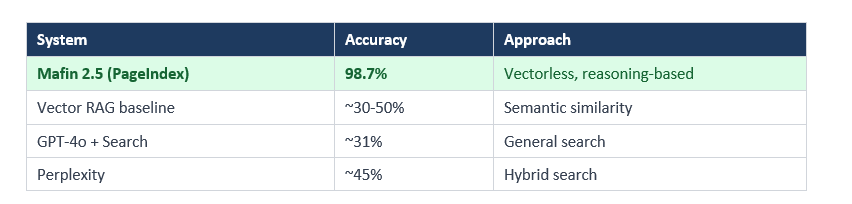
The gap between PageIndex (98.7%) and general vector RAG (~50%) is 48.7 percentage points. That is not a marginal improvement. It is a fundamentally different class of result.
Why does it work so much better? Three reasons show up consistently:
Cross-reference following. PageIndex identifies the Appendix A node when a document says 'see Appendix A' and retrieves it. Vector similarity has no concept of document-level cross-references.
Structure preservation. Financial tables have headers, subheaders, footnotes, and cell relationships. PageIndex preserves these as sections in the tree. Chunking destroys them.
Multi-hop reasoning. Questions like 'What was the year-over-year change in operating margin?' require numbers from two sections plus a calculation. PageIndex navigates to both sections.
One honest note: PageIndex has zero published latency or throughput benchmarks. Each query requires multiple sequential LLM calls. It is slower and more expensive per query than vector retrieval. For high-volume, low-latency use cases, that tradeoff does not work.
When to Use PageIndex (And When Not To)
PageIndex is a specialized tool, not a universal RAG replacement. I have seen developers treat it that way -- that is the wrong frame.
Use PageIndex when:
- Working with long, structured professional documents (annual reports, legal contracts, regulatory filings, technical manuals)
- Accuracy is the dominant constraint and you can tolerate higher latency
- Queries require multi-step reasoning or cross-section reference following
- You need a full audit trail -- PageIndex returns node references and reasoning traces for every answer
- Building for regulated industries (finance, legal, medical) where 'close enough' is not acceptable
Do not use PageIndex when:
- You need sub-second response times at high query volume
- Documents are short, unstructured, or conversational
- You have a large corpus of many small documents (vector search wins on cost and speed)
- Building a consumer-facing chatbot where 90% accuracy is acceptable
The vector database market is projected to hit $10.6 billion by 2032. PageIndex does not invalidate that market. It creates a more accurate alternative for long, structured, high-stakes documents where vector retrieval has always had a known weakness.
Vectorless RAG vs Vector RAG: Side-by-Side Comparison
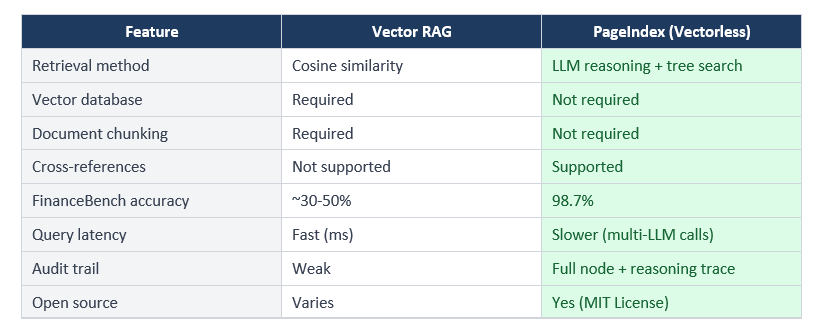
The traceability point matters more than I initially thought. In financial analysis, legal review, and medical records, the answer alone is not enough. A financial analyst needs to know exactly which paragraph of which SEC filing the number came from. PageIndex returns that. Vector RAG returns a chunk that might contain the answer -- not the same thing.
How to Get Started with PageIndex
Three paths, depending on what you want.
Option 1: Cloud Platform (Fastest). Visit chat.pageindex.ai and upload any PDF. No code required. Good for testing retrieval quality on your own documents before building anything.
Option 2: Self-Hosted via GitHub. Clone the open-source repo and run it locally. Requires your own LLM API keys and Python 3.8+.
git clone https://github.com/VectifyAI/PageIndex
cd PageIndex
pip install -e .
Option 3: API Integration. Get an API key at docs.pageindex.ai and integrate via the Python SDK or TypeScript SDK.
pip install pageindex

from pageindex import PageIndexClient

client = PageIndexClient(api_key="your_api_key")

with open("document.pdf", "rb") as f:
    doc = client.documents.create(file=f.read(), filename="document.pdf")

results = client.documents.search(doc.id, query="What is total revenue?")
print(results)
The only comprehensive program designed to take you from basic prompting to building interactive Artifacts, custom integrations, and deploying production-ready code with Claude Code.
Frequently Asked Questions
What is vectorless RAG?
Vectorless RAG is a retrieval approach that does not use vector embeddings or a vector database. Instead of computing semantic similarity scores between a query and document chunks, it builds a hierarchical tree index of a document and uses LLM reasoning to navigate that tree. PageIndex, built by VectifyAI, is the primary open-source implementation and achieved 98.7% accuracy on FinanceBench.
How does PageIndex work without a vector database?
PageIndex works in two steps. First, it ingests a document and generates a hierarchical tree structure where each node has a title, summary, and page range. Second, when a query arrives, an LLM reads the tree and reasons about which nodes are most likely to contain the answer. The content from those nodes feeds into the final answer generation. No embeddings or vector similarity calculations are involved.
Is RAG without chunking actually more accurate?
For long, structured professional documents, yes -- substantially more accurate. PageIndex scored 98.7% on FinanceBench compared to approximately 30-50% for vector-based RAG on the same benchmark. The improvement is most significant for documents with complex hierarchy like SEC filings, legal contracts, and technical manuals.
What is a hierarchical tree index for LLMs?
A hierarchical tree index is a structured representation of a document where sections and subsections are organized as nodes in a tree. Each node contains a title, a summary of its content, and its page range. This structure reflects the document's natural organization rather than arbitrary token boundaries -- similar to a very intelligent table of contents.
PageIndex vs Pinecone: which should I choose?
They solve different problems. Pinecone is optimized for fast, high-volume semantic search across large corpora of short documents. PageIndex is optimized for accurate, reasoning-based retrieval from long, structured documents where exact accuracy matters. If you're building a FAQ chatbot or semantic search across thousands of articles, use a vector database. For financial reports, legal filings, or regulatory documents, evaluate PageIndex.
What are the limitations of vectorless RAG?
The primary limitations are latency and cost. Each query requires multiple sequential LLM inference calls to navigate the tree, which is slower and more expensive than a single vector similarity search. There are currently no published latency or throughput benchmarks from VectifyAI. PageIndex also does not provide an advantage over vector retrieval for short or unstructured content.
Is PageIndex free and open source?
The core PageIndex framework is open source under the MIT License and available at github.com/VectifyAI/PageIndex. VectifyAI also offers a hosted cloud service at chat.pageindex.ai, and API/MCP access for integration. Enterprise and on-premises deployment options are available by contacting VectifyAI.
Recommended Reads
If you found this useful, these posts from Build Fast with AI go deeper on related topics:
- RAGLite: Efficient Retrieval-Augmented Generation Framework
- Smolagents: A Smol Library to Build Great Agents
- Agenta: The Ultimate Open-Source LLMOps Platform
- LangChain Basics: Building Intelligent Workflows
Want to learn how to build AI agents and document pipelines like these?
Join Build Fast with AI's Gen AI Launchpad -- an 8-week structured program
to go from 0 to 1 in Generative AI.
Register here: buildfastwithai.com/genai-course
References
- 1. PageIndex: Document Index for Vectorless, Reasoning-based RAG - VectifyAI GitHub (September 2025)
- 2. Mafin 2.5 Leads Financial QA Benchmark - PageIndex Blog (February 2025)
- 3. VectifyAI Launches Mafin 2.5 and PageIndex - MarkTechPost (February 2026)
- 4. Vectorless RAG Hits 98.7% Accuracy - ByteIota (January 2026)
- 5. PageIndex vs Vector Databases - Accentel Insights
- 6. The Hidden Cost of 98% Accuracy - Medium / Tao An (December 2025)
- 7. Show HN: PageIndex -- Vectorless RAG - Hacker News (September 2025)

