





Game development just got its biggest productivity upgrade in years. On May 4, 2026, Unity launched Unity AI into open beta for all Unity 6 developers — a built-in AI assistant that understands your project, writes C# scripts, generates scenes from images, and creates placeholder assets, all without leaving the editor. Median project development time has already dropped 77% since 2022 across the Unity ecosystem. This guide covers exactly what Unity AI does, how to set it up in under 10 minutes, what it actually costs, and the honest concerns you should weigh before going all-in.
1. What Is Unity AI? (And How Is It Different from Unity Muse?)
Unity AI is an in-editor AI assistant built directly into Unity 6, powered by third-party frontier models including Gemini. It is not Unity Muse, the now-deprecated product that used Unity's own first-party models. Unity AI is a completely new product: it uses external models via Unity Cloud, integrates with your live project context (scene graph, GameObjects, components, packages, and target platform), and is designed for agentic workflows — not just autocomplete.
The key distinction: Unity Muse was a standalone tool you opened separately. Unity AI lives inside the editor and understands your specific project in real time. When you ask it to generate a C# script for player movement, it already knows your scene hierarchy, your target platform, and which packages you have installed. That context gap is what makes it meaningfully different from using a general-purpose coding assistant.
CEO Matthew Bromberg described the ambition clearly at Q4 2025 earnings: Unity AI is designed to be the "universal bridge between the first spark of creativity and a successful, scalable, and enduring digital experience" — language that signals this is a long-term strategic bet, not a feature drop.
2. Core Features of the Unity AI Open Beta
Unity AI in open beta ships with three core components: the AI Assistant, AI Gateway, and the MCP Server. Here is what each one does in practice.
AI Assistant
The AI Assistant is the main interface — a chat panel inside the Unity Editor. It is trained on Unity's 20+ years of documentation and best practices, and grounded in your active project context. You can ask it to:
- Write C# scripts for specific behaviors (player input, physics interactions, UI logic)
- Build scenes from images or design references
- Generate placeholder sprites, textures, and animations via text prompts
- Recommend performance optimizations based on your current scene settings
- Explain errors in your console and suggest fixes
All changes made by the Assistant are reversible. AI-generated assets are tagged with embedded metadata flagging them as AI-generated, which matters for app store declarations.
AI Gateway
The AI Gateway lets you plug in your own preferred AI tools — think Claude, GPT, or any other model provider — and control them directly inside the editor. Using third-party tools via AI Gateway does not consume your Unity credits, which is a practical advantage for teams that already pay for model subscriptions elsewhere.
MCP Server
Unity's official MCP (Model Context Protocol) Server lets you connect AI agents from your IDE directly into Unity's runtime context. This is aimed at power users building custom automation — for example, connecting a coding agent running in VS Code to read and modify your Unity scene graph. If you want a deeper look at how agentic coding tools work in practice, the agentic coding workflows covered in the GPT-5-Codex breakdown offer a useful mental model for how these patterns are evolving across the industry.
3. How to Set Up Unity AI in Unity 6 (Step-by-Step)
Setting up Unity AI takes under 10 minutes. Here is the exact sequence:
- Install Unity 6 or newer. Unity AI strictly requires Unity 6.0+. It is not backwards compatible. Download via Unity Hub.
- Link your project to a Unity Cloud project. Open the Unity Dashboard and create or link a cloud project. Unity AI requires cloud connectivity to function.
- Open the Unity Editor and click the AI button. You will see a new AI icon in the Editor toolbar. Click it and install the Assistant package when prompted.
- Sign up for the free trial. Unity Personal users get 1,000 credits free for 14 days. Pro, Enterprise, and Industry users have Unity MCP Server access included by default.
- Start with the Assistant. Type your first prompt — try something simple like "Create a basic player controller with WASD movement and jumping" — and watch it generate a script directly in your project context.
One thing worth knowing upfront: by default, your project data is not used to train Unity's AI models. Developers can opt in to share data via the Dashboard, but the default is private. If privacy is a hard requirement for your studio, this architecture is more defensible than tools that process code on third-party servers.
For developers who want to experiment hands-on with AI-powered development patterns before diving into the Unity AI ecosystem, the gen-ai-experiments cookbook repository has notebooks covering agent patterns and LLM integrations that translate well to Unity AI's agentic model.
4. Unity AI Pricing: Is the $10/Month Worth It?
Unity AI runs on a credit-based model. Here is the full pricing breakdown:
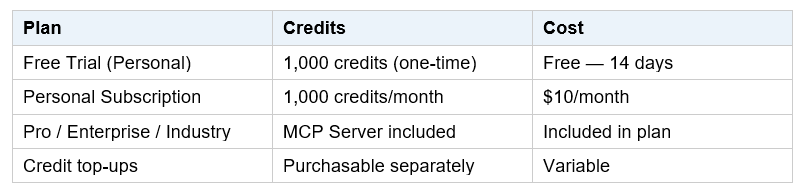
The value of $10/month depends entirely on your workflow. If you are a solo developer using Unity AI primarily for scene setup and quick script generation, 1,000 credits is likely more than enough to cover a month of active prototyping. If you are running complex multi-step generations — generating assets, building scenes, and iterating on code in the same session — you will burn through credits faster.
My honest take: the free trial is generous enough to form a real opinion before committing. Use the 14 days to run the tasks you actually do every day, not just toy examples. The answer to "is it worth it" is a function of your specific workflow, not a general verdict.
One important note: using third-party AI tools via the AI Gateway does not consume Unity credits. Teams already paying for Claude or GPT subscriptions can route those through AI Gateway at no additional Unity credit cost — a meaningful distinction for studios with existing AI tool budgets.
5. What Unity AI Can and Cannot Build
The promotional trailer showed a functional demolition derby game — complete with vehicle controls and weapon mechanics — built from natural language prompts in seconds. That is impressive, and it is also the ceiling, not the floor. Here is a grounded view of current capabilities:
What It Does Well
- Generating C# scripts for common gameplay patterns (movement, physics, UI)
- Creating placeholder 2D assets: sprites, textures, animations from text references
- Building simple scene layouts from images or design inputs
- Explaining console errors and suggesting specific fixes
- Reducing boilerplate on repetitive tasks like setting up prefabs, managers, and event systems
Current Limitations
- Complex AI-generated assets still require significant artist review — the community has already flagged quality concerns with character models in the beta trailer
- Prompt-to-full-game works for very simple casual titles; anything with depth, narrative, or complex systems still requires human architecture
- The tool is context-aware for your project, but it does not understand your design intent — it executes what you describe, not what you mean
- Non-coders who prompt a game into existence and then hit a bug may find themselves unable to debug AI-generated code they do not understand
The industry data supports a nuanced read: 62% of Unity developers already use AI for coding assistance, and median project time has dropped from 91 hours to 21 hours since 2022. AI tools are clearly accelerating development. But the acceleration is in iteration speed and boilerplate removal — not in replacing the design judgment that makes a game worth playing.
Don't just use ChatGPT. Learn to build custom LLM agents, RAG pipelines, and full-stack Agentic AI apps in our intensive 6-week program.
6. Unity AI vs. Cursor: Which Should Game Developers Use?
This is the most common practical question among developers who already use Cursor or GitHub Copilot for their Unity work. The short answer: they are complementary, not competing.
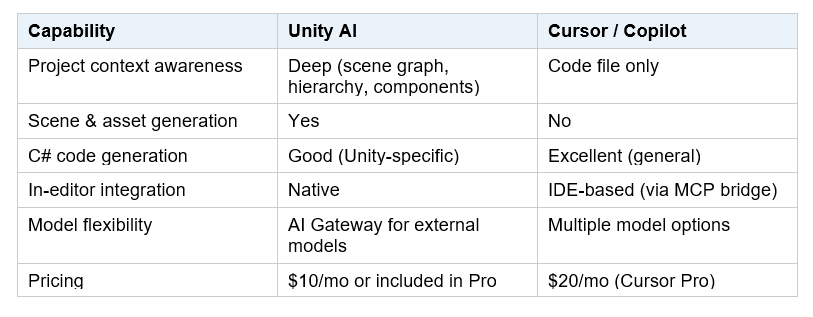
Unity AI wins on context. It knows your scene, your packages, your target platform. That context is genuinely valuable when you need a script that interacts with your existing GameObjects. Cursor wins on general-purpose code quality and breadth — it handles complex refactoring and multi-file edits better. The practical recommendation: use Unity AI for game-specific tasks inside the editor, and keep Cursor for architectural work, complex debugging, and code reviews in your IDE.
7. Honest Concerns: AI Slop, Job Risk, and Quality Control
The community reaction to Unity AI has been split, and the concerns deserve a straight answer.
The AI Slop Problem
ResetEra users called the character models in the beta trailer "nightmare fuel." Critics drew parallels to what is already happening in Godot, where automated AI contributions are overwhelming maintainers with low-quality pull requests. The risk of the same pattern appearing in game storefronts — a flood of low-effort, AI-generated casual titles — is real. Unity has a responsibility here that goes beyond shipping a feature.
Impact on Developers
The junior role pipeline in game development is already under pressure. Tasks that historically justified entry-level positions — basic scripting, placeholder asset creation, scene setup — are exactly what Unity AI automates. This does not mean developers are being replaced. It means the definition of what a developer does is shifting toward design direction, systems architecture, and creative judgment. Developers who adapt early will likely be more productive; those who rely on Unity AI without understanding the underlying systems it generates will be fragile.
Data Privacy
Unity's default is not to use your project data for model training. Users must actively opt in via the Dashboard. This is the right default — but it is worth verifying in your own settings before you start feeding proprietary code into the assistant.
The honest framing: Unity AI is a genuine productivity tool for developers who understand what they are building. It is a liability for non-coders who use it to ship games they cannot maintain or debug. Both outcomes are possible from the same product — which is why the "democratization" pitch requires a lot more nuance than the marketing copy suggests.
Frequently Asked Questions
What is Unity AI and what does it do?
Unity AI is an in-editor AI assistant built into Unity 6, powered by third-party frontier AI models including Gemini. It understands your project's full context — scene graph, GameObjects, components, and packages — and can generate C# scripts, build scenes from images, create placeholder assets, and suggest performance optimizations. It launched in open beta on May 4, 2026, and is available free for 14 days for Unity Personal users.
Is Unity AI the same as Unity Muse?
No. Unity Muse is a deprecated product that used Unity's own first-party AI models and operated as a separate tool outside the editor. Unity AI is a completely new product that uses third-party frontier models, runs natively inside the Unity Editor with full project context, and supports external AI tools via the AI Gateway and MCP Server.
How do I access the Unity AI open beta?
Install Unity 6.0 or newer, link your project to a Unity Cloud project, then click the AI button in the Editor toolbar and install the Assistant package. Unity Personal users get a 14-day free trial with 1,000 credits. Pro, Enterprise, and Industry users have MCP Server access included by default.
Is Unity AI free?
There is a 14-day free trial that includes 1,000 credits for Unity Personal users. After the trial, Unity AI costs $10 per month for 1,000 AI credits. Pro, Enterprise, and Industry plan users have Unity AI access included in their existing subscriptions. Using third-party AI tools via the AI Gateway does not consume Unity credits.
Can Unity AI build a full game from a text prompt?
For simple casual games, yes. The promotional trailer showed a functional demolition derby game — with vehicle controls and weapon mechanics — built from natural language in seconds. For anything with depth, complex systems, narrative, or polished art, Unity AI accelerates development but does not replace it. The tool executes what you describe; it does not understand game design intent.
Will Unity AI replace game developers?
No — but it will change what game developers do. AI is automating the boilerplate: basic scripts, placeholder assets, scene setup. Developers who understand systems architecture, design intent, and how to direct AI output will become more productive. Those who rely on AI without understanding the underlying code risk building games they cannot debug or maintain. The shift is real; the replacement narrative is overstated.
Does Unity AI use my project data to train its models?
By default, no. Unity's default setting does not use project data to train AI models. Developers can choose to opt in via the Unity Dashboard. Unity has also confirmed that AI-generated assets contain embedded metadata flagging them as AI-generated, which is relevant for app store declarations.
Recommended Blogs
The only comprehensive program designed to take you from basic prompting to building interactive Artifacts, custom integrations, and deploying production-ready code with Claude Code.
References
- Unity — Unity AI Features & Open Beta
- Unity Support — Getting Started with Unity AI Open Beta User Guide
- Techtroduce — Unity Launches AI Tool Beta, Promising Games From Text Prompts
- Wccftech — Unity 2026 Game Dev Report: Smaller Teams Making Games in Less Time With AI
- PC Guide — Unity Is Ready to Unveil New AI Tech That Lets You Skip Coding
- PC Gamer — Unity Boss Says New AI Will Enable Developers to Prompt Full Casual Games Into Existence
- GamesBeat — Unity Launches Unity AI Into Open Beta
- ResetEra — Unity Announces That Unity AI Is Now In Open Beta

