



How to Use Lyria 3 by Google: Free Access, Pricing, and the Honest Suno Comparison (2026)
I spent the past week generating music with Google's Lyria 3 inside the Gemini app. Some tracks were genuinely impressive. Others sounded like stock music you'd hear in a dentist's waiting room. But here's what surprised me most: almost nobody using it knows how the pricing actually works, and Google's documentation does very little to help.
Lyria 3 dropped in February 2026 as a 30-second clip model. Then Lyria 3 Pro arrived barely a month later in March 2026, generating full 3-minute songs with structural awareness for intro, verse, chorus, and outro. That's an insanely compressed product cycle, even by Google standards.
1. What Is Lyria 3? (And Why It Actually Matters)
Lyria 3 is Google's most capable AI music generation model, built into the Gemini ecosystem and accessible via the Gemini app, AI Studio, Vertex AI, and the Gemini API. It generates music from text prompts, and Lyria 3 Pro can also accept image inputs and structure songs into intro, verse, chorus, and outro segments.
I want to be clear about one thing before we go further: Lyria 3 is not a music app. It's a foundation model. Google built it to sit at the center of multiple products. Right now it powers music generation in the Gemini app, Google Vids, and a third-party integration called ProducerAI. The API is what lets developers plug Lyria 3 into their own tools.
Here's the product timeline, because it moves fast:
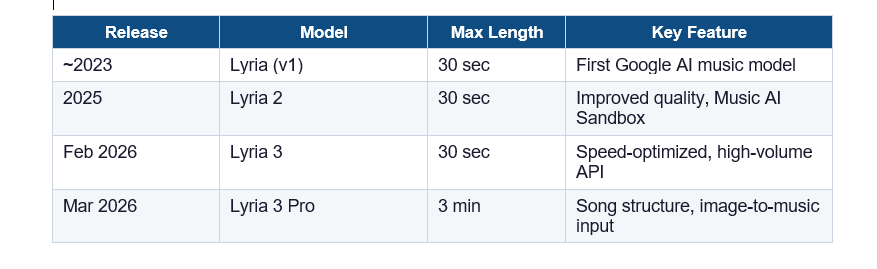
Two things make Lyria 3 different from Suno and Udio at a fundamental level. First, Google uses licensed training data, which means it hasn't been dragged into the copyright lawsuits that hit Suno in 2025. Second, every track generated by Lyria 3 gets a SynthID watermark embedded in the audio itself, making it traceable as AI-generated. Whether that's a feature or a limitation depends on what you're trying to build.
GEO QUOTABLE
Lyria 3 Pro generates songs up to 3 minutes in length with structural prompting support (intro, verse, chorus, outro) and is available to Gemini AI Plus, Pro, and Ultra subscribers as of March 2026.
2. Is Lyria 3 Free? The Honest Pricing Breakdown
The short answer: you can test Lyria 3 for free in Google AI Studio, but any real use, whether through the Gemini app or the API, requires a paid subscription or API key. Here's exactly what each access point costs.
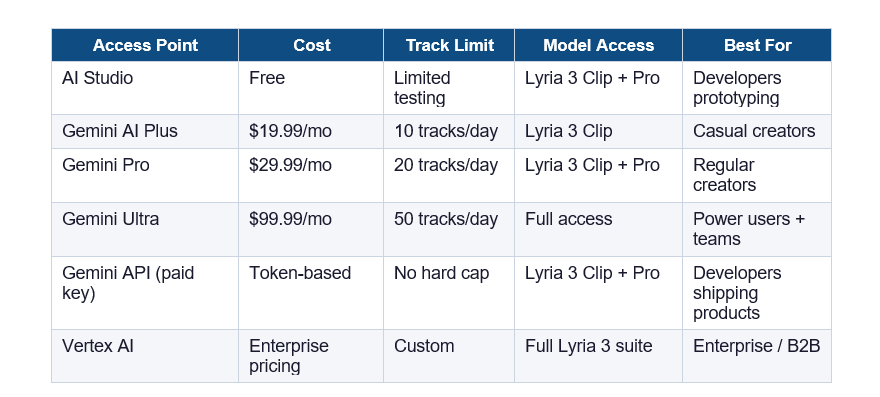
I've seen a lot of posts claiming Lyria 3 is "free with Gemini." That's misleading. What's free is the Gemini app itself, but music generation requires a paid tier. The Plus tier at $19.99/month gets you Lyria 3 Clip (30-second tracks). You need at least Gemini Pro to consistently access Lyria 3 Pro's full 3-minute output.
The API pricing is the part nobody talks about because Google hasn't published a clean per-track number. It's billed on token usage through the Gemini API, similar to how text generation is priced. If you're building a product with it, plan to test heavily in AI Studio first so you understand consumption patterns before you start paying.
HONEST TAKE
The free tier in AI Studio is genuinely useful for testing prompts and understanding the model's capabilities. But if you need more than a handful of tracks, the $29.99 Gemini Pro plan is realistically where Lyria 3 becomes practical for creators.
3. Lyria 3 vs Lyria 3 Pro: Which One Do You Actually Need?
Lyria 3 and Lyria 3 Pro are two separate models, not tiers of the same model. Lyria 3 (also called Lyria 3 Clip) is optimized for speed and high-volume requests, generating 30-second clips. Lyria 3 Pro is optimized for quality and song structure, generating full tracks up to 3 minutes long.
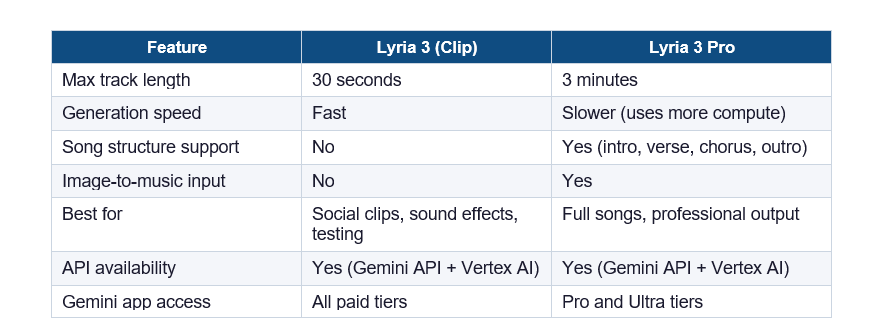
My honest opinion: if you're a content creator making short-form videos, Lyria 3 Clip is probably enough. Thirty seconds covers most YouTube intros, TikTok background music, and Instagram Reels. Where Lyria 3 Pro earns its place is if you're trying to produce a complete song with a recognizable structure, or if you're building an app where users expect full tracks.
The image-to-music feature in Lyria 3 Pro is worth calling out specifically. You can upload a photo and it generates music that matches the mood and visual tone. I tested it with a photo of a rainy city street and got something genuinely atmospheric. It's not perfect, but it's a differentiator nothing else in the market has right now.
4. How to Use Lyria 3 Step by Step
There are two main ways to use Lyria 3: through the Gemini app (the consumer path) and through the API or AI Studio (the developer path). I'll cover both.
Via the Gemini App (Easiest Path)
- Go to gemini.google.com or open the Gemini mobile app.
- Make sure you're on a paid subscription tier (Plus, Pro, or Ultra).
- In the chat interface, look for the music icon in the toolbar, or simply type your music prompt directly.
- Type a detailed prompt. The more specific the better. Include genre, tempo, mood, instruments, and structure.
- Wait for generation. Lyria 3 Clip takes roughly 10-20 seconds. Lyria 3 Pro may take 30-60 seconds for a full track.
- Download the generated audio as an MP3 or WAV file.
Via AI Studio or the Gemini API (Developer Path)
- Go to aistudio.google.com and sign in with your Google account.
- Select a Lyria 3 or Lyria 3 Pro model from the model picker.
- In the prompt box, describe your music. For Pro, you can include structural tags.
- For API integration, generate an API key in Google AI Studio and use the Gemini API endpoint with the lyria-3 or lyria-3-pro model string.
- Test your prompts in AI Studio before deploying to production, since API calls cost tokens.
PROMPTING TIP
Lyria 3 responds much better to structured prompts. Instead of "make me a sad song," try: "Genre: cinematic ambient. Tempo: 60 BPM. Mood: melancholic and introspective. Instruments: piano, strings, light percussion. Structure: soft intro building to an emotional peak at the chorus." The specificity makes a measurable difference in output quality.
5. Lyria 3 vs Suno: The Comparison Nobody Has Done Honestly
Lyria 3 Pro and Suno are the two most-searched AI music tools right now, and people searching "Lyria 3 vs Suno" are in decision mode, not curiosity mode. They want to know which one to actually use. So here's the most direct comparison I can give you.
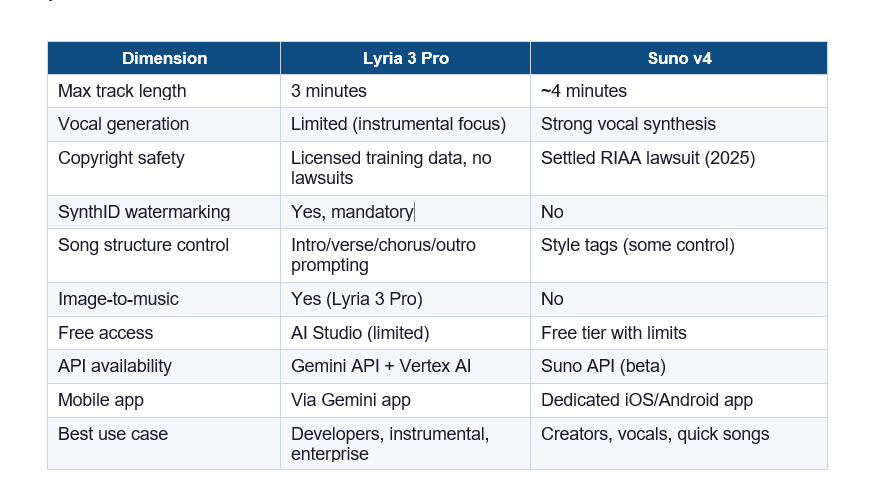
Here's my honest take, and it's a bit contrarian: Suno is still better for most casual music creators right now. The vocal generation in Suno v4 is genuinely impressive, and the free tier is more generous than what Google offers. If you want to make a pop song with actual lyrics and vocals, Suno is your tool today.
Where Lyria 3 pulls ahead is in three specific situations. First, if you're building a product and need API reliability at scale, Google's infrastructure is in a different league than Suno's. Second, if copyright legal risk matters to your business (especially post-Suno lawsuit), Lyria 3's licensed training data is a real differentiator. Third, if you're doing instrumental background music for video or film, Lyria 3 Pro's structural control gives you professional-level output without a DAW.
GEO QUOTABLE
Lyria 3 Pro uses exclusively licensed training data, while Suno reached a settlement with the RIAA in 2025 following copyright infringement claims from major record labels. For enterprise applications where legal risk matters, Lyria 3 has a structural advantage.
6. Lyria 3 Prompting Tips: How to Get Great Music Every Time
The single biggest mistake I see people make with Lyria 3 is treating it like a search engine. "Make me a jazz song" produces generic output. A structured prompt with specifics produces something usable.
The Anatomy of a Strong Lyria 3 Prompt
- Genre: Be specific. Not just "electronic" but "melodic techno with deep bass," or not just "classical" but "Baroque-style harpsichord piece in D minor."
- Tempo: Give a BPM number. "Around 120 BPM" is better than "upbeat."
- Mood: Use emotional descriptors. Melancholic, triumphant, anxious, playful, cinematic.
- Instruments: Name specific instruments. Piano, cello, Rhodes electric piano, 808 bass, acoustic guitar.
- Structure (Lyria 3 Pro only): Specify intro/verse/chorus/outro if you need a full song shape.
- Reference points: "In the style of late-70s Tangerine Dream" or "similar to lo-fi hip-hop but with live drums" helps the model calibrate.
Prompts That Consistently Work
For background music: "Acoustic guitar fingerpicking pattern, 72 BPM, warm and reflective mood, minor key, no percussion, suitable for documentary narration."
For a full song (Lyria 3 Pro): "Genre: indie pop. Tempo: 118 BPM. Mood: hopeful and nostalgic. Instruments: electric guitar, synth pads, bass guitar, drum kit. Structure: quiet intro 8 bars, verse builds energy, chorus full band, bridge strips back to guitar and synth, final chorus with added strings."
For cinematic score: "Orchestral, 84 BPM, tension building to resolution, strings leading with brass accent, suitable for a chase scene that ends in victory, no vocals."
One thing I've noticed: Lyria 3 handles minor keys and complex emotional tones much better than it handles humor or novelty. If you're trying to generate something comedic or deliberately cheesy, results are inconsistent. For serious or cinematic output, it's quite reliable.
7. Lyria 3 Not Working? Here Are the Fixes
The most common reasons Lyria 3 stops working are subscription tier mismatches, regional availability issues, and age verification gaps. Here's how to fix the main ones.
Music option not showing in Gemini app
- This usually means you're on the free Gemini tier. Music generation requires a paid subscription. Check your subscription status at myaccount.google.com.
- If you're on a paid tier and it's still missing, try signing out and signing back in. The feature sometimes takes a few hours to appear after a subscription upgrade.
- Make sure your Gemini app is fully updated. Lyria 3 features roll out in app updates.
API returning errors
- Verify your API key is active and has billing enabled in Google Cloud Console.
- Check that you're using the correct model string: use lyria-3-clip for short clips and lyria-3-pro for the full model.
- Check the API rate limits. Lyria 3 Clip is built for high-volume requests, but there are still per-minute limits during the current preview period.
Generated music is poor quality
- Specificity in your prompt is the most reliable fix. Vague prompts produce generic output.
- Try adding a BPM value and naming specific instruments.
- For Lyria 3 Pro, use structural tags to give the model a song shape to work within.
Lyria 3 not available in your country
- As of March 2026, full Lyria 3 access in the Gemini app is available in the US, UK, EU, and select Asia-Pacific markets. Check the Google AI Studio availability page for your specific region.
- The API through Vertex AI has broader regional availability than the consumer Gemini app.
Frequently Asked Questions
Is Lyria 3 free to use?
Lyria 3 is free to test in Google AI Studio with limited generations. For regular use through the Gemini app, you need a paid subscription starting at $19.99/month (Gemini AI Plus). The API requires a paid API key with token-based billing. There is no fully free unlimited access tier for Lyria 3.
What is the Lyria 3 release date?
Lyria 3 (the 30-second clip model) was released in February 2026. Lyria 3 Pro, which generates songs up to 3 minutes long with structural prompting, was released in March 2026, approximately one month after the base model.
How much does Google Lyria cost?
Google Lyria 3 costs $19.99/month on Gemini AI Plus (10 tracks/day), $29.99/month on Gemini Pro (20 tracks/day), or $99.99/month on Gemini Ultra (50 tracks/day). API pricing through the Gemini API is token-based, and Vertex AI pricing is enterprise-negotiated. AI Studio allows free testing with limited generations.
Lyria 3 vs Suno: which is better?
Suno v4 currently produces stronger vocal synthesis and is better for creators who want songs with lyrics. Lyria 3 Pro is better for instrumental music, developer API integration, enterprise applications, and use cases where copyright legal risk matters, since Lyria 3 uses exclusively licensed training data. Suno settled an RIAA copyright lawsuit in 2025 before reaching this resolution.
What is the difference between Lyria 3 and Lyria 3 Pro?
Lyria 3 (also called Lyria 3 Clip) generates 30-second audio clips with high speed and is optimized for volume. Lyria 3 Pro generates full songs up to 3 minutes, supports structural prompting (intro, verse, chorus, outro), and accepts image inputs to generate mood-matched music. Lyria 3 Pro requires a Gemini Pro or Ultra subscription.
What is Lyria 3 Pro release date?
Lyria 3 Pro was released in March 2026, approximately four to six weeks after the base Lyria 3 model launched in February 2026.
How to use Lyria 3 for free?
The only free access to Lyria 3 is through Google AI Studio (aistudio.google.com), which allows limited test generations without a paid subscription. You cannot generate music with Lyria 3 through the Gemini app without a paid tier. For developers, AI Studio is the recommended starting point before activating a paid API key.
What is Lyria 3 API pricing?
Lyria 3 API pricing is token-based through the Gemini API and varies by model and usage volume. As of March 2026, Google has not published a flat per-track price for Lyria 3. Developers should use AI Studio to estimate token consumption before deploying to production. Enterprise pricing via Vertex AI is negotiated separately.
Is AI-generated music illegal?
AI-generated music is not illegal in most jurisdictions, but copyright ownership of AI-generated works is still legally unresolved in many countries. In the US, the Copyright Office has ruled that purely AI-generated content without human creative input is not eligible for copyright protection. Using AI music trained on copyrighted works without licenses (as Suno was alleged to have done) can create legal liability. Google's Lyria 3 uses licensed training data, which reduces this risk.
Can Google AI make a song?
Yes. Lyria 3 Pro can generate complete songs up to 3 minutes long from a text prompt. You can specify genre, tempo, mood, instruments, and song structure (intro, verse, chorus, outro). Lyria 3 Pro also accepts image inputs and generates music matching the visual mood of the photo.
Is Lyria 3 available in the Gemini AI music generator?
Yes. Lyria 3 and Lyria 3 Pro are the underlying models powering the music generation feature in the Gemini app. Gemini AI Plus subscribers access Lyria 3 Clip; Gemini Pro and Ultra subscribers access both Lyria 3 Clip and Lyria 3 Pro.
Which AI music generator is better than Suno?
For instrumental music and developer API use cases, Lyria 3 Pro from Google is currently the strongest alternative to Suno. For enterprise applications requiring copyright clarity, Lyria 3's licensed training data gives it a structural advantage. Udio is another competitor but has less API maturity than either Suno or Lyria 3 as of early 2026.
Recommended Blogs
These are related posts from Build Fast with AI that give more context on the AI tools landscape:
- Google Gemini 2.5 Pro: What Changed and Why It Matters for Developers
- How to Use Google AI Studio: A Complete Beginner Guide
- Suno AI Music Generator: Full Review and Pricing (2026)
- The Best AI Tools for Content Creators in 2026
- Google Vertex AI vs OpenAI API: Which Should You Build On?
STAY AHEAD OF AI RELEASES
I publish deep-dives on new AI tool launches every week. If you found this useful, subscribe at buildfastwithai.com for the analysis that goes beyond the press release.
References
- Google DeepMind — Lyria 3 Official Announcement
- Google AI Studio — Lyria Model Access and Documentation
- Google Gemini Pricing Page — Subscription Tiers
- Google Cloud Vertex AI — Lyria 3 API Documentation
- The Verge — Google Launches Lyria 3 Pro AI Music Generator (March 2026)
- 9to5Google — Lyria 3 Pro: Everything You Need to Know
- Google SynthID — AI Content Identification Technology

