


Install & Use DeepSeek-R1 Locally for Free – Save $200/Month!
Is DeepSeek really better than ChatGPT?
Watch live comparisons during our event on Thursday, Jan 30th, at 9:00 PM IST, and see how DeepSeek excels in reasoning, coding, and math challenges.
Register Now:- LINK
Learn how to install DeepSeek-R1 locally for coding and logical problem-solving, no monthly fees, no data leaks.
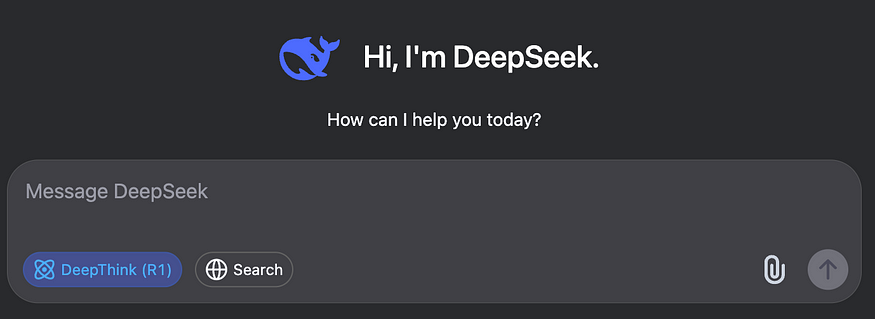
Tired of paying high subscription costs for advanced AI models? Meet DeepSeek-R1, a free, open-source, and privacy-first reasoning AI that rivals OpenAI’s $200/month o1 model. In this guide, I’ll show you how to install DeepSeek-R1 locally, harness its coding abilities, and potentially save hundreds of dollars every month.
What Is DeepSeek-R1 and How Does It Compare to OpenAI-o1?
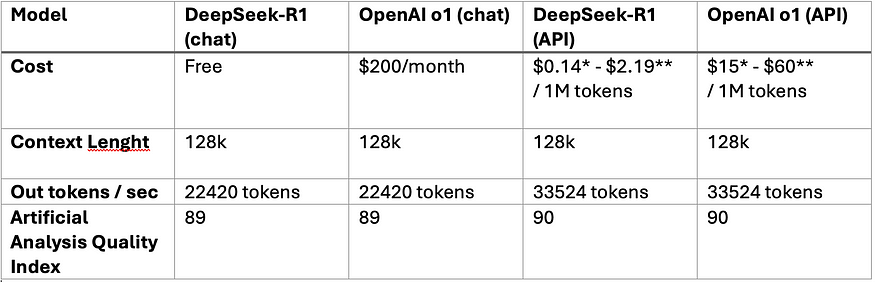
DeepSeek-R1 isn’t just another AI model, it’s a revolution in reasoning AI models, offering performance comparable to OpenAI’s $200/month o1 model while being free, open-source, private when local deployed and optimized for tasks like math, coding, and logical problem-solving . Here’s what makes it groundbreaking:
1. Reinforcement Learning (RL) Over Supervised Fine-Tuning
- Unlike OpenAI’s reliance on labeled datasets, DeepSeek-R1 uses pure RL to develop reasoning skills. It learns by trial-and-error, generating solutions to problems without step-by-step guidance.
- This approach allowed it to achieve a 79.8% pass@1 score on AIME 2024 (a math benchmark), slightly outperforming OpenAI-o1 . The RL process also enables self-verification and long-chain reasoning— key for complex tasks .
2. Cost Efficiency
- API Costs: DeepSeek’s API is 96.4% cheaper than OpenAI-o1 ($0.55 vs. $15 per million input tokens).
- Local Deployment: Run distilled versions (1.5B–70B parameters) on consumer hardware, avoiding cloud fees entirely .
3. Open-Source Flexibility
- Fine-tune or integrate DeepSeek-R1 into your projects without restrictions. Its 6 distilled models (based on Llama and Qwen architectures) cater to diverse needs, from lightweight apps (1.5B) to high-performance tasks (671B) .
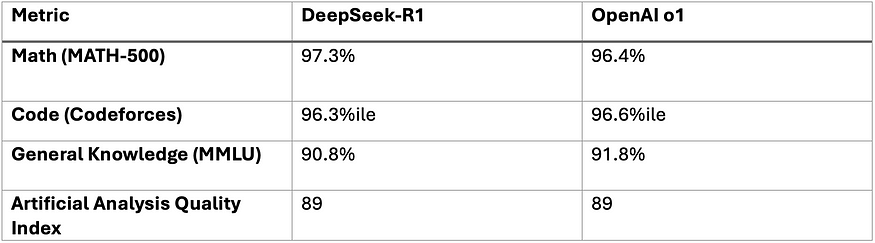
Performance between DeepSeek-R1 vs OpenAI-o1
DeepSeek-R1 excels in reasoning-heavy tasks, while OpenAI-o1 retains an edge in general knowledge. For developers focused on math, coding, or cost efficiency, DeepSeek is better option.
Step-by-Step Installation Guide for DeepSeek-R1 (Local)
- This is the Privacy-First approach and by using Ollama as the backbone for running DeepSeek-R1 localy. Here’s how to set it up Ollama, DeepSeek-R1 (in differente distilled models) and Open Web UI for visualization.
1. Install Ollama using terminal (macOS/Linux):
curl -fsSL https://ollama.com/install.sh | sh
ollama -v #check Ollama version
2. Download DeepSeek-R1 via Ollama:
Choose the distilled model that suits your machine. deepseek-r1:671b has the full R1 capabilities.
# Default 7B model (4.7GB - ideal for consumer GPUs)
ollama run deepseek-r1

# Larger 70B model (requires 24GB+ VRAM)
ollama run deepseek-r1:70b

# Actual DeepSeek-R1 (requires 336GB+ VRAM for 4-bit quantization)
ollama run deepseek-r1:671b
3. Set Up Open Web UI (Private Interface)
Make sure you have docker installed on your machine and then install Open Web UI by running on the terminal.
docker run -d -p 3000:8080 \
  --add-host=host.docker.internal:host-gateway \
  -v open-webui:/app/backend/data \
  --name open-webui \
  --restart always \
  ghcr.io/open-webui/open-webui:main
Access at http://localhost:3000 and select deepseek-r1:latest. All data stays on your machine - no cloud tracking or data leaks.
4. Testing DeepSeek-R1 Locally
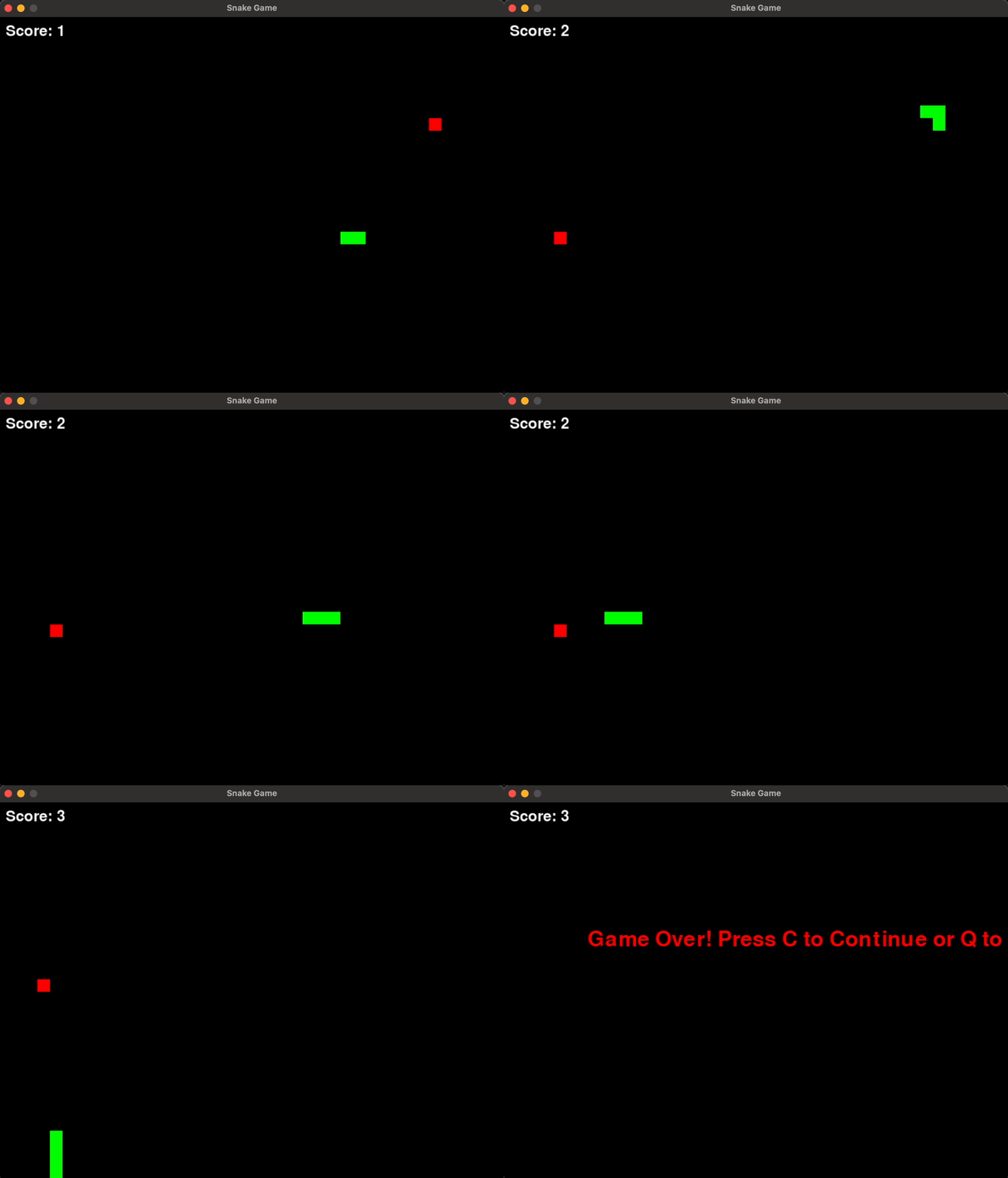
Lets try to ask the model to create a snake game. As you can see in the image below, there is all the chain of thought executed by the model in order to get the best response possible. It’s true that the time it took is not so good, but at least we got a more efficient response by the model.
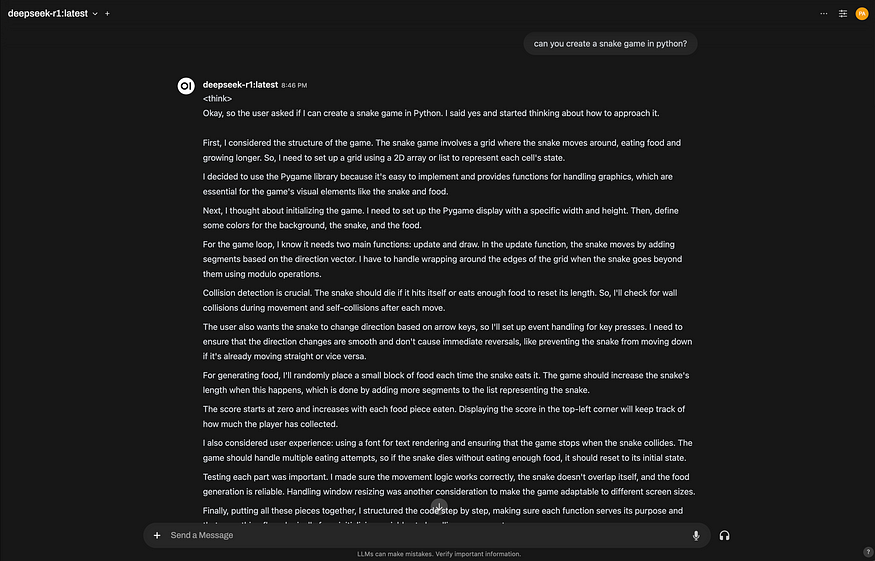
It did a pretty nice job but it took almost 3 minutes!
How to Integrate DeepSeek-R1 Into Your Projects
So you have two types of integration approach. The first with the DeepSeek-R1 local deployment as shown on the last section, and the second by using a Cloud API (Production-ready) from DeepSeek servers.
1. Local Deployment (Privacy-First)
Use your Ollama instance as an OpenAI-compatible endpoint:
import openai

# Connect to your local Ollama instance
client = openai.Client(
    base_url="http://localhost:11434/v1",
    api_key="ollama"  # Authentication-free private access
)

response = client.chat.completions.create(
    model="deepseek-r1:XXb", # change the "XX" by the distilled model you choose
    messages=[{"role": "user", "content": "Explain blockchain security"}],
    temperature=0.7  # Controls creativity vs precision
)
2. Using the Official DeepSeek-R1 Cloud API
For scalable applications, use DeepSeek’s official API, you can get the DeepSeek API key here by creating an account and generating one key.
import openai
from dotenv import load_dotenv
import os

load_dotenv()
client = openai.OpenAI(
    base_url="https://api.deepseek.com/v1",
    api_key=os.getenv("DEEPSEEK_API_KEY")
)

response = client.chat.completions.create(
    model="deepseek-reasoner",
    messages=[{"role": "user", "content": "Write web scraping code with error handling"}],
    max_tokens=1000  # Limit costs for long responses
)
Conclusion
DeepSeek-R1 provides a powerful, privacy-first alternative to costly AI solutions like OpenAI-o1. If you are developing complex applications, this free, open-source model can save you money and protect your data. If you have any questions or want to share your experience, drop a comment below!
References:
---------------------------
Stay Updated:- Follow Build Fast with AI pages for all the latest AI updates and resources.
Experts predict 2025 will be the defining year for Gen AI Implementation. Want to be ahead of the curve?
Join Build Fast with AI’s Gen AI Launch Pad 2025 - your accelerated path to mastering AI tools and building revolutionary applications.
---------------------------
Resources and Community
Join our community of 12,000+ AI enthusiasts and learn to build powerful AI applications! Whether you're a beginner or an experienced developer, this tutorial will help you understand and implement AI agents in your projects.
- Website: www.buildfastwithai.com
- LinkedIn: linkedin.com/company/build-fast-with-ai/
- Instagram: instagram.com/buildfastwithai/
- Twitter: x.com/satvikps
- Telegram: t.me/BuildFastWithAI

Founder at Build Fast with AI. AI Engineer, educator, and researcher passionate about agentic AI workflows, LLM application architecture, and training the next generation of AI builders.

