





Claude AI Is Now Inside Microsoft Office — And It Carries Your Full Conversation Everywhere
I've spent the past 48 hours testing Claude inside Excel, Word, and PowerPoint. And honestly? I wasn't expecting much. We've had Copilot sitting inside Microsoft 365 for over a year, and I've mostly ignored it. But Claude for Office is a different experience — and one specific feature made me genuinely stop and take notes.
On May 7, 2026, Anthropic officially launched Claude as add-ins for Excel, Word, and PowerPoint — all generally available. Claude for Outlook rolled out simultaneously as a public beta. The integrations work on Windows, Mac, and web, and are accessible on all paid Claude plans through the Microsoft Marketplace.
The headline feature: Claude carries your full conversation context as you move between apps. You summarize an email in Outlook. Switch to Excel. Claude already knows what the email said. Open PowerPoint. Claude builds a deck from the same context. No copy-paste. No re-explaining. That's the part that got my attention.
What Anthropic Just Launched (And What's Still Beta)
Claude for Excel, Word, and PowerPoint are generally available as of May 7, 2026. Claude for Outlook is in public beta. All four integrations are available to paid Claude plan subscribers via the Microsoft Marketplace.
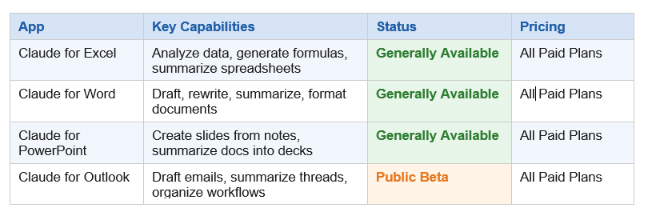
I expected this to feel like another "AI button" buried inside a menu nobody uses. It's not. The add-ins install cleanly, open as a side panel inside each Office app, and — unlike Copilot — don't feel bolted on as an afterthought.
One thing worth flagging upfront: Claude for Outlook is still beta. I ran into a few rough edges around formatting in email drafts, and complex thread summarization occasionally missed context from older messages. That said, the core functionality works, and Anthropic is clearly iterating fast.
Quick stat: Claude for Office is available on all paid Claude plans — no separate Copilot-style add-on at $30/month required. For existing Claude Pro subscribers, this is included.
How Claude for Excel Actually Works
Claude for Excel does what most people wish Excel's own AI would do: answer questions about your data in plain English, without forcing you to remember which VLOOKUP variant handles approximate matches.
Open a spreadsheet with Claude's side panel active and you can ask things like "Which product line had the highest margin in Q1?" or "Build me a formula that calculates a 60-day rolling average for column D." Claude reads the sheet, interprets structure, and either explains what you're looking at or writes the formula directly.
What Claude for Excel Can Do
- Data analysis in plain English — Ask questions directly about your spreadsheet's data
- Formula generation — Describe what you want calculated, Claude writes the formula
- Spreadsheet summarization — Turn 10 tabs of data into a readable executive summary
- Error explanation — Paste a broken formula, Claude explains what's wrong
- Data cleaning guidance — Spot duplicates, inconsistencies, and formatting issues
Anthropic engineer Henry Shi noted publicly that Claude for Excel was built in part because even he struggled with complex spreadsheet work. That's either a great sign (they built it for real users, not power users) or a mild concern (you want your AI to be better at Excel than the person who built the integration). I'm choosing to see it as the former.
My hot take: Claude for Excel is going to be the most-used of the four integrations. Spreadsheets are where non-technical professionals spend the most time feeling lost, and Claude's ability to explain formulas in conversational English fills a real gap that Copilot's more button-heavy interface has struggled to address.
Claude for Word: Beyond Basic Drafting
The Word integration handles the full document lifecycle — not just generation. You can draft from scratch, rewrite existing paragraphs, summarize long reports into executive briefs, or ask Claude to fix the tone on a section that sounds too formal.
Use Cases That Actually Work Well
- Rewriting dense technical content into plain language for non-technical readers
- Generating first drafts from rough bullet points or meeting notes
- Summarizing 40-page reports into a 3-paragraph brief
- Improving clarity and consistency across document sections
- Checking that formatting and structure follow a specific style guide
What's interesting about the Word integration is how well Claude handles context from the rest of the document. Most AI writing tools treat each generation in isolation. Claude reads the full document before responding, which means its suggestions actually match your voice and don't contradict what you wrote three pages earlier.
The one thing Claude for Word doesn't do yet: tracked changes. Edits appear in the side panel and need to be manually accepted into the document. That's a workflow friction point for anyone working in collaborative documents with strict revision histories. It's fixable, and I'd expect it in a future update.
Claude for PowerPoint: Turn Notes Into Slides
Of the four apps, PowerPoint is where the cross-app context feature shows its value most clearly. Here's a real workflow that took me about 4 minutes: I pasted meeting notes into Outlook, asked Claude to summarize the key decisions, switched to PowerPoint, and said "Turn that summary into a 5-slide deck." Claude did it. Outline, speaker notes, structure — all of it, from the email context I'd built in Outlook.
What Claude for PowerPoint Does
- Converts documents, notes, or summaries into slide outlines
- Suggests slide structure based on content type (pitch deck vs status update vs training material)
- Writes speaker notes automatically alongside slide content
- Reformats dense text into bullet-point slides without losing key information
- Maintains cross-app context from Outlook or Word sessions
Honest criticism: Claude generates text-heavy slides by default. If you want a visually designed deck, you'll still need a human designer or a dedicated tool. Claude for PowerPoint is a content and structure tool, not a design tool. That distinction matters.
Image suggestion: Screenshot of Claude's PowerPoint side panel generating slides from a meeting summary. Filename: claude-powerpoint-slide-generation-2026.png | Alt text: Claude AI generating PowerPoint slides from meeting notes inside Microsoft Office add-in panel
Don't just use ChatGPT. Learn to build custom LLM agents, RAG pipelines, and full-stack Agentic AI apps in our intensive 6-week program.
Claude for Outlook (Beta): Email Workflows, Reimagined
Claude for Outlook is the most ambitious of the four integrations — and the roughest around the edges. The core workflow works: open a thread, ask Claude to summarize it, have it draft a reply, or use it to triage a cluttered inbox. The beta label is honest, not marketing.
Current Capabilities in Public Beta
- Email drafting — Write replies from a brief description of what you want to say
- Thread summarization — Condense 20-email threads into 3-sentence summaries
- Reply improvement — Paste a draft, ask Claude to make it more professional or more concise
- Context carry-forward — Summaries from Outlook persist into Excel, Word, and PowerPoint sessions
Where it currently falls short: older email threads (20+ messages) sometimes lose context from earlier in the chain, and highly formatted HTML emails occasionally confuse Claude's parsing. These are solvable engineering problems, and I expect them fixed well before GA.
The context carry-forward feature alone makes the Outlook beta worth enabling. Even if you never use Claude to draft an email, using it to summarize a complex thread and then carrying that summary into a Word report or PowerPoint deck is a legitimate workflow improvement.
Cross-App Context: The Feature That Changes Everything
I want to spend more time on this because it's what separates Claude for Office from everything else in the productivity AI space right now.
Every other AI tool treats each app as a separate session. You use Copilot in Word. You open Excel. Copilot in Excel knows nothing about what you were doing in Word. You start over. Every time. This sounds like a minor inconvenience until you realize how much of real knowledge work involves moving between documents that are all part of the same project.
Claude carries the full context of your conversation as you move between Microsoft apps. That's not a UX feature. That's a fundamentally different mental model for how AI should work inside productivity software.
The practical workflow this enables:
- Summarize a long email thread in Outlook
- Switch to Excel, ask Claude to build a tracker based on the decisions from that email
- Open Word, ask Claude to draft a project update document referencing both
- Open PowerPoint, generate a stakeholder deck from everything discussed
- All within one Claude session. No re-explaining. No copy-paste.
If Anthropic executes on this roadmap, this is the feature that converts Copilot users. Not because Claude is smarter than GPT-4 on any given task, but because the workflow integration is genuinely better.
Claude vs Microsoft Copilot: Direct Comparison
The Copilot vs Claude comparison is the question everyone's asking. Here's my honest read after testing both:
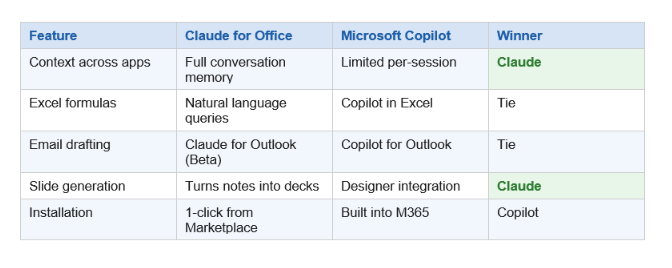
My take: Copilot has the home-field advantage. It's built into Microsoft 365 at the OS level and integrates deeper with Teams, SharePoint, and OneDrive. Claude doesn't touch any of that — yet.
But Claude wins on conversation quality. If you give both the same document and ask the same question, Claude's answer tends to be more nuanced and better calibrated to what you actually asked. And the cross-app context feature is something Copilot simply doesn't have.
Contrarian take: Microsoft Copilot's deep Teams and SharePoint integration is actually a disadvantage for knowledge workers who don't live in those tools. If you're a freelancer, a small team, or someone who moves between multiple clients' environments, Claude's lighter footprint is a feature, not a limitation.
How to Install Claude for Microsoft Office
Installation is genuinely simple. Unlike some enterprise AI deployments that require IT approval, group policy changes, or a 45-minute setup wizard, Claude for Office follows the standard Microsoft add-in flow.
Step-by-Step Installation
- Go to claude.ai and sign in to your paid plan account
- Follow the link to the Microsoft Marketplace (available from Anthropic's Claude integrations page)
- Search for "Claude" in the Marketplace or click Anthropic's direct install link
- Click "Add" for each app: Excel, Word, PowerPoint, and/or Outlook
- Open any Microsoft Office app on Windows, Mac, or web
- Find Claude in the Add-ins panel (usually under Insert > Add-ins or the Home ribbon)
- Sign in with your Claude account — and you're live
The process takes under 5 minutes. There's no admin-level access required for personal installs, though enterprise deployments with managed Microsoft 365 environments may need IT approval through the admin center.
Platform support: Windows, Mac, and web versions of all four Office apps are supported. Mobile Office apps are not currently listed as supported platforms as of the May 2026 launch.
Availability note: Claude for Excel, Word, and PowerPoint are generally available now. Claude for Outlook is in public beta. All four require a paid Claude plan (Pro, Team, or Enterprise).
The only comprehensive program designed to take you from basic prompting to building interactive Artifacts, custom integrations, and deploying production-ready code with Claude Code.
Is This a Real Threat to Copilot?
Short answer: yes, but not in the way most people think.
Claude isn't going to replace Copilot for enterprise customers who are already deeply embedded in Microsoft's ecosystem. SharePoint integration, Teams transcription, organizational knowledge graphs — Claude doesn't touch any of that. And it probably won't anytime soon.
Where Claude actually competes: the individual knowledge worker who has a Claude subscription and uses Microsoft Office as their daily tool. That's a large number of people. For them, Claude for Office is a direct upgrade — better conversation quality, cross-app context, and no extra $30/month on top of a Copilot subscription they may not be using fully.
The Morning Brew comparison that went viral after the announcement was mostly jokes at Copilot's expense. But underneath the memes is a real point: Copilot has had 18 months to win over everyday Office users, and adoption has been lukewarm. Claude showing up with a simpler install and better cross-app context gives undecided users a real reason to switch.
My prediction: Anthropic will use this as a beachhead. Claude in Office documents is a way to get millions of users to experience Claude in a familiar context. Once they're there, the path to Claude Code, Claude's API, and Anthropic's enterprise products becomes much shorter.
Frequently Asked Questions
Does Claude integrate with Microsoft Office?
Yes. As of May 7, 2026, Claude is available as add-ins for Excel, Word, and PowerPoint (generally available) and Outlook (public beta). All integrations install via the Microsoft Marketplace and work on Windows, Mac, and web versions of Office.
Is Claude for Microsoft Office free?
Claude for Office is included with all paid Claude plans (Pro, Team, and Enterprise). There is no additional charge beyond your existing Claude subscription. Free Claude accounts do not have access to the Office integrations.
How is Claude for Office different from Microsoft Copilot?
The biggest difference is cross-app context: Claude carries your full conversation as you move between Excel, Word, PowerPoint, and Outlook. Copilot treats each app as a separate session. Claude also does not require a separate Microsoft 365 Copilot subscription (~$30/month), and many users report Claude's conversational quality as more natural and nuanced.
Does Claude for Office work on Mac and web?
Yes. Claude for Excel, Word, PowerPoint, and Outlook (beta) all support Windows, Mac, and web versions of Microsoft Office. Mobile Office apps are not currently listed as supported at launch.
What can Claude do in Microsoft Excel specifically?
Claude for Excel can analyze spreadsheet data in plain English, generate and explain formulas, summarize multi-tab workbooks, identify errors in existing formulas, and help with data cleaning. You interact with it via a side panel that stays open while you work in the sheet.
Is Claude for Outlook available now?
Claude for Outlook launched in public beta on May 7, 2026. It can draft emails, summarize long threads, and improve draft replies. Full general availability has not been announced. Outlook beta users may encounter rough edges, particularly with long or heavily formatted email threads.
What Microsoft Office plans support Claude?
Any edition of Microsoft Office that supports add-ins from the Microsoft Marketplace (Microsoft 365, Office 2019, Office 2021) should work. The requirement is on the Claude side, not the Office side: you need a paid Claude plan (Pro, Team, or Enterprise).
Can Claude see all my files in Microsoft Office?
Claude only sees what's in the active document or email thread you're working in during your session. It does not have access to your OneDrive, SharePoint, or other stored files unless you explicitly open them and interact with Claude in that context.
Recommended Blogs
If you found this useful, here are related posts from buildfastwithai.com worth reading:
- Claude vs ChatGPT vs Gemini: Full Benchmark Comparison (2026)
- Claude Code vs GitHub Copilot: Which AI Coding Tool Wins?
- How to Use the Anthropic API: A Complete Beginner's Guide
- Best AI Productivity Tools for 2026: Full Breakdown
- Claude Pro vs Claude Team: Which Plan Is Right for You?
References
- Anthropic on X (@claudeai) — Official launch announcement for Claude for Office integrations (May 7, 2026):
- Microsoft Marketplace — Install page for Claude add-ins for Office:
• Anthropic Official Site — Claude product information and pricing:

