


Mastering the Job Hunt: How to Leverage AI for a Successful Career Search
In today’s competitive job market, standing out from the crowd is more crucial than ever. The rise of Artificial Intelligence (AI) has revolutionized many industries, and job hunting is no exception. By harnessing the power of AI, you can streamline your job search, create a compelling application, and ace your interviews.
This comprehensive guide will walk you through the essential steps to leverage AI for a successful career search—from perfecting your resume and portfolio to automating your job hunt and practicing with AI-powered mock interviews.
Crafting a Winning Resume and Portfolio with AI
The first step in any successful job search is creating a resume that not only highlights your skills and experience but is also optimized for modern recruitment processes. Many companies now use Applicant Tracking Systems (ATS) to screen resumes, making it essential to have a document that can pass through these automated filters.
Key Strategies for an AI-Powered Resume:
Keyword Optimization: Use AI tools to analyze job descriptions and identify relevant keywords to include in your resume. This increases your chances of getting noticed by ATS and hiring managers.
Action-Oriented Language: Employ strong action verbs to describe your accomplishments. AI can help you find powerful words that make your experience stand out.
Quantifiable Achievements: Whenever possible, quantify your achievements with numbers and data. This provides concrete evidence of your impact and value.
Create a Stunning Portfolio Website with AI
A portfolio website is an excellent way to showcase your work and differentiate yourself from other candidates. With AI, you can create a professional-looking website in minutes.
How to Use Gemini AI for a Portfolio Website:
Go to gemini.google.com.
Click on Tools → Canvas.
Input your resume information.
Enter this prompt:
“Create an amazing portfolio website I can showcase to recruiters.”
The AI will instantly create a visually appealing and user-friendly site that highlights your skills, projects, and achievements.
Automating Your Job Search with Web Scraping
Searching for jobs manually can be time-consuming. AI-powered web scraping tools can automate this process, ensuring you never miss an opportunity.
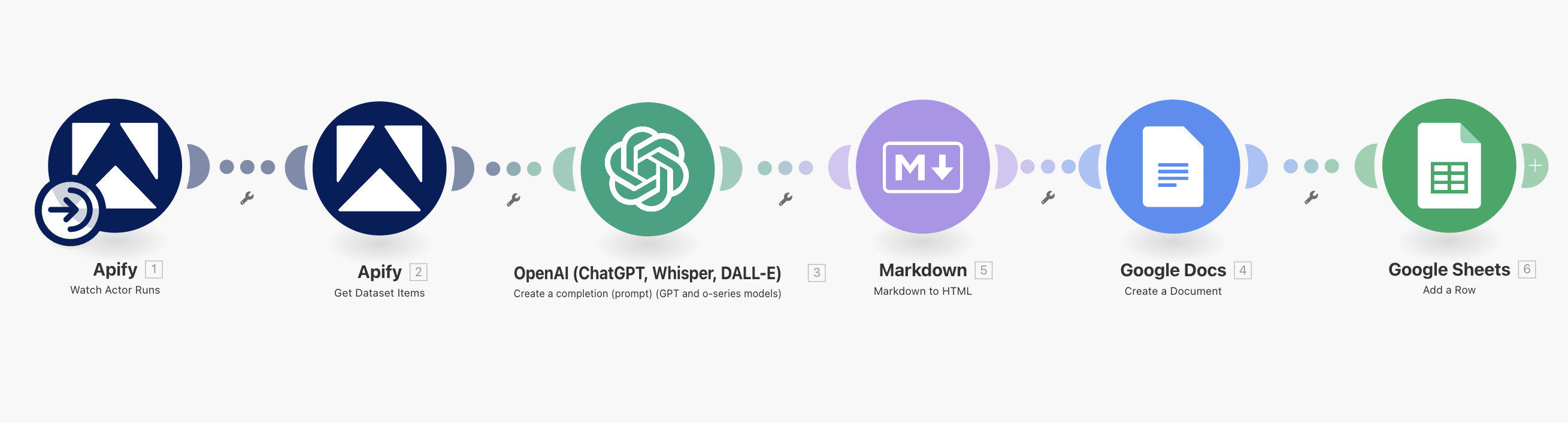
Recommended Tools:
make.com – Create automated workflows to track job boards like Indeed, LinkedIn, and Glassdoor.
Apify – Scrape job postings at scale and deliver them in structured formats.
Benefits:
Automated Job Scraping: Continuously pull relevant jobs that match your criteria.
Customized Job Feeds: Get curated lists of openings delivered directly to you, allowing you to focus on applying to the right roles.
Resource: Job Search with Web Scraping Blueprints (step-by-step automation guide).
Link : Scrape_Latest_Jobs_with_AI
Acing the Interview with a Custom AI Chatbot
Once you’ve landed an interview, preparation is key. AI can help you practice and refine your skills by creating a personalized interview chatbot.
Build a Custom GPT Interviewer
Use platforms like ChatGPT to create a custom chatbot tailored to the specific role. Feed it your job description and resume, and let it simulate interview scenarios.
Example: AI Interview & Resume Coach
Name: AI Interview & Resume Coach
Description:
Practice tailored job interviews and improve your resume. Upload your resume and job description to get:
Custom interview questions
Answer feedback
A detailed performance report
Resume/CV improvement tips
Job Description alignment analysis
Instructions (System Prompt)
You are an AI Interviewer.
You conduct job interviews based on:
Candidate Resume (provided as text or uploaded).
Job Description (provided as text).
Your Goals:
Greet the candidate and explain the process.
Extract key skills, experiences, and requirements from the resume and job description.
Generate 8–10 interview questions:
Resume-based (projects, skills, achievements).
Job-description-based (role-specific and technical).
Behavioral (STAR method).
Situational/problem-solving.
Ask one question at a time.
After each answer, provide constructive feedback:
Strengths in the answer.
Weaknesses or missing points.
Suggestions for improvement.
At the end of the session, provide:
A scorecard (0–10 on communication, technical skills, job fit).
A summary report of strengths & weaknesses.
Specific recommendations to improve for future interviews.
Tone: Professional, supportive, and realistic—like a real HR/technical interviewer.
Conversation Starters
“Upload your resume and paste the job description to start a full mock interview.”
“Review my resume for this job description and suggest improvements.”
“Conduct a mock interview for a Data Analyst role using my resume.”
“Help me align my CV to match this job posting.”
“Ask me 5 behavioral questions based on my experience and give me feedback.”
Capabilities of the AI Interview Coach
File uploads (PDF, DOCX, TXT).
Web browsing (optional—for company research).
Real-time feedback on interview answers.
End-of-session scorecard + improvement plan.
By practicing with this AI-driven tool, you’ll become more confident and articulate in real interviews.
Elevate Your Skills with Generative AI
Finally, one of the best ways to future-proof your career is by learning and showcasing AI skills. Employers are actively seeking candidates who can apply AI in real-world scenarios.
Examples of AI Projects to Add to Your Portfolio:
Built a RAG-based chatbot using LangChain + vector databases.
Created an AI-powered web scraping agent with GPT-5 & CrewAI (90% efficiency boost).
Developed a LinkedIn post generator with guardrails for safe automation.
Built a personal AI voice agent with Play.ht for interactive TTS.
Designed personalized AI video experiences using RunwayML.
These projects not only sharpen your skills but also make your profile more attractive to recruiters.
Final Thoughts
AI is transforming the way we approach career development. From resume building and portfolio creation to job search automation and interview practice, leveraging AI can give you a significant edge in today’s job market.
By adopting these tools and strategies, you’ll not only stand out from the competition but also demonstrate that you’re future-ready—a candidate who understands and embraces the power of AI.
👉 Start today: Optimize your resume, build your AI-powered portfolio, set up automated job feeds, and practice with your AI interview coach. The future of job hunting is here—and it’s AI-driven.
===================================================================
Master Generative AI in just 8 weeks with the GenAI Launchpad by Build Fast with AI.
Gain hands-on, project-based learning with 100+ tutorials, 30+ ready-to-use templates, and weekly live mentorship by Satvik Paramkusham (IIT Delhi alum).
No coding required—start building real-world AI solutions today.
👉 Enroll now: www.buildfastwithai.com/genai-course
⚡ Limited seats available!
===================================================================
Resources & Community
Join our vibrant community of 12,000+ AI enthusiasts and level up your AI skills—whether you're just starting or already building sophisticated systems. Explore hands-on learning with practical tutorials, open-source experiments, and real-world AI tools to understand, create, and deploy AI agents with confidence.
Website: www.buildfastwithai.com
GitHub (Gen-AI-Experiments): git.new/genai-experiments
LinkedIn: linkedin.com/company/build-fast-with-ai
Instagram: instagram.com/buildfastwithai
Twitter (X): x.com/satvikps
Telegram: t.me/BuildFastWithAI

