



Google Adds Notebooks to Gemini: NotebookLM Integration Explained (2026)
I opened Gemini this morning and found a brand-new section in the side panel. No announcement email, no dramatic rollout. Just: Notebooks. Right there between My Stuff and Gems.
Google quietly dropped one of its most practically useful updates in months on April 8, 2026. Notebooks in Gemini are live for paid subscribers, and they do something I've actually been waiting for: they connect your Gemini chats directly to NotebookLM so your AI assistant actually remembers the project you've been working on.
Here's everything you need to know about what changed, who gets it, and whether it's actually worth getting excited about.
What Are Notebooks in Gemini?
Notebooks in Gemini are dedicated project workspaces where you can organize chats, files, and custom AI instructions in one persistent space. Think of them as project folders, but your AI assistant lives inside them and has read access to everything you put there.
Before this update, every Gemini conversation started cold. No memory of your last session, no context from that PDF you uploaded two weeks ago, no awareness of the 12-tab research rabbit hole you went down last month. Notebooks fix that.
You create a notebook directly from Gemini's side panel by clicking 'New Notebook.' From there, you can move past chats into it, upload files and PDFs, add websites as sources, and give Gemini custom instructions that apply across every chat in that notebook.
The key detail: Notebooks act as personal knowledge bases. Gemini uses those sources alongside its own tools and live web search to give you contextually relevant responses. It's not just storage. It's active context.
I'd compare it to the difference between talking to a new hire on day one versus someone who's been on your project for a month. Same model, dramatically different output quality.
How Gemini Notebooks Sync With NotebookLM
The sync between Gemini and NotebookLM is bidirectional and automatic. Any source you add in one app appears immediately in the other.
This is the part that makes the whole thing genuinely interesting. NotebookLM has always been excellent at deep document analysis. Gemini has been excellent at broad, flexible reasoning and generation. Previously, these were two separate tools you had to context-switch between. Now they share the same knowledge base.
Here's a practical example Google shared: upload your class notes to a notebook in Gemini. Then jump to NotebookLM and generate a Cinematic Video Overview from those same notes. Come back to Gemini the next day and ask it to draft an essay outline using that material. No file transfers. No copy-paste. One notebook, both apps.
Custom instructions also sync. If you tell Gemini 'always respond in bullet points' or 'assume I have intermediate Python knowledge,' that preference carries over to NotebookLM sessions on the same notebook.
One caveat worth noting: shared notebooks created in NotebookLM don't appear in Gemini. And notebooks containing Gemini chats can't be shared with collaborators. The sharing behavior is a bit asymmetric right now. Google will likely clean this up, but it's worth knowing before you plan a team workflow around it.
Key Features: What You Can Actually Do
Here's a clear breakdown of what Gemini Notebooks actually gives you as of April 2026:
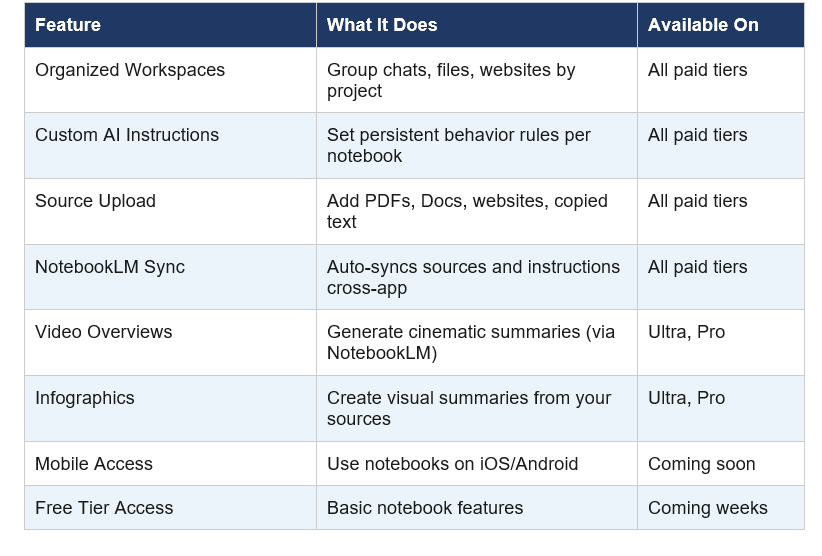
Source limits vary by subscription tier. Google hasn't published exact caps in one place, but NotebookLM Ultra supports up to 600 sources per notebook. Standard paid tiers sit lower. If you're managing a research-heavy project, this matters.
One feature I find underrated: the 'Add to Notebook' option that now appears in every Gemini chat's overflow menu. You can retroactively pull any conversation into a notebook. So if you had a great research session last week, it's not lost. You can fold it into your current project.
NotebookLM vs Gemini Notebooks: What's the Difference Now?
This is the question everyone's asking, so let me be direct about it: they're different tools that now share the same data layer.
NotebookLM is a specialized research and analysis tool. It's built for deep document work. You upload sources, it synthesizes them, and it generates things like Audio Overviews (the podcast feature), Video Overviews, Infographics, and Study Guides. It stays grounded in your uploaded material. It doesn't go off on tangents. That's its strength and its limitation.
Gemini is a general-purpose AI assistant with access to live web search, code execution, image generation, and broad reasoning. It's flexible and creative, but until now it had no memory of your projects.
Notebooks bridge the two. You get NotebookLM's structured document intelligence and Gemini's flexible generation in the same workflow. The honest answer to 'which is better for studying' is: use both. Let NotebookLM do the heavy lifting on source analysis, and use Gemini to generate essays, drafts, and answers using that same material.
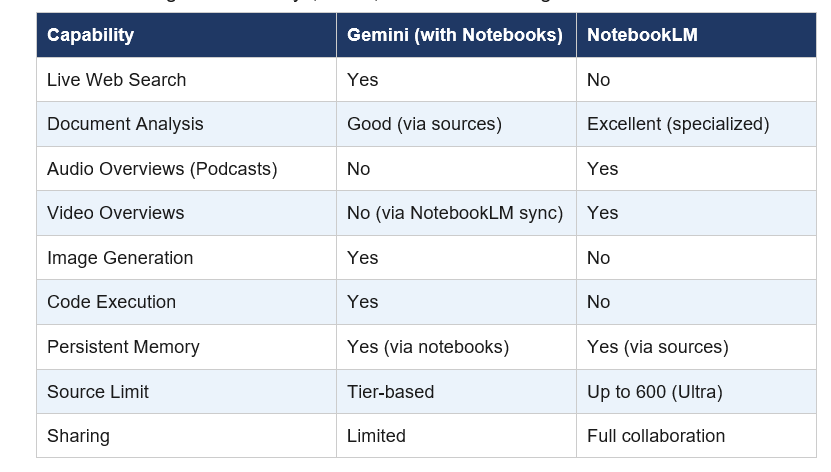
My contrarian take: NotebookLM is still the better tool for pure research and studying. Gemini Notebooks is more useful for project management, drafting, and workflows that need both web access and document grounding. The integration doesn't replace either tool. It makes both more useful.
Who Gets Access and When
As of April 9, 2026, Gemini Notebooks are live for Google AI Ultra, Pro, and Plus subscribers on the web. That covers the majority of paid Gemini users.
Mobile access (iOS and Android) is coming in the next few weeks. European expansion is also coming soon, with some regional variations. Free tier users will get access after that, likely with reduced source limits.
If you're on a Google Workspace Business or Enterprise plan, the NotebookLM integration within Gemini Enterprise has been available since January 2026 (per Google's Workspace updates blog). What's new on April 8 is the consumer-facing Notebooks UI for personal accounts.
To access: open Gemini on the web, look for the 'Notebooks' section in the left side panel, click 'New Notebook,' and start organizing. If you don't see it yet, give it a day or two. The rollout is gradual.
Best Use Cases: Students, Researchers, Professionals
Three use cases where this integration makes a real difference:
1. Students Managing Long-Term Coursework
Upload your syllabus, lecture notes, and reading PDFs into a notebook at the start of a semester. Give Gemini a custom instruction like 'I'm a second-year biology student at intermediate level.' Every chat in that notebook now has full context. Use NotebookLM to generate a podcast-style summary before an exam, then jump to Gemini to draft your essay using that same material.
The specific workflow: upload sources to notebook in Gemini, generate Audio Overview in NotebookLM, draft essay outline in Gemini, export to Google Docs. That's four steps that previously required four separate tools.
2. Researchers Tracking Evolving Topics
Add websites, PDFs, and research papers as sources to a notebook. Ask Gemini to summarize developments across all of them. When new papers drop, add them to the notebook and ask 'what changed since my last source?'. NotebookLM's source-grounded answers prevent Gemini from hallucinating citations.
3. Professionals Running Ongoing Projects
Create a notebook per client or project. Drop in meeting transcripts, briefs, and documents. Custom instructions can encode things like 'this client prefers formal tone' or 'always reference our Q1 targets.' Every new chat in that notebook starts with that context loaded. No more re-explaining your project background every session.
My Take: Is This a Meaningful Update or Just Hype?
I'm genuinely impressed by this one. Not because of what it adds today, but because of what it signals about where Google is taking its AI ecosystem.
The fundamental problem with every AI assistant until now has been statelessness. You do great work in one session, close the tab, and it's gone. Notebooks fix that in a real way, not through summarization hacks or hidden memory systems, but through actual structured source management that you control.
What I actually like: the cross-app sync is seamless. Sources added in Gemini immediately appear in NotebookLM. Custom instructions follow you across both apps. This is how productivity software should work.
What I'm less excited about: the sharing limitations are frustrating. If you build a research notebook for a team project, collaborators can access it through NotebookLM but not through Gemini. That's a workflow-breaking inconsistency. Google needs to fix this.
The bigger picture is this: Google is building something that ChatGPT Projects started, but with a more structured document-intelligence layer underneath. NotebookLM as the knowledge base, Gemini as the generation and reasoning layer. If they keep building on this architecture, this combination has a real shot at becoming the most powerful research-to-production AI workflow on the market.
For now, it's a strong update for paid subscribers. Free users should wait a few weeks for access, then definitely try it.
Frequently Asked Questions
Does Gemini have notebooks?
Yes. As of April 8, 2026, Google rolled out a Notebooks feature in the Gemini app. Notebooks let you organize chats, files, and custom AI instructions in a persistent project workspace. They sync automatically with NotebookLM. Access is currently available to Google AI Ultra, Pro, and Plus subscribers on the web, with mobile and free-tier access coming in the following weeks.
Is NotebookLM included in Gemini Pro?
NotebookLM is a separate product from Gemini, but the two now integrate. Gemini Pro subscribers can access Notebooks in Gemini that sync with NotebookLM. You still need a separate NotebookLM account to use features like Audio Overviews and Video Overviews, but sources sync bidirectionally. NotebookLM has its own free tier with limits, plus a paid Ultra tier.
How is NotebookLM different from Gemini?
NotebookLM is a specialized research and document-analysis tool that stays grounded in sources you upload. It generates Audio Overviews, Video Overviews, and Study Guides from your documents. Gemini is a general-purpose AI assistant with live web search, code execution, and image generation. As of April 2026, they share a unified data layer through Notebooks, so you can use both tools on the same set of sources.
What website turns your notes into a podcast?
NotebookLM (notebooklm.google.com) is Google's tool that converts uploaded notes, PDFs, and documents into Audio Overviews, which are AI-generated podcast-style discussions of your material. As of April 2026, it also supports Cinematic Video Overviews. The tool is free to use with source limits, with an Ultra paid tier for heavier usage.
What are the features of Gemini notebooks for students?
For students, Gemini Notebooks let you upload class notes, textbooks, and PDFs into a project workspace where Gemini retains full context across sessions. You can set custom instructions (e.g., 'I'm studying for a biology exam'). Sources sync with NotebookLM so you can generate Audio Overviews and Study Guides. Gemini can then draft essay outlines, answer questions, and explain concepts using exactly your uploaded material.
Is NotebookLM part of Gemini Enterprise?
Yes. Since January 2026, Google expanded NotebookLM integration to Gemini Enterprise and Education accounts. Enterprise users can add documents found in Gemini Enterprise search directly to a NotebookLM notebook with a single click. The consumer-facing Notebooks UI in the Gemini app rolled out separately on April 8, 2026, for personal paid subscribers.
What is the difference between ChatGPT and NotebookLM?
ChatGPT is a general-purpose AI assistant by OpenAI with live web browsing, image generation, and broad conversational ability. NotebookLM is a specialized research tool by Google that grounds all responses exclusively in sources you upload, like PDFs, Google Docs, and websites. NotebookLM is better for deep document analysis and study; ChatGPT is better for open-ended reasoning and creation. ChatGPT also has Projects, which is roughly analogous to Gemini Notebooks.
NotebookLM vs Gemini: which is better for studying?
For pure studying and document analysis, NotebookLM is the stronger tool because it stays grounded in your sources and won't fabricate citations. For generating essays, drafts, and answers that need both document context and broader reasoning, Gemini with Notebooks is better. As of April 2026, the best study workflow combines both: upload notes to a notebook, use NotebookLM to generate summaries and overviews, then use Gemini to draft written work from that same material.
Recommended Reading
- Google Gemma 4: Best Open AI Model in 2026?
- Best AI Models April 2026: Ranked by Benchmarks
- What Is MCP (Model Context Protocol)? Complete 2026 Guide
- Claude AI Prompt Codes That Actually Work (2026)
- Cursor 3 vs Google Antigravity: Best AI IDE 2026
References
Google Blog (The Keyword) -- Notebooks in Gemini announcement, April 8 2026:
9to5Google -- Gemini notebooks rollout coverage:
NotebookLM Help Center -- Notebooks in Gemini Apps official documentation:
Google Workspace Updates Blog -- NotebookLM + Gemini Enterprise expansion, January 2026:
Android Authority -- Gemini Notebooks feature coverage:
XDA Developers -- Gemini x NotebookLM sync breakdown:

